
Introduction
Thank you for choosing the Rohs Touch Silicone Panda Light Lamp. This LED night light is designed to provide a soft, comforting glow with easy touch control. Please read this manual carefully before use to ensure proper operation and to maintain the product's longevity.
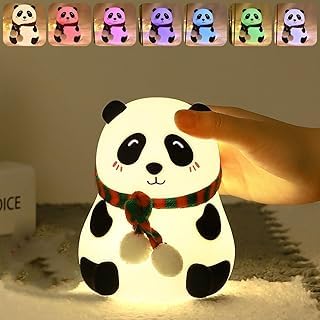
Image: The Rohs Touch Silicone Panda Light Lamp emitting a warm, soft light. The lamp is shaped like a panda wearing a red and green striped scarf.
Safety Information
- Keep the lamp away from water and moisture. This product is not intended for use in wet environments.
- Do not disassemble or attempt to repair the lamp yourself. Contact qualified personnel for service.
- Use only the specified charging cable and power adapter (if included) to prevent damage.
- Keep out of reach of very young children to prevent choking hazards from small parts, although the silicone body is generally safe.
- Avoid extreme temperatures. Do not expose to direct sunlight for prolonged periods or place near heat sources.
- The silicone material is BPA-free and safe for contact.
Package Contents
The package should contain the following items:
- 1 x Rohs Touch Silicone Panda Light Lamp
- 1 x USB Charging Cable (if applicable, check product packaging)
- 1 x User Manual (this document)
Setup
- Unpack the Lamp: Carefully remove the panda light lamp and all accessories from its packaging.
- Initial Charge: Before first use, fully charge the lamp. Locate the charging port (usually at the base) and connect the provided USB charging cable. Connect the other end to a compatible USB power source (e.g., computer, USB wall adapter). The charging indicator (if present) will show charging status.
- Placement: Place the lamp on a stable, flat surface in your desired location, such as a bedside table or shelf.

Image: The Rohs Touch Silicone Panda Light Lamp in its unlit state, showing its white silicone body and black panda features.
Operating Instructions
The Rohs Panda Light Lamp features intuitive touch control for ease of use.
- Power On/Off: Gently tap the silicone surface of the panda lamp to turn it on. Tap again to turn it off.
- Change Light Modes: With the lamp on, continue tapping the silicone surface to cycle through available light modes. This may include warm white, various colors, or a color-changing sequence.
- Rechargeable Convenience: The lamp is rechargeable. When the light dims or stops responding, it indicates a low battery. Reconnect the USB charging cable to recharge.

Image: The Rohs Touch Silicone Panda Light Lamp illuminated with a blue light, demonstrating one of its color modes.
Maintenance
- Cleaning: To clean the lamp, gently wipe the silicone surface with a soft, damp cloth. Do not use harsh chemicals or abrasive cleaners. Ensure the charging port is dry before charging.
- Storage: If storing the lamp for an extended period, ensure it is fully charged and then turn it off. Store in a cool, dry place.
- Battery Care: To prolong battery life, avoid completely draining the battery frequently. Recharge when the light starts to dim.
Troubleshooting
| Problem | Possible Cause | Solution |
|---|---|---|
| Lamp does not turn on. | Battery is depleted. | Charge the lamp using the provided USB cable. |
| Lamp does not respond to touch. | Low battery or internal malfunction. | Ensure the lamp is fully charged. If the issue persists, contact customer support. |
| Light is dim or flickers. | Low battery. | Recharge the lamp. |
| Lamp does not charge. | Faulty cable, adapter, or charging port. | Try a different USB cable or power adapter. Ensure the charging port is clean and free of debris. |
Specifications
- Model: D-PANDA-LAMP-01
- Material: Silicone (BPA-free)
- Light Source: LED
- Control Method: Touch
- Power Source: Rechargeable Battery (via USB)
- Dimensions: Approximately 5D x 5W x 5H Centimeters
- Item Weight: Approximately 0.32 Kilograms (320 g)
- Color: White (lamp body)
- Manufacturer: Rohs
Warranty and Support
For warranty information or technical support, please refer to the contact details provided on your product packaging or purchase receipt. Keep your proof of purchase for any warranty claims.
For further assistance, please contact your retailer or the manufacturer directly.
