
1. Introduction
This manual provides detailed instructions for the installation, operation, and maintenance of your Blackspider BSM1190BT Media Player. Please read this manual thoroughly before using the product to ensure proper function and to prevent damage.
2. Package Contents
Verify that all items listed below are included in your package:
- Blackspider BSM1190BT Media Player
- Remote Control
- External Microphone
- Wiring Harness
- User Manual

Image: Contents of the Blackspider BSM1190BT package, showing the media player, remote, external microphone, wiring harness, and user manual.
3. Product Overview
3.1 Front Panel
The front panel features the display, control buttons, USB port, Type-C charging port, and AUX input.
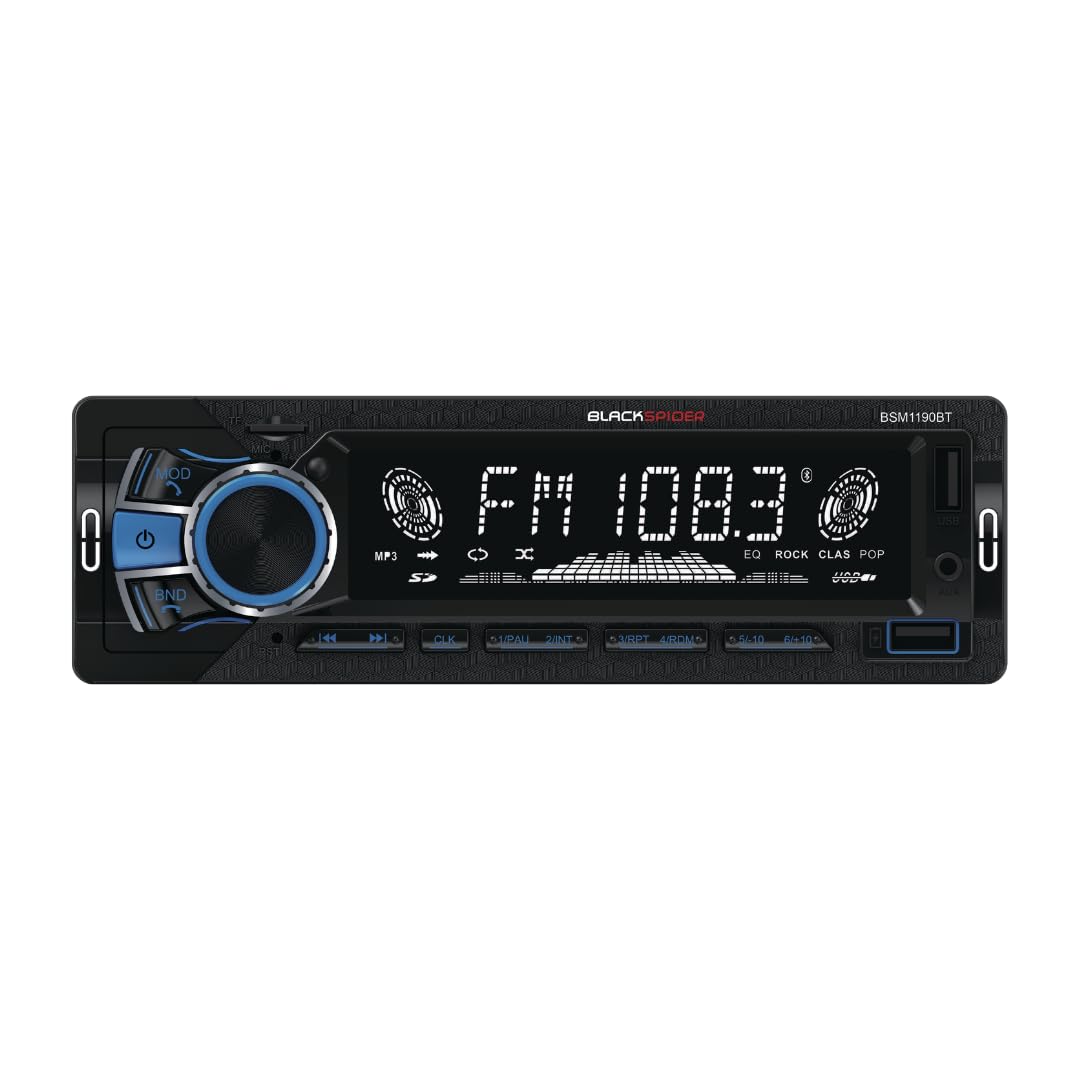
Image: Front view of the BSM1190BT media player, highlighting the illuminated display and various controls.
3.2 Rear Panel
The rear panel includes the wiring harness connector, antenna input, and audio preouts.

Image: Rear view of the BSM1190BT media player, detailing the connection ports and heat sink.
4. Setup and Installation
The Blackspider BSM1190BT is a single DIN fixed face unit. Professional installation is recommended.
4.1 Wiring Connections
Connect the included wiring harness to your vehicle's power, ground, and speaker wires. Ensure correct polarity to prevent damage. The unit features 2 preouts for connecting external amplifiers.
4.2 External Microphone
Connect the external microphone to the designated input on the rear of the unit or as indicated in the wiring diagram. Position the microphone in a location that allows for clear voice pickup, such as near the sun visor or steering column.
4.3 Mounting
Secure the single DIN chassis into your vehicle's dashboard opening. Ensure the unit is firmly mounted to prevent vibrations and ensure stable operation.
5. Operating Instructions
5.1 Basic Operations
- Power On/Off: Press the power button (usually the volume knob) to turn the unit on or off.
- Volume Control: Rotate the volume knob to adjust the audio level.
- Mode Selection: Press the MODE button to cycle through available sources: FM, Bluetooth, USB, AUX.
5.2 Bluetooth Connectivity
The BSM1190BT supports wireless music streaming and hands-free calling.
- Ensure Bluetooth is enabled on your mobile device.
- Select Bluetooth mode on the media player. The display will show "BT PAIRING" or similar.
- Search for "BSM1190BT" in your device's Bluetooth settings and select it to pair.
- Once paired, you can stream audio or make/receive calls. Use the front panel buttons or remote control to manage calls.
5.3 USB Music Playback and Type-C Charging
- USB Playback: Insert a USB drive containing audio files into the USB port. The unit will automatically switch to USB mode and begin playback.
- Type-C Charging: Connect your compatible smartphone or device to the Type-C port for charging.
5.4 AUX Input
Connect external audio devices (e.g., MP3 players) to the 3.5mm AUX input jack on the front panel using a standard 3.5mm audio cable. Select AUX mode on the media player to listen to audio from the connected device.
5.5 FM Radio
- Auto Scan: In FM mode, press and hold the BAND button to automatically scan and store strong stations.
- Manual Tuning: Use the seek buttons (◀◀/▶▶) to manually tune to desired frequencies.
- Presets: Store your favorite stations using the numbered preset buttons (1-6).
5.6 Equalizer (EQ)
The unit features preset EQ settings. Press the EQ button (if available on the remote or front panel) to cycle through options like POP, ROCK, CLASS, JAZZ, etc., or to select a custom setting if applicable.
6. Maintenance
- Cleaning: Use a soft, dry cloth to clean the unit's front panel. Do not use abrasive cleaners or solvents.
- Fuse Replacement: If the unit does not power on, check the fuse located on the rear panel. Replace it with a fuse of the same rating (e.g., 10A).
7. Troubleshooting
| Problem | Possible Cause | Solution |
|---|---|---|
| No power | Blown fuse; incorrect wiring; vehicle battery low | Check/replace fuse; verify wiring connections; check vehicle battery |
| No sound | Volume too low; incorrect source selected; speaker wiring issue | Increase volume; select correct source; check speaker connections |
| Bluetooth not connecting | Bluetooth not enabled on device; unit not in pairing mode; interference | Enable Bluetooth on device; put unit in pairing mode; move closer to unit |
| USB not playing | Unsupported file format; damaged USB drive; USB not inserted correctly | Ensure supported file types; try another USB drive; re-insert USB |
8. Specifications
- Model Number: BSM1190BT
- Brand: Blackspider
- Connectivity Technology: Bluetooth, USB
- Special Feature: Built-In Bluetooth
- Compatible Devices: Smartphone
- Colour: Black
- Product Dimensions (D x W x H): 21D x 18W x 8H centimetres
- Item Weight: 0.55 Kilograms
- Control Method: Push Button
- Power Output: 4 x 80 Watts (Max)
- Audio Output: 2 Preouts
- Input: 3.5mm AUX Jack
- Charging Port: Type-C
- Radio: FM Radio with Preset EQ
- Country of Origin: China
9. Warranty and Support
This Blackspider BSM1190BT Media Player comes with a 1 Year Warranty from the date of purchase. Please retain your proof of purchase for warranty claims.
For technical support or warranty inquiries, please contact your retailer or the Blackspider customer service department.