
1. Introduction
Thank you for choosing the hadbleng Q22 Wireless Bluetooth Earbuds. These earbuds are designed for sports and daily use, offering high-fidelity sound, extended battery life, and a secure, comfortable fit. This manual provides detailed instructions to help you get the most out of your new earbuds.
2. What's in the Box
- Earbuds (2 units)
- 2600mAh Charging Case (1 unit)
- Type-C Charging Cable (1 unit)
- Ear Caps (6 units - S/M/L sizes)
- User Manual (1 unit)

Image: The complete package contents of the hadbleng Q22 Wireless Bluetooth Earbuds.
3. Product Overview and Features
3.1. Extended Playtime and LED Display
The Q22 earbuds offer up to 8 hours of playtime on a single charge. The included 2600 mAh charging case extends total playback time to 128 hours. The charging case features a dual LED digital display that shows the remaining power of the case and the charging status of each earbud, allowing for timely recharging.

Image: Earbuds in the charging case, illustrating the LED digital display for battery status.
3.2. High-Fidelity Sound and Clear Calls
Equipped with 13 mm dual-layer graphene diaphragm drivers, the Q22 earbuds deliver powerful bass and clear sound. Hybrid ENC noise cancellation and a high-quality microphone ensure clear call experiences by passively reducing up to 90% of background noise.

Image: Exploded view of an earbud, detailing the 13.44mm dynamic driver for sound quality.
3.3. Bluetooth 5.3 and One-Step Pairing
The earbuds utilize an upgraded Bluetooth 5.3 chip for improved audio data transfer speed, stable transmission up to 15 meters, and lower energy consumption. After the initial connection, the earbuds will automatically pair with your device when removed from the charging case.
3.4. Ergonomic Design for Sports
Weighing only 6 grams each, the Q22 sport earbuds feature flexible earhooks for a secure and comfortable fit during physical activities. Three sizes of silicone ear caps are included to ensure a proper seal and comfort for extended wear. The IPX7 waterproof rating protects against sweat and rain.

Image: People wearing the earbuds, demonstrating the secure and comfortable fit with earhooks.
3.5. Emergency Power Bank Function
The 2600 mAh charging case can also serve as an emergency power bank, providing charging support for your mobile phone, tablet, or other devices. A fully charged case can charge a mobile phone by over 30%.

Image: The charging case being used to charge a smartphone, demonstrating its emergency power function.
4. Setup
4.1. Charging the Earbuds and Case
- Place the earbuds into the charging case. Ensure they are correctly seated.
- Connect the Type-C charging cable to the charging port on the case and to a power source.
- The LED digital display on the case will show the charging status of the case and each earbud.
- A full charge for the case provides approximately 120 hours of earbud playtime. The earbuds themselves offer 8 hours per charge.
- The case supports fast charging, providing 2 hours of music listening time with just 10 minutes of charging.
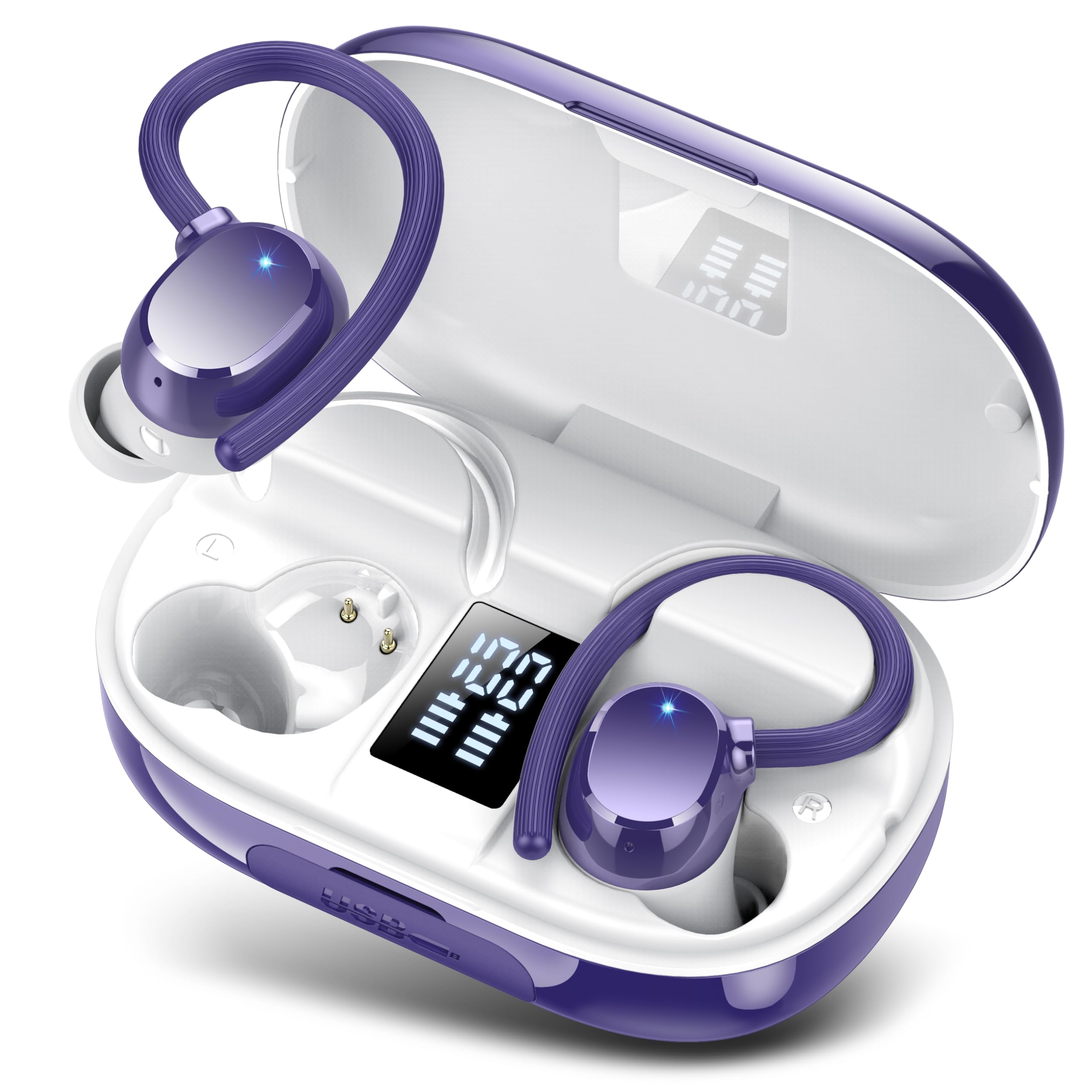
Image: The earbuds inside the charging case, showing the LED battery indicator.
4.2. Initial Pairing
- Open the charging case and remove both earbuds. They will automatically enter pairing mode.
- On your device (smartphone, tablet, laptop), enable Bluetooth.
- Search for "Q22" in the list of available Bluetooth devices and select it to connect.
- Once connected, the earbuds will automatically pair with your device in subsequent uses when removed from the case.

Image: A smartphone displaying the Bluetooth pairing process for the Q22 earbuds.
5. Operating Instructions
5.1. Smart Touch Controls
The Q22 earbuds feature smart touch controls for easy management of music and calls without needing to access your phone.
| Action | Function |
|---|---|
| Single Tap | Play/Pause music, Answer/End call |
| Double Tap (Left Earbud) | Previous Track |
| Double Tap (Right Earbud) | Next Track |
| Triple Tap (Left Earbud) | Volume Down |
| Triple Tap (Right Earbud) | Volume Up |
| Long Press (2 seconds) | Reject Call, Activate Voice Assistant (Siri) |

Image: Visual guide to the smart touch controls on the earbuds.
5.2. Power On/Off
- Power On: Remove earbuds from the charging case. They will power on automatically.
- Power Off: Place earbuds back into the charging case and close the lid. They will power off and begin charging.
6. Maintenance
6.1. Waterproof Rating
The Q22 earbuds are IPX7 rated waterproof, meaning they can withstand splashes, sweat, and rain. They are suitable for sports and outdoor activities. However, they are not designed for swimming or prolonged submersion in water.

Image: Earbuds shown with water, indicating their IPX7 waterproof rating.
6.2. Cleaning
Regularly clean your earbuds and charging case with a soft, dry, lint-free cloth. Avoid using abrasive materials or harsh chemicals. For ear caps, remove them and clean with mild soap and water, then dry thoroughly before reattaching.
7. Troubleshooting
| Problem | Solution |
|---|---|
| Earbuds not pairing/connecting. |
|
| Only one earbud is playing sound. |
|
| Poor sound quality or intermittent connection. |
|
| Charging case not charging. |
|
| Earbuds do not charge when in case. |
|
8. Specifications
| Feature | Detail |
|---|---|
| Model Name | Q22 |
| Brand | hadbleng |
| Connectivity Technology | Wireless (Bluetooth 5.3) |
| Bluetooth Range | 15 Meters |
| Earbud Playtime (Single Charge) | 8 Hours |
| Total Playtime (with Charging Case) | 128 Hours |
| Charging Case Capacity | 2600 mAh |
| Charging Time | 2 Hours (for case) |
| Fast Charging | 10 mins charge for 2 hours playtime |
| Water Resistance Level | IPX7 Waterproof |
| Control Method | Touch |
| Noise Control | Passive Noise Cancellation (ENC for calls) |
| Audio Driver Type | Dynamic Driver (13 mm) |
| Earpiece Shape | Hook (Over Ear) |
| Material | Plastic |
| Item Weight (Earbud) | 6 grams (approx.) |
| Compatible Devices | Smartphones, TVs, Laptops, Tablets, etc. |
9. Safety Information
- Do not disassemble or modify the product.
- Keep away from extreme temperatures, direct sunlight, and open flames.
- Avoid dropping or subjecting the earbuds to strong impacts.
- Do not expose the charging case to water or moisture.
- Use only the provided charging cable or a certified Type-C cable.
- Listening at high volumes for extended periods can cause hearing damage.
- Keep out of reach of children and pets.
10. Warranty and Support
For warranty information or technical support, please refer to the warranty card included with your purchase or contact hadbleng customer service through the retailer where you purchased the product. Please have your model number (Q22) and purchase date available when contacting support.