
Introduction
This manual provides detailed instructions for the assembly, operation, and maintenance of your SOFTSEA Full Size Corner Bed (Model x12). This versatile furniture piece features an L-shaped design with integrated storage drawers, a desk, an LED bookcase, USB charging ports, and an upholstered headboard, designed to optimize space and functionality in your room.
Please read this manual thoroughly before beginning assembly or use to ensure safe and correct operation. Keep this manual for future reference.
Safety Information
- Read all instructions: Before assembly and use, carefully read and understand all instructions provided in this manual.
- Two-person assembly: Assembly requires at least two adults. Do not attempt to assemble alone.
- Use correct tools: Ensure all necessary tools are available and used correctly. All required tools are included with the product.
- Check all parts: Before assembly, verify that all parts are present and undamaged. Do not proceed with assembly if any parts are missing or damaged. Contact customer support for replacements.
- Secure all fasteners: Ensure all screws, bolts, and connectors are securely tightened. Periodically check and re-tighten fasteners to maintain stability.
- Weight limits: Do not exceed the maximum weight capacity of 600 lbs for the bed.
- Proper placement: Place the bed on a level, stable surface. Avoid placing near heat sources or in direct sunlight to prevent material degradation.
- Electrical safety: When using the USB ports and power outlets, ensure proper electrical connections and avoid overloading. Do not use if cables are damaged.
- Children safety: Keep small parts away from children during assembly. Ensure the bed is fully assembled and stable before allowing children to use it.
Package Contents
Your SOFTSEA Full Size Corner Bed is shipped in three separate packages. Please ensure you have received all packages before beginning assembly. Each package contains various components necessary for the complete structure.
While a detailed parts list is typically included in the physical instruction manual, expect to find:
- Wooden panels (MDF and Plywood) for the bed frame, desk, bookcase, and drawers.
- Upholstered headboard sections.
- Bed slats and support components.
- Hardware kit (screws, bolts, connectors, Allen wrenches, etc.).
- LED light strips and power adapter.
- USB charging station module.
- Drawer components and slides.
Refer to the specific parts list included in your product packaging for exact quantities and identification of each component.
Setup & Assembly
Full assembly is required for this product. It is strongly recommended that two people perform the assembly. All necessary tools are included in the package.
- Unpack and Verify: Carefully unpack all three boxes. Lay out all components and hardware on a clean, soft surface (e.g., a rug or blanket) to prevent scratches. Compare all parts against the included parts list to ensure nothing is missing or damaged.
- Prepare the Area: Choose the final location for your bed. Ensure there is enough space for assembly and that the floor is level.
- Follow Step-by-Step Instructions: Refer to the detailed graphical instructions provided in your product's physical manual. Each step will guide you through connecting specific components.
- Assemble the Main Bed Frame: Begin by assembling the primary bed frame structure, including the side rails and end panels. Ensure all connections are snug but do not overtighten until the frame is fully aligned.
- Install the L-Shaped Components: Attach the L-shaped desk and bookcase sections according to the manual. These sections often integrate with the headboard and side panels.
- Integrate the Upholstered Headboard: Secure the upholstered headboard panels into their designated slots or mounting points.
- Assemble and Insert Drawers: Assemble the two underbed storage drawers. Install the drawer slides onto the bed frame and then insert the assembled drawers.
- Install Bed Slats: Place and secure the bed slats across the bed frame. Ensure they are evenly spaced and firmly attached to provide adequate mattress support.
- Connect Electrical Components: Install the LED light strips into the bookcase compartments and connect the USB charging station. Route cables neatly and securely. Plug the power adapter into a wall outlet only after all electrical components are installed.
- Final Tightening and Inspection: Once all components are in place, go back and securely tighten all screws and bolts. Check the entire structure for stability and ensure there are no loose parts.
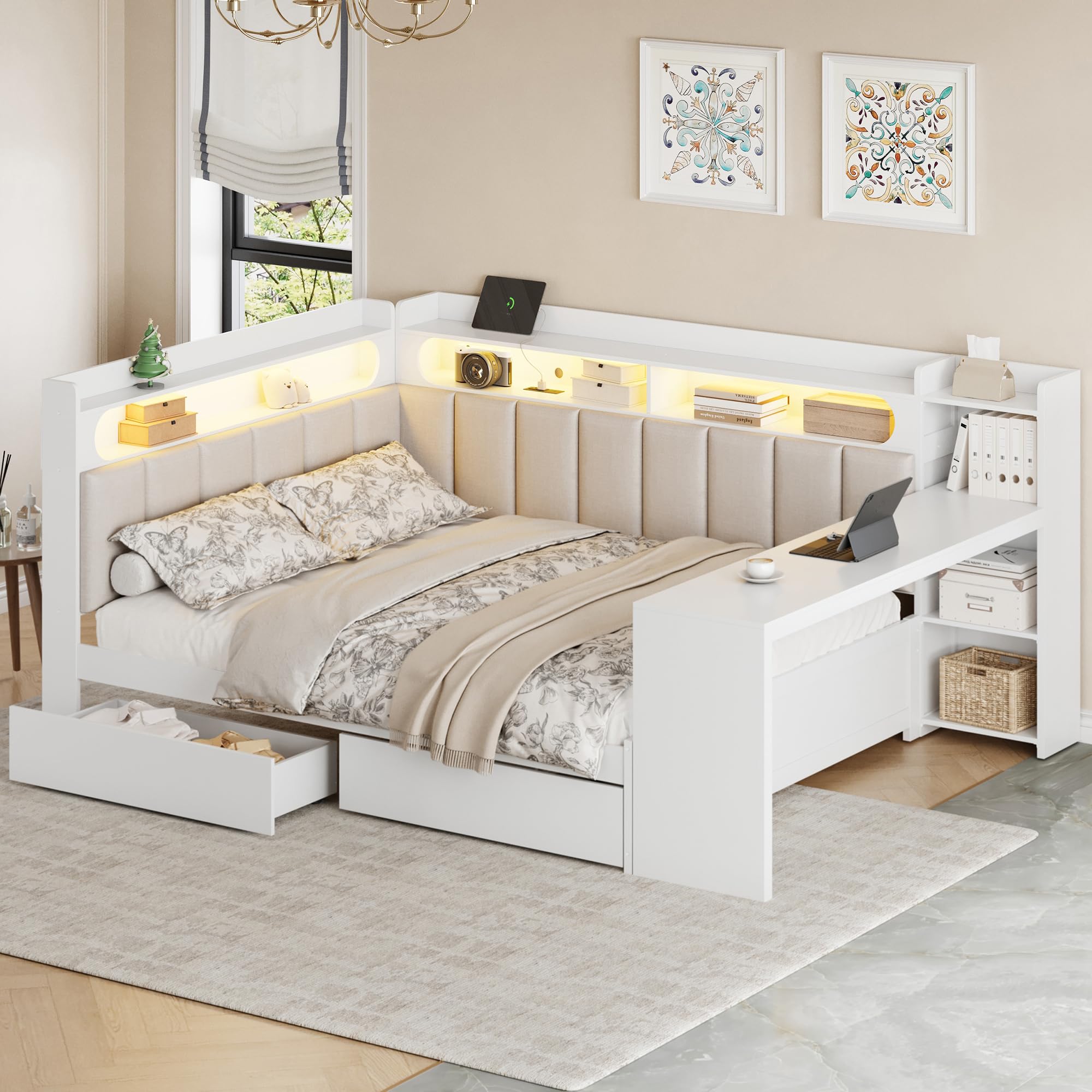
Figure 1: Fully assembled SOFTSEA Full Size Corner Bed (Model x12).
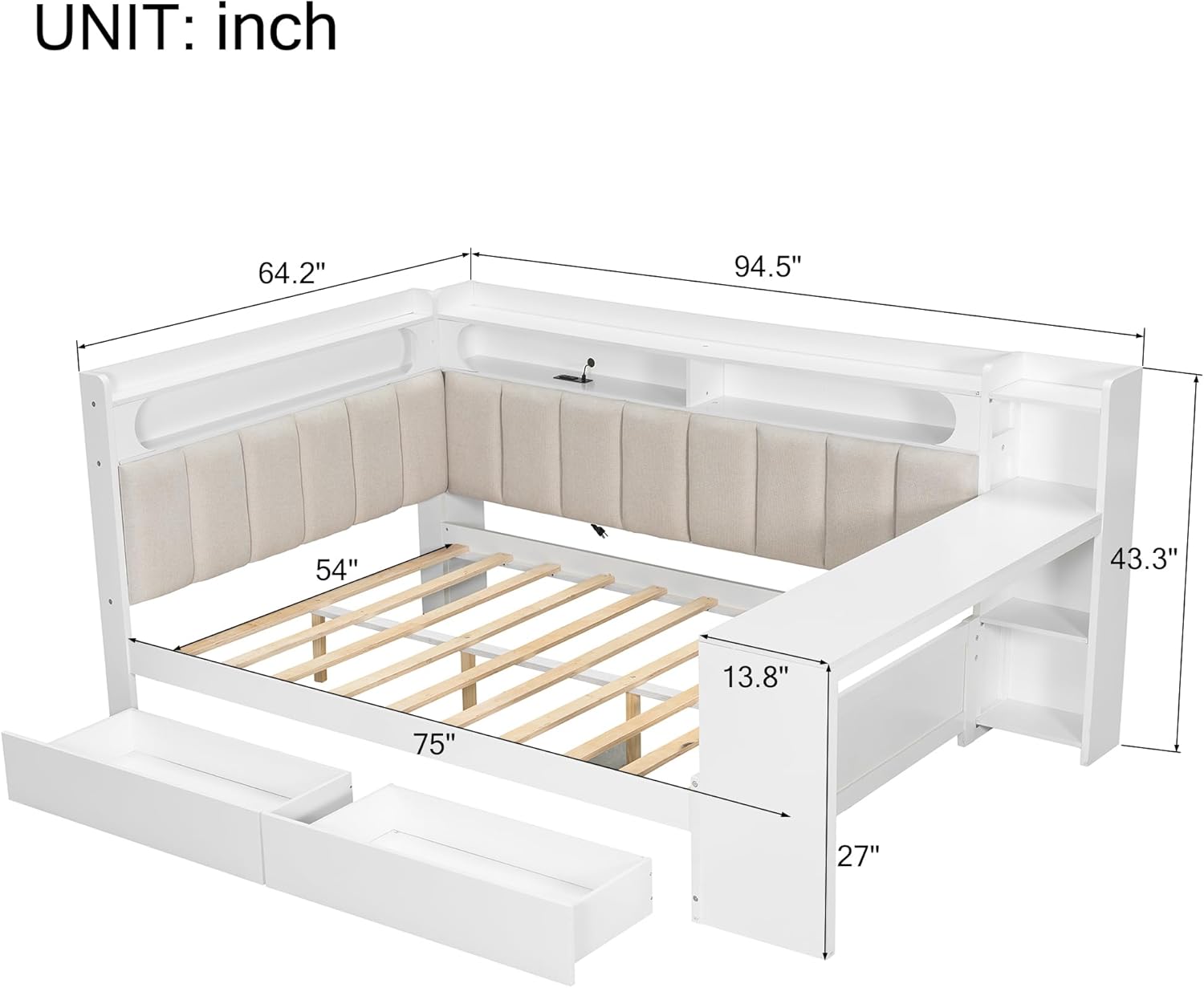
Figure 2: Dimensional overview of the SOFTSEA Full Size Corner Bed, indicating key measurements in inches.
Operation
Storage Drawers
The two underbed storage drawers are designed for easy access and organization. Simply pull the drawer handles to open and push to close. Ensure drawers are fully closed when not in use to prevent dust accumulation and maintain a tidy appearance.
L-Shaped Desk
The integrated L-shaped desk provides a convenient surface for studying, working, or placing personal items. Ensure items placed on the desk do not exceed its weight capacity and are stable to prevent falling.
LED Bookcase Lighting
The LED lights integrated into the bookcase compartments provide ambient illumination. Locate the power switch, typically a small button or touch sensor, within one of the bookcase sections. Press to turn on/off. Some models may offer adjustable brightness or color temperature; refer to your specific product's instructions for advanced features.

Figure 3: Corner bed with LED bookcase lights active.
USB Ports & Power Outlets
The built-in charging station includes USB ports and standard power outlets for convenient device charging. Plug your devices directly into the available ports. Ensure the bed's power cord is securely plugged into a functional wall outlet for these features to operate. Avoid plugging in high-power appliances to prevent overloading.

Figure 4: Detail of LED bookcase and charging station.
Upholstered Headboard
The L-shaped upholstered headboard provides a comfortable backrest. It is padded with soft linen fabric. Avoid sharp objects that could damage the upholstery.
Product Overview Video
Video 1: An overview of the SOFTSEA Full Size Corner Bed's features and design.
Video 2: A demonstration of the SOFTSEA Full Size Corner Bed's functionality and space-saving design.
Maintenance
- Cleaning the Frame: For the MDF and plywood surfaces, wipe regularly with a soft, damp cloth. Avoid abrasive cleaners or harsh chemicals that can damage the finish. Dry immediately with a clean cloth.
- Cleaning Upholstery: For the linen upholstered headboard, spot clean with a mild fabric cleaner and a soft cloth. Test on an inconspicuous area first. Do not saturate the fabric. Allow to air dry completely.
- Hardware Check: Periodically (e.g., every 3-6 months) inspect all screws, bolts, and connections. Re-tighten any loose fasteners to ensure the bed remains stable and secure.
- Electrical Components: Ensure the power cord for the LED lights and charging station is not pinched or damaged. Keep the USB ports and power outlets free from dust and debris.
- Drawer Maintenance: Keep drawer slides clean and free of obstructions for smooth operation.
Troubleshooting
| Problem | Possible Cause | Solution |
|---|---|---|
| Missing parts or damaged components upon arrival. | Shipping damage or packaging error. | Do not proceed with assembly. Contact SOFTSEA customer support immediately with your purchase details and a list of missing/damaged parts for replacement. |
| Difficulty aligning parts during assembly. | Incorrect orientation of parts; pre-drilled holes not aligning; overtightened fasteners too early. | Review the assembly instructions carefully. Ensure parts are oriented correctly. Loosen previously tightened fasteners to allow for adjustment, then re-tighten once aligned. If holes are genuinely misaligned, contact support. |
| Bed feels unstable or wobbly after assembly. | Loose fasteners; uneven floor surface. | Check and securely tighten all screws and bolts. Ensure the bed is placed on a level surface. Use shims if necessary to stabilize on uneven floors. |
| LED lights are not turning on. | Power cord not plugged in; loose connection; faulty switch/LED strip. | Ensure the power adapter is securely plugged into a working wall outlet. Check all cable connections to the LED strips and switch. If issues persist, contact customer support. |
| USB ports or power outlets are not charging devices. | Bed's power cord not plugged in; device cable faulty; port malfunction. | Verify the bed's main power cord is connected to a live outlet. Test with a different device and charging cable. Ensure the device requires the correct voltage/amperage. If still not working, contact support. |
| A bolt is protruding through a surface (e.g., desk). | Incorrect bolt length used; over-tightening; manufacturing defect. | Immediately cease use of the affected area. Identify the specific bolt and refer to the assembly manual to ensure the correct bolt was used. If it's a manufacturing defect or incorrect part, contact customer support for guidance and potential replacement. Do not attempt to force it further. |
Specifications
| Model Number | x12 |
| Size | Full |
| Color | White |
| Overall Dimensions (L x W x H) | 94.5'' x 64.2'' x 43.3'' |
| Recommended Mattress Thickness | 6-8 inches |
| Bed Weight Capacity | 600 lbs |
| Overall Product Weight | 220 lbs |
| Material | MDF + Plywood |
| Upholstery Fabric Type | Linen |
| Special Features | Desk, Storage Drawers, Bookcase, LED Lighting, USB Ports |
| Assembly Required | Yes (Full Assembly) |
| Suggested Number of People for Assembly | 2 |
| Number of Packages | 3 |
Warranty & Support
Warranty Information
The SOFTSEA Full Size Corner Bed (Model x12) comes with a Limited Warranty. Details regarding the duration and coverage of this warranty are typically provided in the documentation included with your product. Please retain your proof of purchase for warranty claims.
The limited warranty generally covers manufacturing defects in materials and workmanship under normal use. It does not cover damage resulting from improper assembly, misuse, abuse, accidents, modifications, or normal wear and tear.
Customer Support
For any questions regarding assembly, missing parts, product operation, or warranty claims, please contact SOFTSEA customer support. Have your model number (x12) and purchase information ready when contacting support.
You can typically find contact information for SOFTSEA customer service on their official website or through the retailer where you purchased the product. For more information, you may visit the official SOFTSEA Store on Amazon.