
1. Introduction
This manual provides comprehensive instructions for the safe and effective use of your Lamicall Camera Tripod and Bike Water Bottle Holder. Please read this manual thoroughly before initial use and retain it for future reference.
2. Safety Information
- Ensure all locking mechanisms are securely fastened before mounting equipment or riding your bike.
- Do not exceed the maximum load capacity of 17.6 lbs (8 kg) for the tripod.
- Avoid placing the tripod on unstable or slippery surfaces.
- When mounting the bottle holder, ensure it does not interfere with bike controls or rider movement.
- Keep small parts away from children to prevent choking hazards.
3. Package Contents
- Lamicall Camera Tripod with 3-Way Pan Head
- Lamicall Bike Water Bottle Holder
- Smartphone Adapter (for tripod)
- Mounting accessories for bottle holder
4. Setup
4.1 Camera Tripod Setup
- Unfold the Tripod: Place the tripod on a flat surface. Engage the quick-release latches on each leg to extend them. Adjust the leg angles (24° to 75°) by gripping the leg tube and positioning it as desired. Ensure all legs are fully extended and locked for stability.
- Adjust Height: Loosen the leg section locks to extend the legs to the desired height (19" to 67"). Securely tighten all locks.
- Mounting Your Device:
- Camera: Attach your camera to the quick-release plate on the 3-way pan head. Ensure it is securely tightened.
- Smartphone: Attach the smartphone adapter to the quick-release plate, then secure your smartphone within the adapter.

Image: The Lamicall Camera Tripod fully extended with a camera and a smartphone mounted, demonstrating its versatility.

Image: A user demonstrating the multi-angle lock design of the tripod legs, allowing for quick and secure adjustment of leg angles from 25° to 75°.
4.2 Bike Water Bottle Holder Setup
- Choose Mounting Location: The holder can be mounted on your bike's handlebar or down tube.
- Attach to Bike: Use the provided mounting accessories to securely fasten the holder to your chosen location. Ensure it is tight and stable.
- Insert Tracker (Optional): If using a small GPS tracker (e.g., Air Tag, Tile Mate, not included), place it into the discreet compartment on the holder.

Image: The Lamicall Bike Water Bottle Holder shown mounted on both a bicycle handlebar and a down tube, illustrating the two available mounting options.

Image: A close-up view of the bike water bottle holder, highlighting the hidden compartment designed for storing small GPS trackers like AirTag or Tile Mate.
5. Operating Instructions
5.1 Camera Tripod Operation
- Pan Head Adjustments: The 3-way pan head allows for precise camera positioning.
- Panoramic Shooting: Loosen the horizontal rotation knob to achieve smooth 360° panoramic movements.
- Up/Down Tilt: Use the tilt handle to adjust the camera's vertical angle up to 180°.
- Vertical Flipping: For portrait orientation, use the dedicated knob to flip the camera 90°.
- Load Capacity: The tripod is designed to support devices up to 17.6 lbs (8 kg). Ensure your equipment does not exceed this limit for optimal stability.

Image: The 3-way pan head of the tripod, illustrating its capabilities for 360° panoramic shooting, 180° up/down tilt, and 90° vertical flipping for various photography needs.

Image: A user with a camera mounted on the tripod, demonstrating the tripod's robust design and its ability to support up to 17.63 lbs (8 kg) of equipment.
5.2 Bike Water Bottle Holder Operation
- Inserting a Bottle: The holder features a firm spring mechanism. Gently push your water bottle into the holder until it is securely gripped. It accommodates bottles with a diameter between 2.28" and 3.39".
- Removing a Bottle: Pull the bottle firmly upwards to release it from the spring grip.
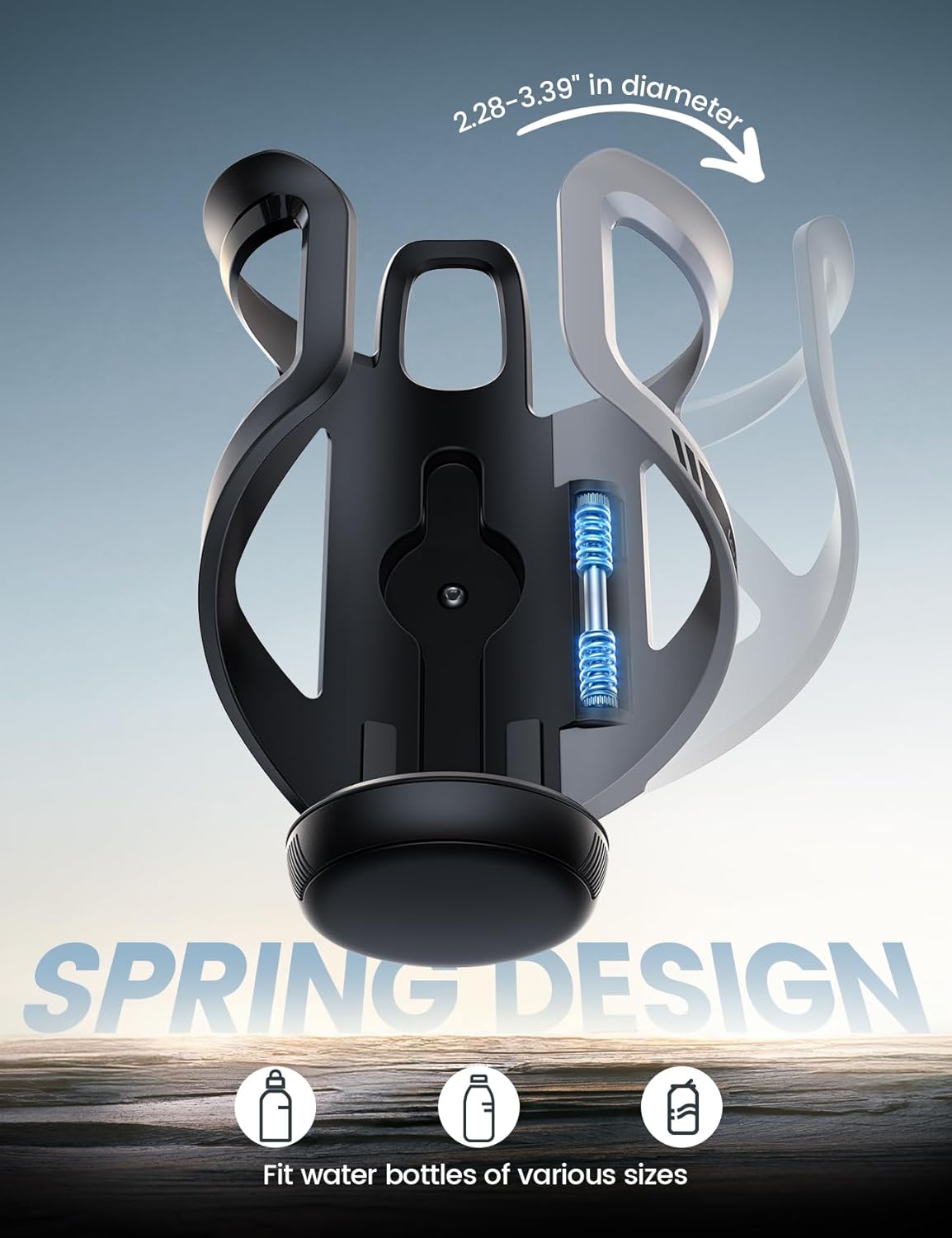
Image: A cutaway view of the bike water bottle holder, illustrating its spring design which securely grips bottles ranging from 2.28 to 3.39 inches in diameter.
6. Maintenance
- Cleaning: Wipe both the tripod and bottle holder with a soft, damp cloth. Avoid harsh chemicals or abrasive cleaners.
- Storage: Store in a dry, cool place away from direct sunlight and extreme temperatures.
- Inspection: Periodically check all screws, bolts, and locking mechanisms for tightness. Tighten if necessary.
7. Troubleshooting
- Tripod Instability: Ensure all leg sections are fully extended and their locks are tightened. Verify the tripod is on a level surface. Adjust leg angles for better balance on uneven terrain.
- Camera Shake: Confirm your camera is securely mounted to the quick-release plate and the plate is firmly attached to the pan head. Ensure the pan head's movement locks are engaged when not adjusting.
- Bottle Not Fitting: Check that your bottle's diameter is within the 2.28" to 3.39" range. Ensure no obstructions are preventing proper insertion.
- Bottle Holder Loose: Re-tighten the mounting screws on your bike's handlebar or frame.
8. Specifications
| Feature | Specification |
|---|---|
| Brand | Lamicall |
| Model | B0FNR6MT7M |
| Tripod Max Load Capacity | 17.6 lbs (8 kg) |
| Tripod Height Adjustment | 19" to 67" |
| Tripod Leg Angles | 24° to 75° |
| Tripod Head Type | 3-Way Pan Head (360° horizontal, 180° up/down, 90° vertical) |
| Bottle Holder Diameter Range | 2.28" to 3.39" |
| Bottle Holder Tracker Slot | Compatible with Air Tag and Tile Mate (trackers not included) |
9. Warranty and Support
For warranty information, technical support, or any inquiries regarding your Lamicall product, please refer to the official Lamicall website or contact Lamicall customer service directly. Please have your product model number (B0FNR6MT7M) available when contacting support.