
Introduction
The VIOFO A229 Ultra is a state-of-the-art 3-channel dash camera system designed to provide comprehensive video surveillance for your vehicle. Equipped with advanced STARVIS 2 sensors, it offers dual 4K recording for front and rear cameras, complemented by a 1080P fisheye cabin camera. This manual provides detailed instructions for installation, operation, and maintenance to ensure optimal performance.
Key Features
- 4K + 4K + FHD Recording: Equipped with three cutting-edge cameras powered by the latest STARVIS 2 technology, offering dual 4K front and rear cameras plus a 1080P fisheye cabin camera for next-level clarity.
- 210° Ultra-Wide Angle Fisheye Cabin Cam: Powered by the STARVIS 2 IMX662 sensor with four IR LEDs, providing clear, detailed footage even in low light, covering the entire cabin and side windows.
- Triple STARVIS 2 Sensors: Delivers a major leap in image performance with wider dynamic range, superior low-light clarity, and reduced noise and motion blur.
- 3-Channel HDR: Optimizes recording across all channels, balancing extreme light and dark conditions for exceptional clarity and sharp detail, enhancing license plate readability.
- Ultra Fast 5GHz Wi-Fi & GPS-Tracking: Upgraded 5GHz Wi-Fi for faster data transfer, smooth video previewing, downloading, and sharing. Supports 4 satellite positioning systems (GPS, BEIDOU, GALILEO, and GLONASS) for accurate location, speed, and time data.
- Smart Voice Control & Notification: Advanced voice control function for hands-free operation (start recording, take photos, turn on/off Wi-Fi) and notifications for settings changes or memory card errors.
- 24/7 Parking Mode: Offers three options: Time Lapse, Low Bitrate, and Auto Event Detection, providing continuous surveillance when parked (requires HK4/HK6 Hardwire cable, sold separately).
- Supports CPL Filter & Bluetooth Remote (Optional): Reduce reflections and glare with an optional CPL filter. Bluetooth remote allows easy operation to lock videos or customize functions.
What's in the Box
The VIOFO A229 Ultra 3CH package includes the following components:
- Front Camera x1
- Rear Camera x1
- Interior Camera x1
- Car Charger x1
- Type-C Data Cable x1
- Rear / Interior Camera Cable x 1
- CPL for Front Camera x 1
- Trim Removal Tool x 1
- Spare Mount Sticky Pad x 3
- Windshield Static Sticker x 3

Image: Detailed view of all components included in the VIOFO A229 Ultra 3CH dash cam package.
Product Overview
4K + 4K + FHD Recording with Triple STARVIS 2 Sensors
The VIOFO A229 Ultra captures crystal-clear footage from three perspectives. The front and rear cameras record in stunning 4K resolution, while the interior cabin camera provides 1080P coverage. All three cameras are equipped with next-generation STARVIS 2 sensors, ensuring superior image quality even in challenging lighting conditions.

Image: This image illustrates the triple-channel recording capability of the VIOFO A229 Ultra. It shows the front camera capturing 4K footage of the road ahead, the rear camera recording 4K footage behind the vehicle, and the interior fisheye camera capturing 1080P footage of the cabin.
Enhanced Clarity with Triple STARVIS 2 Sensors & 3-Channel HDR
Experience a major leap in image performance with three next-generation STARVIS 2 sensors. This technology offers a wider dynamic range, superior low-light clarity, and significantly reduced noise and motion blur. The 3-Channel HDR function further optimizes recording by perfectly balancing extreme light and dark conditions, ensuring critical details like license plates are clear.
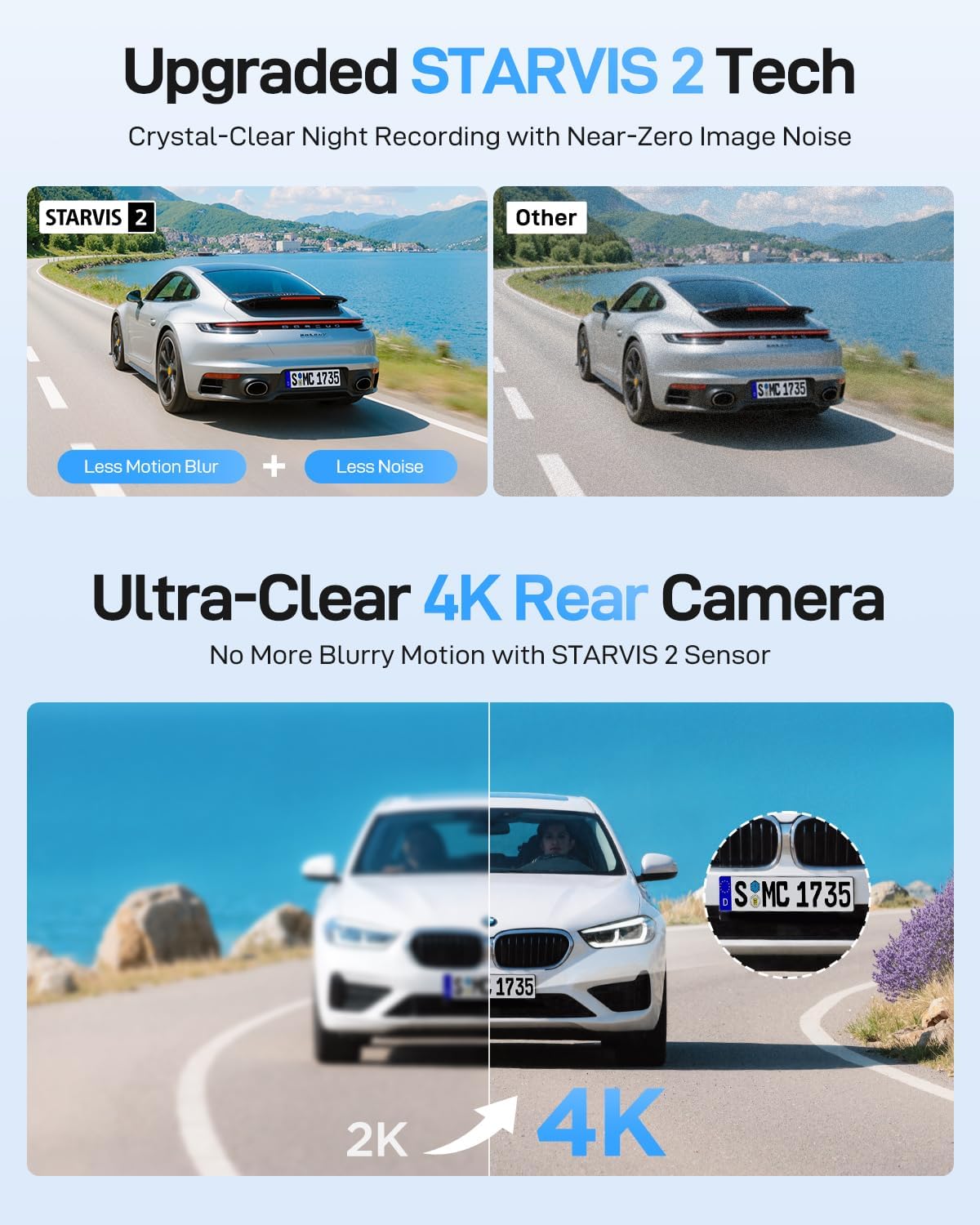
Image: This image highlights the advanced STARVIS 2 sensor technology and 3-Channel HDR function. It visually compares the clarity and detail of footage captured with STARVIS 2 versus conventional sensors, especially in low-light and high-contrast conditions, emphasizing reduced motion blur and noise.
210° Ultra-Wide Angle Cabin Cam
The interior camera features a 210° ultra-wide fisheye lens and four IR LEDs, ensuring clear and detailed footage of your vehicle's cabin, even in complete darkness. This wide coverage helps reduce blind spots and is ideal for families or ride-share drivers.
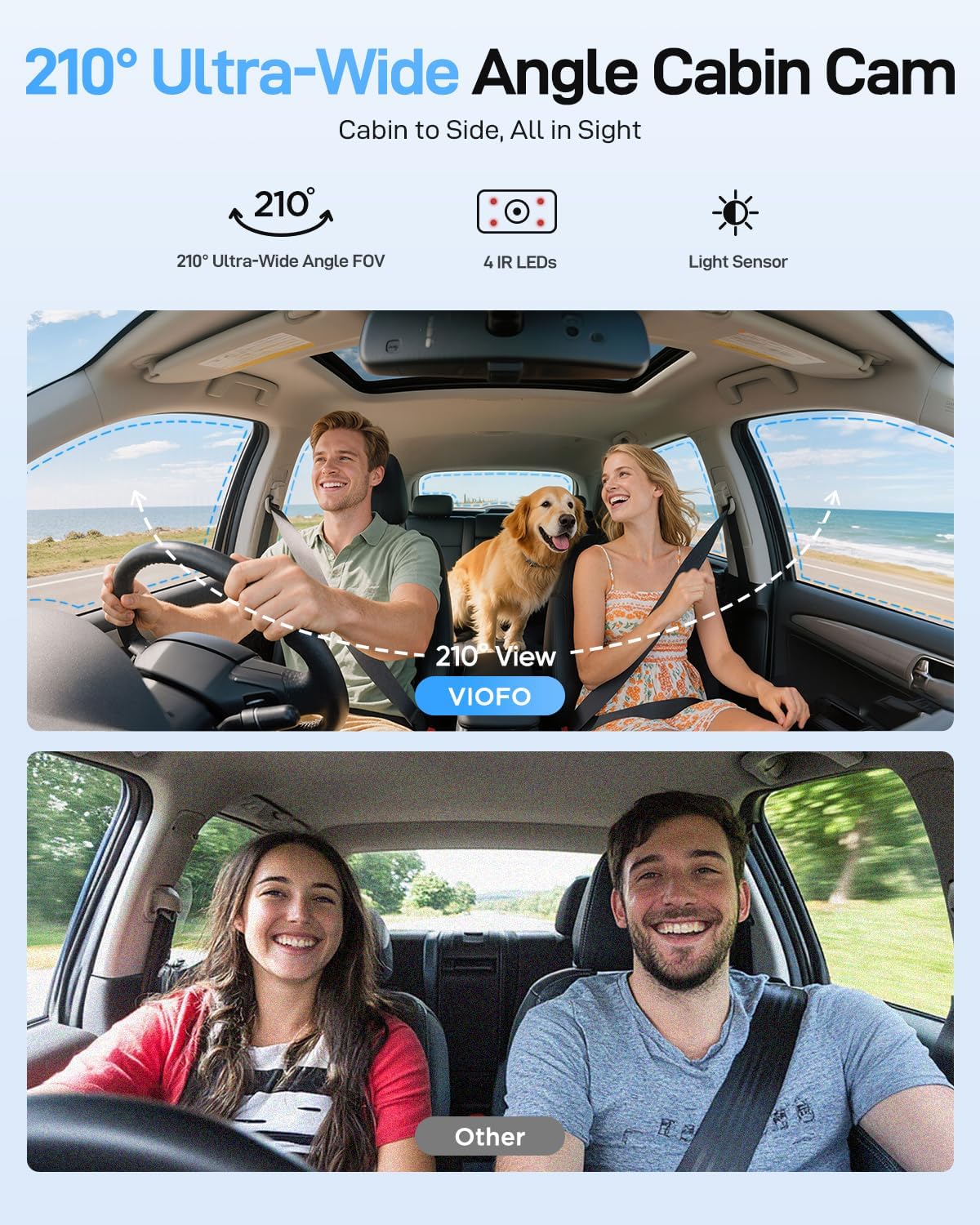
Image: This image demonstrates the wide field of view of the 210° fisheye cabin camera. It shows how the camera covers the entire vehicle interior, including side windows, providing comprehensive surveillance.
Ultra Fast 5GHz Wi-Fi & GPS-Tracking
An upgraded 5GHz Wi-Fi connection module provides much faster data transfer for smooth video previewing, downloading, and sharing via the VIOFO app. The integrated GPS module supports 4 satellite positioning systems (GPS, BEIDOU, GALILEO, and GLONASS), greatly improving positioning accuracy and stability for detailed location, speed, and time data.

Image: This image illustrates the high-speed 5GHz Wi-Fi connectivity for quick video downloads and the precise GPS tracking feature, showing location, speed, and time data on a map interface.
Smart Voice Control & Notification
Operate your A229 Ultra hands-free with simple voice commands in multiple languages. The system also provides audio notifications for settings changes or memory card errors, helping you stay focused on driving.

Image: This image shows the voice control functionality, allowing users to operate the dash cam hands-free with commands like "Take photo" or "Lock the video," enhancing driving safety.
24/7 Parking Mode
Advanced parking mode offers three options: Time Lapse, Low Bitrate, and Auto Event Detection. These modes ensure continuous surveillance and incident recording even when your vehicle is parked. Note that the parking mode requires the HK4/HK6 Hardwire cable (sold separately).
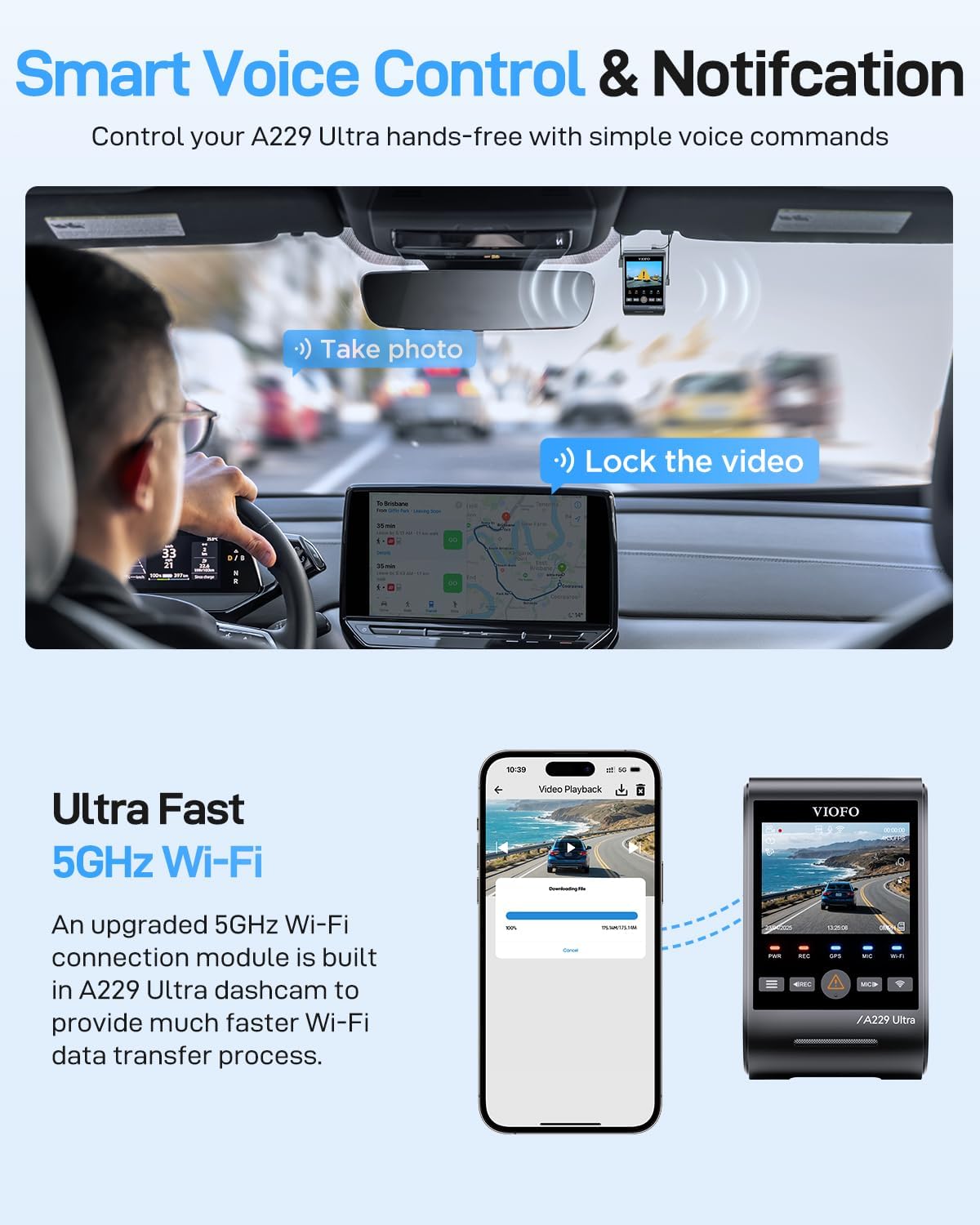
Image: This image explains the various parking modes, including Time Lapse, Low Bitrate, and Auto Event Detection, which provide continuous surveillance even when the vehicle is parked. It also notes the requirement of a hardwire cable for this feature.
Optional CPL Filter & Bluetooth Remote
Enhance video clarity by reducing reflections and glare with an optional CPL filter for both front and rear cameras. The optional Bluetooth remote provides convenient control, allowing you to instantly lock the current video or access other functions with a simple press.

Image: This image shows the optional CPL filter for reducing glare and reflections, and the Bluetooth remote for convenient control of recording and locking videos.
Official Product Video
Video: An official overview video showcasing the VIOFO A229 Ultra 3 Channel Dash Cam's key features and recording capabilities.
Setup
Mounting the Dash Cam
The VIOFO A229 Ultra uses adhesive mounts for secure attachment to your vehicle's windshield and rear window.
- Clean the mounting surface on your windshield and rear window thoroughly.
- Apply the provided windshield static stickers to the desired mounting locations.
- Peel off the protective film from the 3M adhesive on the front camera mount and firmly press it onto the static sticker on the windshield.
- Repeat the process for the rear camera and interior camera, ensuring optimal viewing angles.
- Connect the rear and interior cameras to the main front unit using the provided cables.
Power Connection
Connect the car charger to your vehicle's 12V power outlet.
Plug the Type-C data cable from the car charger into the main front camera unit.
Ensure all cables are neatly routed and tucked away to avoid obstructing your view or interfering with vehicle operation. Use the trim removal tool if necessary.
MicroSD Card Installation
The dash cam requires a high-endurance microSD card (sold separately) for reliable recording.
Insert the microSD card into the designated slot on the main front camera unit. Ensure it clicks into place.
It is recommended to format the microSD card via the dash cam's settings menu after installation.


