
Introduction
This instruction manual provides detailed guidance for installing and operating your BrickSoul LED Lighting Kit, designed specifically for the Lego Up House 43217 Building Set. This kit enhances your model with vibrant, dimmable lighting, transforming it into a dynamic display piece. Please note that the Lego building set itself is not included with this lighting kit.

Image: The Lego Up House model with the BrickSoul LED lighting kit installed, demonstrating the illuminated structure and balloons.
Package Contents
Before beginning installation, please verify that all components listed below are present in your package:
- LED Light Kit (various light strips and individual LEDs)
- Connecting Cables
- Battery Box (AAA batteries not included)
- Light Control Button (integrated into USB cable)
- Tweezers (for precise placement)
- Installation Guide (PDF/Video instructions available online)
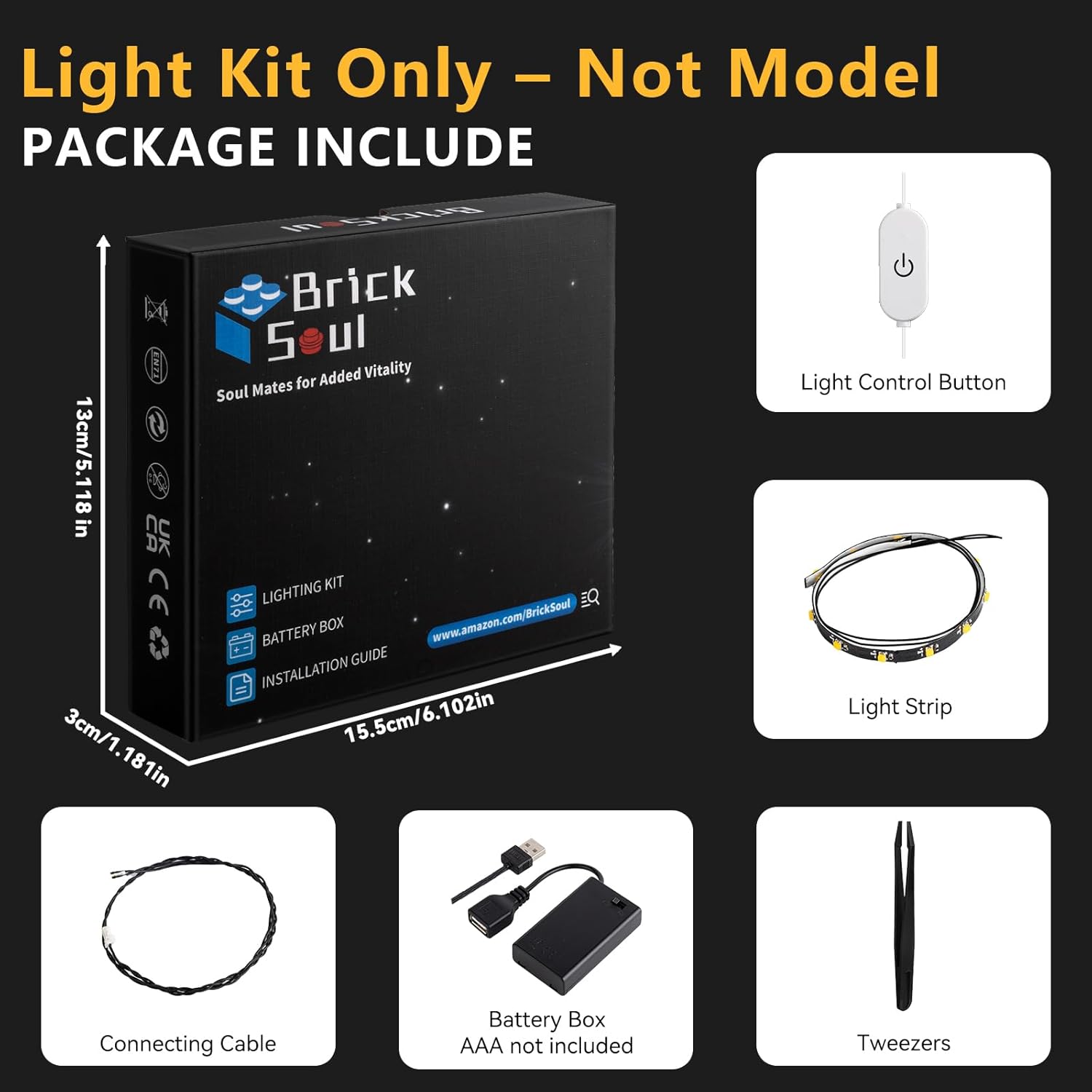
Image: Overview of the BrickSoul LED Lighting Kit components, showing the light control button, light strip, connecting cable, battery box, and tweezers.
Setup and Installation
The BrickSoul LED kit is designed for straightforward installation. Follow the detailed instructions provided in the online guides for the best results.
Accessing Installation Instructions:
Detailed, step-by-step instructions are available online in both video and PDF formats. These guides are numbered and designed for beginner-friendly setup.
- Receive Products: Ensure you have your BrickSoul LED Lighting Kit.
- Find URL in Box: Locate the URL or QR code within your product packaging.
- Search Manual Page: Visit the provided URL and search for the manual specific to model 43217-TV.
- Get the Manual PDF: Download or view the PDF instructions. Video guides may also be available.

Image: Visual guide on how to obtain the digital instruction manual for the lighting kit.
General Installation Tips:
- Preparation: Carefully remove a few bricks from your Lego model as indicated in the instructions to integrate the lights.
- Wiring: The kit is designed for clean wiring. Route cables neatly to avoid tangles and ensure they do not interfere with the model's structure.
- Power Source: The kit operates on 3-5V input. You can power it via a USB connection or by inserting AAA batteries (not included) into the battery box.
- Gentle Handling: Use the provided tweezers for precise placement of small components and wires. Avoid excessive force to prevent damage to the lights or your Lego model.

Image: A comparison demonstrating the clean wiring and vibrant illumination features of the BrickSoul kit.
Operating Instructions
The BrickSoul LED Lighting Kit features a convenient one-touch control for power and brightness adjustment.
Power and Brightness Control:
- Turn On/Off: Tap the button located on the USB cable to toggle the lights on or off.
- Adjust Brightness: Press and hold the button to smoothly adjust the brightness level. Release the button when the desired brightness is achieved.

Image: Demonstration of the adjustable lighting feature, showing the model illuminated at various brightness levels from 0% to 100% via the control button.

Image: Detailed graphic explaining the one-touch control for power and brightness adjustment.

Image: Close-up views of the BrickSoul LED lights integrated into the Lego Up House model, highlighting interior and exterior illumination.
Maintenance
To ensure the longevity and optimal performance of your BrickSoul LED Lighting Kit, follow these simple maintenance guidelines:
- Cleaning: Gently dust the lights and wires with a soft, dry cloth. Avoid using liquid cleaners directly on the electrical components.
- Battery Replacement: If using AAA batteries, replace them when the lights dim significantly or stop working. Ensure correct polarity when inserting new batteries.
- Cable Management: Periodically check that all cables are securely connected and not pinched or strained.
- Storage: If storing the model for an extended period, consider removing the batteries to prevent leakage.
Troubleshooting
If you encounter any issues with your BrickSoul LED Lighting Kit, refer to the following common troubleshooting steps:
- Lights Not Turning On:
- Check power source: Ensure the USB cable is properly connected or that fresh AAA batteries are correctly installed in the battery box.
- Verify connections: Make sure all light strips and connecting cables are securely plugged into the main circuit.
- Inspect for damage: Look for any visible damage to wires or LED components.
- Lights Are Dim or Flickering:
- Adjust brightness: Use the control button to increase the brightness level.
- Check batteries: If using batteries, they may be low and require replacement.
- Power supply: Ensure the USB power source provides sufficient and stable power.
- Individual Lights Not Working:
- Inspect the specific LED or light strip for loose connections or damage.
- If a component is damaged, refer to the warranty section for replacement options.
For persistent issues, please contact BrickSoul customer support.
Specifications
| Feature | Detail |
|---|---|
| Brand | BrickSoul |
| Model Number | 43217-TV |
| Compatibility | Lego Up House 43217 Building Set |
| Power Input | USB (3-5V) or AAA Batteries (not included) |
| Material | ABS Plastic, Copper Wire |
| Special Features | Dimmable, Non-Toxic |
| Item Weight | 4.8 ounces |
| Product Dimensions | 6.36 x 4.32 x 1.33 inches (packaging) |
| Recommended Age | 14 years and up |
Warranty and Support
BrickSoul offers a worry-free warranty for your lighting kit. In the event of accidental damage, such as a bent connector or broken wire, we provide quick and hassle-free replacements to ensure your building experience remains uninterrupted.
For any questions, technical assistance, or warranty claims, please contact the BrickSoul support team. Refer to the contact information provided in your product packaging or visit the official BrickSoul website for support details.
Online Support: Visit the BrickSoul Store on Amazon
