
SenCre Nugget Ice Maker
SenCre Nugget Ice Maker 40lbs/Day Instruction Manual
Model: Nugget Ice Maker
Introduction
This manual provides detailed instructions for the safe and efficient operation, maintenance, and troubleshooting of your SenCre Nugget Ice Maker. Please read this manual thoroughly before using the appliance and retain it for future reference.

Image: The SenCre Nugget Ice Maker positioned on a kitchen countertop, surrounded by various beverages, highlighting its integration into a home environment.
Important Safety Instructions
- Read all instructions before operating the appliance.
- Do not insert hands into the ice outlet to avoid injury.
- Ensure proper ventilation by leaving adequate space around the unit (sides and back).
- Use only potable water.
- Unplug the appliance before cleaning or when not in use for extended periods.
- Keep the appliance away from heat sources and direct sunlight.
- This appliance is for household use only.
What's in the Box
- Ice Maker x 1
- Ice Scoop x 1
- Drip Tray x 1

Image: The SenCre Nugget Ice Maker displayed with its accessories: an ice scoop, a removable ice basket, and a drip tray, illustrating the complete set.
Product Overview
The SenCre Nugget Ice Maker is designed to produce soft, chewable nugget ice quickly and efficiently. It features a compact design suitable for various settings.

Image: A clear front view of the SenCre Nugget Ice Maker, showcasing its stainless steel finish and control panel.
Key Features:
- Fast Ice Production: Produces ice in approximately 5 minutes, with a daily output of up to 40 lbs.
- Soft Nugget Ice: Creates chewable, pellet-style ice.
- Self-Cleaning Function: Automated cleaning for hygiene.
- Compact Design: Space-saving dimensions for countertops.
- Water Recycling System: Melts ice is reused to minimize water waste.
Setup
1. Placement
Place the ice maker on a stable, level surface. Ensure there is adequate space (several inches) on the sides and back of the unit for proper ventilation. This is crucial for the appliance's cooling system and efficient operation.
2. Initial Cleaning
Before first use, it is recommended to perform a self-cleaning cycle. Refer to the "Maintenance" section for detailed instructions on using the self-cleaning function.
3. Add Water
Open the top lid and fill the water reservoir with potable water up to the maximum fill line. The unit does not connect to an external water source, so manual refilling is required.

Image: A visual guide showing the first step of adding water to the ice maker's reservoir.
Operating Instructions
1. Making Ice
- Ensure the water reservoir is filled.
- Press the ICE button on the control panel to start the ice-making process.
- The first batch of ice will be ready in approximately 5 minutes.

Image: A graphic illustrating the simple three-step process for making nugget ice: adding water, pressing the ice button, and then enjoying the ice.
2. Indicators
- ICE FULL: The indicator light will illuminate when the ice basket is full, and the machine will automatically pause ice production to prevent overflow and conserve energy.
- ADD WATER: The indicator light will illuminate when the water level in the reservoir is low, prompting you to refill.
- LIGHT: Press the LIGHT button to turn the internal light on or off, allowing you to view the ice production.

Image: A visual demonstrating the "Ice-full Reminder" feature, showing the ice maker automatically stopping when the basket is full.
3. Scooping Ice
You can access the ice in two ways:
- Open the top cover to scoop ice directly from the ice basket.
- Pull out the front ice basket to scoop ice.
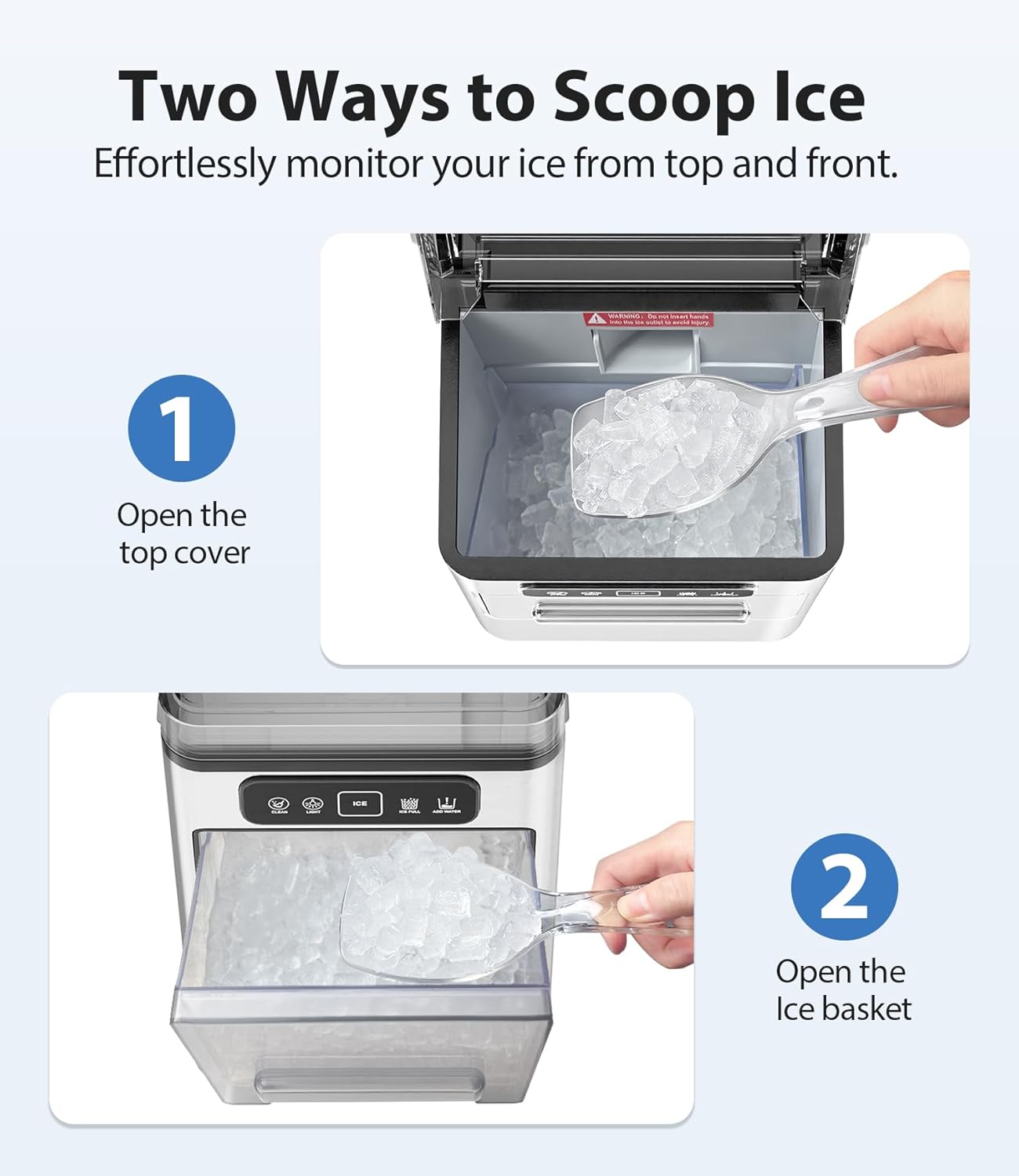
Image: A diagram illustrating two methods for scooping ice: by opening the top lid or by pulling out the front ice basket.
Maintenance
1. Self-Cleaning Function
The ice maker features an automatic self-cleaning function. To activate:
- Ensure the water reservoir is filled.
- Press the CLEAN button on the control panel.
- The cleaning cycle takes approximately 10 minutes.

Image: An illustration of the ice maker's automatic self-cleaning function, showing water circulating within the unit.
2. Descaling
To prevent mineral buildup, especially in hard water areas, descaling is recommended:
- Moderately Hard Water Areas: Descale once a month.
- Hard to Very Hard Water Areas: Descale every two or three weeks.
Consult your local water provider for information on water hardness in your area.

Image: A map of the United States indicating regional water hardness levels, accompanied by descaling frequency recommendations for the ice maker.
3. Water Recycling System
The ice maker features a closed-loop system that reuses melted ice, ensuring maximum water efficiency and continuous ice production. This design minimizes water waste and the need for frequent refills.

Image: A diagram showing the internal mechanism of the ice maker, highlighting how melted ice is recycled back into the water reservoir for reuse.
4. Drainage
The unit includes a unique water outlet design with a drain hose for convenient and leak-free drainage. This helps in emptying the reservoir for cleaning or storage.

Image: A comparison image showing the ice maker's unique water outlet design with a hose for controlled drainage, contrasted with a less efficient method.
Troubleshooting
If you encounter issues with your ice maker, please refer to the following common solutions:
- No Ice Production: Check if the water reservoir is filled and if the ICE button has been pressed. Ensure the unit is plugged in and receiving power.
- "ADD WATER" Indicator On: Refill the water reservoir to the maximum fill line.
- "ICE FULL" Indicator On: Empty the ice basket. The machine will resume ice production automatically.
- Ice Melts Quickly: This ice maker is not a freezer. Ice will melt over time. The melted water is recycled. For long-term storage, transfer ice to a freezer.
- Unusual Noise: Ensure the unit is on a stable, level surface. Check for any obstructions in the ice-making mechanism.
- Poor Ice Quality: Perform a self-cleaning cycle and consider descaling if you are in a hard water area. Use filtered or distilled water for best results.
For further assistance, please contact customer support.
Specifications
| Feature | Detail |
|---|---|
| Brand | SenCre |
| Model Name | Nugget Ice Maker |
| Product Dimensions | 12.99"D x 7.29"W x 12.79"H |
| Capacity | 40 Pounds (daily production) |
| Voltage | 110 Volts (AC) |
| Refrigerant | R600a |
| Item Weight | 19.31 pounds |
Warranty and Support
SenCre is committed to providing quality products and customer satisfaction. For any questions, concerns, or technical support, please contact our 24/7 customer support team.
Refer to your product packaging or the official SenCre website for specific warranty details and contact information.

Image: A graphic highlighting reasons why families trust SenCre, including customer satisfaction and technological advancements.
Ask a question about this manual
Ask about setup, troubleshooting, compatibility, parts, safety, or missing instructions. Manuals+ will review the question and use this page’s manual context to help answer it.