
Introduction
This manual provides comprehensive instructions for the ALLIMITY RC933A FMB1 Voice Remote Control. Designed for ease of use, this remote offers full functionality for compatible TCL Mini LED Smart TV models without requiring complex programming or setup. Its ergonomic design ensures comfortable handling and reliable performance.
Compatible TV Models:
- TCL Q8CX7
- TCL 85Q8CX7
- TCL 98Q8CX7
- TCL 75Q8CX7
- TCL 65C8K
- TCL 75C89K
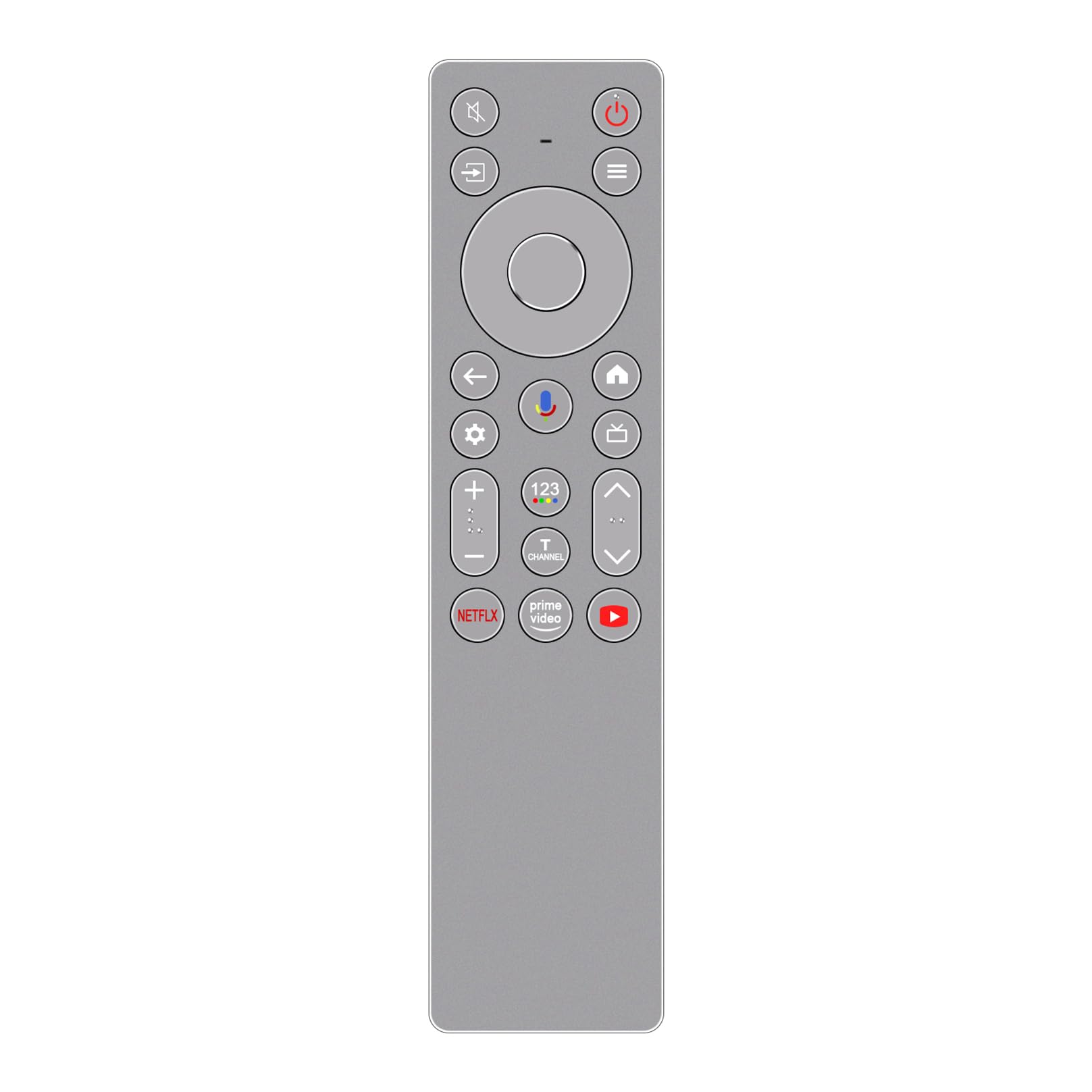
Image: Front view of the ALLIMITY RC933A FMB1 Voice Remote Control, showcasing its button layout and sleek silver-grey finish.
Setup
The ALLIMITY RC933A FMB1 remote control is designed for immediate use with compatible TCL Smart TVs. No programming or complex setup is required. Simply install the batteries to begin operation.
Battery Installation
- Locate the battery compartment on the back of the remote control.
- Slide open the battery compartment cover.
- Insert two AA batteries, ensuring the positive (+) and negative (-) terminals align correctly with the indicators inside the compartment.
- Close the battery compartment cover securely.
The remote is now ready for use. Point it towards your TCL Smart TV and press any button to confirm functionality.
Operating Instructions
The ALLIMITY RC933A FMB1 remote control provides intuitive access to your TV's functions, including voice commands and dedicated app buttons.
Button Functions Overview
- Power Button: Turns the TV on or off.
- Directional Pad (D-Pad) and OK Button: Navigate menus and confirm selections.
- Back Button: Returns to the previous screen or menu.
- Home Button: Accesses the TV's home screen.
- Settings Button: Opens the TV's settings menu.
- Volume Up/Down: Adjusts the TV volume.
- Channel Up/Down: Changes TV channels.
- Mute Button: Mutes or unmutes the TV audio.
- Input/Source Button: Selects input sources (HDMI, AV, etc.).
- Dedicated App Buttons: Quick access to Netflix, Prime Video, and YouTube.
Voice Control Functionality
The remote features a voice command button for convenient control of your TV. This allows you to search for content, change settings, or launch apps using your voice.
- Press the Voice Control Button (typically indicated by a microphone icon).
- Hold the remote approximately 10-30 cm (4-12 inches) from your mouth.
- Speak your command clearly into the remote's microphone.
- Release the button once you have finished speaking.

Image: A detailed view of the ALLIMITY RC933A FMB1 remote control, with a magnified inset showing the multi-colored microphone icon for voice control.
Maintenance
Proper care and maintenance will ensure the longevity and optimal performance of your remote control.
Cleaning
- Wipe the remote control with a soft, dry cloth.
- For stubborn dirt, slightly dampen the cloth with water or a mild, non-abrasive cleaner. Avoid excessive moisture.
- Do not use harsh chemicals, solvents, or abrasive cleaning pads, as these can damage the remote's surface or internal components.
Battery Replacement
- Replace batteries when the remote's response becomes sluggish or stops working.
- Always replace both batteries at the same time with new AA batteries.
- Do not mix old and new batteries, or different types of batteries.
- Remove batteries if the remote will not be used for an extended period to prevent leakage.
Storage
Store the remote control in a cool, dry place away from direct sunlight, extreme temperatures, and high humidity.
Troubleshooting
If you encounter issues with your ALLIMITY RC933A FMB1 remote control, refer to the following common solutions:
- Remote not responding:
- Check if the batteries are inserted correctly with the correct polarity.
- Replace the batteries with fresh AA batteries.
- Ensure there are no obstructions between the remote control and the TV's infrared receiver.
- Make sure you are within the effective operating range (up to 10 meters).
- Voice control not working:
- Ensure the remote has fresh batteries.
- Press and hold the voice control button while speaking.
- Speak clearly and directly into the microphone.
- Check your TV's settings to ensure voice control is enabled and properly configured.
- Short transmission range:
- Replace batteries with new ones. Low battery power can reduce range.
- Ensure no strong light sources (like direct sunlight or bright fluorescent lights) are interfering with the infrared signal.
- Remove any physical obstructions between the remote and the TV.
Specifications
| Brand | ALLIMITY |
| Model Name | MM-RC933A-FMB1 |
| Color | Silver/Grey (as pictured) |
| Connectivity Technology | Infrared (IR) |
| Control Type | Voice Command |
| Maximum Range | 10 meters (33 feet) |
| Number of Buttons | 25 |
| Battery Description | AA (2 required) |
| Product Weight | 59 Grams |
| Dimensions (Length x Width) | 18.5 cm (7.28 in) x 4.8 cm (1.89 in) |
| Maximum Supported Devices | 1 (for direct control, though it can be compatible with multiple models) |

Image: Side-by-side view of the ALLIMITY RC933A FMB1 remote control, illustrating its length (18.5 cm / 7.28 in) and width (4.8 cm / 1.89 in).
Warranty and Support
For specific warranty information or technical support regarding your ALLIMITY RC933A FMB1 Voice Remote Control, please refer to the documentation provided with your purchase or contact the retailer/manufacturer directly. Keep your purchase receipt as proof of purchase for any warranty claims.