
1. Introduction
This manual provides comprehensive instructions for the assembly, operation, and maintenance of your HolaiNail Nail Desk with Electric Dust Collector. Please read this manual thoroughly before use to ensure safe and efficient operation and to maximize the lifespan of your product.
2. Safety Information
Important Safety Instructions:
- Always use the dust collector with proper ventilation.
- Do not operate the desk beyond its weight limit.
- Follow all safety instructions provided in the assembly manual.
- Ensure all electrical connections are secure and meet local safety standards.
- Keep liquids away from electrical components.
- Do not allow children to play with or around the nail desk.
3. Setup and Assembly
The HolaiNail Nail Desk requires assembly. All necessary hardware and tools are included. Please follow the steps below carefully.
3.1 Unpacking
- Carefully open the packaging and remove all components.
- Verify that all parts listed in the included assembly manual are present.
- Place components on a soft, clean surface to prevent scratches during assembly.
3.2 Component Overview

Image: Overview of the HolaiNail Nail Desk, showing the main desk surface, storage cabinets, drawers, and the wrist cushion.
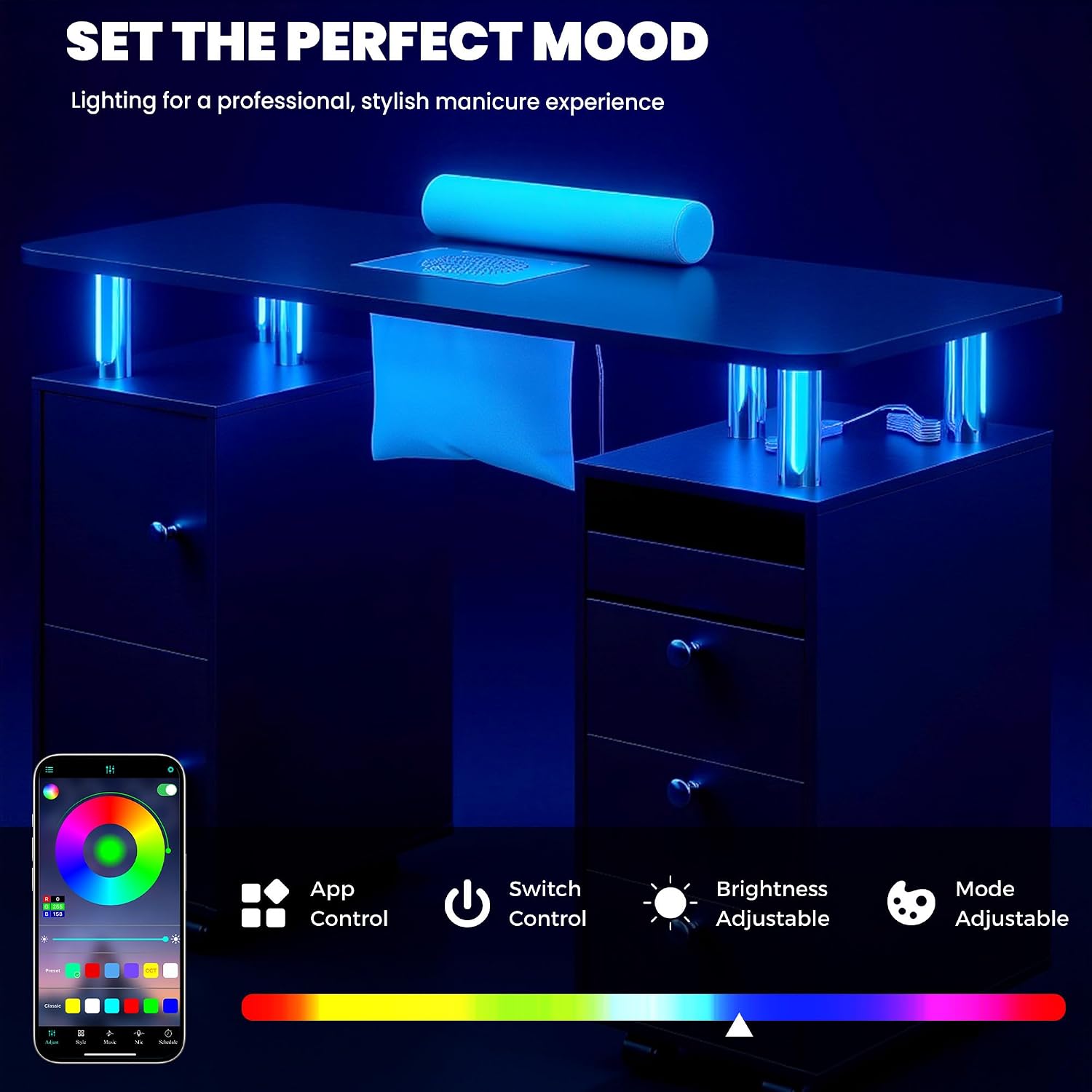
Image: Diagram illustrating the dimensions of the nail desk, including length, width, and height, along with power cord lengths for the vacuum cleaner and light strip.
3.3 Assembly Steps
Refer to the included Assembly Manual for detailed, step-by-step instructions. Key steps typically include:
- Attach the support columns to the base units.
- Secure the main tabletop to the support columns.
- Install drawers and cabinet doors into their respective compartments.
- Mount the electric dust collector and connect its power cord.
- Install the LED light strip and connect its power cord.
- Attach the lockable caster wheels to the base units.
- Place the wrist cushion on the designated area of the tabletop.
Note: The assembly instructions include all necessary hardware and tools for setting up the manicure table.
4. Operation
4.1 Electric Dust Collector
The built-in electric dust collector helps maintain a clean workspace by capturing nail dust and debris. It comes with 4 reusable dust bags.
- Activation: Plug in the dust collector's power cord. The collector typically has a switch for activation.
- Usage: Position the client's hand over the collector's grate during filing or drilling to effectively capture dust.
- Dust Bags: Ensure a dust bag is properly installed before operation. Replace or clean reusable bags regularly for optimal performance.

Image: Close-up view of the built-in vacuum system on the nail desk, showing the grate, soft wrist cushion, and indicating the location of the dust bags underneath.
Video: Demonstration of the compact and stylish nail desk, highlighting its storage features and the integrated dust collector.
4.2 LED Ambient Lighting
The desk features adjustable LED lights to enhance the working atmosphere.
- Control: The LED lights can be controlled via a dedicated app or a physical button.
- Adjustments: Adjust colors and brightness to suit your preference or the desired ambiance.

Image: The nail desk illuminated with blue LED ambient lighting, illustrating the app and switch control options for color and brightness adjustments.
Video: A short demonstration of the LED lighting feature of the nail desk, showcasing various color options.
4.3 Storage Features
The desk is designed with multiple storage options to keep your tools and supplies organized.
- Drawers: Three drawers provide enclosed storage for smaller items.
- Cabinets: Two cabinets offer larger storage space for bottles, towels, or equipment.
- Open Under-Desk Compartment: Suitable for items requiring quick access or larger equipment like UV nail lamps.
- Dual-Direction Pull-Out Tray: A smooth sliding tray allows access from both sides, ideal for nail polish bottles or small tools during a session.

Image: The nail desk with its storage compartments open, displaying the cabinets, drawers, and the dual-sided sliding tray for organizing nail supplies.
Video: A short preview demonstrating the dual-sided sliding tray feature of the nail desk, showing how it can be accessed from either side.
4.4 Mobility and Stability
The desk is equipped with 8 wheels for easy movement, with 4 lockable casters for stability.
- Moving the Desk: Unlock the 4 lockable casters before moving the desk.
- Securing the Desk: Once the desk is in the desired position, engage the locks on the 4 casters to prevent unintended movement.

Image: Detail of a lockable caster wheel and the robust support columns, highlighting the desk's mobility and stability features.
5. Maintenance
5.1 Cleaning
- Surface Cleaning: Wipe clean with a damp cloth. The MDF board is waterproof and acetone-resistant, allowing for easy cleanup of spills.
- Dust Collector: Regularly empty and clean the reusable dust bags to maintain optimal suction and airflow.
- General Care: Avoid abrasive cleaners or harsh chemicals that could damage the finish.

Image: A hand wiping the surface of the nail desk, demonstrating its easy-to-clean and acetone-resistant properties.
5.2 Inspection
- Periodically check all screws and fasteners to ensure they are tight.
- Inspect electrical cords for any signs of damage. Discontinue use if damage is found and contact support.
- Ensure caster wheels roll smoothly and locks engage properly.
6. Troubleshooting
This section addresses common issues you might encounter with your HolaiNail Nail Desk.
6.1 Dust Collector Not Functioning
- Check Power: Ensure the dust collector is properly plugged into a working power outlet.
- Check Switch: Verify that the power switch for the dust collector is in the "ON" position.
- Dust Bag: A full or improperly installed dust bag can affect performance. Empty or re-install the dust bag.
- Obstruction: Check for any obstructions in the intake grate.
6.2 LED Lights Not Working
- Power Connection: Ensure the LED light strip is securely connected to its power source.
- Control Method: If using the app, ensure your device is properly paired. If using the button, ensure it is functioning.
6.3 Desk is Unstable or Difficult to Move
- Caster Locks: Ensure all 4 lockable casters are unlocked when attempting to move the desk.
- Assembly: Verify that all assembly screws are tightened according to the manual. Loose connections can cause instability.
If you encounter issues not covered here, please contact customer support for assistance.
7. Specifications
| Brand: | HolaiNail |
| Model Number: | US860111 |
| Product Dimensions (D x W x H): | 17.7"D x 42.5"W x 30.3"H |
| Item Weight: | 60 Pounds |
| Color: | Black |
| Material Type: | Engineered Wood (MDF) |
| Special Features: | Built-in Dust Collector, Compact Nail Workstation, LED Ambient Lighting, Lockable Caster Wheels |
| Number of Drawers: | 4 (includes the pull-out tray) |
| Number of Cabinets: | 2 |
| Waterproof: | Yes |
| Acetone Resistant: | Yes |
| Assembly Required: | Yes (All tools included) |

Image: The HolaiNail Nail Desk set up in a professional salon environment, showcasing its functional design.
8. Warranty & Support
8.1 Warranty Information
This HolaiNail Nail Desk comes with a Limited Warranty. Please refer to the warranty card included in your packaging for specific terms, conditions, and duration of coverage.
8.2 Customer Support
For any questions, concerns, or assistance with assembly, operation, or troubleshooting, please contact HolaiNail customer support. You may also reach out to the seller, Adwinus, for product-related inquiries.
Please have your model number (US860111) and purchase date available when contacting support.