
1. Safety Information
Read and understand all safety instructions before installation and operation. Failure to follow these instructions may result in serious injury or property damage. Keep this manual for future reference.
- Ensure the installation area is clear of obstructions and potential hazards.
- Do not allow children to play near the gate or operate the gate opener.
- Always use the provided infrared sensors to detect obstacles and prevent accidents.
- Disconnect power before performing any maintenance or repairs.
- Only use genuine Hanchen replacement parts.
- In case of power failure, use the emergency release key to manually operate the gate.
WARNING: Moving gates can cause serious injury, death, or vehicle damage. Keep clear of the gate area at all times. This entrance is for vehicle use only. Pedestrians must use a separate entrance.
2. Product Overview
The Hanchen MX-1107 Solar Sliding Gate Opener is designed for heavy-duty sliding gates up to 1300 lbs in weight and 40 ft in length. It features off-grid operation with a 280W solar panel, a built-in backup battery, WiFi remote control, and advanced safety functions.
Key Features:
- Off-grid Operation: Integrated 280W solar panel and built-in backup battery for continuous operation.
- WiFi Remote Control: Control your gate from anywhere using a smartphone application.
- Infrared (IR) Sensor: Automatically stops and reverses the gate upon detecting obstructions.
- User-friendly LED Indicator: Displays gate status (green for open, red for closed).
- Soft Start and Soft Stop: Extends the lifespan of the gate and opener mechanism.
- Auto-closing Function: Automatically closes the gate after a set time for enhanced security.
- Resistance Function: Activates upon encountering obstructions during gate movement.

Figure 2.1: Main unit of the Hanchen MX-1107 Solar Sliding Gate Opener with included solar panel and accessories.
3. Components Included
The Hanchen MX-1107 package includes the following components:
- Gate Opener Main Unit (with built-in battery)
- 280W Solar Panel (1 pc)
- Nylon Gear Rack (8 pcs, total 13 ft)
- Magnetic Limit Switch (2 pcs)
- Remote Control (2 pcs, batteries included)
- Infrared Photocell (1 pair)
- Emergency Key (2 pcs)
- Warning Sign (2 pcs)
- Mounting Hardware and Fasteners

Figure 3.1: All components included in the Hanchen MX-1107 Solar Sliding Gate Opener package.
4. Setup and Installation
The installation process is designed to be straightforward. Follow the step-by-step instructions provided in the detailed manual included with your product. This section provides a general overview.
4.1 Site Preparation
- Ensure the gate slides smoothly and is properly aligned.
- Clear the area around the gate for the opener installation.
- Identify a suitable location for the solar panel, ensuring maximum sun exposure throughout the day.
4.2 Mounting the Gate Opener
- Securely mount the gate opener main unit on a stable, level surface next to the gate.
- Attach the nylon gear racks to the bottom of the sliding gate, ensuring proper engagement with the opener's drive gear.
- Install the magnetic limit switches at the desired open and closed positions of the gate.

Figure 4.1: The gate opener's drive gear smoothly engaging with the nylon gear rack.
4.3 Electrical Connections and Solar Panel Setup
- Connect the solar panel to the gate opener. This system is designed for plug-and-play solar power, requiring no additional high-voltage wiring.
- Alternatively, the gate opener can be powered by AC110-120V 60Hz.
- Install the infrared photocell sensors across the gate opening for safety.

Figure 4.2: The Hanchen gate opener supports both solar power with battery and AC power.

Figure 4.3: Infrared photocell sensors ensure safety by detecting pedestrians or vehicles.
5. Operating Instructions
The Hanchen MX-1107 offers multiple convenient ways to operate your sliding gate.
5.1 Remote Control Operation
- Use the provided remote controls to open, close, or stop the gate. The remotes offer a reliable control range of up to 165 feet.
- Press the designated button to open the gate.
- Press the designated button to close the gate.
- Press the stop button to halt the gate's movement at any point.
5.2 WiFi Smartphone Control
- Download the official Hanchen gate opener application on your smartphone.
- Follow the in-app instructions to pair your gate opener with your smartphone via WiFi.
- Once paired, you can open, close, or stop your gate from any location with internet access.

Figure 5.1: Control your gate remotely using the smartphone application.
5.3 LED Indicator
- The LED indicator on the gate opener clearly shows the gate's current status.
- A green light indicates the gate is opening or fully open.
- A red light indicates the gate is closing or fully closed.

Figure 5.2: The LED indicator provides clear visual feedback on the gate's status.
6. Safety Functions
The Hanchen MX-1107 is equipped with several safety features to protect users and property.
- IR Sensor: If the infrared beam is interrupted by an object or person, the gate will immediately stop and reverse direction.
- Resistance Function: In the event of physical obstruction during opening or closing, the gate will stop its movement.
- Auto-closing Function: This feature can be programmed to automatically close the gate after a user-defined period, ensuring security even if you forget to close it manually.
- Soft Start and Soft Stop: The gate begins and ends its movement gradually, reducing wear and tear on the motor and gate hardware.
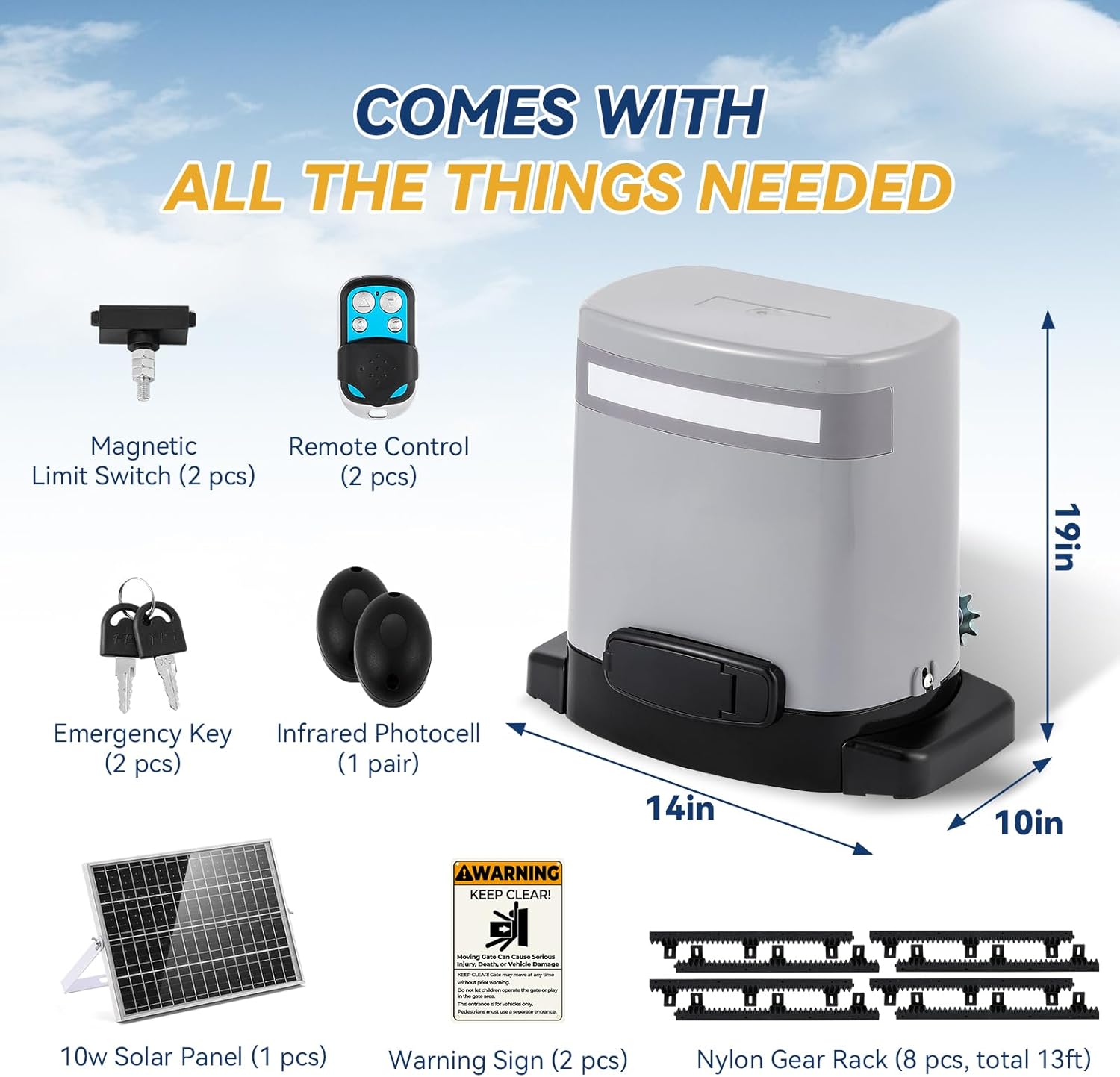
Figure 6.1: Overview of the Hanchen gate opener's safety features.
7. Maintenance
Regular maintenance ensures optimal performance and longevity of your gate opener.
- Monthly: Inspect the gate path for any new obstructions. Check the gear rack for debris and ensure smooth movement.
- Quarterly: Clean the solar panel surface to ensure maximum charging efficiency. Check all mounting bolts and fasteners for tightness.
- Annually: Inspect the wiring for any signs of wear or damage. Test the IR sensors and resistance function to ensure they are working correctly.
- Keep the gate opener unit clean and free from excessive dust or moisture. The unit is waterproof for outdoor use.

Figure 7.1: The Hanchen gate opener is designed to be waterproof for reliable outdoor performance.
8. Troubleshooting
If you encounter issues with your Hanchen MX-1107 gate opener, refer to the following common problems and solutions:
| Problem | Possible Cause | Solution |
|---|---|---|
| Gate does not move | No power; Remote battery low; Emergency release engaged; Obstruction detected. | Check power supply/solar panel connection; Replace remote batteries; Disengage emergency release; Clear obstruction. |
| Gate stops unexpectedly | IR sensor triggered; Obstruction detected; Limit switch issue. | Clear sensor path; Remove obstruction; Check limit switch alignment. |
| Remote control not working | Low battery; Out of range; Remote not paired. | Replace battery; Move closer to gate; Re-pair remote according to manual. |
| WiFi control not connecting | Poor WiFi signal; Incorrect pairing; App issue. | Check WiFi signal strength; Re-pair via app; Restart app/phone. |
For further assistance, please contact customer support.
9. Specifications
| Specification | Value |
|---|---|
| Model Number | MX-1107 |
| Max Gate Weight | 1300 lbs |
| Max Gate Length | 40 ft |
| Motor Power | 3/8HP 280W DC |
| Power Supply | AC110-120V 60Hz or 32V Solar Panel |
| Item Weight | 46 pounds |
| Product Dimensions | 12 x 4 x 16 inches |
| Color | Gray |
| Included Components | Gate Opener, Solar Panel, Nylon Gear Rack, Remote Control, IR Sensor, Emergency Keys |
10. Warranty and Support
Hanchen provides comprehensive support for your product.
- Warranty: 1 Year Free Replacement.
- Technical Support: Lifetime Technical Support is available.
If you have any questions or require assistance, please contact Hanchen customer service. Our specialists are available to provide professional and timely solutions.
11. Product Video
Video 11.1: An official Hanchen video demonstrating the features and operation of the sliding gate opener with rack drive.