
Introduction
This manual provides instructions for the installation, operation, and maintenance of your SignalBrick KT1 Cell Phone Signal Booster. This device is designed to enhance 3G, 4G LTE, and 5G cellular signals within your truck, RV, or other vehicle, improving voice quality, data speeds, and overall connectivity in areas with weak signal.
It is compatible with all major U.S. carriers, including Verizon, AT&T, T-Mobile, and U.S. Cellular, supporting frequency bands 4, 12/17, 13, 5, and 2/25.
Product Overview
The SignalBrick KT1 Cell Phone Signal Booster system includes the following components:
- Booster Unit
- 17" Horizon Omni-Directional Outdoor Antenna
- Indoor Antenna
- DC Power Adapter
- AC Power Supply (for stationary use, if applicable)
- Coaxial Cables (1 x 10' 3D-FB Cable, 2 x 10' 3D-FB Cables)

Image: Diagram illustrating all components included in the SignalBrick KT1 booster kit, such as the booster unit, outdoor antenna, indoor antenna, power adapters, and coaxial cables.
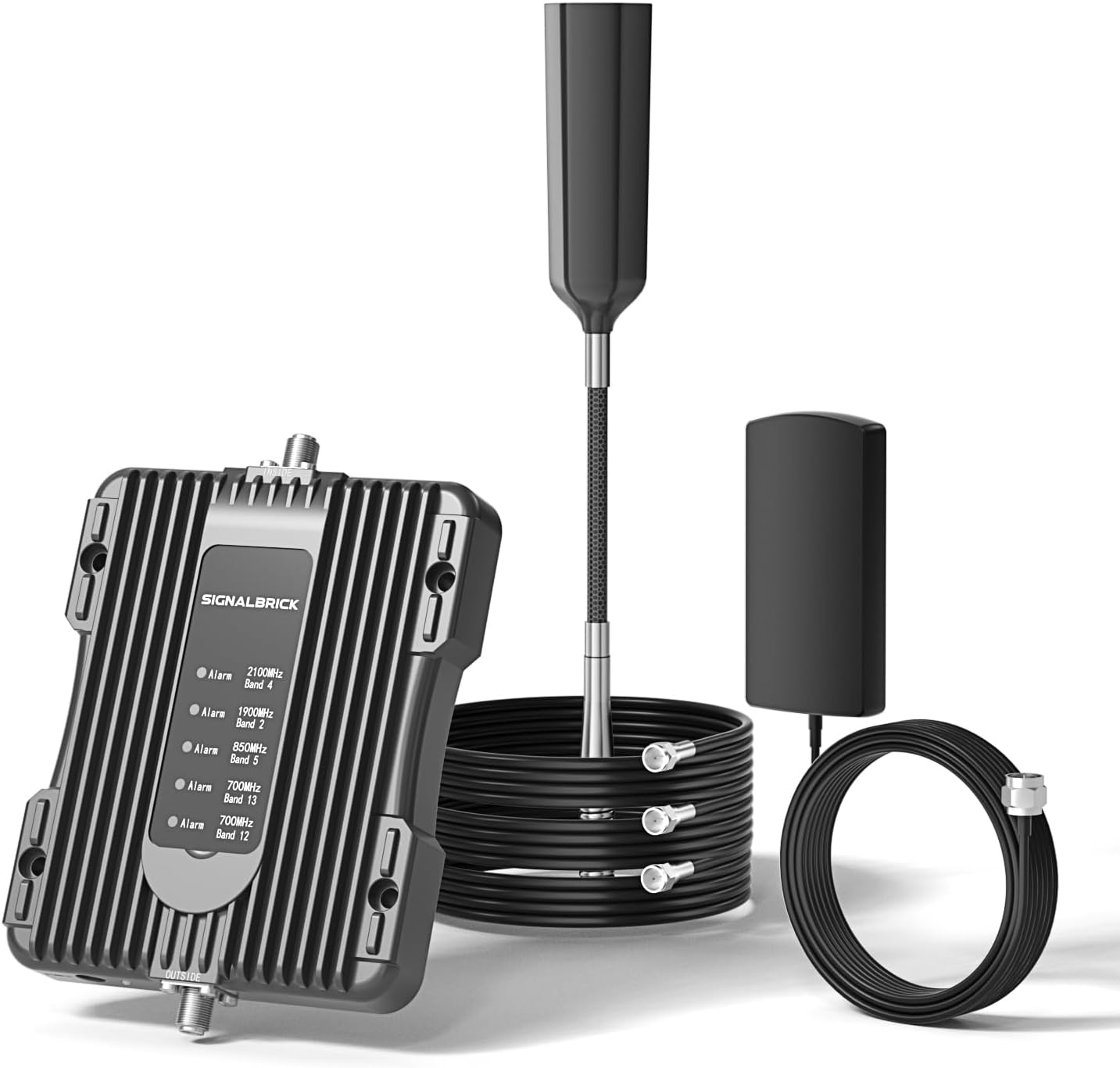
Image: The main components of the SignalBrick KT1 Cell Phone Signal Booster, including the booster unit, outdoor antenna, indoor antenna, and connecting cables.
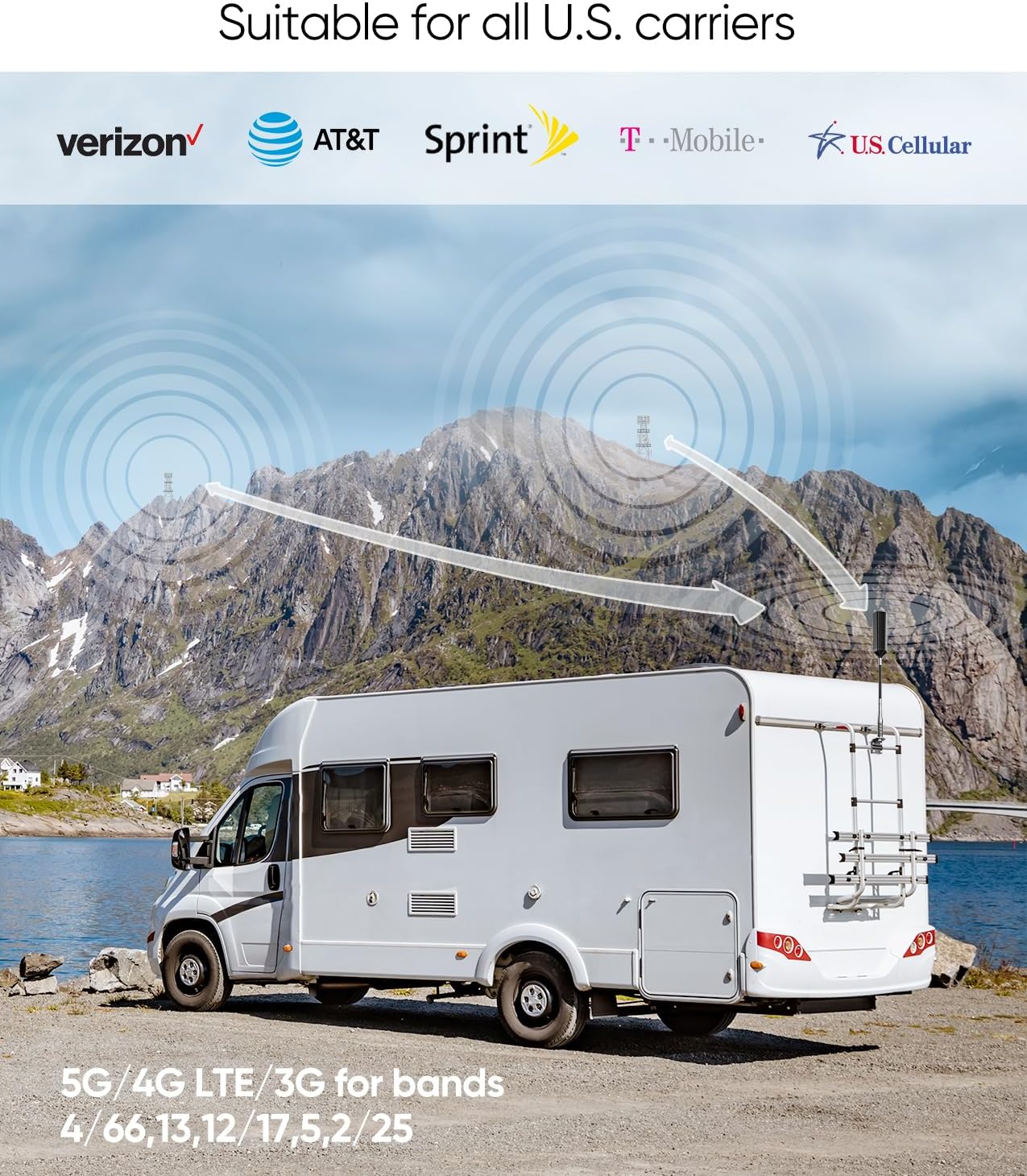
Image: Visual representation of the SignalBrick KT1 booster's compatibility with major U.S. carriers (Verizon, AT&T, Sprint, T-Mobile, U.S. Cellular) and supported 5G/4G LTE/3G frequency bands (4, 66, 13, 12, 17, 5, 2, 25).
Setup and Installation
Pre-Installation Check
Before installation, ensure your phone supports bands 12/17, 13, 5, 4, or 2/25. Verify that your outdoor signal strength is at least 1 bar or approximately -110 dBm. The booster requires an existing outdoor signal to function.
Installation Steps
- Mount the Outdoor Antenna: Install the 17" Horizon Omni-Directional Outdoor Antenna on the roof of your vehicle (truck, RV, etc.). The antenna's spring design is built to withstand extreme weather and shaking. Ensure it has a clear line of sight to receive signals from all directions.
- Connect Outdoor Antenna to Booster: Route the coaxial cable from the outdoor antenna to the booster unit. Securely connect the cable to the designated outdoor antenna port on the booster.
- Mount the Indoor Antenna: Position the indoor antenna inside your vehicle where you need improved signal coverage. Ensure there is adequate separation between the outdoor and indoor antennas to prevent oscillation.
- Connect Indoor Antenna to Booster: Connect the indoor antenna to the booster unit using the provided coaxial cable.
- Power On the Booster: Connect the DC power adapter to the booster unit and plug it into your vehicle's 12V power outlet. If using a separate AC power supply for stationary use, connect it accordingly.
- Verify Operation: Once powered on, observe the indicator lights on the booster unit. Refer to the operating section for light interpretations.

Image: Details of the newly upgraded 17" Horizon Omni-Directional Antenna, showing its extendable pole and durable spring design for extreme weather conditions.

Image: Close-up view of the Omni-Directional Carbon Fiber Antenna, highlighting its 17-inch length, waterproof, shock-resistant, and portable design, suitable for RVs, trucks, camps, and houseboats.

Image: An RV in a mountainous landscape, depicting signal waves being captured by an external antenna and retransmitted inside, indicating enhanced signal coverage.

Image: A truck driving on a road, with text indicating improved voice quality, faster data speeds, and multi-user device support, enabled by the signal booster.
Operating Instructions
The SignalBrick KT1 booster automatically adjusts its gain to optimize signal enhancement. For optimal performance, ensure proper separation between the outdoor and indoor antennas.
Signal Strength and Coverage
The coverage area provided by the indoor antenna is directly dependent on the strength of the outdoor signal.
| Outdoor Signal Strength | Indoor Coverage Radius |
|---|---|
| Strong (5 bars on cellphone) | 10 ft |
| Medium (3-4 bars on cellphone) | 5 ft |
| Weak (1-2 bars on cellphone) | 3 ft |
The booster cannot generate a cellular signal; it amplifies an existing one. It will function properly only when there is at least 1 bar of signal outside.

Image: A table illustrating how the strength of the outdoor cellular signal (in bars) directly correlates with the effective indoor coverage radius provided by the booster.

Image: A person working on a laptop inside an RV, demonstrating the ability to maintain online connectivity and communication even in remote areas, with signal enhancement up to 300X (50dB) and a maximum communication distance of 5-8 miles.
Checking Frequency Band Information
To confirm the frequency bands your device is using, follow these steps:
For iPhone Users:
- Dial *3001#12345#* then press the call button.
- Navigate to "All Metrics" and click "Serving Cell Info".
- Check "Band Info" to identify the active frequency band.
For Android Users:
- Download the "Network Cell Info Lite" app.
- Open the app and select "GAUGE".
- Check "BAND" to identify the active frequency band.

Image: Step-by-step visual guide on how to check the active frequency band on both iPhone (using Field Test Mode) and Android devices (using the Network Cell Info Lite app).
Specifications
| Feature | Detail |
|---|---|
| Model | KT1 |
| Supported Bands | Band 12/17, 13, 5, 4, 2/25 (728-746MHz, 746-757MHz, 869-894MHz, 1930-1995MHz, 2110-2155MHz) |
| Compatible Carriers | All U.S. Carriers (Verizon, AT&T, T-Mobile, Sprint, U.S. Cellular, etc.) |
| Boosted Technologies | 5G, 4G LTE, 3G |
| Maximum Gain | 50dB |
| Output Power | 26dBm (Uplink) / 10dBm (Downlink) |
| In-band Flatness | <9dB |
| EIRP | 1W |
| Impedance | 50 ohm |
| Current | ≤1.5A (12V DC) |
| FCC ID | A7V-SR75502001 |
| HVIN | SR75502001D |

Image: A detailed table outlining the key product parameters of the SignalBrick KT1 booster, including supported bands, maximum gain, output power, and impedance.

Image: A close-up of the FCC compliance label located on the SignalBrick booster unit, displaying the FCC ID and HVIN.
Troubleshooting
No Signal Improvement
- Check Outdoor Signal: Ensure there is at least 1 bar of existing outdoor signal. The booster cannot create a signal where none exists.
- Antenna Separation: Verify that the outdoor and indoor antennas are sufficiently separated (vertically and horizontally) to prevent oscillation.
- Cable Connections: Confirm all coaxial cable connections are secure and properly tightened.
- Power Supply: Ensure the booster unit is receiving power and its indicator lights are on.
Reduced Coverage Area
- Outdoor Antenna Placement: Adjust the outdoor antenna's position for optimal signal reception. Ensure it is not obstructed.
- Interference: Check for potential sources of interference near the indoor antenna.
FCC Compliance
This is a CONSUMER device. BEFORE USE, you MUST REGISTER THIS DEVICE with your wireless provider and have your provider's consent. Most wireless providers consent to the use of this device on their network. If you are unsure, contact your provider. You MUST operate this device with approved antennas and cables as specified by the manufacturer. Antennas MUST be installed at least 20 cm (8 inches) from any person. You MUST cease operating this device immediately if requested by the FCC or a licensed wireless service provider. WARNING: E911 location information may not be provided or may be inaccurate for calls served by using this device.
Warranty and Support
The SignalBrick KT1 Cell Phone Signal Booster comes with a 3-year warranty.
For technical support, warranty claims, or any questions regarding your device, please contact SignalBrick customer service. Refer to the contact information provided with your product packaging or visit the official SignalBrick website.
