
Product Overview
The DAJUNGUO TW100S is a high-performance mono Bluetooth amplifier board designed for various audio applications, including DIY setups and vehicle audio systems. It features a genuine TPA3116 amplifier chip, delivering up to 100W of output power. This board supports True Wireless Stereo (TWS) pairing for an immersive stereo experience and offers multiple audio input options.
- Genuine TPA3116 Chip: Supports 9-24V input voltage and provides up to 100W output.
- TWS True Wireless Stereo Pairing: Allows two boards to sync for left/right channel stereo sound.
- Multiple Input Modes: Bluetooth, 3.5mm AUX, USB sound card, and USB flash drive (FAT32 format).
- Bluetooth Antenna Base: Equipped for external antenna connection to enhance stability and range.

Image: Detailed view of the TW100S amplifier board highlighting the TWS Bluetooth Chip, TPA3116D2 Chip, and the high-density slotted heatsink for efficient heat dissipation.
Setup Instructions
Follow these steps to properly set up your DAJUNGUO TW100S amplifier board.
Component Identification

Image: Labeled diagram of the TW100S amplifier board, showing the location of all inputs, outputs, controls, and indicators.
1. Power Connection
- Connect a DC 9-24V power supply to the DC 5.5*2.1mm socket. Ensure the power supply provides at least 3A for optimal performance.
- Verify the power supply voltage matches the board's requirements to prevent damage.
2. Speaker Connection
- Connect your passive speaker(s) to the designated speaker terminals on the board.
- For 24V operation, speakers with an impedance of ≥4Ω must be used.
- If using 2Ω speakers, the input voltage must not exceed 21V to prevent damage.
3. Audio Input Options
The TW100S supports multiple audio input methods:
- Bluetooth Input: Pair your device wirelessly.
- 3.5mm AUX Input: Connect via a standard 3.5mm audio cable.
- USB Audio Input: Connect as a USB sound card or use a USB flash drive (FAT32 format, ≤32GB).

Image: Visual representation of the three audio input methods available on the TW100S amplifier board.
4. TWS True Wireless Stereo Pairing
To achieve true wireless stereo sound, you need two TW100S amplifier boards. Follow these steps:
- Power on both amplifier boards. The blue LED on each board will flash rapidly. Do not connect Bluetooth, AUX, or USB at this stage.
- On either board, triple-press the volume knob. The red LED will flash rapidly, indicating it has entered TWS master pairing mode.
- Wait for the red LED on the master unit to change from rapid flashing to solid. The other unit (slave) will turn off its blue LED and its red LED will flash slowly. This indicates successful TWS pairing. If the red LED turns off instead, pairing failed. Repeat the triple-press to try again.
- To cancel TWS pairing, triple-press the volume knob on either board during the pairing process.
Note: Connect TWS first, then pair with your phone via Bluetooth. TWS has a memory function; it will automatically reconnect after powering on.

Image: Step-by-step instructions for TWS pairing between two TW100S amplifier boards.
Operating Instructions
Multi-functional Knob Operations
The single multi-functional knob controls various functions:
- Single Press: Play/Pause audio.
- Double Press: Next Track.
- Triple Press: Toggle TWS ON/OFF (during pairing or to cancel).
- Quadruple Press: Switch Input Mode (Bluetooth, AUX, USB).
- Quintuple Press: Factory Reset.
- Long Press: Power On/Off.
Please note: When pressing, do it quickly and continuously for multi-press functions.

Image: Explanation of the multi-functional knob's various press commands.
Bluetooth Connection
- After powering on, the blue indicator light will flash, indicating it's ready for Bluetooth pairing.
- On your device (phone, tablet, etc.), search for Bluetooth devices and select "TW100S" to connect.
- Once connected, the blue indicator light will remain solid.
- For enhanced range and stability, connect an external Bluetooth antenna to the IPEX1 base.

Image: Detail of the Bluetooth antenna base, showing the IPEX1 connector and Bluetooth 5.3 capability.
Maintenance
To ensure the longevity and optimal performance of your TW100S amplifier board, follow these general maintenance guidelines:
- Keep Dry: Avoid exposure to moisture, water, or high humidity, which can damage electronic components.
- Clean Gently: Use a soft, dry cloth to clean the surface of the board. Do not use harsh chemicals or abrasive materials.
- Avoid Extreme Temperatures: Operate and store the board within recommended temperature ranges. Extreme heat or cold can affect performance and lifespan.
- Ensure Ventilation: If enclosing the board, ensure adequate airflow to prevent overheating, especially during prolonged use at high power.
Troubleshooting
If you encounter issues with your TW100S amplifier board, refer to the following common problems and solutions:
No Power
- Check Power Supply: Ensure the DC power supply is correctly connected and providing the required 9-24V.
- Verify Polarity: Confirm the power input polarity is correct.
- Power Button: Ensure the multi-functional knob has been long-pressed to power on the device.
No Sound Output
- Speaker Connections: Check that speakers are correctly wired to the output terminals.
- Input Source: Verify the audio input source (Bluetooth, AUX, USB) is properly connected and playing audio.
- Input Mode: Ensure the correct input mode is selected using the quadruple press on the knob.
- Volume Level: Adjust the volume knob to an audible level.
Bluetooth Pairing Issues
- Device Visibility: Make sure the amplifier board is in pairing mode (blue LED flashing rapidly).
- Device Range: Ensure your Bluetooth device is within range of the amplifier board.
- Interference: Minimize interference from other wireless devices.
- External Antenna: If using, ensure the external antenna is securely connected.
TWS Pairing Failure
- Initial State: Ensure both boards are powered on and no other inputs (Bluetooth, AUX, USB) are connected before initiating TWS pairing.
- Triple Press: Confirm the triple-press on the knob is performed quickly and correctly on one board to initiate master mode.
- LED Indicators: Observe the red and blue LED indicators as described in the TWS pairing instructions. If pairing fails, repeat the triple-press.
Specifications
| Feature | Specification |
|---|---|
| Model | TW100S |
| Input Voltage | DC 9-24V / 3A or Above |
| Chip | TPA3116D2 Chip |
| Bluetooth Version | 5.3 |
| Input Mode | Bluetooth + AUX + USB Input |
| USB Decoding Format | WAV, FLAC, APE, MP3 |
| Output Power | Mono 100W |
| Product Size (L x W x H) | 3.54 x 2.04 x 0.86 inches (90 x 52 x 22 mm) |
| Product Weight | 109 g (without packaging) |
| Bluetooth Audio Decoding | AAC, SBC |
| Number of Channels | 1 |
| Mounting Type | Surface Mount |
| Specification Met | FCC |
| UPC | 194852391918 |
| Part Number | 1002S |
Output Power Table
| Input Voltage | Speaker Impedance | Output Power |
|---|---|---|
| 12VDC | 8Ω | 10W |
| 4Ω | 20W | |
| 24VDC | 8Ω | 35W |
| 4Ω | 70W | |
| 21VDC | 2Ω | 100W |
When operating at 24V, speakers with an impedance of ≥4Ω must be used. If using 2Ω speakers, the input voltage must not exceed 21V to prevent damage to the device.
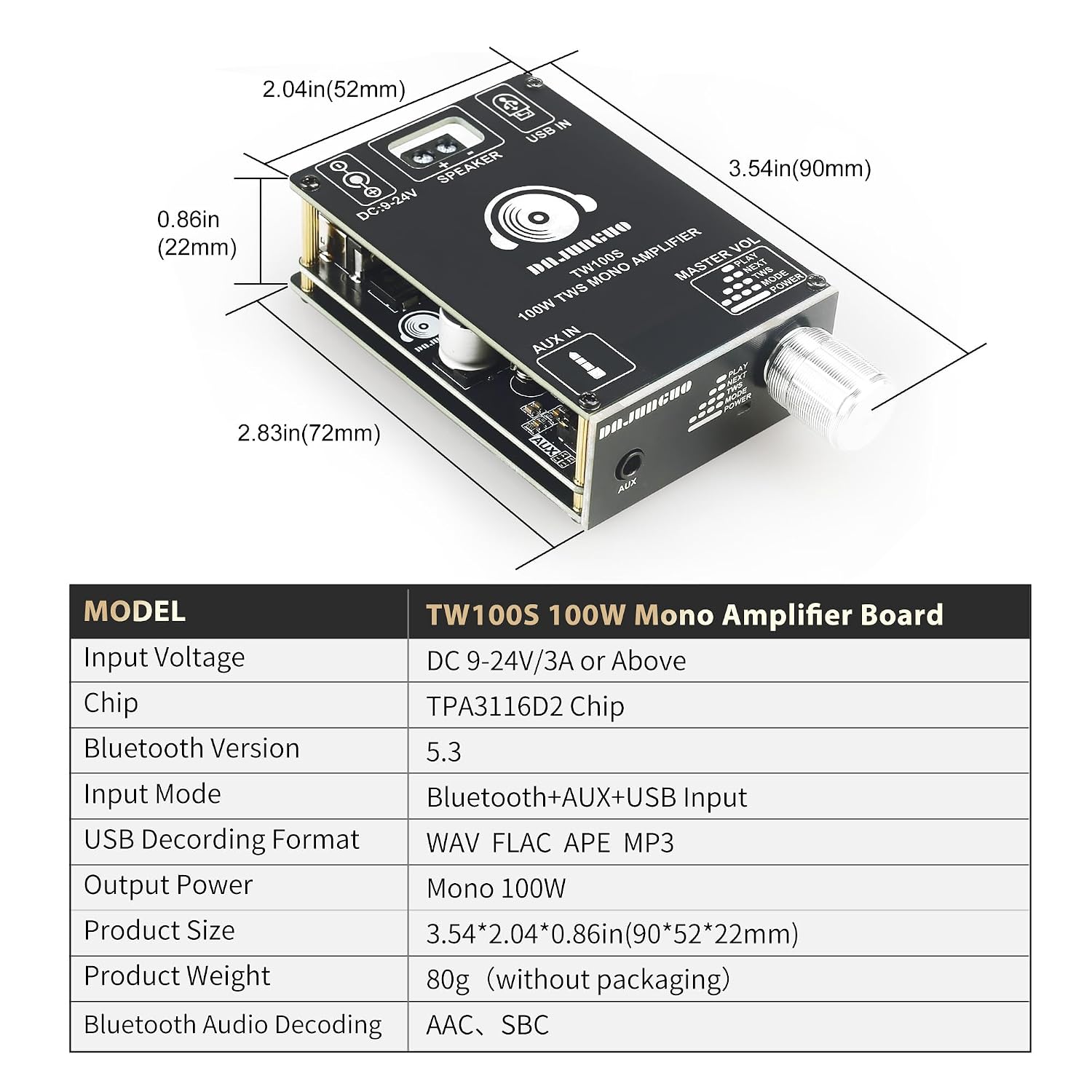
Image: Dimensions and a summary table of the TW100S amplifier board's specifications.
Warranty and Support
DAJUNGUO is committed to customer satisfaction. If you have any questions about the product, or if the product experiences quality problems, please contact us at any time. We are dedicated to providing a satisfactory resolution.
For support, please refer to the contact information provided with your purchase or visit the official DAJUNGUO store page on Amazon.