1. Introduction
The ATOTOEXCEL A5L is an Android-based single DIN car stereo designed to integrate advanced multimedia and navigation features into your vehicle. It features a 5-inch display, wireless CarPlay and Android Auto compatibility, Wi-Fi, GPS, and various audio enhancements. This manual provides essential information for the proper installation, operation, and maintenance of your device.
2. Package Contents
Verify that all items listed below are included in your package:
- 5-Inch Single Din Car Stereo Unit
- Installation Frame
- Power Cable
- GPS Antenna
- 24Pin RCA Combination Cable
- 8Pin USB Cable
- Mounting Brackets (L-Shaped)
- Mounting Screws
- Removal Keys
- Online Manual Quick Guide
- Product Care Online Support Information

Image: The ATOTOEXCEL A5L car stereo and its included accessories, such as the installation frame, various cables, mounting hardware, and documentation.
3. Specifications
| Item Weight | 3.26 pounds |
| Package Dimensions | 9 x 7.5 x 6.3 inches |
| Display Size | 5 Inches |
| Connectivity Technology | Bluetooth, USB, Wi-Fi |
| Controller Type | Android |
| Special Features | 3 Ways for Internet (WiFi/Bluetooth/USB Tethering), 5-Inch Screen Display with Dual Physical Knobs, Android, 2G RAM and 32G ROM, USB Fast Charging, AUX-Input, Micro SD Card Slot, Wireless CarPlay and Android Auto, Mirror Link |
| Compatible Devices | Amplifier, Smartphone, Speaker |
| Connector Type | 3.5mm Jack, RCA |
| Audio Output Mode | Stereo |
| Supported Internet Services | Pandora, Skype, Spotify, Tik Tok, YouTube |
| Control Method | App, Remote, Touch, Voice |
4. Setup and Installation
The A5L car stereo is designed for adaptable installation into various vehicle dashboards. Follow these guidelines for proper setup:
4.1. Mounting
- Standard Single-DIN Opening: For vehicles with a standard single-DIN opening, the unit can be fitted directly using the supplied metal sleeve.
- Non-Standard Installation: If your dashboard requires additional reinforcement or precise alignment, utilize the included L-shaped mounting brackets for enhanced stability.

Image: Installation methods for the ATOTOEXCEL A5L, showing both standard single-DIN and non-standard mounting options with brackets.
4.2. Wiring Connections
Refer to the detailed wiring diagram for connecting the power cable, GPS antenna, RCA cables, and USB cables. Ensure all connections are secure before powering on the unit.
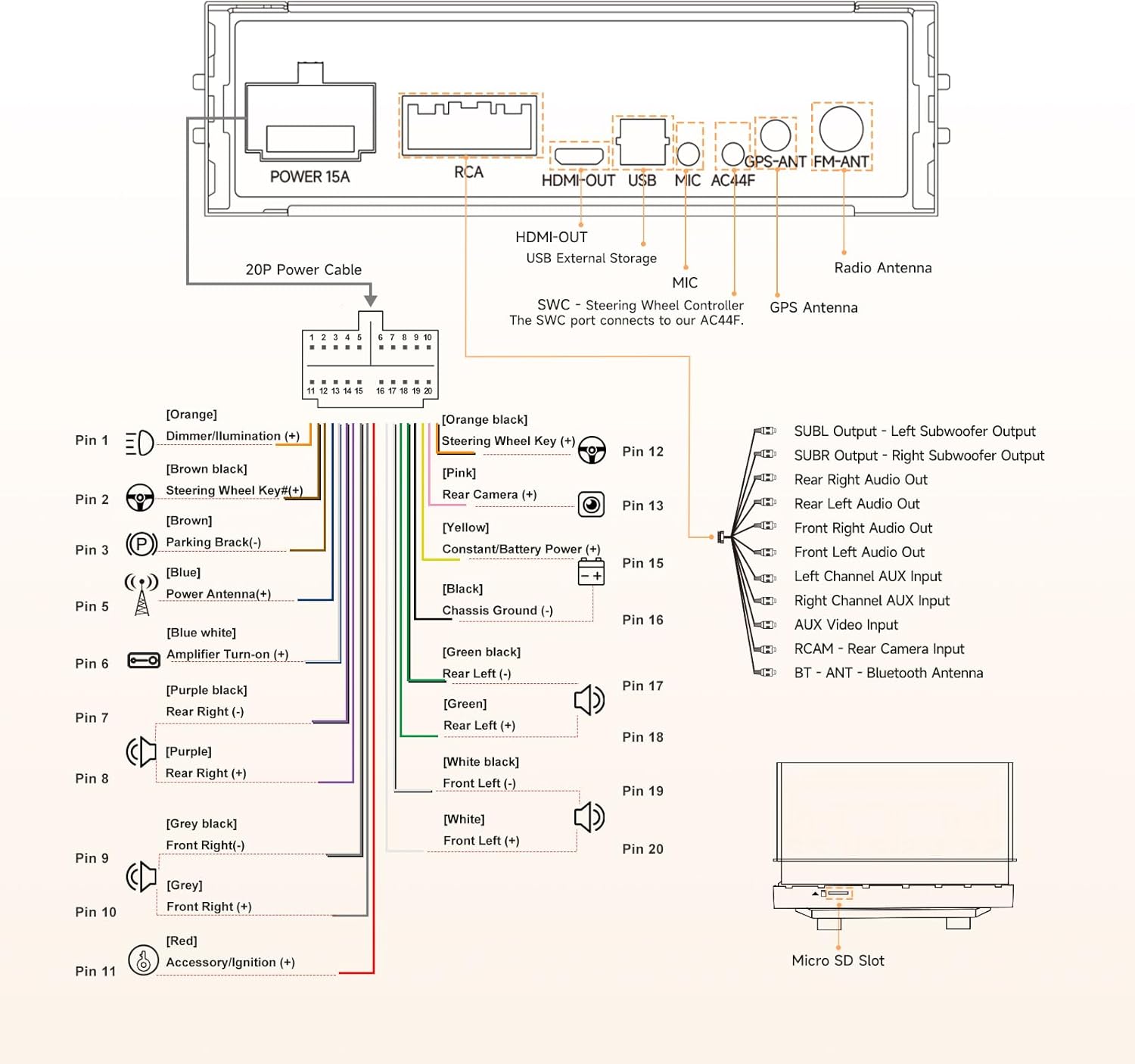
Image: Comprehensive wiring diagram for the ATOTOEXCEL A5L, detailing all input and output connections.
5. Operating Instructions
5.1. User Interface and Controls
The A5L features a 5-inch 1280x720 IPS touch screen for intuitive control. Physical knobs are provided for quick adjustments without diverting attention from the road.
- Physical Knobs: Rotate to adjust volume or navigate tracks. Short press for mute/pause, long press for power off.
- Touch Screen: Interact with the AICE UI 10 (Android-based) for app access, settings, and media control.

Image: The ATOTOEXCEL A5L's physical knobs and touchscreen, detailing their respective functions for audio and system control.
5.2. Connectivity
The unit offers multiple connectivity options for internet access and smartphone integration:
- Wireless CarPlay & Android Auto: Connect your smartphone wirelessly for navigation, music, calls, and messaging.
- Phone Mirroring: Display your phone's screen directly on the A5L unit. Note that some apps may not support mirroring due to copyright or system limitations.
- Internet Access: Connect via Wi-Fi hotspot, Bluetooth tethering, or USB tethering to stay online.

Image: Wireless CarPlay, Android Auto, Phone Mirroring, and Split Screen features of the ATOTOEXCEL A5L.
5.3. Audio Features
Enhance your in-car audio experience with the built-in Digital Signal Processor (DSP):
- 24-Band EQ: Customize sound frequencies to your preference.
- Crossover, HPF/LPF: Fine-tune speaker output for optimal sound distribution.
- Time Alignment: Adjust audio timing for a balanced soundstage.
- Presets: Choose from 9 pre-configured audio settings.

Image: DSP features of the ATOTOEXCEL A5L, illustrating audio enhancements and customization options.
5.4. Privacy and Vehicle Awareness
- Bluetooth Auto Lock: The screen automatically locks and hides personal accounts and apps when your phone disconnects, reactivating upon reconnection. This feature is useful for valet parking or service use.
- Built-in GPS with TrackHU: Records driving routes and displays real-time vehicle location, providing awareness of your car's whereabouts.

Image: Bluetooth Auto Lock and TrackHU GPS features for privacy and vehicle tracking.
5.5. Rear View Camera (LRV)
Utilize the RCAM app for Live Rear View functionality:
- Supports AHD 720P rearview camera input (camera not included).
- Features include Night Vision, RearView Guideline, and Strong Light Suppression for improved visibility.

Image: Rearview camera input features, including Live Rear View, night vision, and guidelines.
5.6. AI and Custom Tools
- DriveChat: An integrated AI assistant to enhance your driving experience.
- FindApps: Access a growing library of in-car applications.
6. Software Updates (OTA)
The A5L supports Over-The-Air (OTA) updates, providing regular system enhancements directly to your device. These updates improve performance, stability, and introduce new features. You can choose when to install them.

Image: OTA update process, ensuring new features, performance, and stability.
7. Troubleshooting
If you encounter any issues with your ATOTOEXCEL A5L, please refer to the online manual for detailed troubleshooting steps. Common issues often relate to power connections, software settings, or peripheral device compatibility. Ensure all cables are securely connected and the unit's software is up to date.
For persistent problems, contact customer support as detailed in the Warranty & Support section.
8. Maintenance
To ensure the longevity and optimal performance of your ATOTOEXCEL A5L car stereo, follow these maintenance guidelines:
- Screen Cleaning: Use a soft, lint-free cloth to gently wipe the touchscreen. Avoid abrasive materials or harsh chemical cleaners, which can damage the display.
- Dust Removal: Periodically clean any dust accumulation around the physical knobs and ports using a soft brush or compressed air.
- Software Updates: Regularly install available OTA updates to benefit from performance improvements and bug fixes.
- Environmental Conditions: Avoid exposing the unit to extreme temperatures or direct sunlight for prolonged periods when the vehicle is parked.
9. Warranty and Support
Your ATOTOEXCEL A5L car stereo comes with comprehensive support:
- Standard Warranty: A 12-month warranty period begins from the date of purchase.
- Extended Warranty: An additional 6 months of coverage can be obtained by contacting our after-sales team within 30 days of purchase.
- Customer Support: Our after-sales team is available on weekdays to provide prompt assistance.
- Online Manual: A multilingual online manual is available. Refer to the product box for a QR code or link to access it.

Image: Overview of warranty and support options, including extended coverage and online resources.