
1. Introduction
Thank you for purchasing the Telbum PL-31BW 4-in-1 LED DJ Lighting System. This system is designed to provide versatile and dynamic lighting effects for various events, including parties, DJ sets, and live performances. It integrates multiple lighting functions into a single, portable unit. Please read this manual thoroughly before operating the device to ensure safe and optimal performance.
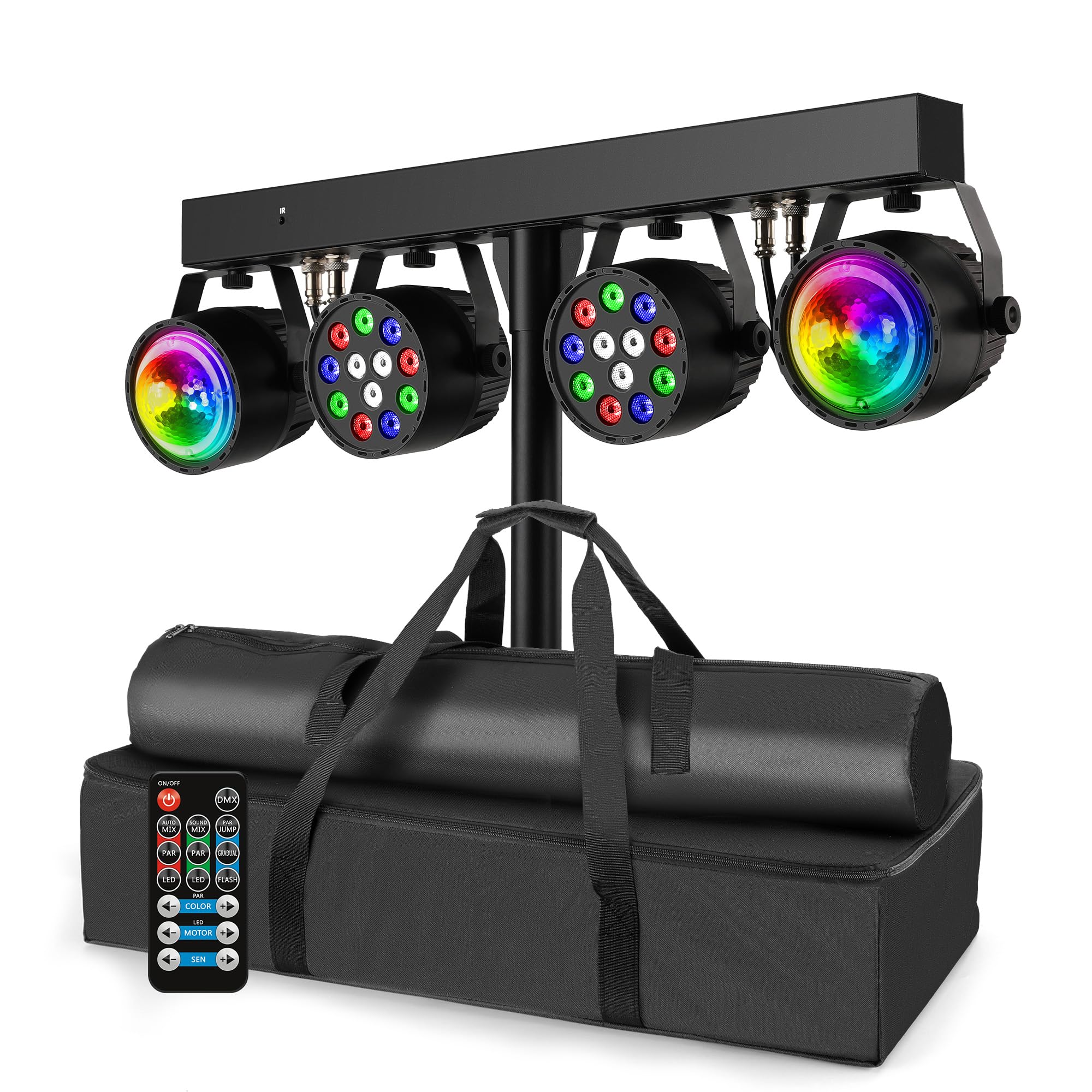
Image 1.1: Telbum PL-31BW 4-in-1 LED DJ Lighting System in operation, showcasing its mobile DJ party light capabilities with IR Remote, Sound Activated, DMX512, Master-Slave, and Control Panel features.
2. Safety Information
Always observe the following safety precautions to prevent electric shock, fire, or injury:
- Power Supply: Ensure the power supply voltage matches the requirements specified on the device. Use only the provided power cord.
- Ventilation: Do not block ventilation openings. Ensure adequate airflow around the unit to prevent overheating.
- Moisture: Keep the device away from water, moisture, and high humidity environments. Do not operate with wet hands.
- Heat: Avoid placing the unit near heat sources or in direct sunlight.
- Handling: Handle the unit with care. Avoid dropping or subjecting it to strong impacts.
- Servicing: Do not attempt to repair or modify the device yourself. Refer all servicing to qualified personnel.
- Eye Safety: Do not stare directly into the light source, as it can cause eye damage.
3. Package Contents
Verify that all items listed below are included in your package:
- 1 x DJ Light Set with Carry Bag
- 1 x Lighting Stand with Carry Bag
- 1 x Power Cord
- 1 x Remote Control
- 1 x User Manual (this document)
4. Product Features and Overview
The Telbum PL-31BW is a 4-in-1 LED DJ Lighting System designed for comprehensive lighting effects. It features multiple control options and a robust design for portability.
Key Features:
- Integrated 4-in-1 LED DJ Lighting System.
- Multiple control modes: IR Remote, Sound Activated, DMX512, Master-Slave, and Control Panel.
- Includes a sturdy stand with an extension pole for optimal height and coverage.
- Comes with transport bags for easy setup and portability.
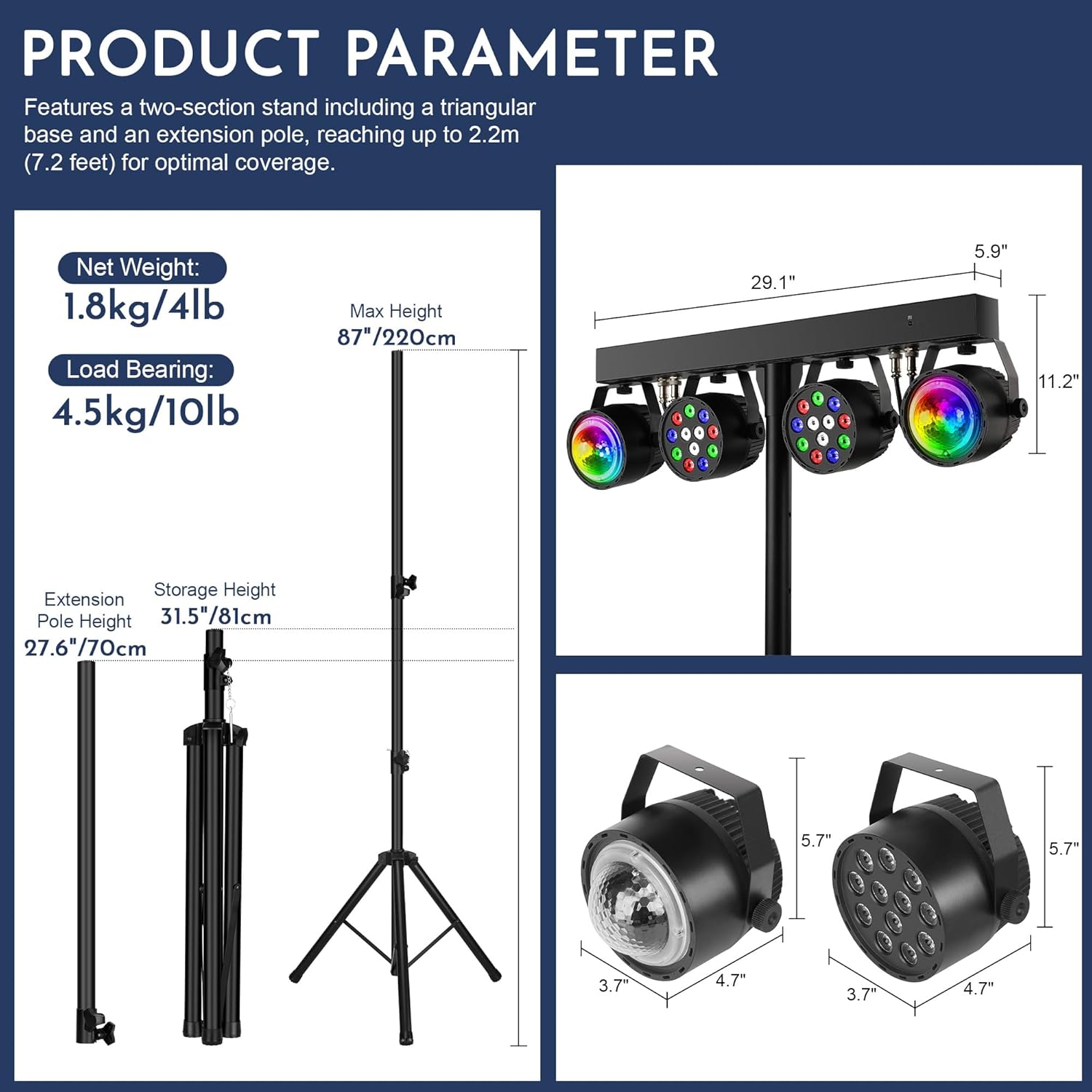
Image 4.1: Product parameters including net weight (1.8kg/4lb), load bearing (4.5kg/10lb), max height (220cm/87"), extension pole height (70cm/27.6"), and storage height (81cm/31.5"). Also shows dimensions of the light bar (29.1" x 11.2" x 5.9") and individual lights (4.7" x 5.7" x 3.7").
5. Assembly and Setup
Follow these steps to assemble and set up your Telbum PL-31BW lighting system:
- Unpack Components: Carefully remove all components from their carry bags.
- Assemble the Stand: Extend the legs of the lighting stand to form a stable base. Secure the extension pole into the main stand column, adjusting to your desired height. Ensure all locking mechanisms are tightened.
- Mount the Light Bar: Place the light bar assembly onto the top of the stand's extension pole. Secure it firmly using the provided mounting hardware.
- Connect Power: Plug the power cord into the lighting system's power input, then connect the other end to a suitable power outlet.
- Positioning: Position the assembled system in your desired location, ensuring it is stable and the light beams have a clear path.

Image 5.1: The Telbum PL-31BW lighting system fully assembled on its stand, demonstrating quick setup and easy transport with included carry bags.
6. Operating Instructions
The Telbum PL-31BW offers multiple ways to control its lighting effects.
6.1 Control Panel Operation
The control panel located on the light bar allows direct access to various settings and modes.

Image 6.1: User-friendly control panel featuring DMX IN/OUT ports, a digital display, MENU, UP, DOWN, and ENTER buttons, and a built-in microphone.
- Display: Shows current mode or parameter.
- MENU Button: Cycles through the main menu options.
- UP/DOWN Buttons: Adjust values or navigate through options within a menu.
- ENTER Button: Confirms selection.
- DMX IN/OUT: For connecting to a DMX controller (03/06/15 Channel selectable).
- MIC: Built-in microphone for sound-activated modes.
6.2 Remote Control Functions
The included IR remote control provides convenient wireless operation.

Image 6.2: Remote control layout with buttons for ON/OFF, DMX ON/OFF, Auto Mode + Effect, Auto Mode (Par Can), Auto Mode (Disco Ball), Sound Mode + Effects, Sound Mode (Par Can), Sound Mode (Disco Ball), Color Jump (Par Can), Gradual Mode (Par Can), Gradual Mode (Disco Ball), Strobe Mode (Par Can), Color Navigation (+/-), LED Motor Speed (Slow/Fast), and Sound Sensitivity (SEN +/-).
- ON/OFF: Powers the unit on or off.
- DMX ON/OFF: Toggles DMX control mode.
- AUTO MIX / AUTO (PAR) / AUTO (LED): Activates various automatic programs.
- SOUND MIX / SOUND (PAR) / SOUND (LED): Activates sound-activated modes.
- PAR JUMP / PAR GRADUAL / PAR FLASH: Specific effects for the Par Can lights.
- LED JUMP / LED GRADUAL / LED FLASH: Specific effects for the Disco Ball lights.
- COLOR +/-: Navigates through color options.
- MOTOR +/-: Adjusts the rotation speed of the Disco Ball motor.
- SEN +/-: Adjusts sound sensitivity in sound-activated modes.
6.3 Lighting Effects
The system produces a variety of light effects, including solid colors, color changes, and strobe effects.

Image 6.3: Examples of the Telbum PL-31BW's lighting output, demonstrating red, green, blue, and white light effects.
7. Maintenance
Proper maintenance ensures the longevity and optimal performance of your lighting system.
- Cleaning: Regularly clean the exterior of the unit with a soft, dry cloth. Do not use abrasive cleaners or solvents.
- Lens Cleaning: Gently wipe the light lenses with a soft, lint-free cloth to maintain light output clarity.
- Storage: When not in use, store the system in its provided carry bags in a cool, dry place, away from dust and extreme temperatures.
- Inspection: Periodically inspect the power cord and all connections for any signs of damage. If damage is found, discontinue use and contact qualified service personnel.
8. Troubleshooting
If you encounter issues with your Telbum PL-31BW, refer to the following common problems and solutions:
| Problem | Possible Cause | Solution |
|---|---|---|
| No power | Power cord not connected; Power outlet faulty; Unit switched off. | Check power cord connection; Try a different outlet; Ensure unit is switched on. |
| Lights not responding to remote | Remote battery low/dead; Obstruction between remote and unit; Remote not pointed correctly. | Replace remote battery; Remove obstructions; Point remote directly at the unit's IR receiver. |
| Sound-activated mode not working | Microphone sensitivity too low; No sound input; Microphone blocked. | Increase sound sensitivity using the remote (SEN +/-) or control panel; Ensure music is playing loudly enough; Check if the microphone is clear. |
| DMX control issues | Incorrect DMX cable connection; Wrong DMX address/channel setting; DMX controller issue. | Verify DMX cable connections; Check DMX address and channel settings on both the unit and controller; Test with a different DMX controller if possible. |
If the problem persists after trying these solutions, please contact customer support.
9. Technical Specifications
| Specification | Detail |
|---|---|
| Model Number | PL-31BW |
| Brand | Telbum |
| Colour | RGBW |
| Material | Iron |
| Light Source Type | Light Emitting Diode (LED) |
| Power Source | Corded Electric |
| Number of Lights | 4 |
| Item Dimensions (L x W x H) | 83.8L x 40.6W x 19.1H Centimeters |
| Net Weight | 1.8 kg (4 lbs) |
| Load Bearing (Stand) | 4.5 kg (10 lbs) |
| Max Stand Height | 2.2 meters (7.2 feet) |
| DMX Channels | 03/06/15 Channel selectable |
10. Warranty and Support
For warranty information and customer support, please refer to the documentation provided at the time of purchase or contact your retailer. Keep your purchase receipt as proof of purchase for any warranty claims.
