Introduction
The OLIGHT Ostation X is an advanced 3-in-1 smart battery charger designed exclusively for NiMH AA rechargeable batteries. It integrates charging, testing, and storage functionalities into a single, compact unit. Featuring intelligent battery detection, app control, and a unique waterfall charging design, the Ostation X simplifies battery management for a seamless user experience.
This manual provides detailed instructions for the proper setup, operation, and maintenance of your Ostation X charger to ensure optimal performance and longevity.

Image: The Olight Ostation X charger, showcasing its sleek design and the included AA batteries.
What's in the Box
Upon unboxing your OLIGHT Ostation X, please verify that all the following items are included:
- OLIGHT Ostation X Battery Charger
- 32 x AA 2100mAh NiMH Rechargeable Batteries
- USB-C to USB-C Cable (1.5 m)
- User Manual (this document)
Product Overview
Familiarize yourself with the key components of your Ostation X charger:

Image: Detailed view of the Ostation X highlighting its various components.
- Sliding Dust Cover: Protects the battery input slot from dust and debris.
- Easily Detachable 3-Compartment Design: Allows for easy cleaning and maintenance.
- LED Indicator Ring: Provides visual feedback on the charger's status (e.g., ready, charging, malfunction).
- Invalid Battery Bin: Automatically sorts out incompatible or faulty batteries.
- USB-C Input/Output Ports: For power input and charging another device in tandem.
- Vent (Air Outlet): Ensures proper heat dissipation during charging.
- Dispensing Lever: Used to release charged batteries from the storage compartment.
Setup
- Power Connection: Connect the provided USB-C to USB-C cable to the Ostation X's input port and to a PD-compatible charger that outputs at least 12V & 1.5A. Ensure the connection is secure. The LED indicator ring will illuminate, indicating the device is powered on.
- Initial Check: Before first use, ensure there are no foreign objects in the battery slots or compartments.
- App Download: For full functionality and firmware updates, download the official OLIGHT app from your smartphone's app store.
Operation
Charging Batteries
The Ostation X features an original waterfall charging design, allowing for simple and efficient battery charging.

Image: Visual representation of the drop, charge, and go process.
- Load Batteries: Open the sliding dust cover. Drop NiMH AA rechargeable batteries into the input slot. You do not need to check for positive (+) or negative (-) polarity; the charger will automatically detect it. Load them evenly in the 4 channels of the compartment.
- Automatic Charging: The Ostation X will automatically begin the charging process. It charges up to 4 batteries per round, analyzing and selectively charging them.
- Charging Modes: The charger offers two modes:
- Standard Charging: Approximately 3.8 hours per round.
- Fast Charging: Approximately 2.5 hours per round.

Image: Comparison of Fast Charging and Standard Charging times.
Intelligent Battery Detection and Sorting
The Ostation X features a smart detection system that identifies the battery type and health status. It automatically sorts out incompatible or faulty batteries into a dedicated invalid battery bin.
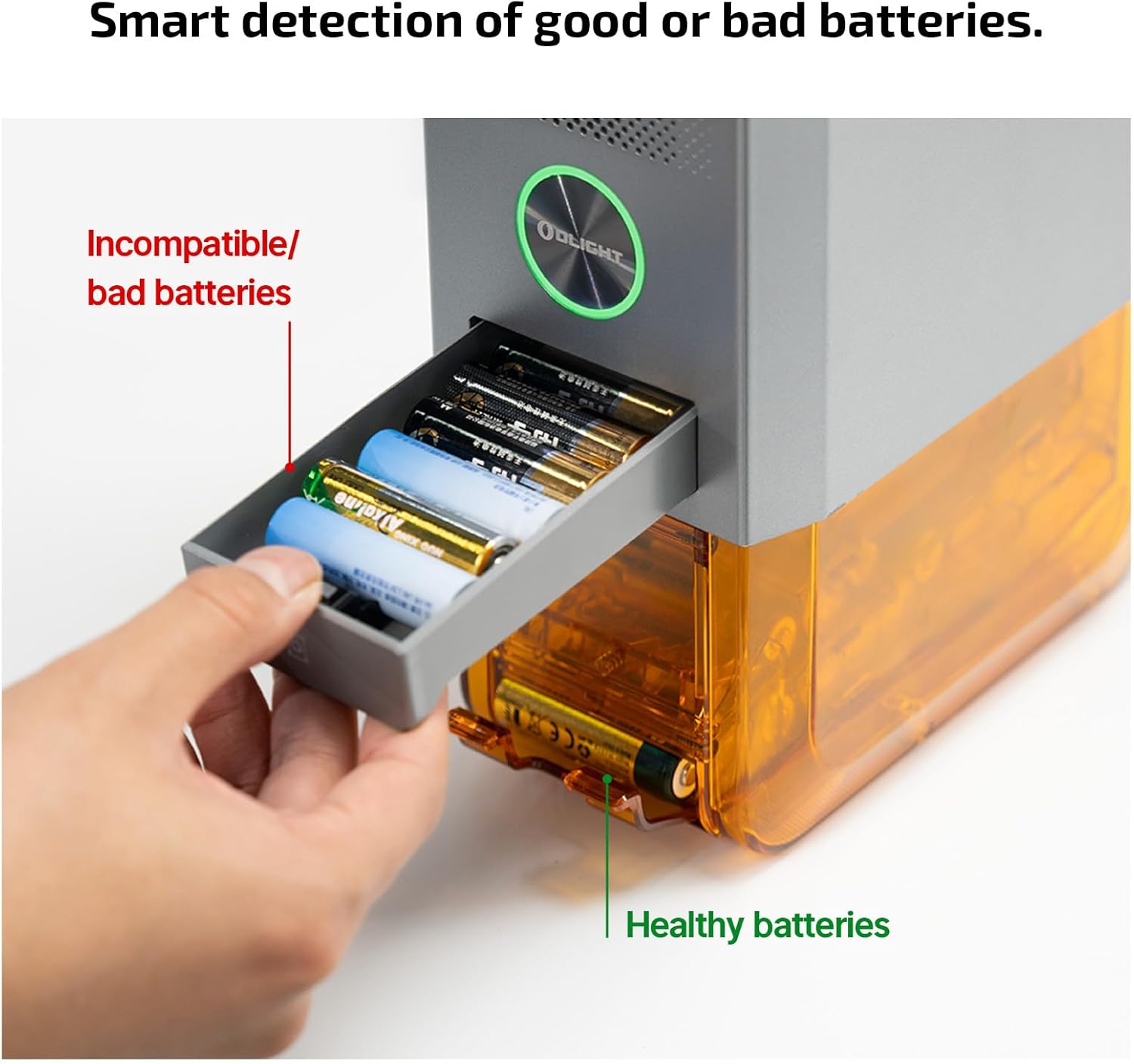
Image: Illustration of the invalid battery bin for incompatible or bad batteries.
Retrieving Charged Batteries
Once batteries are fully charged, they are moved to the dispensing area. You can retrieve up to 32 charged batteries at once by pulling the dispensing lever.
App Control & Monitoring
The OLIGHT app provides comprehensive control and monitoring capabilities for your Ostation X charger. It is highly recommended to use the app for the best user experience and to receive important firmware updates.

Image: Screenshot of the Olight app interface showing battery status and control options.
With the app, you can:
- Turn the charger On/Off.
- Monitor real-time battery status and health.
- Select different charging modes (Standard/Fast).
- View the number of charged cells.
- Set and manage paused charging schedules.
- Receive Over-The-Air (OTA) firmware upgrades for enhanced functionality and bug fixes.
Please update to the latest version of the app before initial use to ensure optimal performance and access to all features.
Compatibility
The OLIGHT Ostation X is exclusively designed for NiMH AA rechargeable batteries. It works with various brands of AA NiMH batteries, including Eneloop, EBL, Energizer, Amazon Basics, and Olight's own Ostation B Pro AA batteries.

Image: Visual representation of the Ostation X's compatibility with various NiMH AA battery brands.
Note: This charger is not compatible with alkaline, lithium, or other battery chemistries. Using incompatible batteries may damage the charger or cause safety hazards.
Maintenance
Proper maintenance ensures the longevity and optimal performance of your Ostation X charger.
- Cleaning: Regularly clean the exterior of the charger with a soft, dry cloth. For internal components, the 3-compartment design is easily detachable for cleaning. Ensure no dust or debris accumulates in the battery slots or dispensing area.
- Battery Contacts: If batteries are rejected frequently, check if their surfaces are dirty or corroded. Clean battery contacts with a clean, dry cloth or a cotton swab dipped in rubbing alcohol.
- Storage: When not in use for extended periods, store the charger in a cool, dry place away from direct sunlight and extreme temperatures.
Troubleshooting
This section addresses common issues you might encounter with your Ostation X charger.
Indicator Light Meanings
The LED indicator ring provides crucial information about the device's current status:

Image: Visual guide to the different colors of the LED indicator ring.
- White: Ready for loading cells.
- Green: Preparing for charging.
- Blue: Charging in progress.
- Red: Malfunction detected (e.g., faulty battery).
- Yellow: Incompatible adapter connected.
Common Issues and Solutions
- Charger not working with adapter / Indicator is Yellow:
Ensure you are using a PD-compatible charger that outputs at least 12V & 1.5A. The device will not function correctly with an incompatible power source.

Image: Illustration emphasizing the requirement for a 12V & 1.5A PD-compatible adapter.
- Last 20% of charge takes longer:
This is normal behavior. To protect battery health and extend lifespan, the charging speed slows down after reaching 80% capacity.
- Noise in fast charging mode:
The cooling fan activates in fast-charging mode to dissipate heat. This is normal. If the noise is disruptive, consider placing the charger in a less sensitive area or setting a non-charging time in the app.

Image: Explanations for slower charging at high capacity and fan operation during fast charging.
- Good cells in the invalid bin:
The battery identification accuracy is 99.5%. If a seemingly good battery is rejected, dirty or corroded surfaces might be the cause. Clean the battery contacts and re-insert it. If the issue persists, the battery might be genuinely faulty.

Image: Guidance on what to do if a good battery is sorted into the invalid bin.
- Is the APP required to use the Ostation X?
While the basic charging function can operate without the app, the app is required to monitor charging status, control advanced features, and receive important firmware updates for the Ostation X AA. It is highly recommended for a complete user experience.

Image: Visual reminder that the app is essential for monitoring and updates.
Specifications
| Feature | Detail |
|---|---|
| Model | Ostation X AA |
| Battery Size & Type | AA Ni-MH |
| Capacity (No. of Batteries) | 32 |
| Invalid Battery Bin Capacity | 7 |
| No. of Batteries Charged at One Time | 4 |
| Battery Charging Time | 2.5-3.8 hours per Group of Batteries |
| Power Source | USB-C PD |
| Input | 12V== 1.5A, 2A, 3A, 5A |
| Output | 12V== 1.5A, 2A, 3A |
| Weight | 3.31 lbs (1.5 kg) |
| Dimensions (L x W x H) | 7.36 x 3.84 x 11.02 inches (187 x 97.5 x 280 mm) |
| Included Accessory | 1 x 4.92 ft (1.5 m) USB-C to USB-C Cable |

Image: Detailed dimensions and weight of the Ostation X charger.
Safety Information
Please read and adhere to the following safety guidelines to prevent injury or damage to the device:
- Use only NiMH AA rechargeable batteries with this charger. Do not attempt to charge alkaline, lithium, or other non-rechargeable battery types.
- Ensure the charger is connected to a compatible power adapter (12V & 1.5A PD-compatible) to avoid malfunction or damage.
- Do not disassemble, modify, or attempt to repair the charger yourself. Contact customer support for assistance.
- Keep the charger away from water, moisture, and high temperatures.
- Do not block the ventilation openings during operation.
- Keep out of reach of children and pets.
- The Ostation X incorporates 7-layer protection for safety, including overheat, over-current, over-voltage, over-charging, short circuit, cooling system, and electrostatic breakdown protection.

Image: Overview of the 7-layer protection system integrated into the Ostation X.
Warranty and Support
OLIGHT products are backed by a manufacturer's warranty. For specific warranty terms, conditions, and duration, please refer to the warranty card included with your product or visit the official OLIGHT website.
For technical support, troubleshooting assistance, or any inquiries regarding your Ostation X charger, please contact OLIGHT customer service through their official website or the contact information provided in your product packaging.
You can visit the official OLIGHT Store on Amazon for more information: OLIGHT Store


