1. Introduction
This manual provides detailed instructions for the installation, operation, and maintenance of your Antec GSK750 V2 ATX3.1 750W Full Modular Power Supply. This power supply unit (PSU) is designed to deliver stable and efficient power to your computer system, featuring ATX3.1 and PCIe 5.1 compatibility, 80 PLUS Gold certification, and a full modular cable design for optimized cable management.

Image: The Antec GSK750 V2 750W Full Modular Power Supply, showcasing its compact design and modular connectors.
2. Safety Information
Please read and follow all safety instructions carefully before installing or operating the power supply. Failure to do so may result in personal injury or damage to your equipment.
- Ensure the power supply is disconnected from the AC power outlet before installation or maintenance.
- Do not open the power supply casing. High voltages are present inside, and there are no user-serviceable parts.
- Install the power supply in a well-ventilated area, away from heat sources, direct sunlight, and moisture.
- Use only the modular cables provided with this power supply. Using incompatible cables may damage the PSU or connected components.
- Ensure all cables are securely connected before powering on the system.
3. Package Contents
Verify that all items are present in the package:
- Antec GSK750 V2 ATX3.1 750W Full Modular Power Supply Unit
- Modular Cable Set (including 12V-2x6 PCIe 5.1 cable)
- AC Power Cord
- Mounting Screws
- User Manual (this document)
4. Setup & Installation
Follow these steps to install your Antec GSK750 V2 power supply:
4.1 Physical Installation
- Ensure your computer is powered off and unplugged from the wall outlet.
- Open your computer case.
- Mount the Antec GSK750 V2 PSU into the designated power supply bay in your PC case using the provided mounting screws. Ensure the fan is oriented correctly for optimal airflow (typically facing down if there's a bottom vent, or up if not).

Image: The compact size of the Antec GSK750 V2 power supply, illustrating its smaller dimensions compared to larger PSUs, allowing for easier installation in various PC cases.
4.2 Cable Connections
The GSK750 V2 is a full modular PSU, meaning you only connect the cables you need, which helps improve airflow and cable management within your case.
- Connect the necessary modular cables to the power supply unit. Refer to the labels on the PSU and the cables to ensure correct connections.
- Connect the 24-pin ATX cable to your motherboard.
- Connect the 8-pin (4+4) EPS/CPU cables to your motherboard's CPU power connectors.
- For graphics cards, use the appropriate PCIe cables. The GSK750 V2 supports PCIe 5.1 with a dedicated 12V-2x6 (450W) cable for modern GPUs. Connect these securely to your graphics card(s).
- Connect SATA power cables to your storage drives (SSDs, HDDs) and other SATA-powered devices.
- Connect Molex cables for any peripherals that require them.
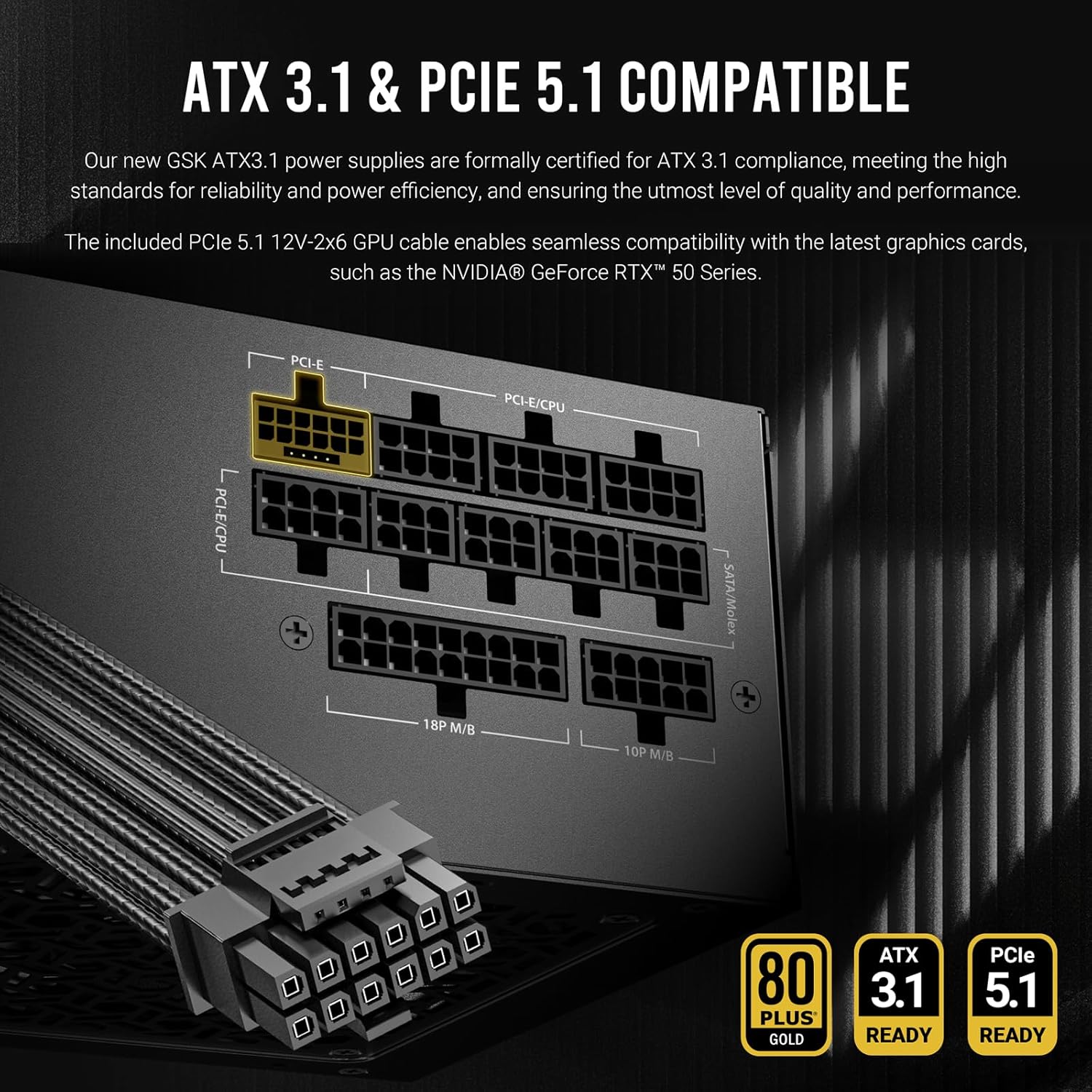
Image: A detailed view of the Antec GSK750 V2's modular cable ports, highlighting the ATX3.1 and PCIe 5.1 compatibility and the various connection types available for system components.

Image: Illustration of the full modular cable design, demonstrating how only necessary cables are connected to the PSU, reducing clutter and improving airflow within the PC case.
4.3 Initial Power Up
- Once all internal connections are made, close your computer case.
- Connect the AC power cord to the PSU and then to a wall outlet.
- Flip the power switch on the back of the PSU to the 'ON' position.
- Power on your computer.
5. Operating Instructions
The Antec GSK750 V2 PSU is designed for reliable and efficient operation with minimal user intervention.
5.1 Zero RPM Manager
This power supply features a Zero RPM Manager mode. In this mode, the 120mm silent fan remains off under low to moderate loads to provide silent operation. The fan will automatically activate when the power load increases, ensuring optimal cooling while minimizing noise levels.

Image: Diagram illustrating the Zero RPM Manager's fan speed curve relative to power load, alongside a visual of the 120mm silent fan designed for quiet and efficient cooling.
5.2 PhaseWave Design
The PSU incorporates Antec's PhaseWave Design, which utilizes an LLC + DC-DC topology for server-class power delivery. This design ensures high efficiency, stable voltage regulation, and reliable performance for your system.

Image: Explanation of PhaseWave Design for power delivery efficiency and CircuitShield, a suite of industrial-grade protections including OCP, OVP, UVP, SCP, OPP, OTP, SIP, and NLO.
6. Maintenance
To ensure the longevity and optimal performance of your Antec GSK750 V2 power supply, follow these simple maintenance guidelines:
- Keep Vents Clear: Ensure that the intake and exhaust vents of the power supply are not obstructed by dust or other objects. Proper airflow is crucial for cooling.
- Regular Cleaning: Periodically clean the exterior of the power supply and its fan grille using compressed air to remove dust buildup. Always disconnect the PSU from the AC power before cleaning.
- Cable Management: Maintain tidy cable management within your PC case to prevent cables from obstructing airflow to the PSU and other components.
7. Troubleshooting
If you encounter issues with your Antec GSK750 V2 power supply, refer to the following common problems and solutions:
7.1 No Power to System
- Check AC Power: Ensure the AC power cord is securely connected to both the PSU and the wall outlet. Verify the wall outlet is functional.
- PSU Switch: Confirm the power switch on the back of the PSU is in the 'ON' position.
- Internal Connections: Double-check all modular cable connections to the PSU and to your components (motherboard, CPU, GPU). Ensure the 24-pin and 8-pin CPU cables are fully seated.
- Motherboard Stand-offs: Ensure your motherboard is properly installed with stand-offs to prevent short circuits.
7.2 System Instability or Random Shutdowns
- Overload: Ensure your system's power requirements do not exceed the 750W capacity of the PSU.
- Overheating: Check for proper airflow within your case and ensure the PSU fan is operating when under load. Clean any dust buildup.
- CircuitShield Protection: The Antec GSK750 V2 includes comprehensive industrial-grade protections (OCP, OVP, UVP, SCP, OPP, OTP, SIP, NLO). If the PSU detects an unsafe condition, it may shut down to protect your components. If this occurs repeatedly, consult a professional.
7.3 Fan Not Spinning
- Zero RPM Mode: Under low loads, the fan will not spin. This is normal operation. The fan will activate automatically as the system load increases.
- Obstruction: Ensure nothing is physically blocking the fan blades.
If problems persist after following these steps, please contact Antec customer support.
8. Specifications
Detailed technical specifications for the Antec GSK750 V2 ATX3.1 750W Full Modular Power Supply:
| Feature | Detail |
|---|---|
| Model Name | GSK750 V2 US |
| Wattage | 750 watts |
| Form Factor | ATX |
| Efficiency Certification | 80 PLUS Gold Certified |
| ATX Standard | ATX3.1 |
| PCIe Support | PCIe 5.1 (with 12V-2x6 cable) |
| Modularity | Full Modular |
| Cooling Method | Air (120mm Silent Fan with Zero RPM Manager) |
| Design | PhaseWave Design (LLC + DC-DC) |
| Protections | OCP, OVP, UVP, SCP, OPP, OTP, SIP, NLO (CircuitShield) |
| Product Dimensions | 5.51 x 3.38 x 5.9 inches (140 x 86 x 150 mm) |
| Item Weight | 5.29 pounds |
| Compatible Devices | Personal Computer |
8.1 Input and Output Ratings

Image: Table detailing the input voltage ranges and the output voltage, current, and wattage for each rail (+3.3V, +5V, +12V, -12V, +5VSB) of the Antec GSK750 V2 power supply.
| Input | |||||
|---|---|---|---|---|---|
| 100-240V~, 50Hz-60Hz, 10A Max 200-240V~, 50Hz-60Hz, 10A Max / for China and Korea | |||||
| Output | |||||
| +3.3V | +5V | +12V | -12V | +5VSB | |
| 20A | 20A | 62.5A | 0.3A | 3.0A | |
| 100W | 750W | 3.6W | 15W | ||
| 750W (Combined) | |||||
9. Warranty Information
The Antec GSK750 V2 ATX3.1 750W Full Modular Power Supply comes with a 10-Year Warranty from the date of purchase. This warranty covers defects in materials and workmanship under normal use. Please retain your proof of purchase for warranty claims. For full warranty terms and conditions, please visit the official Antec website or contact customer support.
10. Customer Support
For technical assistance, troubleshooting, or warranty inquiries, please contact Antec customer support through their official website:
You may also find helpful resources, FAQs, and driver downloads on their support page.


