
Hiwill-Audio N512
Hiwill-Audio N512 5.1.2 Sound System User Manual
Comprehensive Guide for Setup, Operation, and Maintenance
1. Introduction
Welcome to your new Hiwill-Audio N512 5.1.2 Sound System. This manual provides detailed instructions to help you set up, operate, and maintain your system for an optimal audio experience. Please read this manual thoroughly before use and retain it for future reference.
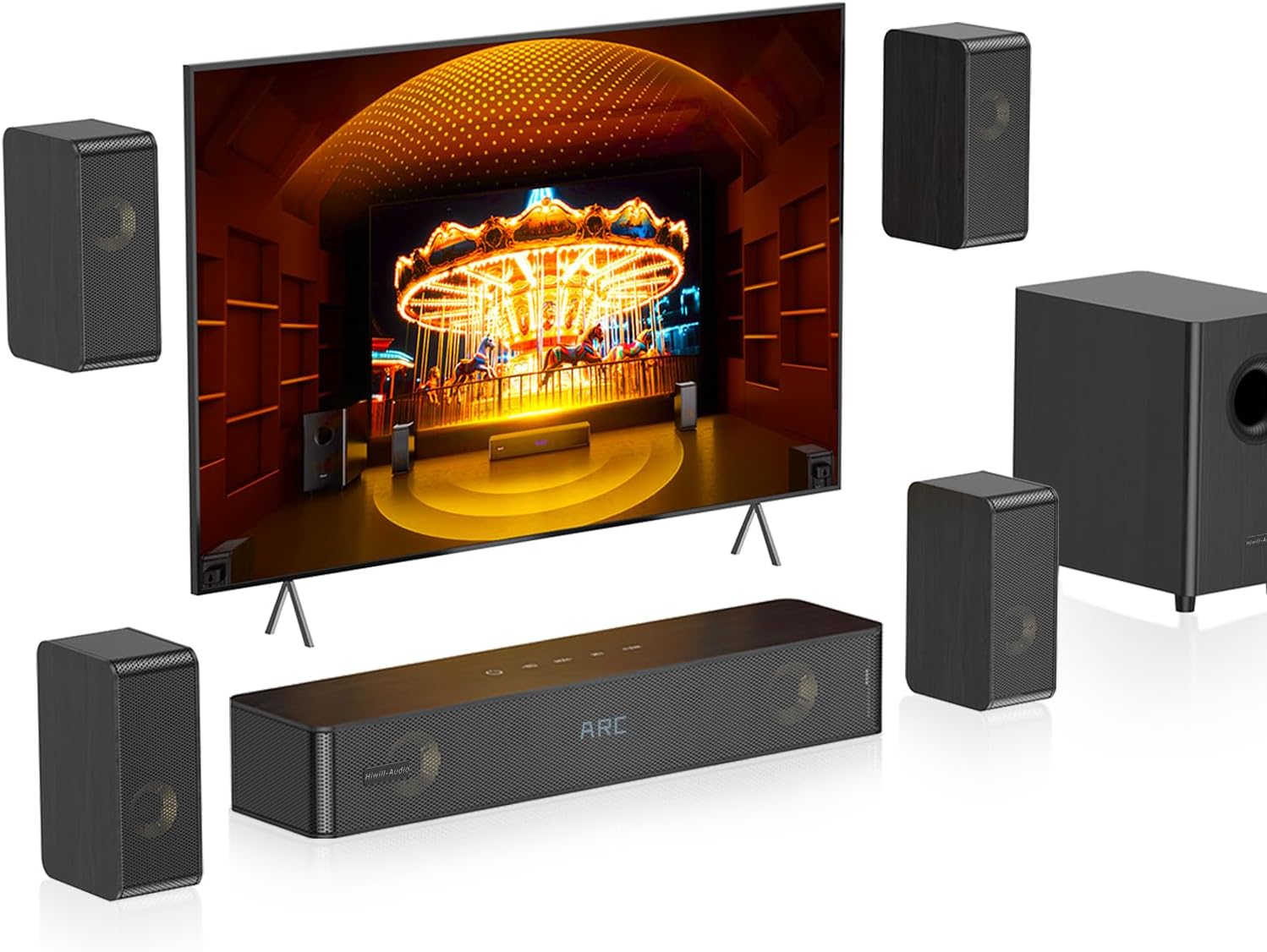
Figure 1: Hiwill-Audio N512 5.1.2 Sound System Overview
2. What's in the Box
Carefully unpack all components and ensure the following items are included:
- Center Speaker: 1 unit (Soundbar)
- Front Surround Speakers: 2 units
- Rear Right Surround Speaker (Active): 1 unit
- Rear Left Surround Speaker (Passive): 1 unit
- Wired Subwoofer: 1 unit
- ARC Cable: 1 unit (for TV connection)
- Digital Optical Cable: 1 unit (for TV connection)
- 3.5mm Stereo Audio Cable: 1 unit (for AUX connection)
- 3m (10 ft) Front Speaker Cables: 2 units
- 6m (20 ft) Rear Speaker Cable: 1 unit
- Remote Control: 1 unit
- User Manual: 1 unit (this document)
- Switching Power Adapter: 1 unit (for soundbar)
- AC Power Cord: 1 unit (for soundbar power adapter)
- Rear Speaker Power Adapter: 1 unit (for active rear speaker)
- Wall Mount Kit: 1 set (includes screws and anchors)
- Hook & Loop Fasteners: Included (for cable management)

Figure 2: All included components of the N512 Sound System
3. Setup Instructions
Follow these steps to correctly set up your Hiwill-Audio N512 Sound System.
3.1 Speaker Placement
Optimal speaker placement is crucial for an immersive sound experience. Ensure all speakers are placed at approximately ear level when seated.
- Center Speaker (Soundbar): Place the soundbar directly in front of your TV, either on a tabletop or mounted on the wall.
- Front Surround Speakers: Position these speakers to the left and right of your TV, slightly wider than the TV itself.
- Subwoofer: Place the subwoofer near the soundbar, ideally within 0.5 to 1 meter (1.6 to 3.3 feet) on either side. Keep it at least 10cm (0.33 ft) from any wall for optimal bass performance.
- Rear Surround Speakers: Place these speakers to the left and right of your main listening position, typically beside or slightly behind your sofa. Ensure the active rear speaker (with the power input) is placed on the right side, and the passive rear speaker on the left.
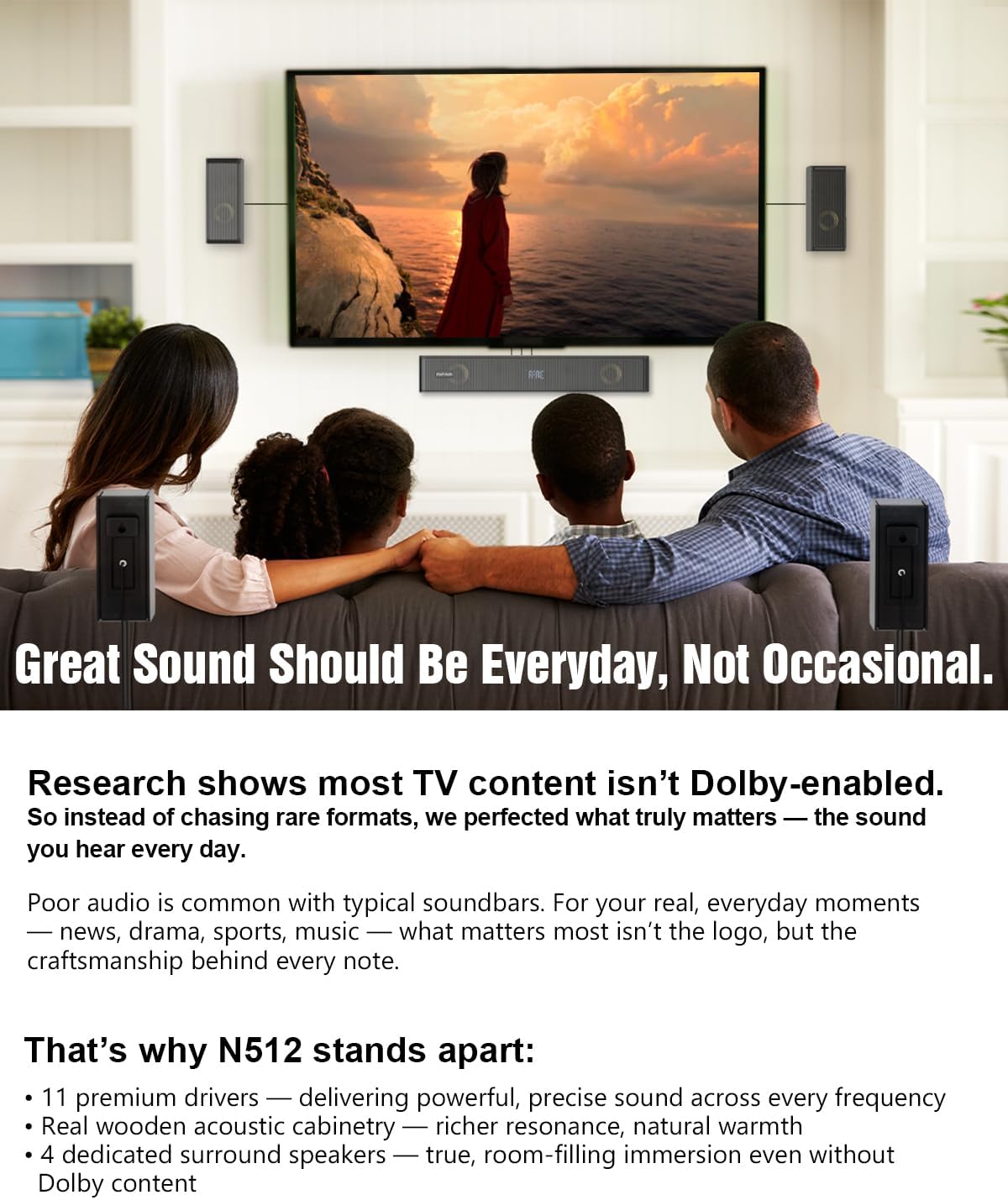
Figure 3: Recommended speaker placement in a living room setting.
3.2 Connections
Connect the speakers and power as follows:
- Front Speakers: Use the included 3m (10 ft) cables to connect the front left and front right surround speakers to their corresponding ports on the center speaker (soundbar).
- Subwoofer: Connect the wired subwoofer's built-in cable to the 'SUB OUT' port on the center speaker.
- Rear Speakers: Connect the passive rear speaker to the active rear speaker using the included 6m (20 ft) cable.
- Rear Speaker Power: Plug the rear speaker power adapter into the active rear speaker, then connect it to a power outlet.
- Soundbar Power: Plug the soundbar's power adapter into the 'DC IN' port on the center speaker, then connect it to a power outlet.
- TV Connection: Choose one of the following methods to connect the soundbar to your TV:
- HDMI ARC: Connect one end of the ARC cable to the 'ARC' port on the soundbar and the other end to the 'HDMI ARC' port on your TV. This allows your TV remote to control the soundbar's power and volume.
- Optical: Connect one end of the Digital Optical Cable to the 'OPTICAL' port on the soundbar and the other end to the optical output port on your TV.
- AUX: Connect one end of the 3.5mm Stereo Audio Cable to the 'AUX' port on the soundbar and the other end to the 3.5mm audio output on your TV or other audio device.
3.3 Power On and Pairing
Once all connections are made:
- Ensure both the soundbar and the active rear speaker are plugged into power outlets.
- The rear speakers will automatically pair with the soundbar when powered on. A steady blue light on the active rear speaker indicates successful pairing.
- Turn on your TV and the soundbar. Select the appropriate input source on the soundbar (ARC, OPT, AUX, or BT) using the remote control or buttons on the soundbar.
Video 1: Hiwill-Audio N512 Soundbar Unboxing & Easy Setup Guide. This video demonstrates the unboxing process and provides a visual guide for connecting all components of the N512 sound system.
4. Operating Your Sound System
4.1 Input Selection
Use the remote control or the input button on the soundbar to switch between available input sources:
- ARC: For HDMI ARC connection to your TV.
- OPT: For Digital Optical connection.
- AUX: For 3.5mm stereo audio connection.
- BT: For Bluetooth connection.
- USB: For playing audio from a USB drive.
4.2 EQ Modes
The N512 offers preset Equalizer (EQ) modes to optimize audio for different content types. Use the remote control to switch between these modes:
- Movie Mode: Enhances cinematic sound effects and dialogue.
- Music Mode: Provides a balanced sound profile for music playback.
- NEWS (Dialogue Enhanced) Mode: Optimizes vocal clarity for news and talk shows.
- Game Mode: Enhances in-game audio cues and immersion.
Video 2: TV Soundbar with 4 EQ Modes. This video illustrates the different EQ modes available for various content types like music, movies, and news.
4.3 Volume Control
You can adjust various volume levels to customize your listening experience:
- Master Volume: Adjusts the overall system volume.
- Bass Control: Fine-tune the subwoofer's bass output (-6 to +6 levels).
- Treble Control: Adjusts the high-frequency output.
- Rear Surround Volume: Independently adjust the volume of the rear surround speakers for a personalized surround effect.
Video 3: 5.1.2 Virtual Surround Soundbar Features. This video highlights adjustable rear speaker volume, clear voice, deep bass, and night mode functionalities.
4.4 Bluetooth Pairing
To connect a Bluetooth device:
- Switch the soundbar to BT input mode. The display will show "BT" and flash, indicating it's in pairing mode.
- On your mobile device, enable Bluetooth and search for "Hiwill-Audio N512".
- Select the device to pair. Once connected, the "BT" indicator on the soundbar will stop flashing and remain steady.
Video 4: Bluetooth TV Soundbar for Music Lovers. This video demonstrates the Bluetooth connectivity and flexible dual-room setup capabilities.
4.5 Night Mode
Activate Night Mode via the remote control to reduce dynamic range, making loud sounds quieter and soft sounds clearer. This is ideal for late-night listening without disturbing others.
5. Maintenance
To ensure the longevity and optimal performance of your Hiwill-Audio N512 Sound System, follow these maintenance guidelines:
- Cleaning: Use a soft, dry cloth to clean the surfaces of the soundbar, speakers, and subwoofer. Avoid using liquid cleaners, aerosols, or abrasive materials, as they may damage the finish.
- Placement: Keep the system away from direct sunlight, heat sources, and excessive moisture. Ensure adequate ventilation around all components.
- Cables: Periodically check all cable connections to ensure they are secure and free from damage. Use the provided hook & loop fasteners for tidy cable management.
- Storage: If storing the system for an extended period, disconnect it from power, carefully pack it in its original packaging, and store it in a cool, dry place.
6. Troubleshooting
If you encounter issues with your sound system, refer to the following common problems and solutions:
| Problem | Possible Cause | Solution |
|---|---|---|
| No sound from the system. | Incorrect input selected, cables loose, TV audio settings incorrect, system muted. | Verify the correct input source is selected. Check all cable connections. Ensure TV audio output is set to external speakers (e.g., PCM for optical). Unmute the soundbar. |
| Rear speakers not pairing or no sound. | Active rear speaker not powered, passive speaker not connected to active, interference. | Ensure the active rear speaker is powered. Check the cable connection between active and passive rear speakers. Move the soundbar or rear speakers to reduce interference. |
| Bluetooth device not connecting. | Soundbar not in pairing mode, device too far, interference. | Switch soundbar to BT input. Ensure your device's Bluetooth is on and within range. Try restarting both devices. |
| Sound distortion or poor quality. | Volume too high, incorrect EQ mode, poor source audio quality. | Reduce volume. Try different EQ modes. Ensure the audio source is of good quality. |
| Remote control not working. | Batteries depleted, obstruction, remote out of range. | Replace batteries (AAA not included). Remove any obstructions between the remote and soundbar. Ensure you are within effective range. |
| Compatibility issues with TV ARC. | TV settings, specific TV model incompatibility. | Ensure your TV's HDMI ARC feature is enabled in its settings. Try updating your TV's firmware. If issues persist, use an Optical or AUX connection as an alternative. |
7. Specifications
Key technical specifications for the Hiwill-Audio N512 Sound System:
| Feature | Detail |
|---|---|
| Model Name | N512 |
| Speaker Type | Soundbar with 5.1.2 Channel System |
| Special Features | 4 Virtual Surround Speakers, Bass Boost, Independently Adjustable Rear Speakers, Remote Control, One-Touch Night Mode |
| Connectivity Technology | ARC, Optical (OPT), Bluetooth 5.3, AUX, USB |
| Speaker Maximum Output Power | 400 Watts |
| Subwoofer | 5.25" Down-Firing Wired Subwoofer |
| Drivers | 11 Premium Aluminum-Magnesium Alloy Drivers (including dedicated tweeters, full-range, up-firing) |
| Cabinet Material | Wood |
| Product Dimensions | 4.3"D x 5.8"W x 2.6"H (Soundbar) |
| Item Weight | 6.5 Kilograms (14.3 pounds) |
8. Warranty and Support
For detailed warranty information, please refer to the warranty card included with your product packaging or visit the official Hiwill-Audio website. If you require technical assistance, troubleshooting beyond this manual, or have questions about your product, please contact Hiwill-Audio customer support. Contact details are typically found on the product packaging or the official brand website.
Related Documents - N512
 |
Hiwill-Audio N512 Soundbar User Manual & Setup Guide Comprehensive user manual for the Hiwill-Audio N512 soundbar system. Includes setup instructions, specifications, audio settings, firmware updates, and troubleshooting. |
 |
ULTIMEA Poseidon D50 Soundbar: Connection Guide and Troubleshooting Comprehensive guide to connecting your ULTIMEA Poseidon D50 soundbar via HDMI ARC, Optical, AUX, Bluetooth, and USB. Includes detailed troubleshooting steps for common issues, pairing, settings, and installation. |
 |
LIPEILA Soundbar TV Connection and Setup Guide Comprehensive guide to connecting your LIPEILA soundbar to your TV using HDMI ARC or Optical connections, including TV sound settings for optimal audio. |
 |
CASA Suni SL5000 5.1 Channel Soundbar User Manual - Setup and Operation Guide Comprehensive user manual for the CASA Suni SL5000 5.1 Channel Soundbar. Includes setup, connection guides (HDMI ARC, Bluetooth, Optical, AUX), remote control, specifications, and troubleshooting for an optimal audio experience. |
 |
ULTIMEA Poseidon D60 Soundbar Troubleshooting Guide This comprehensive troubleshooting guide for the ULTIMEA Poseidon D60 soundbar provides detailed instructions on various connection methods (HDMI ARC, Optical, Bluetooth, AUX, USB), audio format settings (DTS, Dolby Atmos), remote control issues, subwoofer pairing, PC and phone connectivity, and wall mounting. It helps users resolve common problems and optimize their audio experience. |
 |
GEOYEAO BT103 Soundbar User Manual Comprehensive user manual for the GEOYEAO BT103 Soundbar, covering features, safety information, installation, connections, remote control, troubleshooting, and product specifications. |
Ask a question about this manual
Ask about setup, troubleshooting, compatibility, parts, safety, or missing instructions. Manuals+ will review the question and use this page’s manual context to help answer it.