
1. Introduction
The LVYUAN F-600A Power Inverter is designed to convert 12V DC power from your vehicle's battery or cigarette lighter into 220V AC power, suitable for a wide range of electronic devices. Equipped with one AC outlet and two USB ports, this inverter provides a safe and reliable power source for mobile phones, laptops, lamps, cameras, televisions, DVD players, fans, and power tools. It offers 600W of continuous power and a peak power of 1200W, making it ideal for camping, road trips, and emergency power needs.
2. Safety Information
Please read all safety instructions carefully before using the inverter. Failure to follow these instructions may result in electric shock, fire, or serious injury.
- Do not open the inverter casing. There are no user-serviceable parts inside.
- Do not expose the inverter to rain, moisture, or extreme temperatures.
- Ensure proper ventilation around the inverter to prevent overheating.
- Connect the inverter only to a 12V DC power source. Connecting to a 24V or higher DC source will damage the unit.
- Always connect the inverter to the power source before connecting any AC devices.
- Disconnect the inverter from the power source when not in use.
- Keep out of reach of children.
- Avoid using the inverter with inductive loads that have high surge power requirements, such as refrigerators or microwaves, as this unit produces a modified sine wave output.
3. Product Overview
The LVYUAN F-600A Power Inverter features a compact design with essential ports and an intelligent LCD display for monitoring.
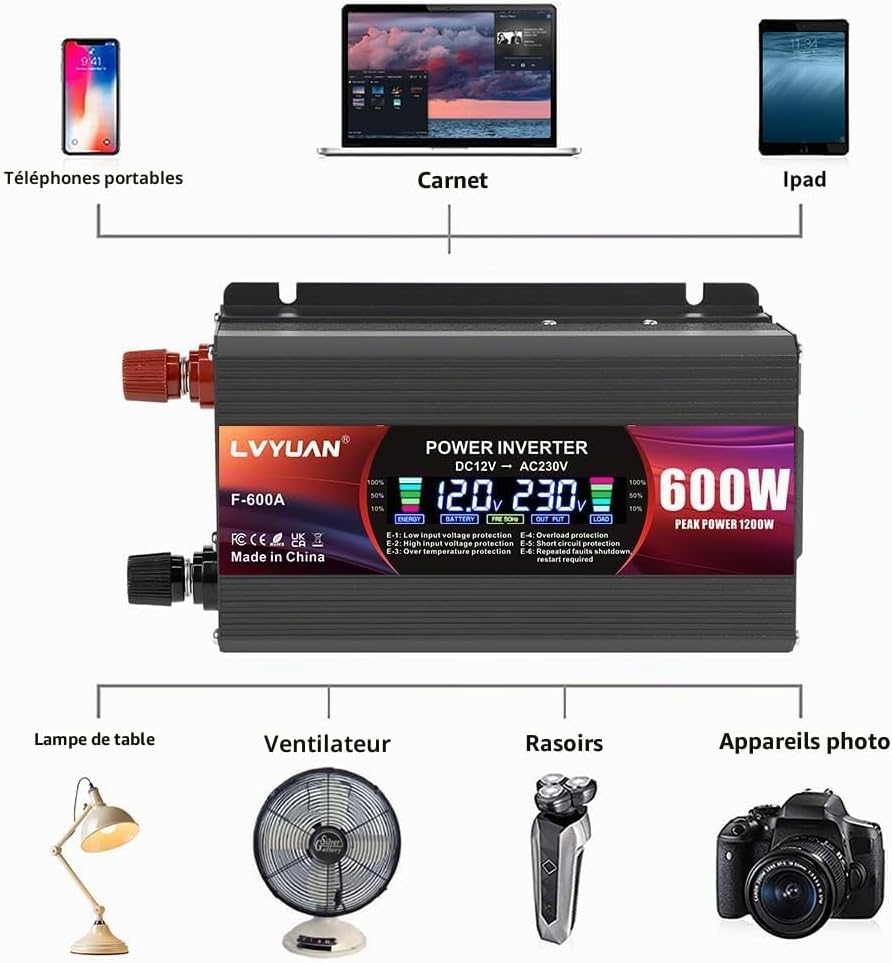
Image: The LVYUAN F-600A Power Inverter showing its connections to various devices like phones, laptops, lamps, and cameras.
Components:
- DC Input Terminals: Red (+) and Black (-) terminals for connecting to a 12V battery.
- AC Outlet: One 220V AC universal outlet for standard appliances.
- USB Ports: Two 5V USB output ports for charging mobile devices.
- Power Switch: On/Off button for controlling the inverter.
- Cooling Fan: Integrated fan for thermal management.
- Intelligent LCD Display: Shows real-time operational status.
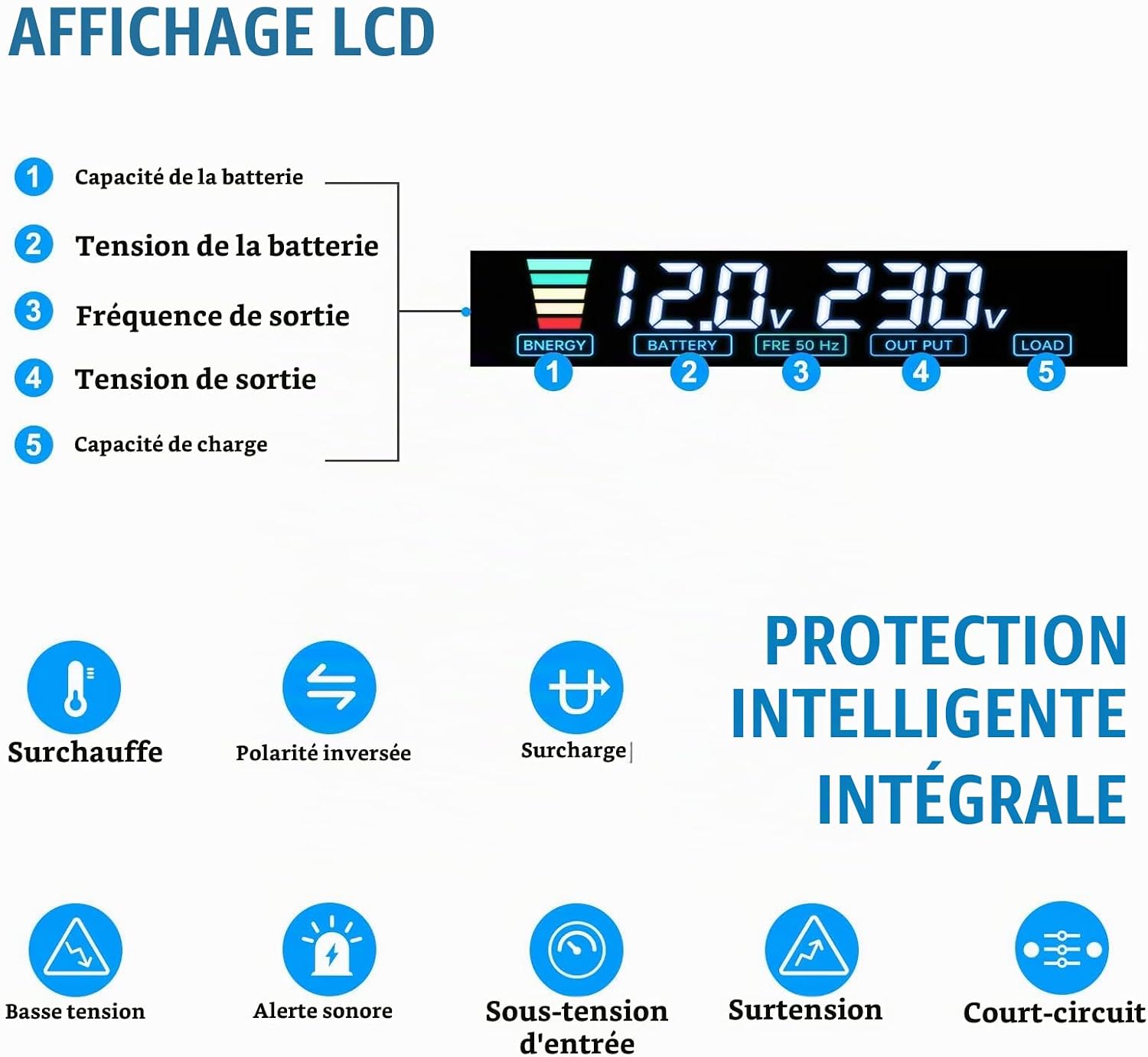
Image: Detailed view of the inverter's LCD display and icons representing various protection features.
LCD Display Information:
- Battery Capacity: Indicates the remaining battery charge.
- Battery Voltage: Displays the input DC voltage from the battery.
- Output Frequency: Shows the AC output frequency (50 Hz).
- Output Voltage: Displays the AC output voltage (220V).
- Load Capacity: Indicates the current power draw of connected devices.

Image: A close-up view of the inverter's active cooling fan, indicating efficient heat dissipation.
4. Setup
The inverter offers two primary connection methods depending on your power requirements.

Image: The inverter shown with its physical dimensions and the included cigarette lighter adapter and battery clamp cables.
4.1. Connecting via Cigarette Lighter Socket (Max 150W)
- Ensure the inverter's power switch is in the OFF position.
- Insert the cigarette lighter adapter cable into the inverter's DC input terminals, ensuring correct polarity (red to +, black to -).
- Plug the cigarette lighter adapter into your vehicle's 12V cigarette lighter socket.
- This method is suitable for devices requiring up to 150W of power.
4.2. Connecting Directly to a 12V Battery (Up to 600W)
- Ensure the inverter's power switch is in the OFF position.
- Connect the red battery clamp cable to the inverter's red (+) terminal and the black battery clamp cable to the inverter's black (-) terminal. Tighten securely.
- Connect the red battery clamp to the positive (+) terminal of your 12V battery.
- Connect the black battery clamp to the negative (-) terminal of your 12V battery.
- This method allows for continuous power output up to 600W.
5. Operating Instructions
Follow these steps to operate your LVYUAN Power Inverter safely and efficiently.
- Connect the Inverter: As described in the Setup section, connect the inverter to your 12V DC power source (cigarette lighter or battery).
- Turn On: Press the power switch on the inverter to the ON position. The LCD display will illuminate, showing input voltage, output voltage, and other parameters.
- Connect Devices: Plug your AC devices into the 220V AC outlet and/or your USB devices into the 5V USB ports. Ensure the total power consumption of your devices does not exceed the inverter's continuous power rating (600W for battery connection, 150W for cigarette lighter connection).
- Monitor Operation: Observe the LCD display for real-time information on battery status, power output, and any potential error codes.
- Turn Off: When you are finished using the inverter, first disconnect all connected devices, then press the power switch to the OFF position. Finally, disconnect the inverter from the 12V DC power source.

Image: A detailed view of the inverter's AC outlet and dual USB ports, demonstrating how devices can be connected simultaneously.
Important Note: The inverter produces a modified sine wave output. While suitable for most electronic devices, some sensitive electronics or appliances with motors may require a pure sine wave inverter for optimal performance and to prevent damage.
6. Maintenance
Proper maintenance ensures the longevity and reliable operation of your inverter.
- Cleaning: Periodically clean the exterior of the inverter with a dry, soft cloth. Do not use abrasive cleaners or solvents. Ensure ventilation openings are free from dust and debris.
- Storage: Store the inverter in a cool, dry place away from direct sunlight and moisture when not in use.
- Connections: Regularly check all cable connections to ensure they are tight and free from corrosion.
7. Troubleshooting
The intelligent LCD display provides error codes to help diagnose issues.

Image: The inverter's LCD displaying an 'E-1' error, with a graphic explaining the meaning of error codes E1 through E6.
LCD Error Codes:
- E-1: Low Voltage Protection - The input DC voltage is too low. Recharge or replace the 12V battery.
- E-2: High Voltage Protection - The input DC voltage is too high. Ensure you are using a 12V power source.
- E-3: Over Temperature Protection - The inverter is overheating. Reduce the load, ensure proper ventilation, and allow it to cool down.
- E-4: Overload Protection - The connected devices exceed the inverter's power capacity. Disconnect some devices.
- E-5: Short Circuit Protection - A short circuit has occurred in the output. Check connected devices and cables for faults.
- E-6: Restart Required - A general fault requiring a restart. Turn off the inverter, disconnect from the power source, wait a few minutes, then reconnect and restart.
General Troubleshooting:
- No Power Output: Check battery connections, ensure the inverter is switched ON, and verify the 12V power source is functioning.
- Device Not Working: Ensure the device's power consumption is within the inverter's limits. Check if the device itself is working correctly.
- Fan Noise: The cooling fan activates automatically when the inverter heats up or under heavy load. This is normal operation.
8. Specifications
| Attribute | Value |
|---|---|
| Brand | LVYUAN |
| Model Name | F-600A |
| Product Dimensions (L x W x H) | 18L x 18W x 5.4H cm |
| Input Voltage | 12 Volts DC |
| Output Power (Continuous) | 600 Watts |
| Peak Output Power | 1200 Watts |
| Output Voltage | 220 Volts AC |
| Output Waveform | Modified Sine Wave |
| Frequency | 50 Hz |
| Recommended Uses | Home, Vehicle (Car, RV, Truck) |
| Power Source | Battery powered, Cigarette lighter powered |
| Safety Standard | CE |
| Country of Origin | China |
9. Warranty and Support
The LVYUAN F-600A Power Inverter comes with a 1 Year Warranty Against Manufacturer Defects.
For technical support, warranty claims, or further assistance, please contact your retailer or visit the official LVYUAN website. Please have your model number (F-600A) and proof of purchase ready when contacting support.


