
JOVELL DVD-198
JOVELL DVD-198 Region Free DVD Player User Manual
Model: DVD-198 Grey
1. Introduction
This manual provides detailed instructions for the setup, operation, and maintenance of your JOVELL DVD-198 Region Free DVD Player. Please read this manual thoroughly before using the device to ensure proper functionality and to prevent damage.
2. Safety Information
Observe the following safety precautions to ensure safe operation of the DVD player:
- Do not expose the unit to rain or moisture to prevent fire or electric shock.
- Do not open the casing. Refer all servicing to qualified personnel.
- Ensure proper ventilation around the unit. Do not block ventilation openings.
- Use only the power adapter supplied with the unit.
- Disconnect the power plug from the wall outlet if the unit will not be used for an extended period.
- Avoid placing the unit on unstable surfaces.
3. Package Contents
Verify that all items are present in the package:
- 1 x JOVELL DVD-198 Grey DVD Player
- 1 x Full-function Remote Control (Batteries not included)
- 1 x HDMI Cable (4.92 ft)
- 1 x RCA Cable (3 ft)
- 1 x User Manual

Image: Contents of the JOVELL DVD-198 package, including the DVD player, remote control, HDMI cable, RCA cable, and user manual. The image also shows the player's dimensions.
4. Product Overview
4.1 Front Panel

Image: Front view of the JOVELL DVD-198 Grey DVD Player, displaying the disc tray, USB port, and basic control buttons (Play/Pause, Stop, Skip, Power).
- Disc Tray: Insert DVDs or CDs.
- USB Port: Connect USB flash drives for media playback.
- Display: Shows current track time, mode, and other information.
- Control Buttons: Power, Play/Pause, Stop, Previous, Next, Open/Close.
4.2 Rear Panel (Connections)
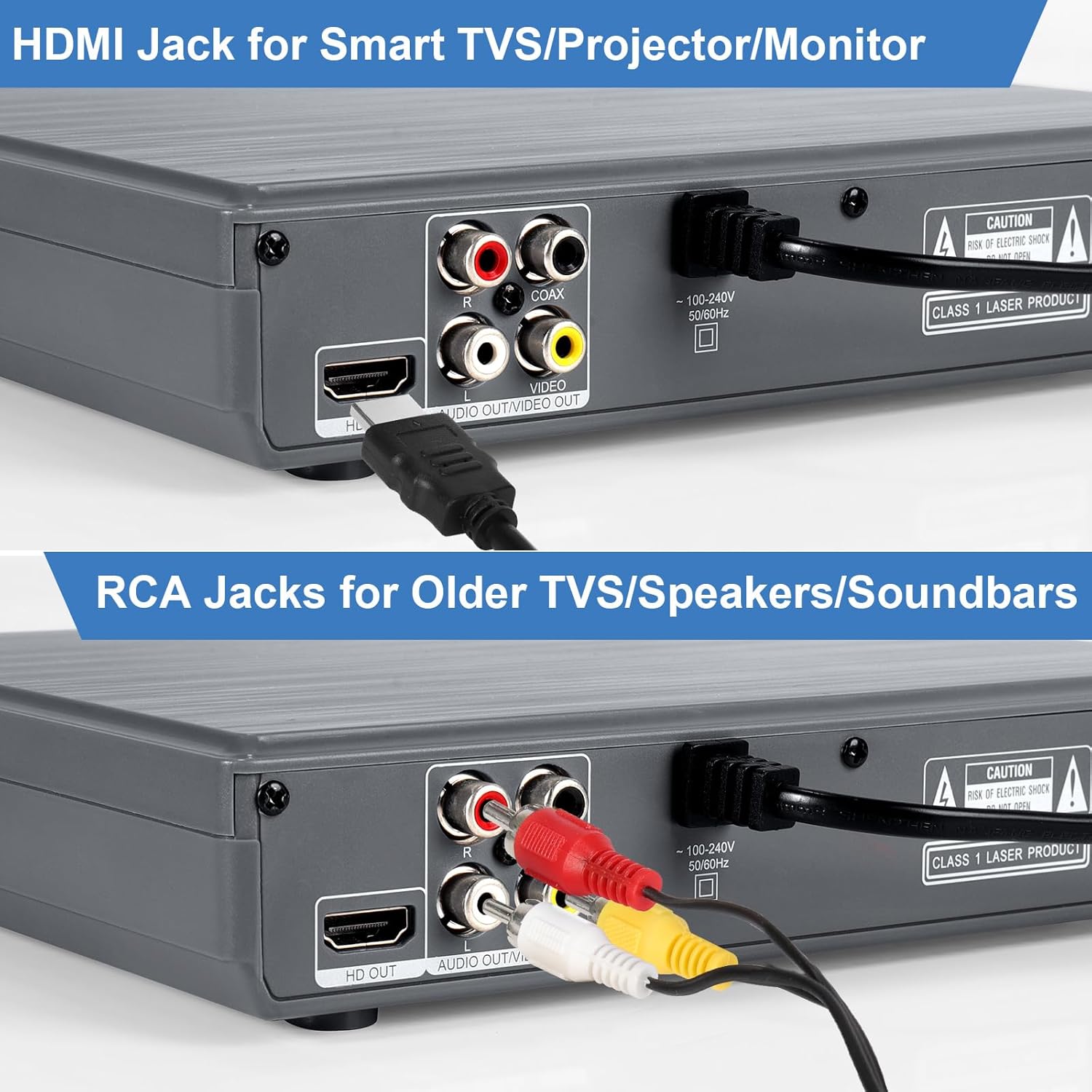
Image: Rear panel of the JOVELL DVD-198 DVD Player, highlighting the HDMI output, AV (RCA) output, and Coaxial audio output ports.
- HDMI Output: Connects to modern TVs, projectors, or monitors for high-definition video and audio.
- AV Output (RCA): Connects to older TVs or audio systems using red, white, and yellow cables.
- Coaxial Output: Provides digital audio output for compatible audio receivers.
- Power Input: Connect the power cable.
4.3 Remote Control
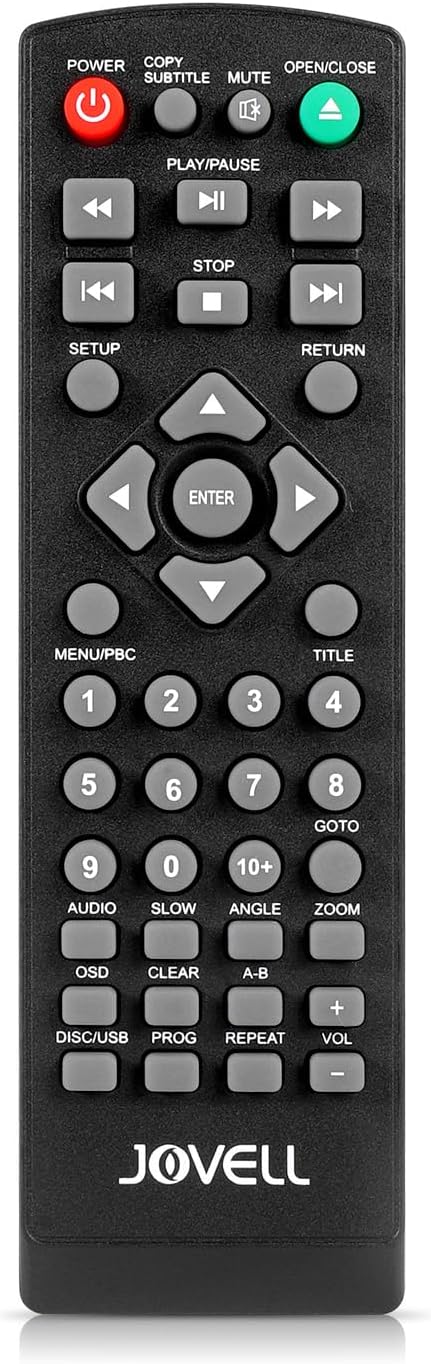
Image: Close-up view of the JOVELL DVD-198 remote control, showing buttons for power, open/close, play/pause, stop, navigation, volume, and various other playback and menu functions.
The remote control allows full operation of the DVD player. Insert two AAA batteries (not included) into the remote control before use. Familiarize yourself with the button layout for optimal control.
5. Setup
5.1 Connecting to a Television
Choose the appropriate connection method based on your television's available ports:
HDMI Connection (Recommended for HD Quality)
- Connect one end of the HDMI cable to the HDMI OUT port on the DVD player.
- Connect the other end of the HDMI cable to an HDMI IN port on your television.
- Select the corresponding HDMI input on your television using its remote control.
AV (RCA) Connection (For Older Televisions)
- Connect the yellow plug of the RCA cable to the VIDEO OUT port on the DVD player.
- Connect the red and white plugs of the RCA cable to the AUDIO OUT (R/L) ports on the DVD player.
- Connect the other ends of the RCA cables to the corresponding VIDEO IN and AUDIO IN (R/L) ports on your television.
- Select the corresponding AV input on your television.

Image: A diagram illustrating how to connect the DVD player using HDMI to a smart TV/projector and using RCA cables to an older TV. It also shows the coaxial output for surround sound.
5.2 Power Connection
- Plug the power cable into the POWER INPUT on the rear of the DVD player.
- Plug the other end of the power cable into a standard electrical outlet.
6. Operating Instructions
6.1 Disc Playback
The JOVELL DVD-198 supports various disc formats, including CD, DVD, DVD-R/+R, DVD-RW/+RW, CD-R/-RW, VCD, and SVCD. It does not support Blu-ray or 4K discs.
- Press the POWER button to turn on the DVD player.
- Press the OPEN/CLOSE button on the front panel or remote control to open the disc tray.
- Place a disc gently into the tray with the label side facing up.
- Press the OPEN/CLOSE button again to close the tray.
- The player will automatically begin playback or display a disc menu.

Image: The JOVELL DVD player with a disc being inserted, illustrating its capability to support multiple disc formats and region-free playback.
6.2 USB Playback
The player features a built-in USB port for playing digital audio and video files. It supports USB 2.0 flash drives up to 64GB. Only FAT/FAT32 formatted USB drives are supported; NTFS/exFAT are not compatible. Supported video formats include AVI, MPG, MPEG4, VOB (720*480/576 resolution). Supported audio formats include MP3, WMA, MPEG1.
- Insert a compatible USB flash drive into the USB port on the front panel.
- The player will automatically detect the USB drive and display its contents, or you may need to press the DISC/USB button on the remote to switch to USB mode.
- Use the navigation buttons on the remote to browse files and press ENTER to select and play.
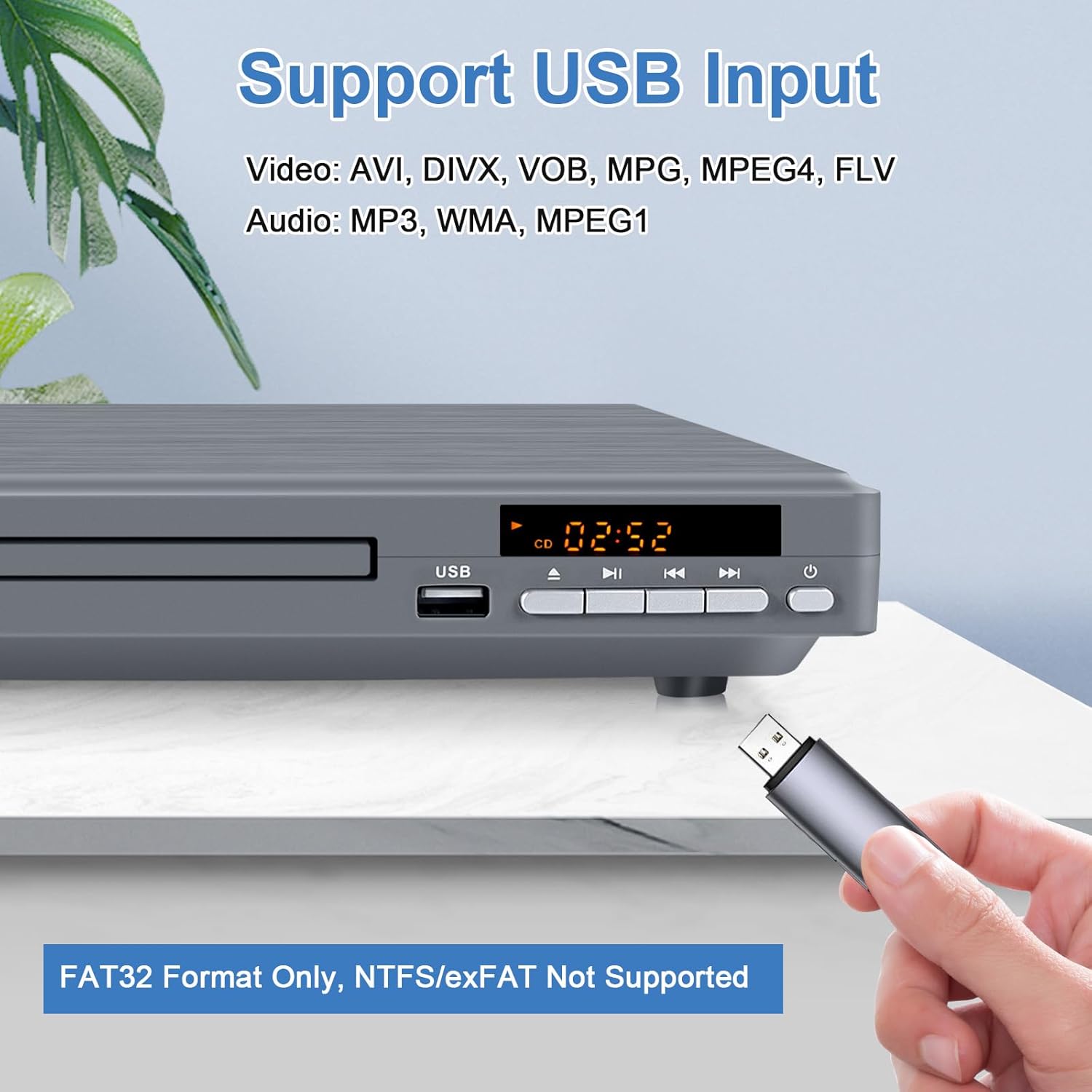
Image: A close-up of the JOVELL DVD player's front panel, showing a USB flash drive inserted into the USB input port. A note indicates that only FAT32 format is supported.
6.3 Basic Playback Functions
- Play/Pause: Press to start or temporarily stop playback.
- Stop: Press to stop playback.
- Previous/Next: Press to skip to the previous or next track/chapter.
- Fast Forward/Rewind: Press and hold to fast forward or rewind.
- Volume: Use the VOL +/- buttons on the remote control to adjust the audio output level.
- Mute: Press to temporarily silence the audio.
6.4 Region Free Functionality
This DVD player is designed to play DVDs from any region (Regions 1-6), with the exception of Japan CPRM discs. This allows for maximum compatibility with your disc collection.
6.5 Breakpoint Memory
The player features a breakpoint memory function, which allows it to resume playback from where it was last stopped, even after the player has been turned off.
7. Maintenance
7.1 Cleaning
- Unit: Wipe the exterior of the player with a soft, dry cloth. Do not use liquid cleaners or abrasive materials.
- Discs: Clean discs with a soft, lint-free cloth, wiping from the center outwards. Avoid touching the playback surface.
7.2 Storage
When not in use, store the DVD player in a cool, dry place away from direct sunlight and extreme temperatures. Remove discs and USB drives before storing.
8. Troubleshooting
| Problem | Possible Cause | Solution |
|---|---|---|
| No power | Power cable not connected; Power outlet faulty | Ensure power cable is securely plugged in; Try a different outlet. |
| No picture/sound | Incorrect input selected on TV; Connection cables loose or faulty | Select the correct HDMI/AV input on your TV; Check all cable connections. |
| Disc not playing/reading | Disc is dirty, scratched, or incompatible format; Disc inserted incorrectly | Clean the disc; Try a different disc; Ensure disc is label-side up; Verify disc format is supported (no Blu-ray/4K). |
| USB drive not recognized | USB drive format incompatible; File format not supported; Drive capacity too large | Ensure USB drive is FAT/FAT32 format (max 64GB); Verify media files are supported (AVI/MPG/MPEG4/VOB for video, MP3/WMA/MPEG1 for audio). |
| Remote control not working | Batteries depleted or inserted incorrectly; Obstruction between remote and player | Replace batteries; Ensure correct polarity; Remove any obstructions. |
9. Specifications
| Feature | Description |
|---|---|
| Model Name | DVD-198 |
| Color | Grey |
| Media Type Supported | CD, DVD, DVD-R/DVD+R, DVD-RW/DVD+RW, CD-R/CD-RW, VCD, SVCD |
| Region Compatibility | All Regions (1-6), except Japan CPRM Discs |
| Video Output Resolution | 1080P (Upscaling), 1920x1080 |
| Special Features | 1080P HD, Anti-Shock, Multi-Format Playback, Progressive Scan, Region Free, Breakpoint Memory |
| Connectivity Technology | HDMI, RCA Coaxial, USB |
| USB Support | USB 2.0, up to 64GB, FAT/FAT32 format only |
| Supported USB Video Formats | AVI, MPG, MPEG4, VOB (720*480/576) |
| Supported USB Audio Formats | MP3, WMA, MPEG1 |
| Audio Output Mode | Stereo |
| Item Weight | 2.31 pounds |
| Package Dimensions | 10.59 x 10.16 x 3.31 inches |
10. Warranty and Support
Your JOVELL DVD-198 DVD Player comes with a 24-month warranty from the date of purchase.
For technical assistance, troubleshooting, or warranty claims, please contact our customer support team. We offer 24-hour friendly customer support to assist you with any issues or questions you may have.
Please refer to your purchase documentation for specific contact details or visit the official JOVELL support website.
Ask a question about this manual
Ask about setup, troubleshooting, compatibility, parts, safety, or missing instructions. Manuals+ will review the question and use this page’s manual context to help answer it.