
1. Introduction
This manual provides essential instructions for the proper setup, operation, and maintenance of your aMagisn Magnetic Quick Release Mount. This accessory is designed to facilitate rapid attachment and detachment of your DJI Osmo 360, Action 5 Pro, Action 4, or Action 3 camera to various mounting accessories.
2. Safety Information
- Ensure the mount is securely attached to both the camera and the accessory before use.
- Avoid exposing the mount to extreme temperatures or corrosive substances.
- Do not attempt to modify the product, as this may compromise its integrity and void any potential warranty.
- Keep out of reach of small children.
3. Package Contents
Verify that all items are present in your package:
- 1 x aMagisn Magnetic Quick Release Mount
4. Product Overview
The aMagisn Magnetic Quick Release Mount (Model AA25) is a lightweight and durable accessory designed for action cameras. It features a magnetic attachment system combined with stainless steel clips for secure fastening. The mount is constructed from high-resilience plastic composite material and incorporates an anti-shock silicone pad for enhanced stability.

Figure 4.1: The aMagisn Magnetic Quick Release Mount attached to a DJI Osmo Action camera, demonstrating its compact design and integration.

Figure 4.2: A detailed view of the quick release mount, highlighting its lightweight and rugged construction.
5. Setup Instructions
Follow these steps to properly set up your aMagisn Magnetic Quick Release Mount:
- Attaching to Camera: Align the quick release mount with the bottom of your DJI Osmo 360/Action 5 Pro/4/3 camera. The mount will be attracted instantly by the built-in strong magnets. Press the mount firmly until the stainless steel clips engage securely with the camera's mounting points.
- Compatibility with Accessories: The mount is designed to be compatible with various accessories such as frame cages and silicone cases. Ensure the camera is properly seated within its protective accessory before attaching the quick release mount.

Figure 5.1: The quick release mount demonstrating compatibility with a silicone case and a camera frame cage for DJI Osmo Action cameras.
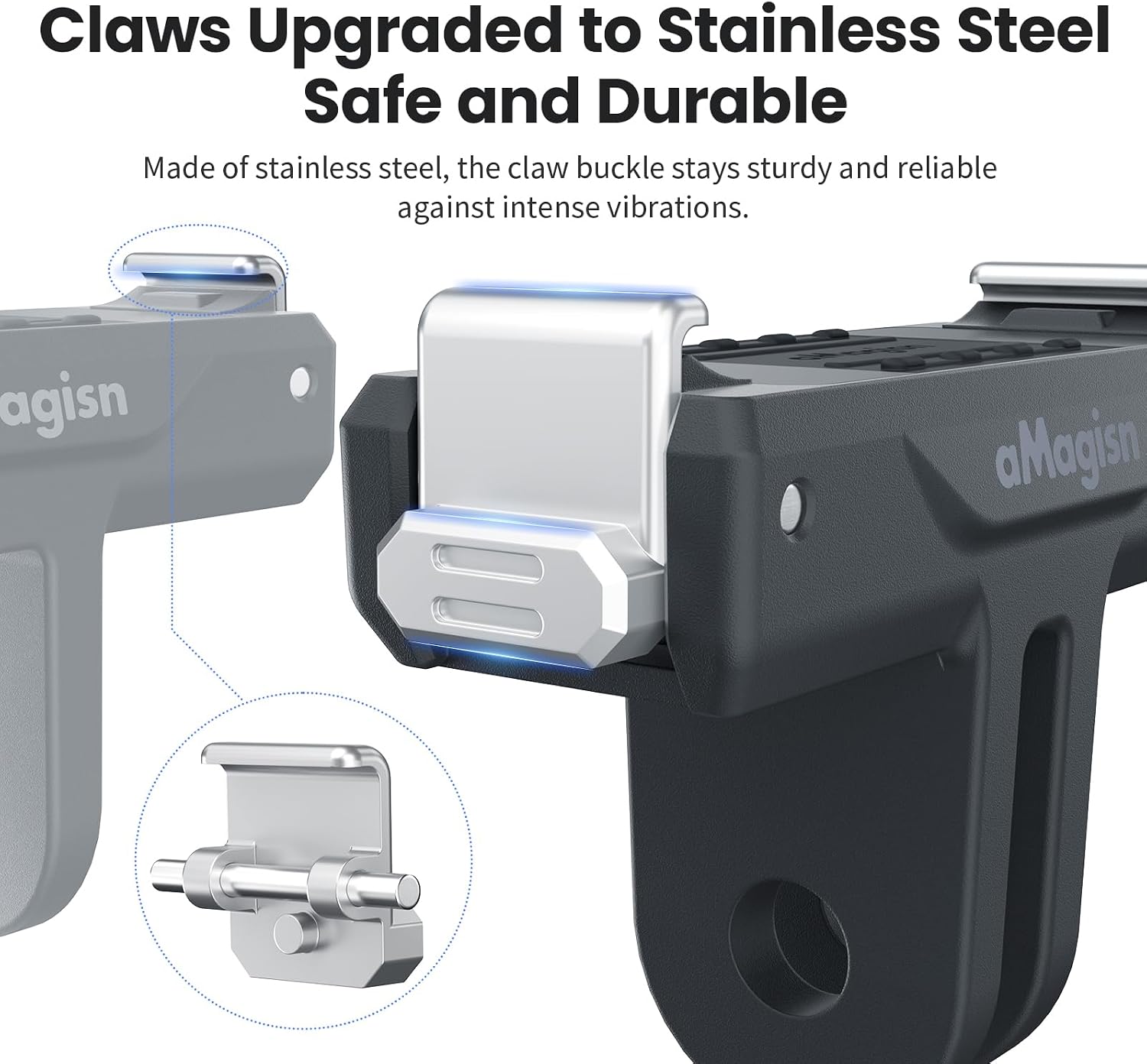
Figure 5.2: Visual guide showing the magnetic attraction and the process of attaching and detaching the camera from the mount by pressing the side buttons.
6. Operating Instructions
The quick release design allows for efficient camera transitions between different mounts:
- Attaching the Camera: Position your DJI Osmo Action camera (with the quick release mount attached) over the desired accessory (e.g., tripod, selfie stick) that uses a standard two-prong adapter. The mount's prongs will slide into the accessory's slot.
- Securing the Camera: Once aligned, ensure the accessory's screw or locking mechanism is tightened to secure the quick release mount firmly in place.
- Detaching the Camera: To remove the camera from the quick release mount, simultaneously press the release buttons located on both sides of the mount. This action disengages the stainless steel clips, allowing the camera to be lifted away.
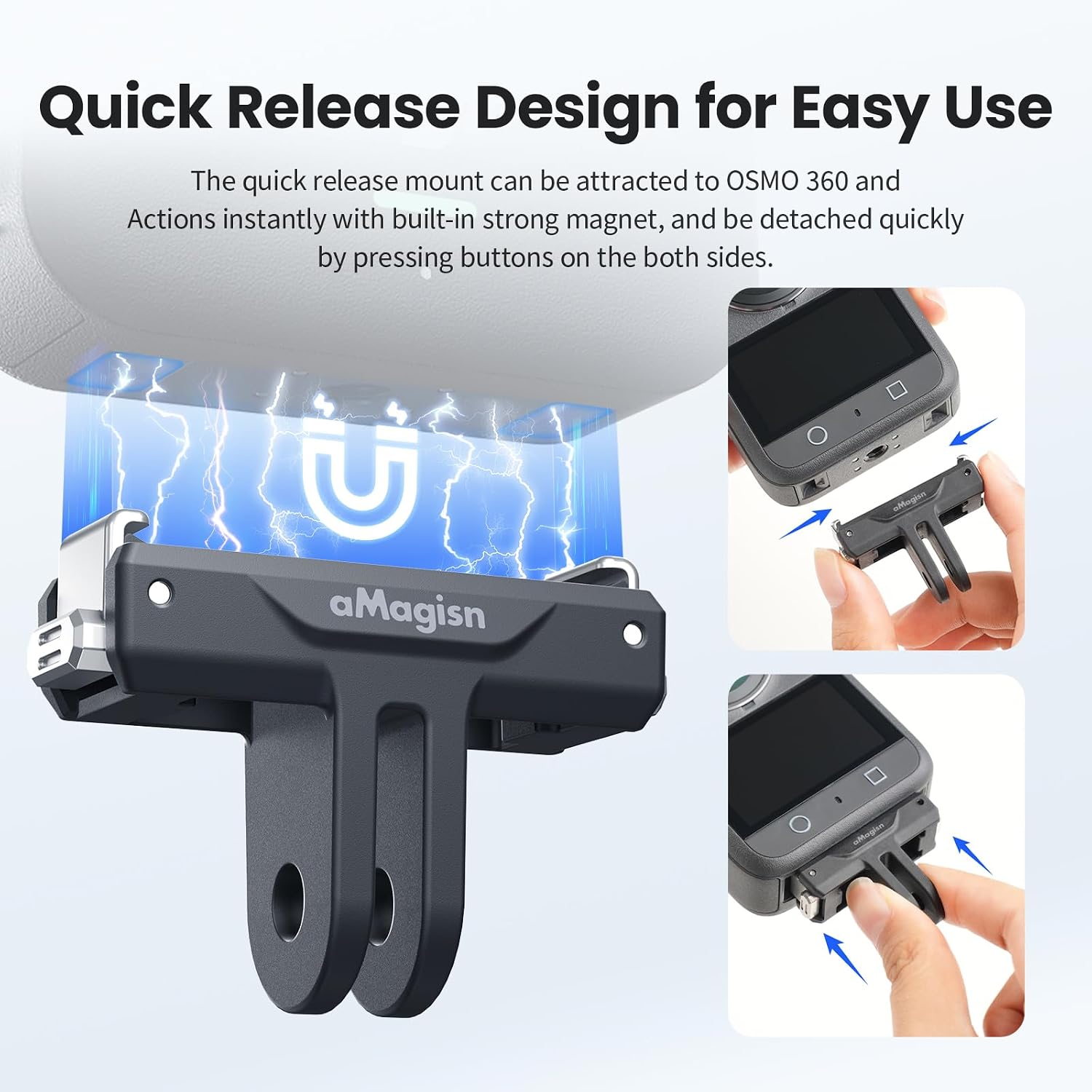
Figure 6.1: Detail of the upgraded stainless steel claws, designed for secure and durable attachment, resisting vibrations during use.
7. Maintenance
Proper maintenance ensures the longevity and optimal performance of your quick release mount:
- Cleaning: Wipe the mount with a soft, dry cloth to remove dust and debris. For stubborn dirt, a slightly damp cloth can be used, followed by immediate drying. Avoid harsh chemicals or abrasive materials.
- Silicone Pad: Periodically check the anti-shock silicone pad for wear or damage. This pad helps secure the mounting firmness and reduces vibration.
- Storage: Store the mount in a clean, dry environment away from direct sunlight and extreme temperatures when not in use.

Figure 7.1: Illustration highlighting the anti-shock silicone pad, which contributes to mounting firmness and vibration reduction.

Figure 7.2: A visual comparison demonstrating the rounded buckle edges of the aMagisn mount, designed to minimize abrasion and protect your camera during repeated use.
8. Troubleshooting
- Camera not securing firmly: Ensure the quick release mount is correctly aligned with the camera's mounting points and the side release buttons are not inadvertently pressed during attachment. Check for any debris obstructing the clips.
- Difficulty detaching camera: Ensure both release buttons are pressed simultaneously and fully. Avoid forcing the camera off the mount.
- Mount feels loose on accessory: Verify that the accessory's screw or locking mechanism is fully tightened after attaching the quick release mount.
9. Specifications
| Feature | Detail |
|---|---|
| Model Number | AA25 |
| Material | ABS + Stainless Steel |
| Dimensions (L x W x H) | 43.3 x 16.6 x 31.6 mm (1.7 x 0.65 x 1.24 inches) |
| Weight | 13g (0.459 ounces) |
| Compatibility | DJI Osmo 360, Action 5 Pro, Action 4, Action 3 |
| Mounting Type | Magnetic Quick Release |

Figure 9.1: Detailed dimensions of the aMagisn Magnetic Quick Release Mount.
10. Warranty Information
Specific warranty details for this product are not provided in the available information. Please refer to the retailer's return policy or contact the manufacturer directly for warranty inquiries.
11. Customer Support
For technical assistance or product-related questions, please contact your point of purchase or visit the official aMagisn website for support resources.