
Introduction
Thank you for choosing the EZ EAR CCZ CM01 USB C to 3.5mm Headphone Adapter. This high-fidelity audio converter is designed to deliver exceptional sound quality from your USB-C devices to your 3.5mm headphones. Featuring advanced decoding chips and durable construction, the CM01 ensures a superior listening experience. This manual provides essential information for setup, operation, maintenance, and troubleshooting.

The EZ EAR CCZ CM01 USB C to 3.5mm Headphone Adapter, featuring a compact design and durable braided cable.
Setup
- Connect the Adapter to Your Device: Insert the USB-C connector of the CM01 adapter into the USB-C port of your smartphone, tablet, laptop, or gaming console. Ensure the connection is firm.
- Connect Headphones: Plug your 3.5mm headphones or earphones into the 3.5mm jack of the CM01 adapter.
- (Optional) USB-A Connection: If your device only has USB-A ports, use the provided USB-A to USB-C adapter. First, connect the CM01's USB-C end to the USB-A adapter, then plug the USB-A adapter into your device's USB-A port.
The adapter is plug-and-play and typically requires no additional drivers for most compatible operating systems.

The CCZ CM01 adapter can be connected to USB-C devices directly or to USB-A ports using the provided adapter for broader compatibility.
Operating Instructions
Once connected, the CM01 adapter will automatically be recognized by your device as an audio output. You can then play audio through your connected 3.5mm headphones.
Inline Control Functions
The CM01 adapter supports inline remote controls found on many 3.5mm headphones (TRRS/TRS compatible). These controls allow you to manage:
- Music Playback: Play, pause, skip tracks.
- Volume Adjustment: Increase or decrease audio volume.
- Call Management: Answer, end, or reject phone calls.
Note: Some Apple headphones may have limited inline control functionality. Ensure your headphones support TRRS/TRS interfaces for full compatibility.

The adapter supports inline controls for managing music playback, adjusting volume, and handling phone calls, compatible with TRRS/TRS headphones.
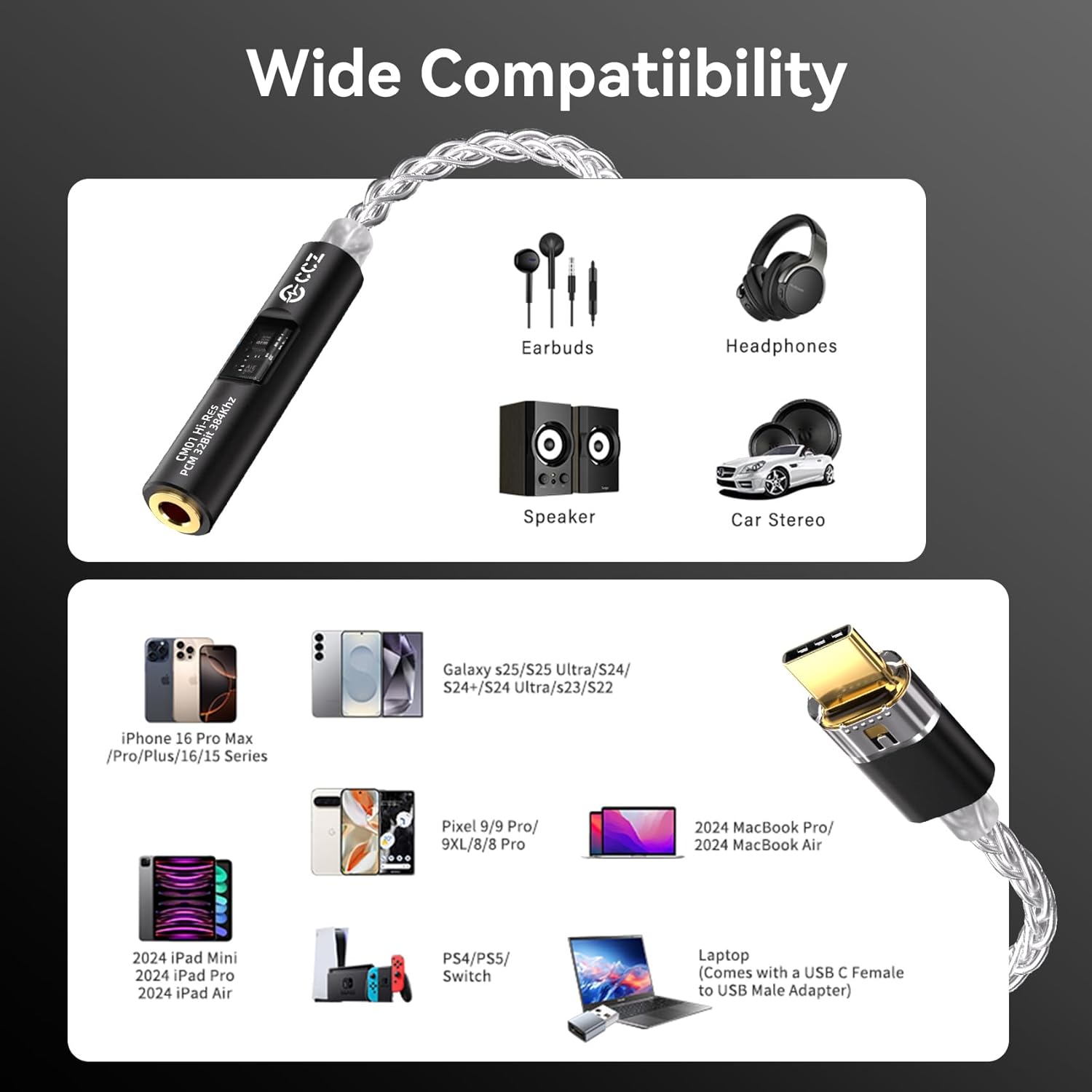
The CCZ CM01 adapter offers broad compatibility with a range of USB-C devices, including modern smartphones, tablets, laptops, and gaming systems.
Maintenance
- Cleaning: Use a soft, dry cloth to gently wipe the adapter. Avoid using liquid cleaners or abrasive materials.
- Storage: Store the adapter in a cool, dry place away from direct sunlight and extreme temperatures.
- Handling: Avoid bending or twisting the cable excessively. The 8-strand silver-plated copper wiring and aluminum alloy connectors are designed for durability, but proper handling extends product life.
- Portability: The compact 125mm design with a braided cable is built for easy transport. When carrying, ensure it is not subjected to undue pressure or sharp objects.

The compact design and lightweight nature of the CCZ CM01 adapter make it highly portable, easily fitting into pockets or small compartments for on-the-go use.
Troubleshooting
- No Sound:
- Ensure both the USB-C connector and the 3.5mm headphone jack are fully inserted.
- Check your device's audio output settings to confirm the CM01 adapter is selected.
- Test with different headphones or a different USB-C device to isolate the issue.
- Verify that your device's volume is not muted or set too low.
- Inline Controls Not Working:
- Confirm your headphones support TRRS/TRS interfaces.
- Note that some Apple headphones may have limited functionality.
- Ensure your device's operating system is compatible (CM01 does not support WIN10 or lower for some functions).
- Incompatibility:
- The CM01 adapter is known to be incompatible with Raspberry Pi and Switch 2.
- Other models not explicitly listed as compatible may also experience issues. Refer to the compatibility table below.

This table provides a detailed list of tested compatible devices and the functions supported by the CCZ CM01 adapter for each, including music playback, control, recording, and calls.
Specifications
| Brand | EZ EAR |
| Model Number | CM01 |
| DAC Chip | Conexant CX31993 |
| Amplifier Chip | MAX97220 |
| Audio Resolution | Up to 32-bit/384kHz PCM |
| ADC Resolution | Up to 24-bit/96kHz |
| THD+N | < 0.001% |
| Signal-to-Noise Ratio (SNR) | > 124 dB |
| Connector Type | USB Type C (Male) to 3.5mm Jack (Female) |
| Cable Material | 8-strand silver-plated copper wiring |
| Connector Material | Aerospace-grade aluminum alloy |
| Length | 125 mm (approx.) |
| Weight | 53.37 Grams |
| Compatible Devices | Personal Computer, Gaming Console, Headphones, Smartphones, Tablets |
| Incompatible Devices | Raspberry Pi, Switch 2 |

Detailed view of the adapter's high-quality components, including the gold-plated 3.5mm audio interface, the durable USB-C connector, and the 8-strand high-purity copper-silver plated wire.

This image highlights the Hi-Res Audio certification of the CC01, indicating its capability for high-fidelity sound reproduction with impressive technical specifications.
Warranty Information
The EZ EAR CCZ CM01 USB C to 3.5mm Headphone Adapter comes with a one-year warranty from the date of purchase. This warranty covers manufacturing defects and issues arising from normal use. It does not cover damage caused by misuse, accidents, unauthorized modifications, or improper storage.
Please retain your proof of purchase for warranty claims.
Support
If you encounter any issues or have questions regarding your EZ EAR CCZ CM01 adapter that are not addressed in this manual, please contact the seller or manufacturer for assistance. Provide your product model number (CM01) and a detailed description of the issue to facilitate support.