
1. Introduction
Thank you for purchasing the FUSOU Corner Vanity Desk. This manual provides essential information for the safe assembly, operation, and maintenance of your new vanity desk. Please read this manual thoroughly before use and retain it for future reference.
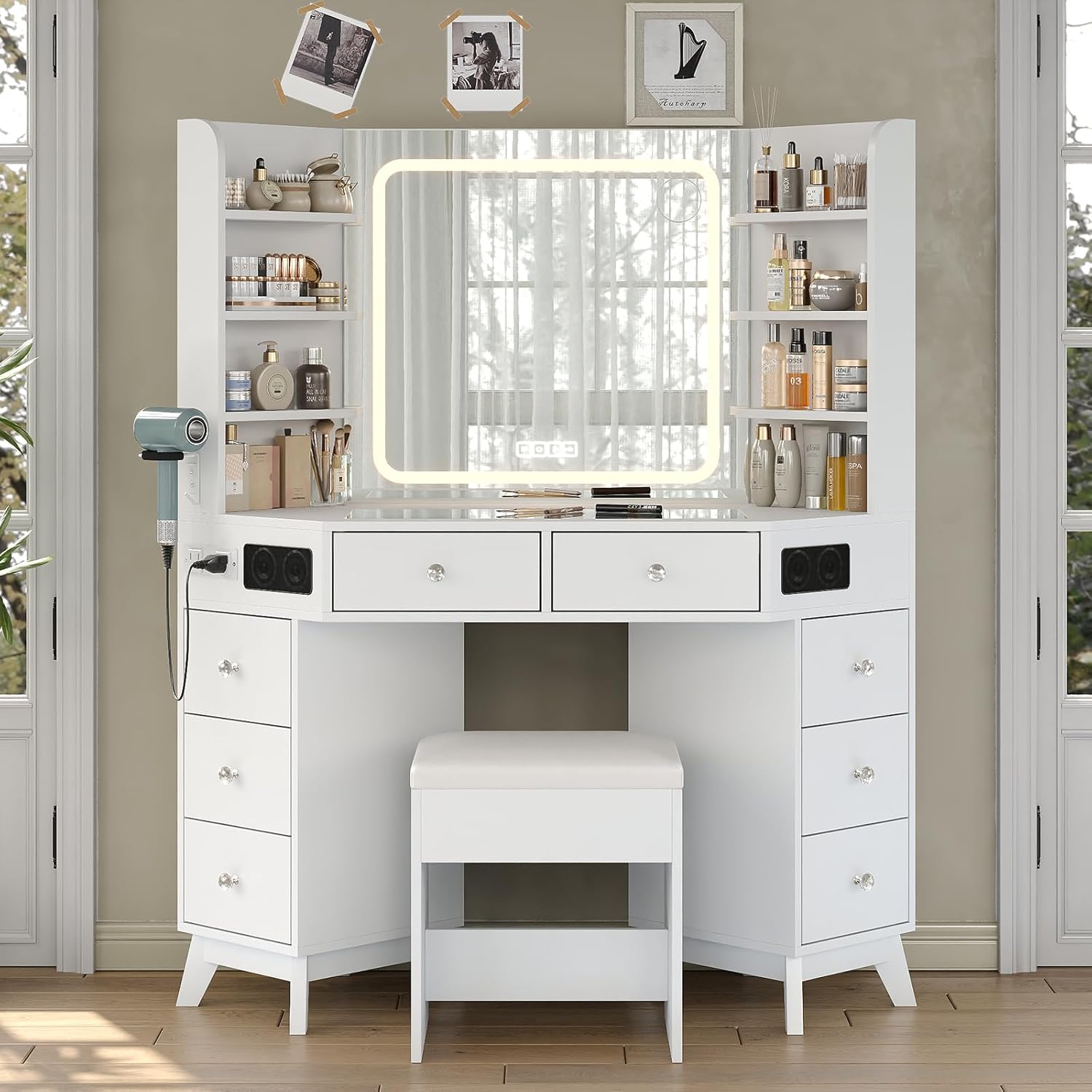
Image 1.1: The FUSOU Corner Vanity Desk, featuring an LED mirror, built-in speakers, and a power station, shown with a matching stool.
2. Important Safety Information
Please observe the following safety precautions to prevent injury or damage to the product:
- Always assemble the product on a soft, clean surface to prevent scratches.
- Ensure all screws and fasteners are securely tightened before use. Periodically check and re-tighten as necessary.
- Do not overload drawers or shelves. Distribute weight evenly.
- Keep electrical components (mirror, power station) away from water or excessive moisture.
- Use only the provided power cord and ensure it is properly plugged into a grounded outlet.
- Do not attempt to modify or repair the electrical components yourself. Contact qualified personnel for service.
- Keep small parts out of reach of children during assembly.
3. Setup and Assembly
3.1 Package Contents
Before beginning assembly, verify that all parts are present. Refer to the included assembly diagram for a complete list of components and hardware.
3.2 Assembly Instructions
Follow the step-by-step instructions provided in the separate assembly guide. Ensure you have adequate space and the necessary tools (typically a screwdriver and hammer, not included).
- Unpack all components and lay them out on a protected surface.
- Attach the side cabinets to the main desk frame using the designated hardware.
- Install the drawers into their respective slots.
- Secure the LED mirror unit to the desk.
- Connect the power cord for the LED mirror and power station to a wall outlet.

Image 3.1: Overview of the vanity desk's multi-drawer storage and open shelves, illustrating the various storage options available.
4. Operating Instructions
4.1 LED Mirror Operation
The integrated LED mirror features smart touch controls for lighting adjustments.
- Power On/Off: Tap the power icon on the mirror to turn the lights on or off.
- Change Lighting Mode: Short press the mode icon (often represented by a circle with a percentage or sun icon) to cycle through three lighting modes: cool white, natural daylight, and warm glow.
- Adjust Brightness: Long press the mode icon to continuously adjust the brightness level from 0% to 100%. Release when the desired brightness is reached.

Image 4.1: Close-up of the HD LED mirror, showing the touch controls for switching lighting modes and adjusting brightness.
4.2 Built-in Speaker System
The vanity desk includes built-in speakers for audio playback.
- Bluetooth Pairing: Long press the Bluetooth icon on the mirror's control panel to enter pairing mode. On your mobile device, search for "FUSOU Vanity" (or similar name) in your Bluetooth settings and connect.
- Play/Pause: Tap the play/pause icon to start or stop audio playback.
- Adjust Volume: Long press the volume up (+) or volume down (-) icons to adjust the speaker volume.
- Skip Tracks: Tap the next track (>>) or previous track (<<) icons to skip songs.

Image 4.2: Illustration of the speaker control panel on the vanity desk, detailing how to link a phone, adjust volume, and skip tracks.
4.3 Integrated Power Station
The vanity desk is equipped with a power station for charging devices and powering accessories.
- AC Outlets: Two 125V/12A AC outlets are provided for powering hair dryers, curling irons, or other small appliances.
- USB Ports: Two 5V/2A USB ports are available for charging smartphones, tablets, and other USB-powered devices.
- Ensure devices connected do not exceed the maximum power rating of the power station.
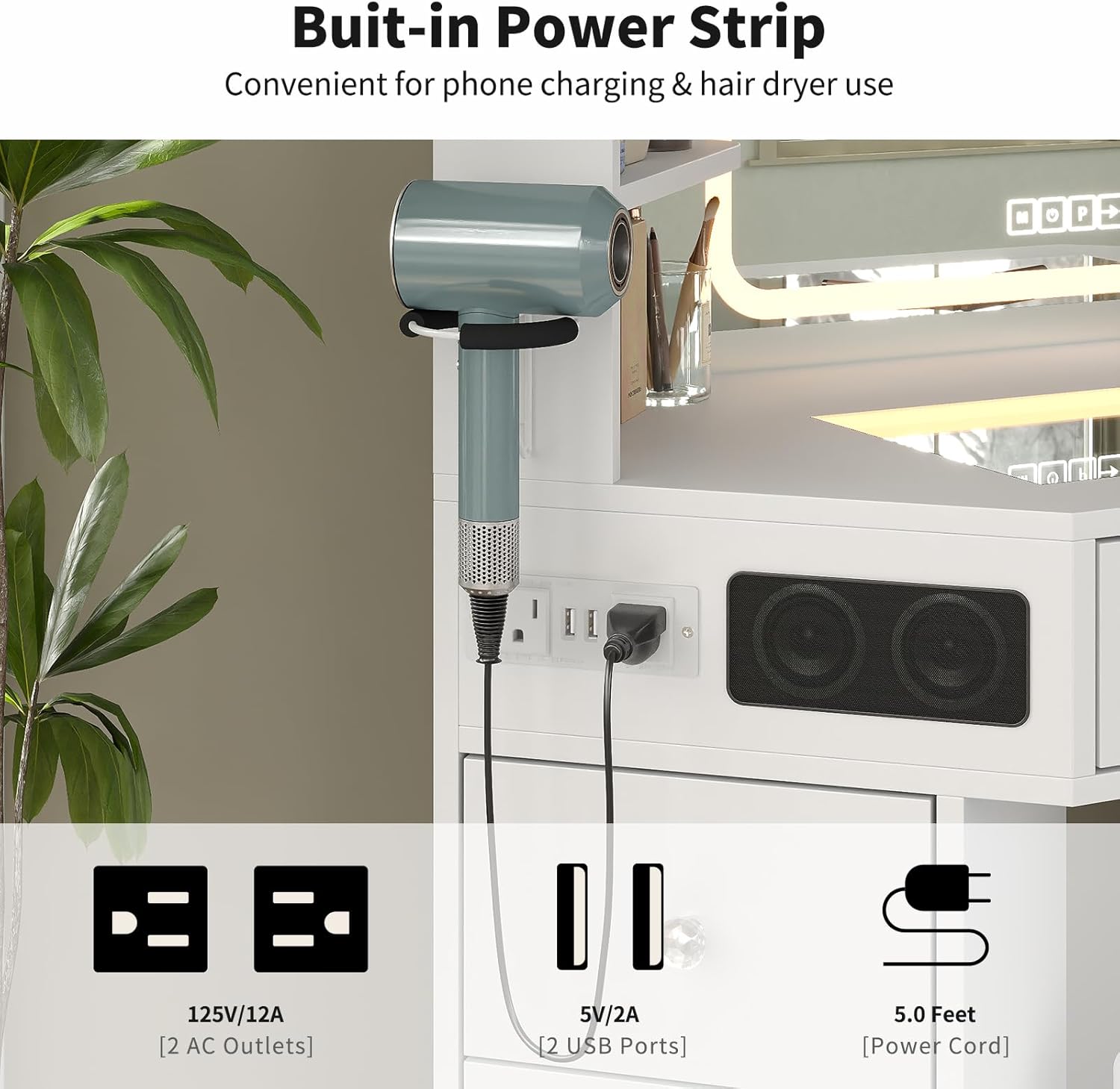
Image 4.3: Detail of the built-in power strip, highlighting the two AC outlets and two USB ports for convenient charging and power access.
4.4 Storage Features
The vanity desk offers ample storage solutions:
- Drawers: Eight smooth-gliding drawers are available for organizing makeup, skincare, and accessories. The top central drawers feature a glass top for display.
- Open Shelves: Six open side shelves provide easy access storage for frequently used items or decorative pieces.
5. Maintenance and Care
Proper care will extend the life and appearance of your vanity desk.
- Cleaning Surfaces: Wipe surfaces with a soft, damp cloth. Avoid harsh chemicals or abrasive cleaners that may damage the finish.
- Glass Top: Clean the tempered glass top with a glass cleaner and a lint-free cloth.
- Mirror: Use a soft, dry cloth or a specialized mirror cleaner to clean the LED mirror surface. Do not spray cleaner directly onto the mirror to avoid liquid entering the electrical components.
- Electrical Components: Ensure the power is disconnected before cleaning any electrical parts. Wipe with a dry cloth only.
- Hardware: Periodically check and tighten all screws and fasteners to ensure stability.
6. Troubleshooting
Refer to this section for solutions to common issues.
| Problem | Possible Cause | Solution |
|---|---|---|
| LED Mirror not lighting up. | Power cord not connected; power outlet not working; mirror controls not activated. | Ensure power cord is securely plugged in. Test the outlet with another device. Tap the power icon on the mirror. |
| Speakers not producing sound. | Not paired via Bluetooth; device volume too low; speaker volume too low. | Ensure Bluetooth is paired (see Section 4.2). Increase volume on both your device and the vanity speakers. |
| Power outlets/USB ports not working. | Power cord not connected; power outlet not working; device drawing too much power. | Verify power cord connection. Test the wall outlet. Ensure connected devices do not exceed the power station's limits. |
| Drawers are stiff or misaligned. | Improper assembly; obstruction in the drawer slide. | Review assembly instructions for drawer installation. Check for any objects blocking the slides. |
7. Specifications
- Model: VD021-WH-CA-1
- Brand: FUSOU
- Dimensions (Overall): 47.24" W x 20" D x 56.3" H (120cm W x 50.8cm D x 143cm H)
- Item Weight: Approximately 110 lbs (50 kg)
- Material: Engineered Wood, Tempered Glass
- Color: White
- LED Mirror: 3 Lighting Modes (Cool White, Natural Daylight, Warm Glow), Dimmable
- Power Station: 2 x 125V/12A AC Outlets, 2 x 5V/2A USB Ports
- Storage: 8 Drawers, 6 Open Shelves

Image 7.1: Detailed diagram showing the overall dimensions of the FUSOU Corner Vanity Desk.
8. Warranty and Support
FUSOU products are manufactured with quality and care. For warranty information, technical support, or replacement parts, please refer to the contact information provided at the point of purchase or visit the official FUSOU website.
Manufacturer: FUSOU
Contact: Please refer to your purchase documentation for specific customer service details.