
1. Introduction
This manual provides detailed instructions for the safe and efficient operation of your Blukar Mini Rechargeable LED Flashlight, Model K9183. Please read this manual thoroughly before using the product and retain it for future reference.
The Blukar K9183 is a compact, durable, and versatile LED flashlight designed for everyday carry (EDC). Its small size, multiple lighting modes, and USB-C rechargeable battery make it ideal for various situations, from outdoor activities to emergency lighting.
2. Package Contents
Please check the package for the following items:
- 1 x Blukar Mini Rechargeable LED Flashlight (Model K9183)
- 1 x USB-C Charging Cable
- 1 x User Manual
3. Product Features
- Ultra-Compact EDC Design: Super compact and lightweight, equipped with a keychain for easy attachment to keys, backpacks, or pockets.
- Three Lighting Modes: Offers High, Medium, and Low brightness levels to suit different illumination needs.
- USB-C Rechargeable: Features a built-in battery that recharges conveniently via the included USB-C cable.
- Memory Function: Automatically remembers the last used lighting mode when turned off and on again.
- IPX6 Waterproof Rating: Ensures safe operation in wet conditions and rain, making it suitable for outdoor use.
- Durable Construction: Made from high-quality aluminum alloy, providing a lightweight, durable, and corrosion-resistant housing.
- Battery Indicator: The power switch illuminates red during charging or when the battery is low, and green when fully charged or in use.
4. Setup
Before initial use, it is recommended to fully charge the flashlight. Refer to the "Charging Instructions" section for details.

Image: The Blukar Mini Rechargeable LED Flashlight K9183, showcasing its compact design and illuminated power button.
Attaching to a Keychain
The flashlight comes with an integrated keychain ring. You can easily attach it to your existing key ring, backpack, or other personal items for convenient access.

Image: Demonstrates various carrying options for the Blukar Mini Flashlight, including with a necklace, keychain, and in a pocket.
5. Operating Instructions
The Blukar K9183 flashlight features a single button for all operations.

Image: Illustrates the three lighting modes (High, Medium, Low) and the single-button control for switching modes and turning off.
- Turning On/Changing Modes: Press the power button briefly to turn on the flashlight. Each subsequent brief press will cycle through the brightness modes: High > Medium > Low.
- Turning Off:
- If the flashlight has been on for more than 8 seconds in any mode, a single brief press of the power button will turn it off.
- To turn off the flashlight quickly at any time (within 8 seconds of turning on or changing modes), press and hold the power button for approximately 3 seconds.
- Memory Function: The flashlight will remember the last used brightness mode. When you turn it on again, it will activate in that mode.
6. Charging Instructions
The Blukar K9183 flashlight is equipped with a built-in rechargeable battery.
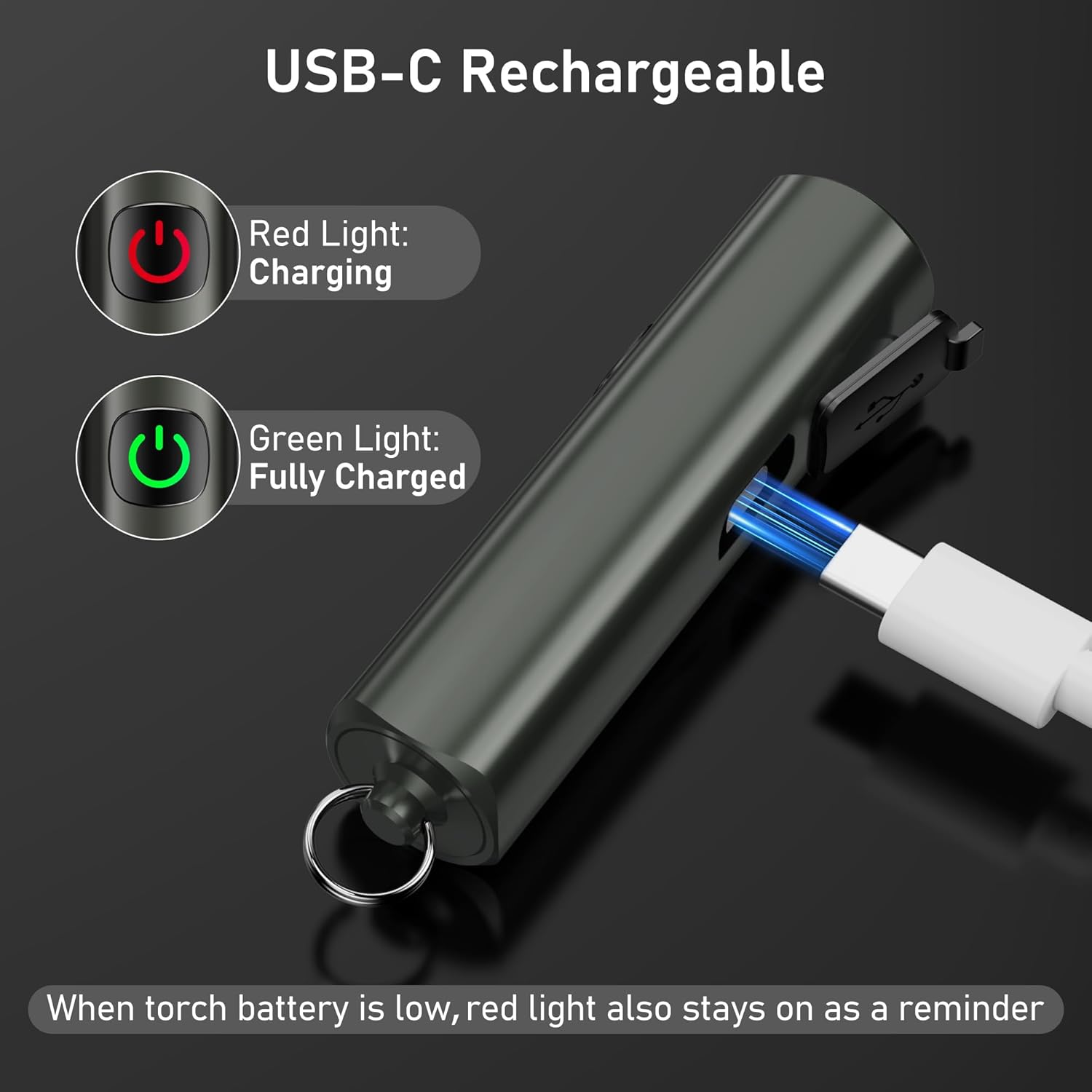
Image: Shows the USB-C charging port and the red/green indicator lights for charging status.
- Locate the USB-C charging port on the side of the flashlight, usually covered by a rubber flap.
- Gently open the rubber flap to expose the port.
- Connect the included USB-C charging cable to the flashlight's port and the other end to a standard USB power source (e.g., computer, wall adapter, power bank).
- The power button will illuminate red to indicate that the flashlight is charging.
- Once fully charged, the power button will turn green.
- A full charge typically takes approximately 2 hours.
- When the battery is low during operation, the power button will also illuminate red as a reminder to recharge.
A full charge provides up to 5.5 hours of continuous illumination on the low brightness setting.
7. Maintenance
Cleaning
- Wipe the flashlight with a soft, damp cloth to remove dirt or debris.
- Do not use abrasive cleaners or solvents, as these may damage the finish or internal components.
- Ensure the USB-C port cover is securely closed after charging to maintain its IPX6 waterproof rating.
Storage
- Store the flashlight in a cool, dry place away from direct sunlight and extreme temperatures.
- If storing for an extended period, recharge the battery every 3 months to prevent battery degradation and prolong its lifespan.
8. Troubleshooting
| Problem | Possible Cause | Solution |
|---|---|---|
| Flashlight does not turn on. | Battery is depleted. | Charge the flashlight using the provided USB-C cable. |
| Light is dim or flickers. | Low battery. | Recharge the flashlight. |
| Flashlight does not charge. | Charging cable or adapter faulty; port not connected properly. | Ensure the USB-C cable is securely connected. Try a different USB-C cable or power adapter. |
| Cannot change brightness modes. | Incorrect operation. | Ensure you are pressing the button briefly to cycle modes. |
9. Specifications

Image: Visual representation of key specifications including beam distance, drop test, weight, waterproof rating, and length.
| Feature | Detail |
|---|---|
| Model Number | K9183 |
| Brand | Blukar |
| Dimensions (L x W x H) | 6.64 x 1.58 x 1.58 cm (2.61 x 0.62 x 0.62 inches) |
| Weight | 27 grams (0.95 oz) |
| Battery Type | 1 Lithium-ion battery (included) |
| Power Source | Battery powered |
| Waterproof Rating | IPX6 (Resistant to powerful water jets) |
| Charging Port | USB-C |
| Charging Time | Approximately 2 hours |
| Max Runtime (Low Mode) | Up to 5.5 hours |
| Beam Distance | Up to 48 meters (157 feet) |
| Drop Resistance | 1.5 meters (5 feet) |
| Material | High-quality Aluminum Alloy |
10. Safety Information
- Do not shine the flashlight directly into eyes, as the bright light can cause temporary vision impairment.
- Keep out of reach of children. This is not a toy.
- Do not disassemble, modify, or attempt to repair the flashlight yourself. This may void the warranty and pose safety risks.
- Avoid exposing the flashlight to extreme temperatures, open flames, or corrosive liquids.
- While the flashlight is IPX6 waterproof, it is not designed for submersion in water.
- Use only the provided USB-C cable or a certified equivalent for charging.
11. Warranty and Support
For warranty information, please refer to the documentation included with your purchase or visit the official Blukar website. If you encounter any issues or require technical assistance, please contact Blukar customer support through their official channels.


