
Bikevee SF20250929B0FN818NDK
Bikevee GPS Bike Computer Wireless Instruction Manual
Model: SF20250929B0FN818NDK
1. Introduction
This manual provides detailed instructions for the Bikevee GPS Bike Computer. This device is designed to track various cycling data, including speed, distance, time, and altitude, with features like auto start/stop, auto backlight, and IPX7 waterproofing. Please read this manual thoroughly before using the product to ensure proper operation and maintenance.
2. What's Included
Verify that all components are present in your package:
- Bike Computer (Main Unit)
- Charging Cable (USB-C)
- Out Front Extended Mount
- Hexagon Socket Screw
- Hexagon Wrench
- Sponge
- User Manual

Image: All components included in the Bikevee GPS Bike Computer package.
3. Setup and Installation
3.1 Mounting the Bike Computer
The Bikevee GPS Bike Computer uses a wireless design for easy installation. Follow these steps to mount the device:
- Attach the Out Front Extended Mount to your bicycle's handlebar. Use the provided Hexagon Socket Screw and Hexagon Wrench to secure it firmly.
- Slide the Bike Computer onto the mount until it clicks securely into place.

Image: Simple installation of the wireless GPS bike computer on the handlebar mount.
3.2 Initial Power On and GPS Acquisition
After mounting, press the power button to turn on the device. The computer will automatically search for GPS signals. It utilizes a 5-satellite system (GPS, BDS, Glonass, Galileo, QZSS) for accurate and stable positioning. The initial connection time may be longer, but subsequent connections will be faster.

Image: The bike computer's 5-satellite positioning system for enhanced accuracy.
3.3 Language Settings
The device supports 9 languages. Refer to the user manual for specific instructions on how to navigate to the language settings and select your preferred language.

Image: The bike computer displaying data in multiple languages.
4. Operating Instructions
4.1 Display Pages and Data Types
The Bikevee GPS Bike Computer features a 2.4" LCD screen that displays various cycling data across 6 functional pages. You can cycle through these pages using the device's buttons. The data types include:
- GPS Altitude
- Clock
- Speed (MPH and KM/H)
- Trip Time
- Trip Distance
- Total Time
- Total Distance
- Average Speed
- Max Speed
- Backlight status

Image: Examples of the 6 functional data display pages.
4.2 Auto Start/Stop Function
The device automatically starts recording data when you begin cycling and pauses when you stop, conserving battery life and ensuring accurate trip data.
4.3 Auto Backlight
To turn the backlight on or off, press both the left and right buttons simultaneously. Once activated, the backlight remains on throughout your ride. You can turn off the backlight during the day to save battery power, or keep it on for clear visibility at night.
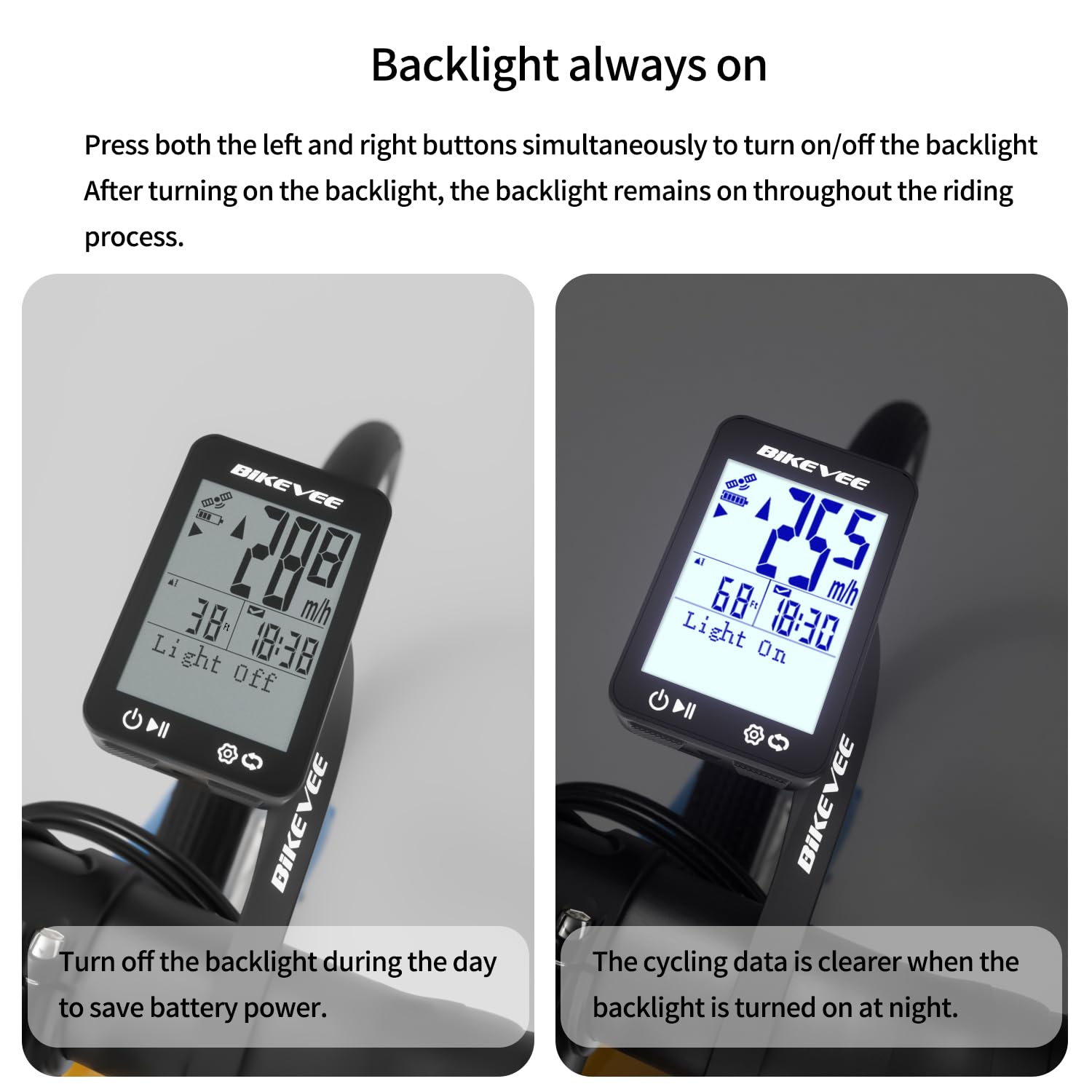
Image: Backlight functionality, showing display with backlight off and on.
5. Maintenance and Care
5.1 Cleaning
Wipe the device with a soft, damp cloth. Do not use abrasive cleaners or solvents, as they may damage the screen or casing.
5.2 Waterproofing
The Bikevee GPS Bike Computer has an IPX7 waterproof rating, meaning it can withstand immersion in water up to 1 meter for 30 minutes. This protects it from rain and splashes during your rides. However, avoid prolonged submersion or high-pressure water jets.
5.3 Battery Charging
The device is equipped with a 650mAh Lithium Ion battery, providing up to 28 hours of continuous use. Charge the device using the provided USB-C charging cable when the battery indicator is low.
6. Troubleshooting
If you encounter issues with your Bikevee GPS Bike Computer, consider the following:
- Device not powering on: Ensure the battery is charged. Connect the device to the charging cable and allow it to charge for at least 30 minutes before attempting to power it on again.
- GPS signal not acquired: Ensure you are in an open area with a clear view of the sky. Initial GPS acquisition can take longer. If indoors or under heavy tree cover, signal acquisition may be difficult.
- Inaccurate data: Ensure the device is securely mounted and has a clear GPS signal. Verify that the correct units (MPH/KM/H) are selected in the settings.
- Screen not visible: Check the backlight setting. If the backlight is off, press both left and right buttons simultaneously to activate it.
For further assistance, please refer to the contact information in the Warranty and Support section.
7. Specifications
| Feature | Specification |
|---|---|
| Brand | Bikevee |
| Model Number | SF20250929B0FN818NDK |
| Color | Black |
| Product Dimensions | 45L x 16W x 70H Millimeters |
| Item Weight | 50 Grams |
| Screen Size | 2.4 Inches |
| Display Type | LCD |
| Battery Life | 28 Hours |
| Battery Cell Composition | Lithium Ion |
| International Protection Rating | IPX7 |
| Mounting Type | Handlebar Mount |
| Human Interface Input | Buttons |
| Country of Origin | China |

Image: Summary of key product features and specifications.
8. Warranty and Support
8.1 Quality Assurance
Bikevee is committed to providing dependable products. This GPS Bike Computer is designed for lasting satisfaction.
8.2 Customer Support
For any questions, technical support, or warranty claims, please contact Bikevee customer service through the retailer where you purchased the product or visit the official Bikevee website for contact information.
Related documentsSF20250929B0FN818NDK


Ask a question about this manual
Ask about setup, troubleshooting, compatibility, parts, safety, or missing instructions. Manuals+ will review the question and use this page’s manual context to help answer it.