
1. Introduction
Thank you for choosing the JUMMICO JETSTREAM Ergonomic Gaming Chair. This manual provides essential information for the safe assembly, operation, and maintenance of your new chair. Please read these instructions carefully before use and retain them for future reference.
2. Safety Information
WARNING:
- Assemble the chair carefully according to the provided instructions.
- The maximum weight capacity for this chair is 150 kg (330 lbs). Do not exceed this limit to prevent accidents or damage.
- Do not stand on the chair.
- Ensure all bolts and screws are securely tightened before use. Periodically check and re-tighten as necessary.
- Keep children and pets away during assembly.
- Use the chair on a flat, stable surface.
3. Package Contents
Before assembly, please ensure all components are present and undamaged. If any parts are missing or damaged, contact customer support immediately.
- Backrest
- Seat Cushion
- Armrests (2)
- Gas Lift Cylinder
- Gas Lift Cover
- Star Base
- Casters (5)
- Mechanism Plate
- Lumbar Support Cushion (with massage function)
- Headrest Cushion
- Footrest
- Hardware Pack (screws, washers, Allen key)
- Assembly Instructions Manual
4. Assembly Instructions
The JUMMICO JETSTREAM chair features a quick assembly design, typically taking around 20 minutes. For detailed, step-by-step visual instructions, please refer to the separate assembly guide included in your package. Below is a general overview of the assembly process.
- Attach Casters to Base: Insert the five casters into the holes at the end of the star base.
- Install Gas Lift: Place the gas lift cylinder into the center hole of the star base, then cover it with the gas lift cover.
- Attach Mechanism Plate to Seat: Secure the mechanism plate to the underside of the seat cushion using the provided screws. Ensure the front of the mechanism faces the front of the seat.
- Connect Armrests: Attach the armrests to the seat cushion using the designated screws.
- Attach Backrest to Seat: Align the backrest with the seat cushion and secure it using screws.
- Mount Seat Assembly to Gas Lift: Carefully place the assembled seat onto the gas lift cylinder.
- Attach Lumbar and Headrest Cushions: Secure the lumbar and headrest cushions using their integrated straps.
- Install Footrest: Slide the footrest into its designated slots on the mechanism.
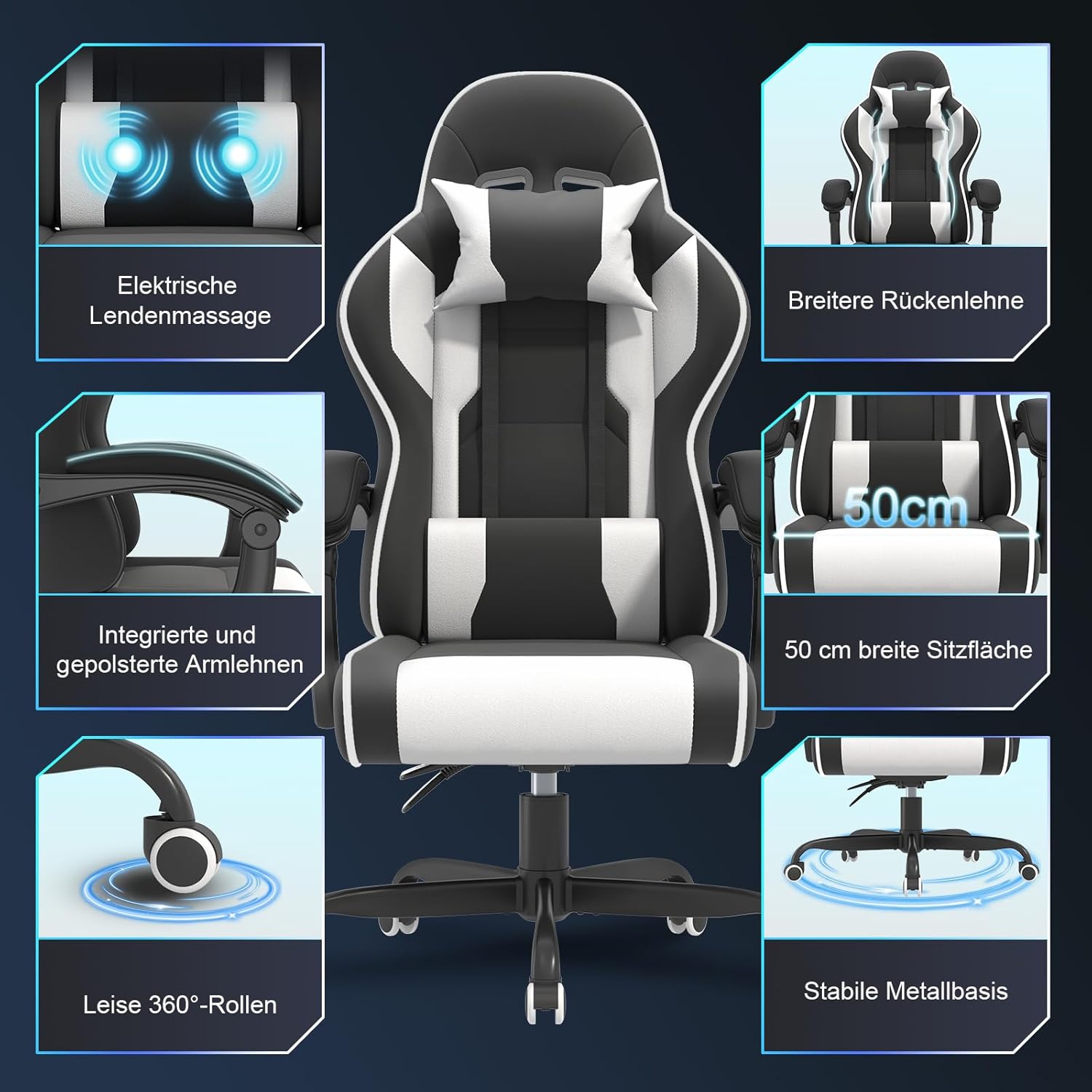
Image: Overview of JUMMICO JETSTREAM chair components and features.
5. Operating Instructions
5.1. Height Adjustment
To adjust the chair height, pull the lever located under the right side of the seat upwards. While pulling the lever, lift your body weight off the seat to raise the chair, or remain seated to lower it. Release the lever to lock the height.
5.2. Backrest Recline
The backrest can be reclined between 90 and 150 degrees. Pull the recline lever (usually on the right side, below the seat) upwards and lean back to your desired angle. Release the lever to lock the backrest in position. The chair offers fixed recline positions at 90, 120, and 150 degrees for optimal comfort during work, relaxation, or gaming.
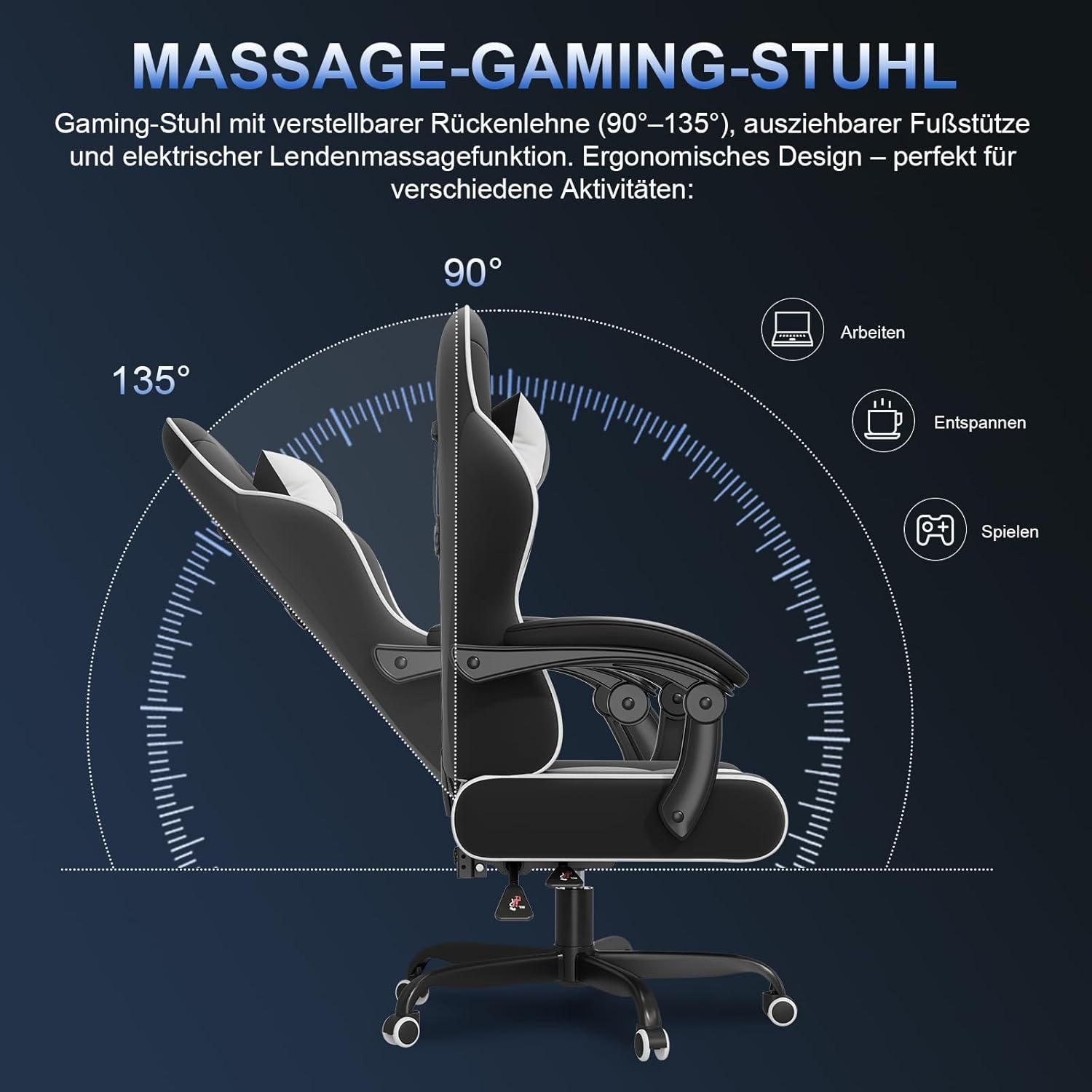
Image: Backrest recline angles for various activities.
5.3. Lumbar Massage Function
The integrated lumbar cushion features a 2-point high-frequency electric massage function. To activate, connect the USB cable from the lumbar cushion to a compatible USB power source (e.g., computer, power bank, USB wall adapter). The massage function helps alleviate fatigue during long periods of sitting.

Image: Detail of the electric lumbar massage function.
5.4. Adjustable Armrests
The armrests are designed to be movable, providing optimal support for different postures. They can be adjusted to suit both working and relaxing positions, enhancing overall comfort.

Image: Adjustable armrest positions for work and relaxation.
5.5. Retractable Footrest
Pull out the footrest from underneath the seat to extend it. This feature provides additional leg support for relaxation, especially when the backrest is reclined. Push it back in when not in use.
5.6. Lumbar and Headrest Cushions
The adjustable lumbar and headrest cushions are designed to provide optimal support for your neck, shoulders, back, and lumbar region, promoting correct posture and reducing muscle stress. Adjust their position by sliding them along the backrest straps to find your most comfortable support points.
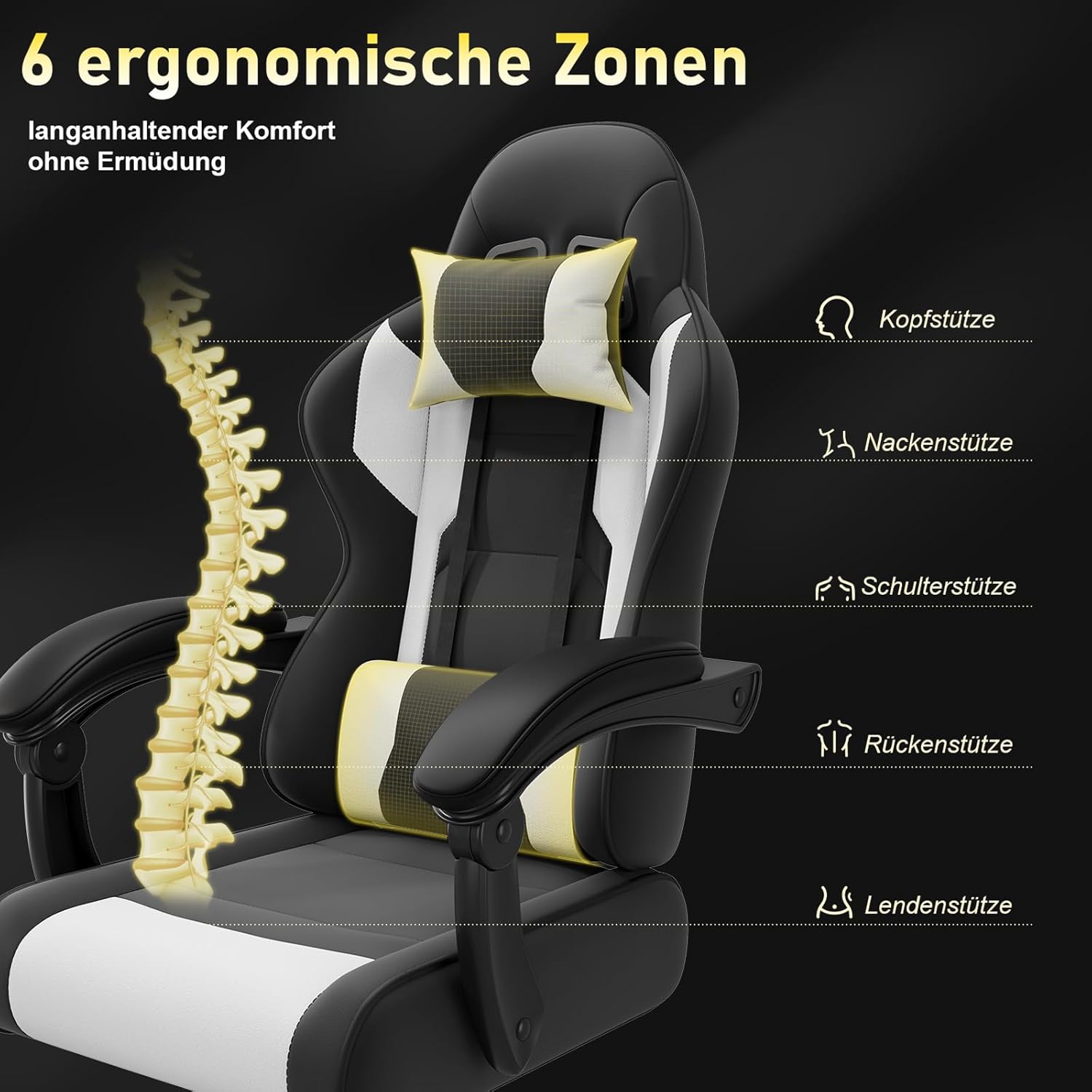
Image: Six ergonomic support zones of the JUMMICO JETSTREAM chair.
6. Maintenance
- Cleaning: Wipe the chair's surface with a soft, damp cloth. For stubborn stains, use a mild soap solution and then wipe with a clean, damp cloth. Avoid harsh chemicals or abrasive cleaners.
- Hardware Check: Periodically check all screws and bolts to ensure they are tight. Re-tighten any loose hardware to maintain stability and safety.
- Caster Care: Keep the casters clean from dust and hair to ensure smooth movement.
- Avoid Overloading: Do not exceed the maximum weight capacity of 150 kg.
- Sunlight Exposure: Avoid prolonged exposure to direct sunlight to prevent fading and material degradation.
7. Troubleshooting
- Chair Squeaks: Check and tighten all screws and bolts. A small amount of silicone lubricant can be applied to moving parts if necessary.
- Chair Wobbles: Ensure the star base is fully assembled and the gas lift is properly seated. Check that all screws connecting the seat and backrest are tight.
- Height Adjustment Not Working: Verify that the gas lift lever is functioning correctly and that the gas lift cylinder is not damaged. Ensure the gas lift is fully inserted into the base.
- Backrest Recline Not Holding: Check the recline mechanism lever. Ensure it is fully engaged when released.
- Massage Function Not Working: Confirm the USB cable is securely connected to a working power source. Check for any damage to the cable or the lumbar cushion.
8. Specifications
| Brand | JUMMICO |
| Model | JETSTREAM (0482A) |
| Color | White and Black |
| Product Dimensions (L x W x H) | 50 x 50 x 130 cm |
| Item Weight | 18.7 kg |
| Maximum Weight Capacity | 150 kg (330 lbs) |
| Seat Width | 50 cm |
| Recline Angle | 90° - 150° |
| Massage Function | 2-point electric lumbar massage (USB powered) |
9. Warranty and Customer Support
JUMMICO is committed to providing high-quality products. If you encounter any issues or have questions regarding your JETSTREAM gaming chair, please contact our customer support team. For purchases made through Amazon, you can reach us via the Amazon platform. Your satisfaction is our priority.
Please retain your proof of purchase for any warranty claims.
