
Sharmeal GL902-15000-CDT-4
Sharmeal GL902-15000A Jump Starter User Manual
1. Introduction
The Sharmeal GL902-15000A is a versatile and portable jump starter designed to provide emergency starting power for vehicles and serve as a power bank for electronic devices. This manual provides essential instructions for the safe and effective operation, maintenance, and troubleshooting of your device. Please read this manual thoroughly before first use and retain it for future reference.
2. Important Safety Information
Always observe the following safety precautions to prevent injury or damage to the device and vehicle:
- Read all instructions carefully before using the jump starter.
- Wear appropriate eye protection (safety glasses) when working with vehicle batteries.
- Do not short-circuit the jumper clamps. Avoid touching the red and black clamps together.
- Keep the device away from children and pets.
- Do not expose the jump starter to rain, water, or extreme temperatures.
- Ensure proper polarity when connecting the jumper cables to the vehicle battery (red to positive, black to negative). Incorrect connection can cause damage.
- Do not attempt to jump start a frozen or damaged battery.
- If the jump starter becomes excessively hot during use, disconnect it immediately and allow it to cool down.
- Only use the provided smart jumper cables with the device.

Image: Safety Protections Overview
This image illustrates the multiple safety protections integrated into the Sharmeal GL902-15000A Jump Starter, including reverse reconnection, over-discharge, over-current, short circuit, reverse charge, over-temperature, low voltage, reverse polarity, over-charge, and low-temperature protection. These features ensure safe operation during vehicle jump-starting and device charging.
3. Package Contents
Please check the package for the following items:
- Sharmeal GL902-15000A Jump Starter Unit
- Smart Jumper Cables with Clamps
- USB-C Charging Cable
- User Manual
- Storage Case
4. Product Overview
The Sharmeal GL902-15000A features a compact design with multiple functionalities. Familiarize yourself with its components:
- Intelligent Screen Display: Shows battery level, inflation mode, and real-time tire pressure (if applicable to specific model variants).
- LED Flashlight: Provides illumination with multiple modes (illumination, SOS, strobe).
- Dual USB Output (5V/2A): For charging smartphones, tablets, laptops, and other USB-powered devices.
- Jump Starter Port: Connection point for the smart jumper cables.
- USB-C Input Port: For recharging the jump starter unit.
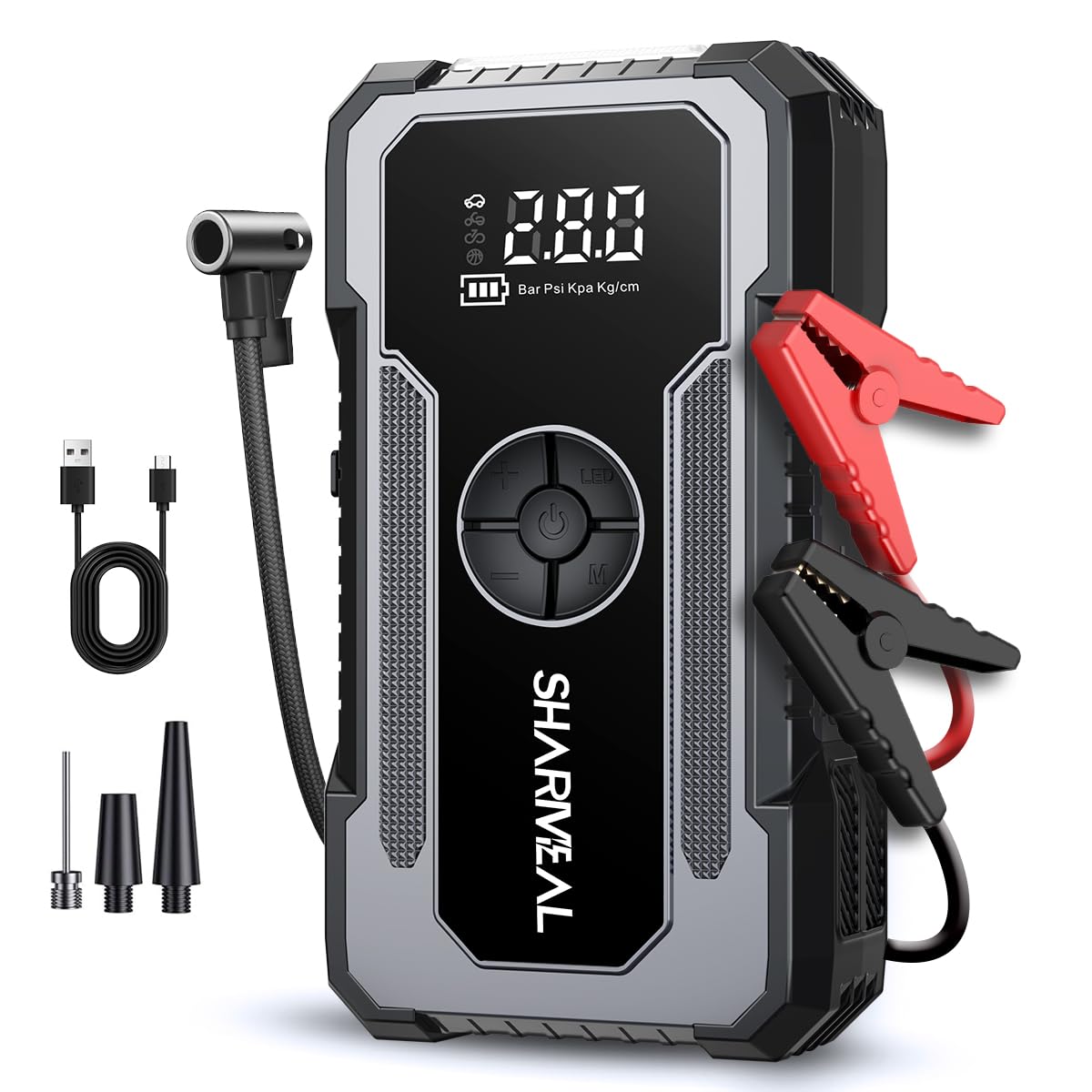
Image: Portable Power Bank Output
This image highlights the Sharmeal GL902-15000A's capability to function as a portable power bank, demonstrating its dual USB output ports. It shows various devices like headphones, cameras, smartwatches, laptops, cell phones, and tablets being charged, emphasizing its versatility beyond just jump-starting vehicles.

Image: Intelligent Screen Display
This image focuses on the intelligent screen display of the Sharmeal GL902-15000A. The display shows critical information such as battery level, and potentially inflation mode and real-time tire pressure (PSI, KPA, Kg/cm²), providing users with clear, at-a-glance operational status.
5. Setup and Charging
5.1 Initial Charging of the Jump Starter
Before using the Sharmeal GL902-15000A for the first time, ensure it is fully charged. This maximizes its performance and extends battery life.
- Connect the provided USB-C charging cable to the input port on the jump starter.
- Connect the other end of the USB-C cable to a suitable USB wall adapter (not included) or a powered USB port.
- The intelligent screen display will indicate the charging status. Charge until the display shows 100% or a full battery icon.
- Charging typically takes several hours.
5.2 Preparing Jumper Cables
Inspect the smart jumper cables for any signs of damage, such as frayed wires or cracked insulation, before each use. Ensure the clamps are clean and free of corrosion.
6. Operating Instructions
6.1 Jump Starting a Vehicle
Follow these steps carefully to safely jump start your vehicle:
- Ensure the jump starter is sufficiently charged (at least 50% recommended).
- Turn off the vehicle's ignition and all accessories (lights, radio, AC).
- Connect the red (+) clamp of the smart jumper cables to the positive (+) terminal of the vehicle's battery.
- Connect the black (-) clamp of the smart jumper cables to the negative (-) terminal of the vehicle's battery.
- Insert the plug of the smart jumper cables firmly into the jump starter's jump start port. The indicator on the smart cable should show a solid green light, indicating a correct connection.
- Start the vehicle's engine. If it doesn't start immediately, wait 30 seconds and try again. Do not crank for more than 3 seconds per attempt.
- Once the vehicle starts, immediately disconnect the smart jumper cable plug from the jump starter unit.
- Then, disconnect the black (-) clamp from the vehicle battery, followed by the red (+) clamp.
6.2 Using as a Portable Power Bank
The Sharmeal GL902-15000A can charge various electronic devices via its dual USB output ports.
- Connect your device's USB charging cable to one of the USB output ports (5V/2A) on the jump starter.
- The jump starter will automatically begin charging your device.
- Monitor your device's charging status.
6.3 Using the LED Flashlight
The integrated LED flashlight offers multiple lighting modes for convenience and emergencies.
- Illumination: Long press the power button to turn on the flashlight for continuous illumination.
- SOS Mode: With the flashlight on, short press the power button to switch to SOS signaling mode.
- Strobe Mode: With the flashlight in SOS mode, short press the power button again to activate the strobe light mode.
- Turn Off: Long press the power button to turn off the flashlight from any mode.
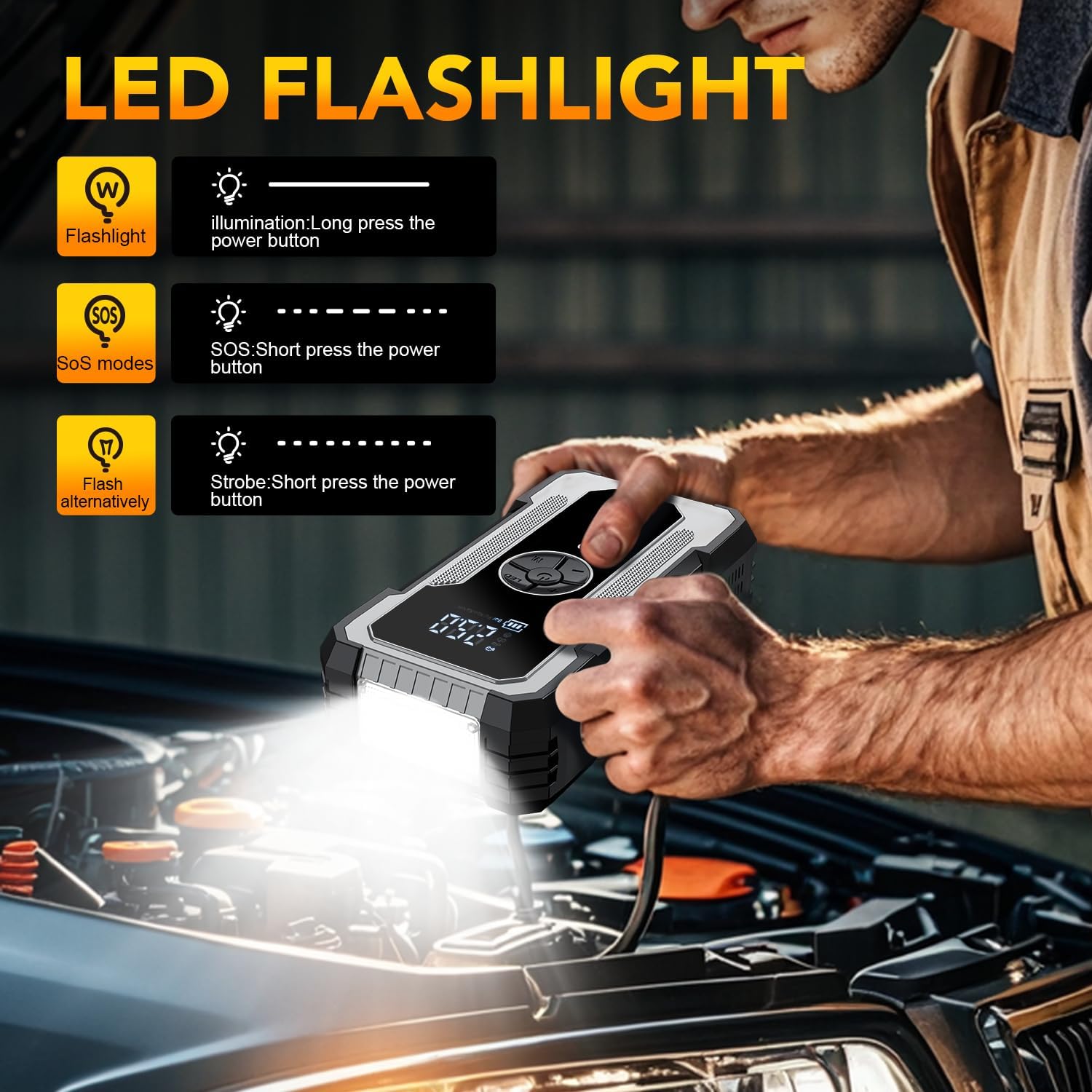
Image: LED Flashlight Functionality
This image demonstrates the LED flashlight feature of the Sharmeal GL902-15000A Jump Starter. It shows the flashlight illuminating an engine bay and details the three modes: standard illumination (long press), SOS mode (short press), and strobe mode (short press again), highlighting its utility in low-light conditions or emergencies.
7. Maintenance and Storage
7.1 Cleaning
Wipe the exterior of the jump starter with a soft, dry cloth. Do not use harsh chemicals or abrasive cleaners. Ensure all ports are free of dust and debris.
7.2 Storage
Store the Sharmeal GL902-15000A in a cool, dry place, away from direct sunlight, moisture, and flammable materials. The ideal storage temperature is between 0°C and 40°C (32°F and 104°F).
7.3 Recharging
To maintain optimal battery health, recharge the jump starter every 3-6 months, even if it has not been used. This prevents deep discharge and prolongs the lifespan of the internal battery.
8. Troubleshooting
If you encounter issues with your Sharmeal GL902-15000A, refer to the following common problems and solutions:
| Problem | Possible Cause | Solution |
|---|---|---|
| Jump starter does not turn on. | Low battery level. | Recharge the jump starter fully. |
| Vehicle does not start after jump-starting. | Incorrect cable connection. Vehicle battery severely discharged or damaged. Jump starter battery too low. | Ensure clamps are connected correctly (red to +, black to -). Check vehicle battery for damage. If severely discharged, allow more time for the jump starter to provide a charge before attempting to start. Recharge the jump starter. |
| Smart jumper cable indicator shows red light or error. | Reverse polarity, short circuit, or other safety trigger. | Disconnect cables immediately. Recheck connections for correct polarity. Ensure clamps are not touching each other or other metal parts. |
| Devices not charging via USB. | Jump starter battery low. Faulty USB cable or device. | Recharge the jump starter. Try a different USB cable or device to isolate the issue. |
If the problem persists after attempting these solutions, please contact customer support.
9. Specifications
| Feature | Specification |
|---|---|
| Brand | Sharmeal |
| Model | GL902-15000-CDT-4 |
| Battery Cell Composition | Lithium Ion |
| Battery Capacity | 15000 Milliamp Hours |
| Amperage | 15000 Amps (Peak) |
| Product Dimensions (D x W x H) | 1.1" x 7" x 3" |
| Item Weight | 1.76 Pounds |
| Vehicle Service Type Compatibility | All of the above (Car, Motorcycle, RV, Tractor, etc.) |
| USB Output | Dual 5V/2A |
| Charging Input | USB-C |
10. Warranty and Customer Support
10.1 Warranty Information
For detailed warranty information regarding your Sharmeal GL902-15000A Jump Starter, please refer to the product packaging or visit the official Sharmeal website. Warranty terms and conditions may vary by region and retailer.
10.2 Customer Support
If you have any questions, require technical assistance, or need to report an issue with your product, please contact Sharmeal customer service. Contact details can typically be found on the product packaging, the official Sharmeal website, or through your purchase platform.
Ask a question about this manual
Ask about setup, troubleshooting, compatibility, parts, safety, or missing instructions. Manuals+ will review the question and use this page’s manual context to help answer it.