
Introduction
This manual provides essential instructions for setting up, operating, and maintaining your Konitee IDW25 Smart Watch. Please read this manual thoroughly before use to ensure proper functionality and to maximize your device's potential.

Figure 1: Konitee IDW25 Smart Watch
What's in the Box
- Konitee IDW25 Smart Watch (1)
- Charging Cable (1)
- English User Manual (1)

Figure 2: Package Contents
Setup
1. Charging the Smart Watch
Before initial use, fully charge your Konitee IDW25 Smart Watch. Connect the magnetic charging cable to the charging points on the back of the watch and plug the USB end into a 5V1A power adapter or a computer USB port. A full charge typically takes approximately 2.5 hours.

Figure 3: Charging the Smart Watch
2. App Installation and Device Pairing
To access all features and synchronize data, download the 'VeryFit' app from the Google Play Store (for Android) or the Apple App Store (for iOS). Ensure your phone's Bluetooth is enabled.
- Open the 'VeryFit' app and follow the on-screen instructions to create an account or log in.
- In the app, select 'Add Device' or 'Pair Device'. The app will search for available devices.
- Select 'IDW25' from the list of found devices.
- Confirm the pairing request on both your phone and the smart watch.
- Allow necessary permissions for notifications and data synchronization.
Video 1: How to Connect Bluetooth
3. Band Installation and Removal
The watch bands are designed for easy installation and removal. To remove, locate the small pin on the underside of the band near the watch body. Slide the pin inwards and gently pull the band away from the watch. To install, align the pin with the corresponding hole on the watch body, slide the pin inwards, and push the band into place until the pin locks securely.
Video 2: How to Fit & Remove the Watch Band
Operating the Smart Watch
1. Basic Navigation
- Swipe Up/Down: Scroll through menus and notifications.
- Swipe Left/Right: Access quick functions or different data screens.
- Press Side Button: Return to the home screen or power on/off (long press).
- Tap: Select an item or confirm an action.
2. Watch Faces
The IDW25 offers over 100 cloud-based watch faces. You can change the watch face directly on the device by long-pressing the home screen and swiping, or through the 'VeryFit' app for more customization options, including using your own photos.

Figure 4: Customizable Watch Faces
3. Bluetooth Calling & Message Notifications
Once paired with your smartphone via Bluetooth and the 'VeryFit' app, the smart watch allows you to make and receive calls directly from your wrist using its built-in microphone and speaker. You can also store contacts and view call records. Real-time notifications from various apps (SMS, Facebook, WhatsApp, Instagram, TikTok, Twitter, Snapchat, etc.) will be displayed on the watch screen.
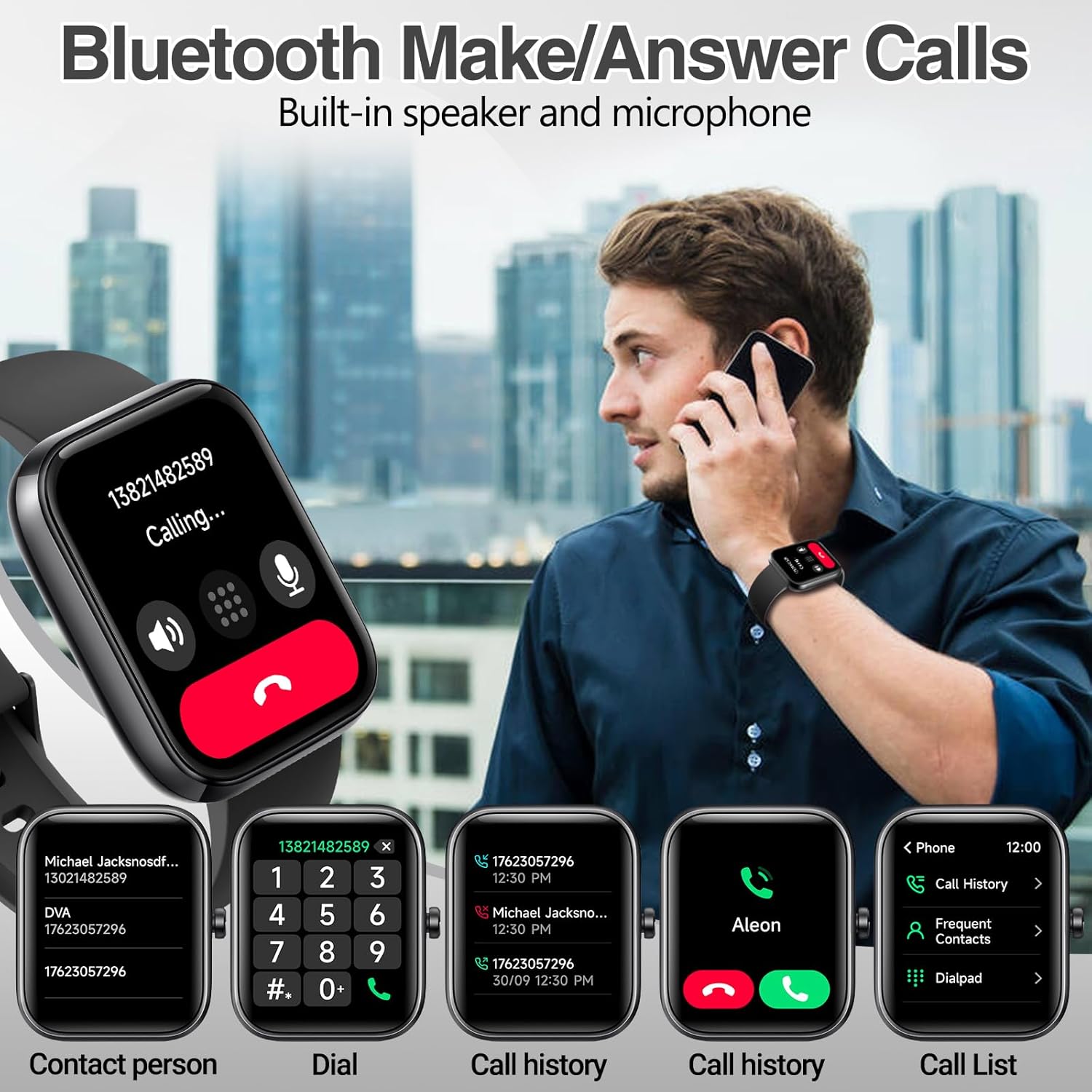
Figure 5: Bluetooth Call Function

Figure 6: Message Notifications
4. Alexa Voice Assistant
The IDW25 Smart Watch features built-in Amazon Alexa. After connecting your Amazon account through the 'VeryFit' app, you can use voice commands to check news, weather forecasts, set alarms, and control compatible smart home devices.

Figure 7: Alexa Voice Assistant
5. Music Control
Control music playback on your connected smartphone directly from your watch. You can play, pause, skip tracks, and adjust volume.
Health Monitoring
The IDW25 Smart Watch provides 24/7 health monitoring features. For accurate readings, ensure the watch is worn snugly on your wrist.

Figure 8: Health Monitoring Features
- Heart Rate Monitor: Tracks your heart rate throughout the day.
- Blood Oxygen (SpO2) Monitor: Measures your blood oxygen levels.
- Sleep Monitor: Analyzes your sleep patterns, including light, deep, and REM sleep stages.
- Stress Monitor: Provides insights into your stress levels based on heart rate variability (HRV).
- Women's Health Tracking: Offers menstrual cycle tracking features.
Activity Tracking
The IDW25 Smart Watch supports over 110 built-in sport modes, including walking, running, cycling, swimming, football, and more. It accurately records calories burned, distance traveled, and other exercise data. You can add your favorite sports modes via the 'VeryFit' app.

Figure 9: 110+ Sport Modes
- GPS: Utilizes your smartphone's GPS for accurate outdoor activity tracking.
- Activity Data: Records steps, distance, calories, and active minutes.
Water Resistance (IP68)
The Konitee IDW25 Smart Watch is IP68 rated for water resistance. This means it is protected against dust and can withstand immersion in water up to 1.5 meters for up to 30 minutes. It is suitable for daily activities such as hand washing, showering, and swimming in a pool. Note: Do not use the watch in hot water, saunas, or hot springs, as steam and high temperatures can compromise the water seal.
Video 3: IDW25 Smart Watch Waterproof Test
Battery Life
The IDW25 Smart Watch is equipped with a 300mAh battery, providing:
- Up to 5-7 days of active use.
- Up to 30 days on standby.
Actual battery life may vary based on usage patterns and settings.
Specifications
| Model Number | IDW25 |
| Screen Size | 1.83 Inches |
| Battery Capacity | 300 Milliamp Hours |
| Operating System | Android 6.0 and iOS 9.0+ |
| Water Resistance | IP68 |
| Connectivity | Bluetooth |
| Special Features | Activity Tracker, Lightweight, Notifications, Sedentary Reminder, Weather Forecast, Alexa Built-in |
| Item Weight | 2.39 ounces |
Troubleshooting
1. Device Not Pairing
- Ensure Bluetooth is enabled on your smartphone.
- Make sure the watch is sufficiently charged.
- Restart both your smartphone and the smart watch.
- Ensure the 'VeryFit' app is updated to the latest version.
- If issues persist, try unpairing and re-pairing the device through the app.
2. Inaccurate Health Data
- Ensure the watch is worn snugly on your wrist, not too loose or too tight.
- Keep your body still during measurements for heart rate and SpO2.
- Avoid caffeine, nicotine, and alcohol before measurements as they can affect readings.
3. Notifications Not Appearing
- Check that the watch is successfully paired with your phone.
- Verify that notification permissions are granted for the 'VeryFit' app and individual apps on your smartphone.
- Ensure 'Do Not Disturb' mode is not active on either your phone or watch.
Maintenance
- Clean the watch regularly with a soft, dry cloth.
- Avoid exposing the watch to extreme temperatures or direct sunlight for prolonged periods.
- Do not attempt to disassemble or repair the watch yourself. Contact customer support for assistance.
Warranty and Support
Konitee offers a 1-year warranty on the IDW25 Smart Watch. For technical support, warranty claims, or any inquiries, please contact Konitee customer service. Refer to the contact information provided in your product packaging or on the official Konitee website.