1. Introduction
This manual provides essential information for the proper use and maintenance of your ZWP GK-001 Replacement Remote Control. Please read these instructions carefully before operating the device to ensure optimal performance and longevity. This remote is designed for specific Bifanuo Walking Pad Treadmill models.
2. Product Overview
The ZWP GK-001 is a high-quality replacement remote control crafted from durable ABS material, offering a comfortable grip and wear-resistant properties. It features a stable signal, quick response, smart chip technology, and power-saving capabilities for an enhanced user experience.

Figure 1: Front view of the ZWP GK-001 Replacement Remote Control.

Figure 2: Key features of the remote control, including stable link, quick response, smart chip, and power saving.

Figure 3: Design aspects emphasizing comfortable feel, use of environmentally friendly ABS, and quality assurance.
3. Setup
3.1 Battery Installation
The ZWP GK-001 remote control requires one CR2025 3V Lithium Button Battery (not included). Follow these steps to install the battery:
- Locate the battery compartment on the back of the remote control.
- Gently slide open the battery cover.
- Insert the CR2025 battery with the positive (+) side facing upwards, as indicated inside the compartment.
- Close the battery cover securely until it clicks into place.
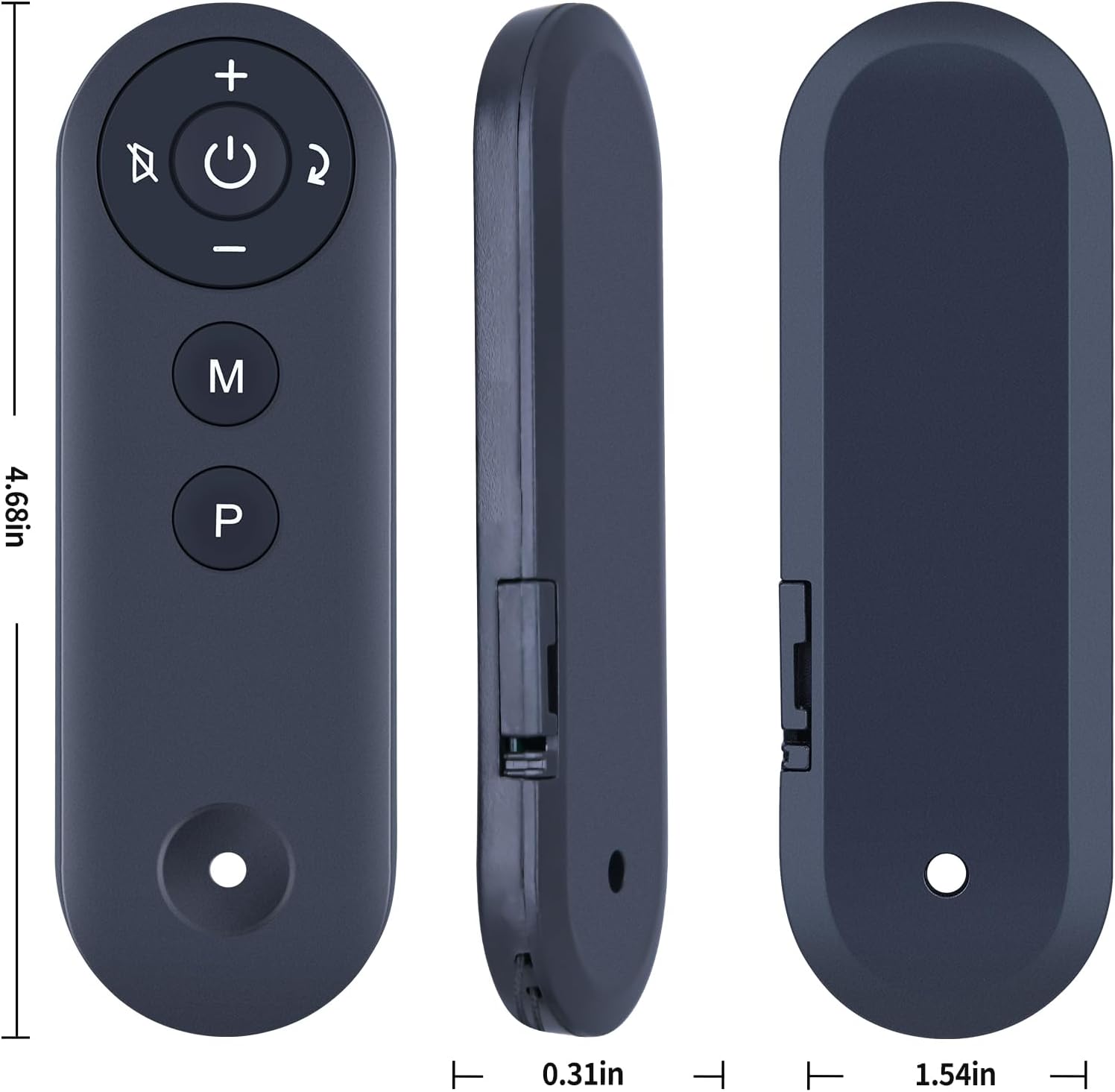
Figure 4: View of the battery compartment on the remote control.

Figure 5: Illustration of the CR2025 3V Lithium Battery required for operation.
4. Operating Instructions
4.1 Pairing the Remote Control
To ensure proper communication between the remote control and your Bifanuo Walking Pad Treadmill, pairing is required. Follow these steps:
- Power on your Bifanuo Walking Pad Treadmill.
- Wait for the treadmill's display to complete its power-on sequence (typically within 20 seconds).
- On the remote control, long press the "—" (minus) key.
- Continue holding the "—" key until the treadmill's display panel begins to blink.
- Release the "—" key. The display panel will blink twice, and the treadmill's buzzer will sound twice, indicating successful pairing.
If the remote control is unresponsive after battery installation, repeat this pairing process once.

Figure 6: The remote control operating a treadmill, demonstrating an effective operational distance of up to 8 meters.

Figure 7: The remote control in hand, illustrating enhanced signal strength and extended service life.
5. Maintenance
To maintain your remote control in optimal condition:
- Keep the remote control clean by wiping it with a soft, dry cloth.
- Avoid exposing the remote to extreme temperatures, direct sunlight, or moisture.
- If the remote will not be used for an extended period, remove the battery to prevent leakage.
6. Troubleshooting
6.1 Remote Control Not Responding
- Check Battery: Ensure the CR2025 battery is correctly installed with the correct polarity and is not depleted. Replace if necessary.
- Re-Pairing: If the remote becomes unresponsive, repeat the pairing procedure described in Section 4.1.
- Obstructions: Ensure there are no physical obstructions between the remote control and the treadmill's receiver.
- Distance: Confirm you are within the operational range (approximately 8 meters) of the treadmill.
7. Specifications
| Feature | Specification |
|---|---|
| Model | GK-001 |
| Brand | ZWP |
| Compatible Devices | Bifanuo Walking Pad Treadmills (TM008, TM008BK, TM008CK, TM006-BK, TM002, TM001, TM008SL, TM009) |
| Power Source | 1 x CR2025 3V Lithium Battery (not included) |
| Material | High-quality ABS |
| Color | Black |
| Item Weight | 2.08 ounces |
| Package Dimensions | 7.4 x 2.5 x 1.1 inches |
Figure 8: Detailed dimensions of the ZWP GK-001 remote control.
8. Warranty and Support
For any questions, concerns, or issues regarding your ZWP GK-001 Replacement Remote Control, please contact the seller or manufacturer directly. Refer to your purchase documentation for specific warranty details and customer support contact information. We are committed to assisting you with any difficulties you may encounter.


