
1. Introduction
The be quiet! Pure Power 13M 850W is a high-performance PC power supply unit designed for reliable and quiet operation. It features 80 Plus Gold and Cybenetics Gold certification, ensuring high efficiency across various workloads, including gaming and creative applications. This power supply is compliant with ATX 3.1 and PCIe 5.1 standards, supporting high-end graphics cards with up to 600W power delivery. Its dedicated 120mm silent fan operates in a semi-passive mode, providing a quiet computing environment by only activating under sufficient load. This manual provides essential information for the safe and proper installation, operation, and maintenance of your Pure Power 13M 850W power supply.
2. Safety Information
- Always disconnect the power supply from the mains electricity before installation, maintenance, or troubleshooting.
- Installation should be performed by qualified personnel. Incorrect installation can lead to damage to the unit or other components.
- Do not open the power supply unit casing. High voltages are present inside, which can cause electric shock.
- Keep the power supply away from moisture, liquids, and extreme temperatures.
- Ensure proper ventilation around the power supply to prevent overheating.
- Use only the modular cables provided with the power supply. Using incompatible cables can cause damage.
3. Package Contents
Verify that all items are present in the package:
- be quiet! Pure Power 13M 850W Power Supply Unit
- Modular Cable Set (including 24-pin ATX, 8-pin CPU, PCIe 6+2 pin, SATA, and PATA connectors)
- AC Power Cord
- Mounting Screws
- Instruction Manual
4. Installation
Follow these steps to install your power supply unit:
- Prepare Your System: Ensure your computer case is compatible with ATX power supplies. Disconnect all power from your PC and open the case.
- Mount the Power Supply: Carefully slide the Pure Power 13M 850W into the designated PSU bay in your PC case. Secure it with the provided mounting screws.
- Connect Modular Cables: Identify the necessary cables for your components. Connect the 24-pin ATX cable to your motherboard. Connect the 8-pin (or 4+4 pin) CPU power cable to your motherboard.
- Connect Graphics Card (GPU): For high-end graphics cards, use the appropriate PCIe 6+2 pin connectors. The Pure Power 13M 850W is compliant with PCIe 5.1, supporting up to 600W for modern GPUs.
- Connect Peripherals: Connect SATA power cables to your storage drives (SSDs, HDDs) and PATA cables to any other compatible peripherals.
- Cable Management: Utilize the full modular design to connect only the cables you need, improving airflow and reducing clutter inside your case.
- Final Check: Double-check all connections to ensure they are secure and correctly seated. Close your PC case.
- Connect to Mains: Connect the AC power cord to the power supply and then to a wall outlet.
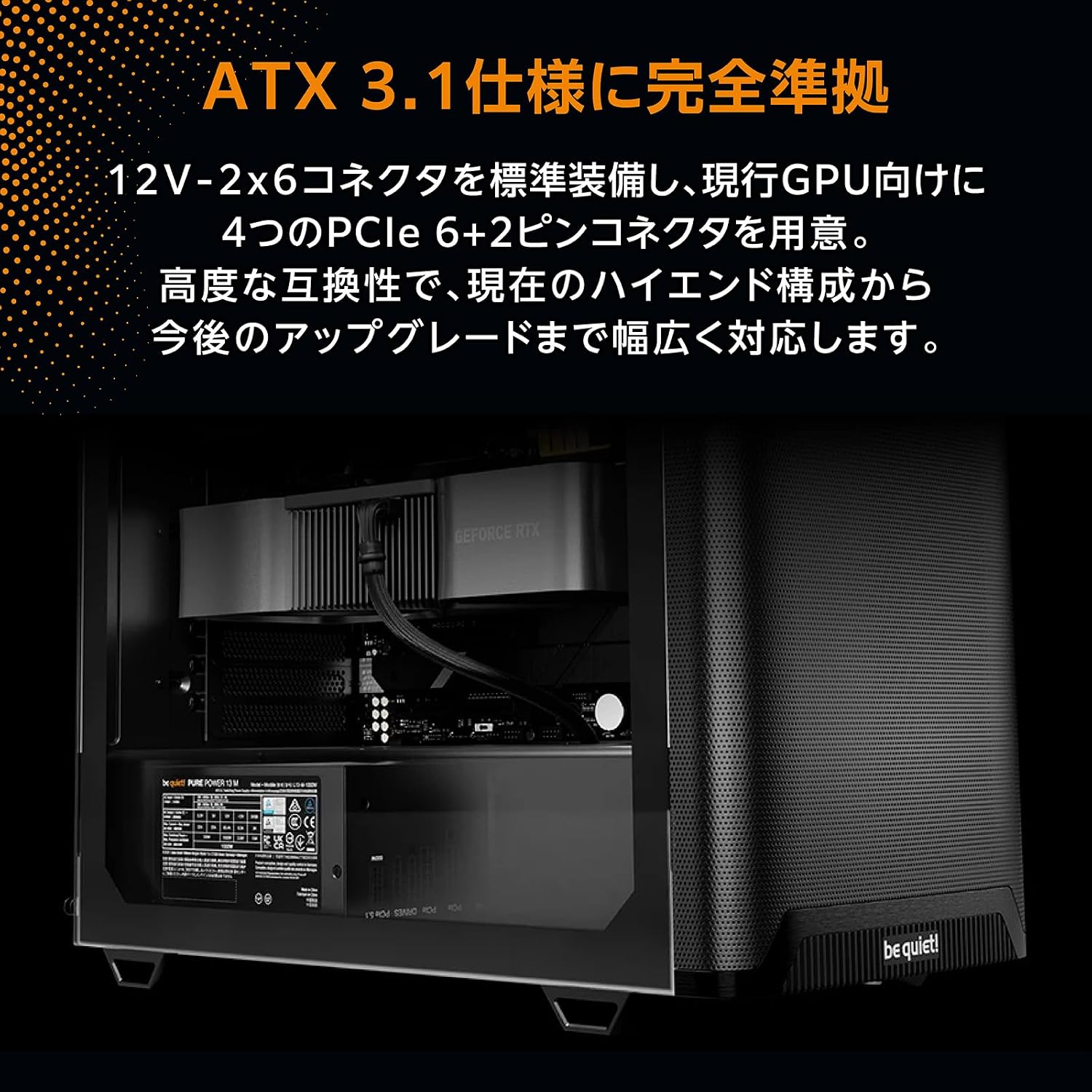
Image: The Pure Power 13M 850W power supply unit correctly installed within a computer case, demonstrating cable routing.

Image: A close-up view of the modular cable ports on the power supply, showing labels for motherboard (MB), PCIe, and drive connections.
5. Operation
Once installed, turn on your computer. The Pure Power 13M 850W operates with a focus on quietness and efficiency:
- Semi-Passive Mode: The integrated 120mm fan is designed to remain off during low system loads. This semi-passive operation ensures near-silent performance when your PC is idle or performing light tasks.
- Fan Activation: The fan will automatically start spinning once the power supply reaches a certain internal temperature or load threshold. This intelligent control optimizes cooling while minimizing noise.
- High Efficiency: With 80 Plus Gold and Cybenetics Gold certification, the power supply delivers up to 94.4% efficiency, reducing energy waste and operating costs.

Image: A detailed view of the 120mm fan on the Pure Power 13M 850W, highlighting its quiet design.

Image: An angled top-down view of the power supply, showcasing the fan grill and the 'be quiet!' branding on the fan.
6. Maintenance
To ensure optimal performance and longevity of your power supply, follow these maintenance guidelines:
- Dust Removal: Periodically clean the exterior of the power supply and its fan grill to prevent dust buildup. Use compressed air or a soft brush. Ensure the power supply is disconnected from the mains before cleaning.
- Ventilation: Ensure that the air intake and exhaust vents of the power supply are not obstructed. Good airflow is crucial for efficient cooling.
- Cable Check: Occasionally check that all modular cables are securely connected to both the power supply and your components.
7. Troubleshooting
If you encounter issues with your power supply, refer to the following common troubleshooting steps:
- No Power:
- Check if the AC power cord is securely connected to both the power supply and the wall outlet.
- Ensure the power switch on the back of the PSU is in the 'ON' position.
- Verify that all modular cables (24-pin ATX, CPU, GPU) are correctly and firmly seated.
- Test the wall outlet with another device to confirm it has power.
- System Instability/Crashes:
- Ensure your system's power requirements do not exceed the 850W capacity of the PSU.
- Check for loose cable connections.
- Monitor system temperatures to rule out overheating of other components.
- Unusual Noise:
- Confirm that the noise is coming from the PSU and not another component.
- Check for dust buildup on the fan. Clean if necessary (refer to Maintenance section).
- Note that the fan operates in semi-passive mode; it will only spin under load. If the noise occurs only under heavy load, it may be normal operation.
If problems persist after following these steps, contact be quiet! customer support.
8. Specifications
| Feature | Specification |
|---|---|
| Brand | be quiet! |
| Model | Pure Power 13M 850W (BP027JP) |
| Output Power | 850 W |
| Efficiency Certification | 80 PLUS Gold, Cybenetics Gold (up to 94.4%) |
| Form Factor | ATX |
| Fan Size | 120mm |
| Cable Management | Full Modular |
| Dimensions (L x W x H) | 160 x 150 x 86 mm |
| ATX Standard | 3.1 |
| PCIe Standard | 5.1 (up to 600W for high-end video cards) |
| MTBF (Mean Time Between Failures) | 100,000 hours |
| Origin | Germany |

Image: Official 80 PLUS Gold and Cybenetics Gold certification logos, indicating high power efficiency.

Image: An internal view of a power supply unit's circuit board, illustrating the advanced LLC topology for stable voltage control and efficiency.
9. Warranty and Support
The be quiet! Pure Power 13M 850W power supply unit comes with a 10-year manufacturer's warranty from the date of purchase. This warranty covers defects in materials and workmanship under normal use.
For technical support, warranty claims, or further assistance, please visit the official be quiet! website or contact their customer service department. Please have your product model and proof of purchase ready when contacting support.
Online Support: www.bequiet.com


