
1. Introduction
The JBL Bar 1300XMK2 is an 11.1.4 channel soundbar system designed to deliver a cinematic audio experience. It features detachable wireless surround speakers, a 12-inch wireless subwoofer, and supports Dolby Atmos® and DTS:X® for immersive 3D spatial sound. This manual provides instructions for setup, operation, and maintenance to help you maximize your system's performance.

Image 1.1: The JBL Bar 1300XMK2 system, including the main soundbar, two detachable wireless surround speakers, and the wireless subwoofer.
2. What's in the Box
Verify that all components are present in the packaging:
- 1x JBL Bar 1300MK2 Soundbar
- 2x Detachable wireless surround speakers
- 1x Wireless subwoofer (12-inch)
- 1 x HDMI cable
- 4 x Side caps for detachable speakers
- 2 x L-shape wall-mount bracket (for main soundbar)
- 2 x U-shape wall-mount bracket (for surround speakers) kit with screws
- Power cords (up to 6pcs depending on region SKUs)
- Remote control with 2 x batteries

Image 2.1: Rear view of the JBL Bar 1300XMK2 soundbar showing various input ports, alongside the wireless subwoofer.
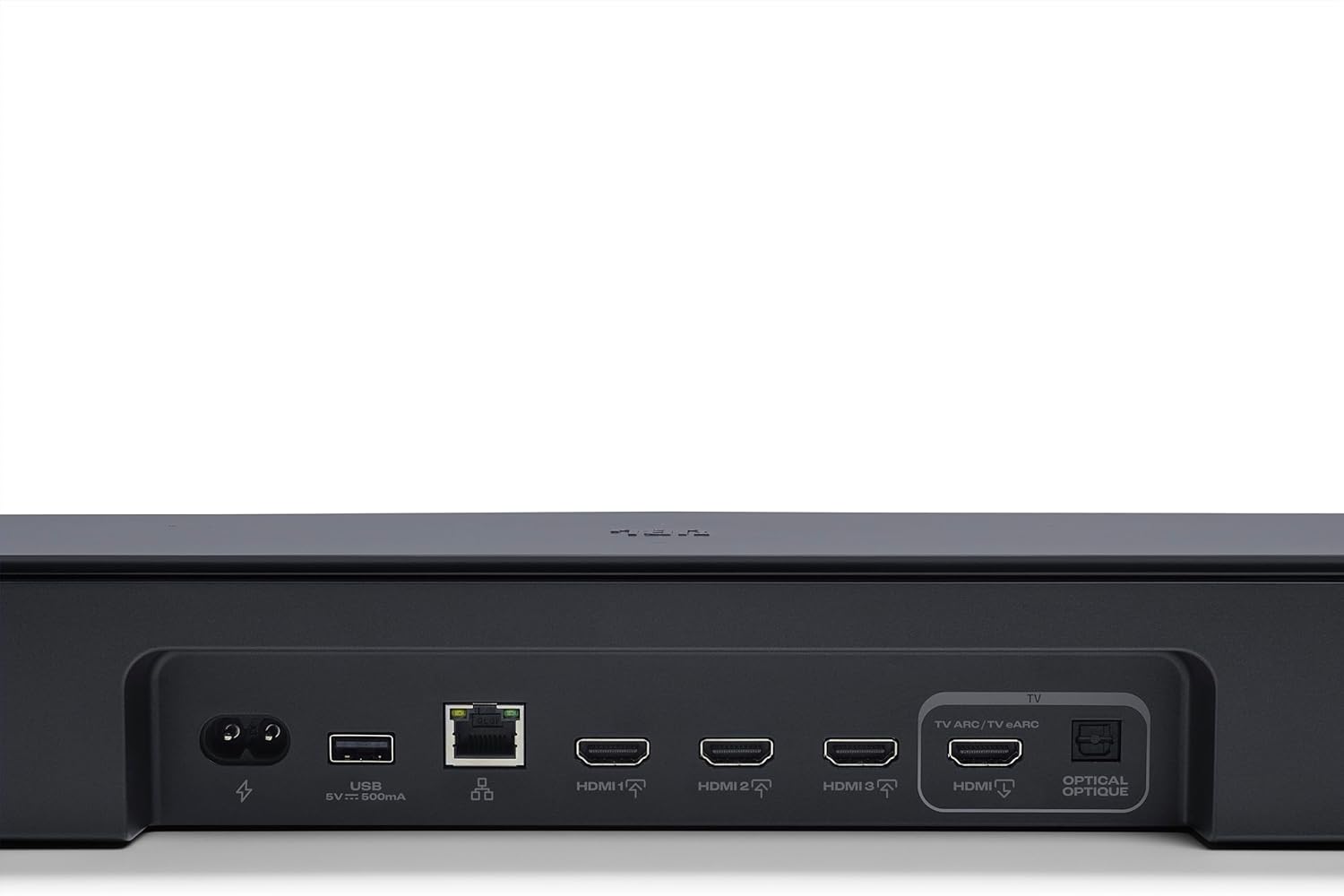
Image 2.2: All included accessories for the JBL Bar 1300XMK2, such as power cables, HDMI cable, remote control, and wall-mounting kits.
3. Setup
3.1 Placement
- Place the main soundbar below your television, ensuring it is centered.
- Position the wireless subwoofer in a location that provides optimal bass response, typically in a corner or near a wall.
- For surround sound, detach the wireless speakers and place them behind your listening position.
3.2 Connections
- Connect the soundbar to your TV's HDMI ARC/eARC port using the provided HDMI cable.
- Plug the soundbar and subwoofer into power outlets.
- The detachable speakers will automatically pair with the soundbar when reattached or powered on.
- For network features and updates, connect the soundbar to your home network via Wi-Fi or Ethernet.
3.3 Initial Calibration
After connecting, perform the sound calibration process for optimized audio performance in your room. Refer to the JBL ONE App for guided calibration steps.
Video 3.1: An official product video demonstrating the features and setup of the JBL Bar 1300XMK2 soundbar system, including the detachable speakers and subwoofer.
4. Operating Instructions
4.1 Detachable Surround Speakers
The wireless detachable speakers provide true surround sound. Simply lift them from the main soundbar and place them behind your listening area. They recharge when reattached to the soundbar.

Image 4.1: Detachable speakers positioned behind a sofa to create a surround sound experience for viewers.

Image 4.2: A user detaching one of the wireless surround speakers from the main soundbar unit.

Image 4.3: A detailed view of the control buttons located on one of the detachable wireless speakers.
4.2 JBL ONE App
The JBL ONE App allows for comprehensive control and customization of your soundbar system. Use it to:
- Customize sound settings with a precise equalizer.
- Browse and access various music streaming services.
- Enable 'Night Listening' mode to reduce disturbance.
- Receive software updates for new features and improvements.

Image 4.4: A smartphone displaying the JBL ONE App interface, showing options for sound control and customization.
4.3 Music Streaming
The system supports various streaming options:
- Wi-Fi Streaming: Enjoy high-definition audio from services like AirPlay, Google Cast, Spotify Connect, Tidal Connect, and Roon Ready.
- Bluetooth: Pair any Bluetooth-enabled device for wireless audio playback.
5. Key Features
- True Dolby Atmos® and DTS:X®: Experience immersive 3D spatial sound with six up-firing speakers in the soundbar and wireless rear speakers.
- Detachable Wireless Surround Speakers: Easily convert from a soundbar to a full surround sound system by placing the battery-powered speakers behind you.
- 12-inch Wireless Subwoofer: Delivers deep, powerful bass for an impactful audio experience.
- MultiBeam™ 3.0: Creates a wide, cinema-like soundstage that fills your room, ensuring optimal sound from any seating position.
- PureVoice 2.0: Automatically enhances dialogue clarity, ensuring every word is heard, even during intense scenes or at lower volumes.
- SmartDetails: Optimizes sound details for a clear, balanced audio field, reproducing subtle sounds as intended by filmmakers.
- Night Listening: Mutes the soundbar and subwoofer, allowing the detachable speakers to provide intimate, high-quality audio for quiet viewing.
- Broadcasting: Take one or both detachable speakers to another room to continue listening to your audio content.
- JBL ONE App: Provides comprehensive control, sound customization, and access to music streaming services.

Image 5.1: An internal view of the soundbar, highlighting the arrangement of its various speaker drivers.

Image 5.2: An exploded diagram illustrating the internal components and modular design of the JBL Bar 1300XMK2.

Image 5.3: The standalone wireless subwoofer, designed to deliver deep bass.
6. Maintenance
- Cleaning: Use a soft, dry cloth to clean the surfaces of the soundbar, speakers, and subwoofer. Avoid abrasive cleaners or solvents.
- Software Updates: Regularly check for and install software updates via the JBL ONE App to ensure optimal performance and access to the latest features.
- Battery Care: For detachable speakers, ensure they are regularly charged by docking them to the main soundbar. Avoid fully discharging the batteries for extended periods.
7. Troubleshooting
| Problem | Possible Cause | Solution |
|---|---|---|
| No power | Power cord not connected | Ensure all power cords are securely plugged into the soundbar, subwoofer, and wall outlets. |
| No sound | Incorrect input source, volume too low, or incorrect TV audio settings | Select the correct input source on the soundbar. Increase volume. Check TV audio output settings (e.g., set to PCM or Bitstream). |
| Surround speakers not working | Not paired, low battery, or out of range | Ensure speakers are charged and within range of the soundbar. Re-pair if necessary via the JBL ONE App. |
| Subwoofer not working | Not paired or out of range | Ensure subwoofer is powered on and within range. Re-pair if connection is lost (refer to full manual for pairing steps). |
| Remote control not working | Dead batteries or obstruction | Replace batteries. Ensure no obstructions between remote and soundbar. |
8. Specifications
| Feature | Detail |
|---|---|
| Model Name | Bar 1300XMK2 |
| Surround Sound Channel Configuration | 11.1.4 |
| Speaker Maximum Output Power | 1570 Watts |
| Woofer Diameter | 12 Inches |
| Frequency Response | 20 Hz |
| Connectivity Technology | Bluetooth, Ethernet, HDMI, Optical, USB, Wi-Fi |
| Wireless Communication Technology | Wi-Fi |
| Product Dimensions (Soundbar) | 5.4"D x 55.3"W x 2.3"H |
| Item Weight | 65 Pounds (total system) |
| Color | Black |
| Control Method | Remote |
| Special Features | Built-in Microphone, Dolby Enabled, Multi Room Audio, Stereo Pairing, USB Port |
9. Warranty and Support
The JBL Bar 1300XMK2 comes with a limited warranty. For detailed warranty information, product registration, and technical support, please visit the official JBL website or contact JBL customer service. Keep your proof of purchase for warranty claims.
For additional assistance, refer to the JBL ONE App for FAQs and support resources.


