
SOOPYK LYCZ629BBK
SOOPYK LYCZ629BBK Water Cooler Dispenser with Ice Maker User Manual
Model: LYCZ629BBK
Important Safety Information
Please read all instructions carefully before using this appliance to prevent injury or damage.
- Always place the dispenser on a level, stable surface.
- Ensure the dispenser is plugged into a grounded electrical outlet. Do not use extension cords.
- Keep the dispenser away from direct sunlight and heat sources.
- Do not operate the dispenser without a water bottle installed.
- Hot Water Safety: The hot water dispenser features a child safety lock. Always engage the child safety lock when not in use, especially in households with children. To dispense hot water, press the Child Lock button first, then press the hot water button.
- Do not immerse the dispenser, cord, or plug in water or other liquids.
- Unplug the dispenser before cleaning or performing any maintenance.
- This appliance is not intended for use by persons with reduced physical, sensory, or mental capabilities, or lack of experience and knowledge, unless they have been given supervision or instruction concerning use of the appliance by a person responsible for their safety.
Product Overview
The SOOPYK LYCZ629BBK is a versatile bottom-load water cooler dispenser that provides hot, cold, and room temperature water, along with a built-in ice maker. It features a self-cleaning function, touch screen controls, and a child safety lock for hot water dispensing.

Image: Front view of the SOOPYK water cooler dispenser, showing the control panel and dispensing area.
Key Features:
- Three Temperature Settings: Dispenses hot, cold, and room temperature water.
- Integrated Ice Maker: Produces bullet-shaped ice, with a daily capacity of 22 lbs and storage for 0.88 lbs. Note: The unit does not keep ice frozen long-term.
- Self-Cleaning Function: Activated by holding the ice-making button for 3 seconds, utilizing a UV lamp for sanitation.
- Bottom-Loading Design: Accommodates 3 and 5-gallon water bottles, eliminating heavy lifting and spills.
- Touch Screen Controls: Intuitive interface with indicator lights for operational status.
- Child Safety Lock: Prevents accidental hot water dispensing.
- ECO Mode: Energy-saving feature that stops water heating at night.
- Empty Bottle Alert: Indicator light signals when the water bottle needs replacement.
- Nightlight Feature: Illuminates the dispensing area for visibility in low light.
Setup Instructions
1. Unpacking and Placement
- Carefully remove all packaging materials.
- Place the dispenser on a firm, level surface. Ensure there is at least 4 inches of clearance from the wall for proper ventilation.
- Avoid placing the unit in direct sunlight or near heat-generating appliances.

Image: Diagram showing the dimensions of the water cooler dispenser (16.5"D x 12.2"W x 40.7"H).
2. Water Bottle Installation (Bottom-Load)
- Open the lower cabinet door of the dispenser.
- Remove the cap from a new 3 or 5-gallon water bottle.
- Insert the probe from the dispenser into the opening of the water bottle.
- Slide the water bottle into the cabinet and close the door securely.
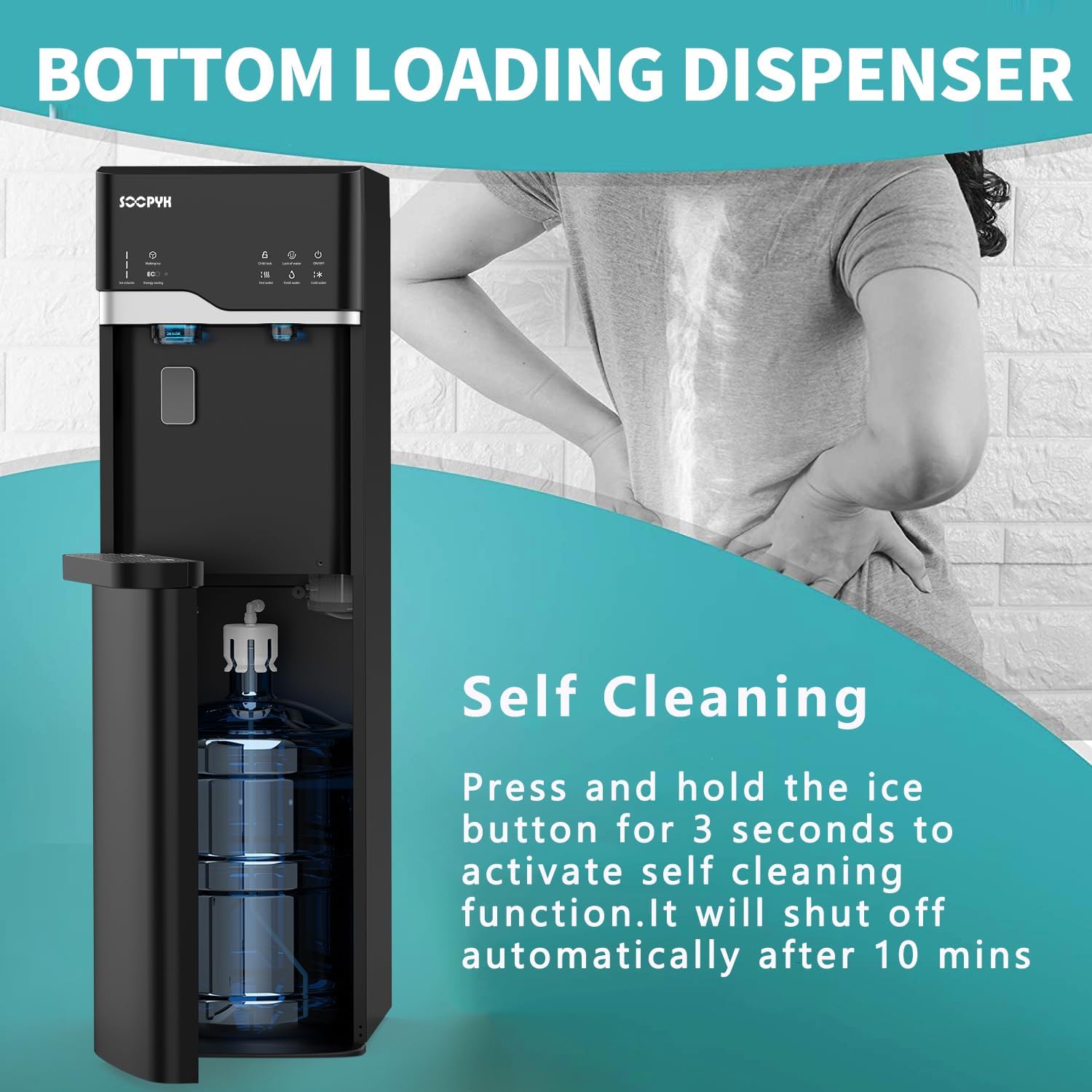
Image: Illustration of the bottom-loading mechanism with a water bottle being inserted into the lower cabinet.
3. Initial Flushing
Before first use, it is recommended to flush the system to remove any dust or manufacturing residue.
- Plug the dispenser into a grounded electrical outlet.
- Allow the unit to sit for at least 5 minutes to allow water to fill the internal tanks.
- Dispense and discard at least 2-3 cups of water from each spigot (hot, cold, room temperature) until water flows smoothly.
Operating Instructions
1. Control Panel Overview
The dispenser features a touch screen control panel with various indicators and buttons.

Image: Close-up of the touch screen control panel showing icons for hot water, cold water, fresh water, child lock, lack of water, ON/OFF, making ice, ECO mode, and ice volume.
- ON/OFF Button: Powers the unit on or off.
- Hot Water Indicator: Illuminates when hot water is ready.
- Cold Water Indicator: Illuminates when cold water is ready.
- Making Ice Indicator: Illuminates when ice is being produced.
- Child Lock: Button to activate/deactivate the hot water safety lock.
- ECO Mode: Button to toggle energy-saving mode.
- Empty Bottle Alert: Indicator light for low water bottle level.
2. Dispensing Water
- Cold Water: Place your cup under the cold water spigot and press the cold water button on the touch screen.
- Room Temperature Water: Place your cup under the room temperature water spigot and press the fresh water button on the touch screen.
- Hot Water (with Child Safety Lock):
- Place your cup under the hot water spigot.
- First, press the Child Lock button on the touch screen.
- Then, press the hot water button to dispense.
3. Ice Making Function
The dispenser can produce bullet-shaped ice. The ice indicator will illuminate when ice is being made.
- Ensure the water bottle is full and the unit is powered on.
- The ice maker will automatically begin producing ice.
- Ice production takes approximately 7 minutes per cycle, yielding 9 pieces of ice. The daily capacity is 22 lbs.
- The internal storage can hold up to 0.88 lbs of ice.
- Important: This unit does not function as a freezer and will not keep ice frozen for extended periods. Ice will melt if not used.

Image: Graphic illustrating fast ice-making (7 minutes), 9 pieces per cycle, and 22 lbs daily capacity.
4. ECO Mode
To conserve energy, especially at night, activate the ECO mode.
- Press the ECO button on the touch screen to turn on ECO mode. The unit will stop heating water.
- To turn off ECO mode, press and hold the ECO button for 3 seconds.
5. Nightlight Feature
The nightlight feature automatically illuminates the dispensing area when water or ice is being dispensed, providing visibility in low-light conditions.

Image: The water cooler dispenser in a dimly lit room, with the dispensing area illuminated by a blue nightlight.
Maintenance
1. Self-Cleaning Function
The dispenser is equipped with a UV-infused self-cleaning system to maintain water quality.
- To activate, press and hold the Ice-Making button for 3 seconds.
- The ice indicator will blink, and the power light will remain on during the cleaning cycle.
- The self-cleaning cycle will automatically shut off after 10 minutes.
- The UV lamp in the cold water tank will continue to work as long as the machine is plugged in.

Image: Diagram showing the internal UV lamp and its effect on reducing contaminants in water.

Image: Internal view of the dispenser, highlighting the location of the UV lamp in the cold water tank.
2. Exterior Cleaning
- Unplug the dispenser from the power outlet.
- Wipe the exterior surfaces with a soft, damp cloth. Do not use abrasive cleaners or solvents.
- Clean the drip tray regularly by removing it, emptying any water, washing with mild soap, rinsing, and drying thoroughly before reinserting.
3. Water Bottle Replacement
The "Empty Bottle Alert" indicator will light up when the water bottle needs to be replaced.
- Open the lower cabinet door.
- Carefully remove the empty water bottle and the probe.
- Install a new 3 or 5-gallon water bottle as described in the Setup section.
Troubleshooting
| Problem | Possible Cause | Solution |
|---|---|---|
| No water dispensing. |
|
|
| Water not hot/cold enough. |
|
|
| Ice maker not producing ice. |
|
|
| "Empty Bottle Alert" is on, but bottle is full. |
|
|
Specifications
| Feature | Detail |
|---|---|
| Model Number | LYCZ629BBK |
| Brand | SOOPYK |
| Product Dimensions (D x W x H) | 16.5" x 12.2" x 40.7" |
| Material | Plastic |
| Installation Type | Freestanding |
| Power Source | Corded Electric |
| Water Temperatures | Hot, Cold, Room Temperature |
| Ice Making Capacity | Up to 22 lbs per day |
| Ice Storage Capacity | 0.88 lbs |
| Compatible Water Bottle Sizes | 3 and 5 Gallon |
Warranty and Support
For warranty information or technical support, please refer to the documentation included with your purchase or contact SOOPYK customer service directly.
Please have your model number (LYCZ629BBK) and purchase date available when contacting support.
Manufacturer: SOOPYK
Related documentsLYCZ629BBK


Ask a question about this manual
Ask about setup, troubleshooting, compatibility, parts, safety, or missing instructions. Manuals+ will review the question and use this page’s manual context to help answer it.