
1. Introduction
Thank you for choosing the HINOMI Q2 Ergonomic Office Chair. This manual provides essential information for the safe assembly, operation, maintenance, and care of your new chair. Please read these instructions thoroughly before use and retain them for future reference.
The HINOMI Q2 is designed to enhance your comfort and productivity with its advanced ergonomic features, including dynamic lumbar support, adjustable headrest, and multi-functional armrests. It is suitable for various environments, from home offices to professional workspaces.
2. Safety Information
- Ensure all components are securely fastened before use. Regularly check for loose screws or parts.
- Do not stand on the chair. Use it only for seating purposes.
- Avoid placing heavy objects on the chair that exceed its maximum weight capacity of 220 pounds (approximately 100 kg).
- Keep hands and fingers clear of moving parts during adjustment to prevent pinching.
- Use the chair on a stable, level surface.
- Keep children and pets away from the chair during assembly and adjustment.
3. Setup and Assembly
The HINOMI Q2 chair requires assembly. Detailed assembly instructions are provided in the packaging. Please follow them carefully. Ensure all parts are present before beginning assembly.
Included Components:
- Caster wheels
- Chair base
- Gas lift cylinder
- Chair frame (seat and backrest assembly)
- Headrest
General Assembly Steps:
- Insert the caster wheels into the chair base.
- Place the gas lift cylinder into the center hole of the chair base.
- Attach the seat and backrest assembly to the top of the gas lift cylinder.
- Secure the headrest to the top of the backrest.
- Verify all connections are tight and the chair is stable before use.
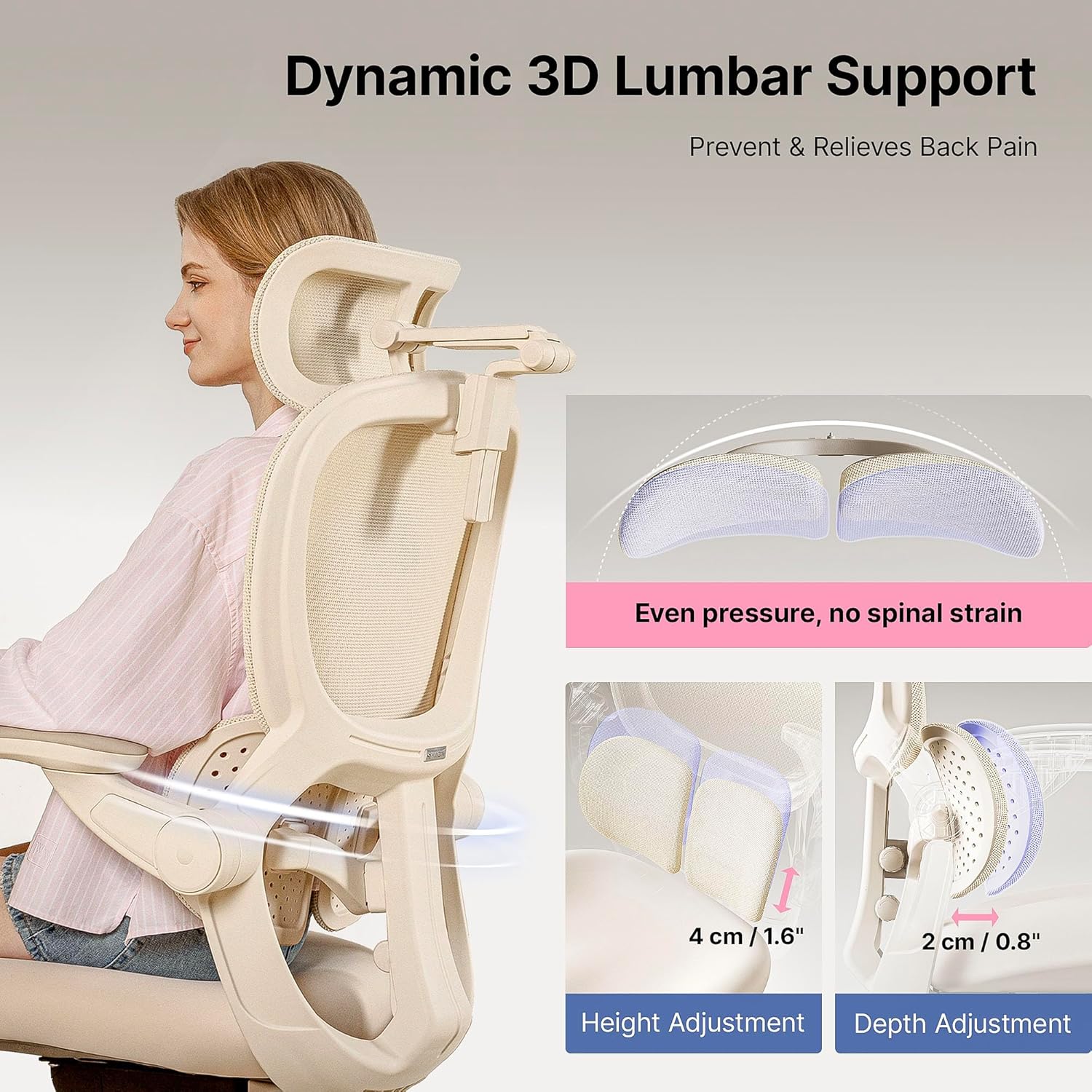
Image: Front view of the HINOMI Q2 Ergonomic Office Chair, illustrating its overall design and components.
4. Operating Instructions
The HINOMI Q2 chair offers multiple adjustment points to customize your seating experience for optimal comfort and ergonomic support.
4.1. Dynamic 3D Lumbar Support
The dual-panel lumbar support system automatically adjusts to your movements. You can further customize its position:
- Height Adjustment: Adjust the lumbar support vertically by 4 cm (1.6 inches) to align with your lower back curve.
- Depth Adjustment: Adjust the lumbar support horizontally by 2 cm (0.8 inches) to control the intensity of the support.

Image: Illustration of the dynamic 3D lumbar support system, showing its height and depth adjustment capabilities.
4.2. Flexible 4D Headrest
The headrest provides tailored support for your neck and head:
- Height Adjustment: Adjust the headrest height by 6 cm (2.4 inches) to position it correctly for your neck.
- Depth Adjustment: The headrest offers 3 levels of depth adjustment.
- Rotation: Rotate the headrest for optimal angle and comfort.

Image: Diagram demonstrating the height, depth, tilt, and rotation adjustments of the flexible 4D headrest.
4.3. Multi-Functional Adjustable Armrests
The armrests are designed for versatility and comfort:
- Height Adjustment: Adjust the armrests to 4 different height levels.
- Flip-Up Design: The armrests can be flipped up to save space or allow closer access to your desk.
- Horizontal Rotation: Rotate the armrests horizontally by 120 degrees to support various activities like typing, reading, or gaming.

Image: Visual guide to the armrest adjustments, including height, flip-up function, and horizontal rotation.
4.4. Reclining Function and Retractable Footrest
For relaxation, the chair offers a reclining feature and an integrated footrest:
- Recline: Recline the backrest up to 135 degrees. Use the locking mechanism to secure your desired recline angle.
- Footrest: Extend the retractable footrest to support your legs and improve circulation during reclined positions.

Image: A person relaxing in the HINOMI Q2 chair, demonstrating the 135-degree recline and extended footrest.
4.5. Seat Adjustments
Customize the seat to fit your body type and desk height:
- Seat Depth: Adjust the seat depth by 6 cm (2.4 inches) to ensure proper thigh support and leg circulation.
- Seat Height: Adjust the seat height by 9 cm (3.5 inches) to achieve an ergonomic posture with your feet flat on the floor or a footrest.

Image: Close-up of the HINOMI Q2 chair seat, highlighting the controls for seat depth and height adjustments.
5. Maintenance
Proper maintenance ensures the longevity and performance of your HINOMI Q2 chair.
5.1. Cleaning Instructions
- Fabric/Mesh: Spot clean with a mild detergent and a damp cloth. Avoid harsh chemicals or abrasive cleaners.
- Frame/Base: Wipe with a soft, damp cloth.
- Ensure the chair is completely dry before use.

Image: Detailed view of the ultra-soft, breathable mesh material used in the HINOMI Q2 chair.
5.2. General Care
- Periodically check all screws and bolts and tighten them if necessary.
- Avoid exposing the chair to direct sunlight for extended periods to prevent material degradation.
- Do not use sharp objects on the chair's surfaces.
6. Troubleshooting
If you encounter any issues with your HINOMI Q2 chair, please refer to the following common solutions:
- Chair Squeaks: Check and tighten all assembly bolts. Apply a small amount of silicone lubricant to moving metal parts if necessary.
- Gas Lift Not Functioning: Ensure the gas lift lever is fully engaged or disengaged. If the issue persists, the gas lift may need replacement. Contact support.
- Casters Not Rolling Smoothly: Check for debris (hair, lint) wrapped around the caster wheels and remove them. Clean the wheels regularly.
- Adjustments Not Holding: Verify that adjustment levers are fully engaged. For recline, ensure the lock mechanism is properly set.
7. Specifications
Detailed specifications for the HINOMI Q2 Ergonomic Office Chair:
| Feature | Detail |
|---|---|
| Brand | HINOMI |
| Model Name | Q2 |
| Colour | Grey |
| Material | Polyamide with Glass Fiber Polyester Woven Mesh (Seat: Memory Foam) |
| Product Dimensions (D x W x H) | 69.6D x 69.6W x 139.4H centimetres (27.4D x 27.4W x 54.9H inches) |
| Item Weight | 52.9 Pounds (24 kg) |
| Maximum Weight Recommendation | 220 Pounds (100 kg) |
| Back Style | Split Back |
| Arm Style | Flip-up armrest |
| Included Components | Caster, Chair Frame, Chair base, Gas lift, Headrest |
| Assembly Required | Yes |
| Product Care Instructions | Spot Clean |

Image: Detailed diagram illustrating the various dimensions of the HINOMI Q2 Ergonomic Office Chair.
8. Warranty and Support
8.1. Warranty Information
For specific warranty details, please refer to the documentation included with your purchase or contact the seller directly. A return policy of 15 days is typically offered for this product.
8.2. Customer Support
If you require further assistance, have questions about assembly, operation, or need to report a defect, please contact HINOMI customer support or the seller from whom you purchased the product.
You can visit the official HINOMI store for more information: HINOMI Store on Amazon


