
1. Introduction
This manual provides essential information for the safe and efficient operation of your Geek AiroCook Magnix 36 Litre Air Fryer Oven. Please read all instructions carefully before first use and retain this manual for future reference.
The Geek AiroCook Magnix is a versatile kitchen appliance designed for air frying, grilling, baking, toasting, and rotisserie cooking. It features a 36-litre capacity and 1800W power for various culinary tasks.
2. Important Safety Instructions
When using electrical appliances, basic safety precautions should always be followed, including:
- Read all instructions before operating the appliance.
- Do not touch hot surfaces. Use handles or knobs.
- To protect against electrical shock, do not immerse cord, plugs, or the appliance body in water or other liquid.
- Close supervision is necessary when any appliance is used by or near children.
- Unplug from outlet when not in use and before cleaning. Allow to cool before putting on or taking off parts.
- Do not operate any appliance with a damaged cord or plug, or after the appliance malfunctions or has been damaged in any manner.
- The use of accessory attachments not recommended by the appliance manufacturer may cause injuries.
- Do not use outdoors.
- Do not let cord hang over edge of table or counter, or touch hot surfaces.
- Do not place on or near a hot gas or electric burner, or in a heated oven.
- Extreme caution must be used when moving an appliance containing hot oil or other hot liquids.
- Always attach plug to appliance first, then plug cord into the wall outlet. To disconnect, turn any control to "off", then remove plug from wall outlet.
- Do not use appliance for other than intended use.
- The product comes with a 3 pin 16 Amps plug. Ensure compatibility at your premises.
3. Product Components and Accessories
Your Geek AiroCook Magnix Air Fryer Oven includes the following components and accessories:
- Main Air Fryer Oven Unit
- Air Fry Basket
- Baking Pan
- Oven Rack
- Rotisserie Kit (Rotisserie Rod, Fetch Rack)
- Crumb Tray
- Oven Mitt
- Recipe App (downloadable)

Image: Overview of the Geek AiroCook Magnix Air Fryer Oven and its included accessories, such as the air fry basket, baking pan, oven rack, rotisserie kit, crumb tray, and oven mitt.
4. Setup and First Use
- Unpacking: Carefully remove all packaging materials and accessories from the oven.
- Cleaning: Wipe the exterior of the oven with a damp cloth. Wash all accessories (air fry basket, baking pan, oven rack, rotisserie kit, crumb tray) in warm, soapy water, then rinse and dry thoroughly.
- Placement: Place the oven on a stable, heat-resistant, and level surface. Ensure there is adequate clearance (at least 10 cm) on all sides for proper ventilation. Do not place near flammable materials.
- Power Connection: Ensure your electrical outlet is compatible with the appliance's 3 pin 16 Amps plug and 220 Volts. Plug the power cord into a grounded wall outlet.
- Initial Burn-off: Before cooking food, operate the oven empty for approximately 15 minutes at 200°C to burn off any manufacturing residues. A slight odor or smoke may be present; this is normal. Ensure good ventilation during this process.
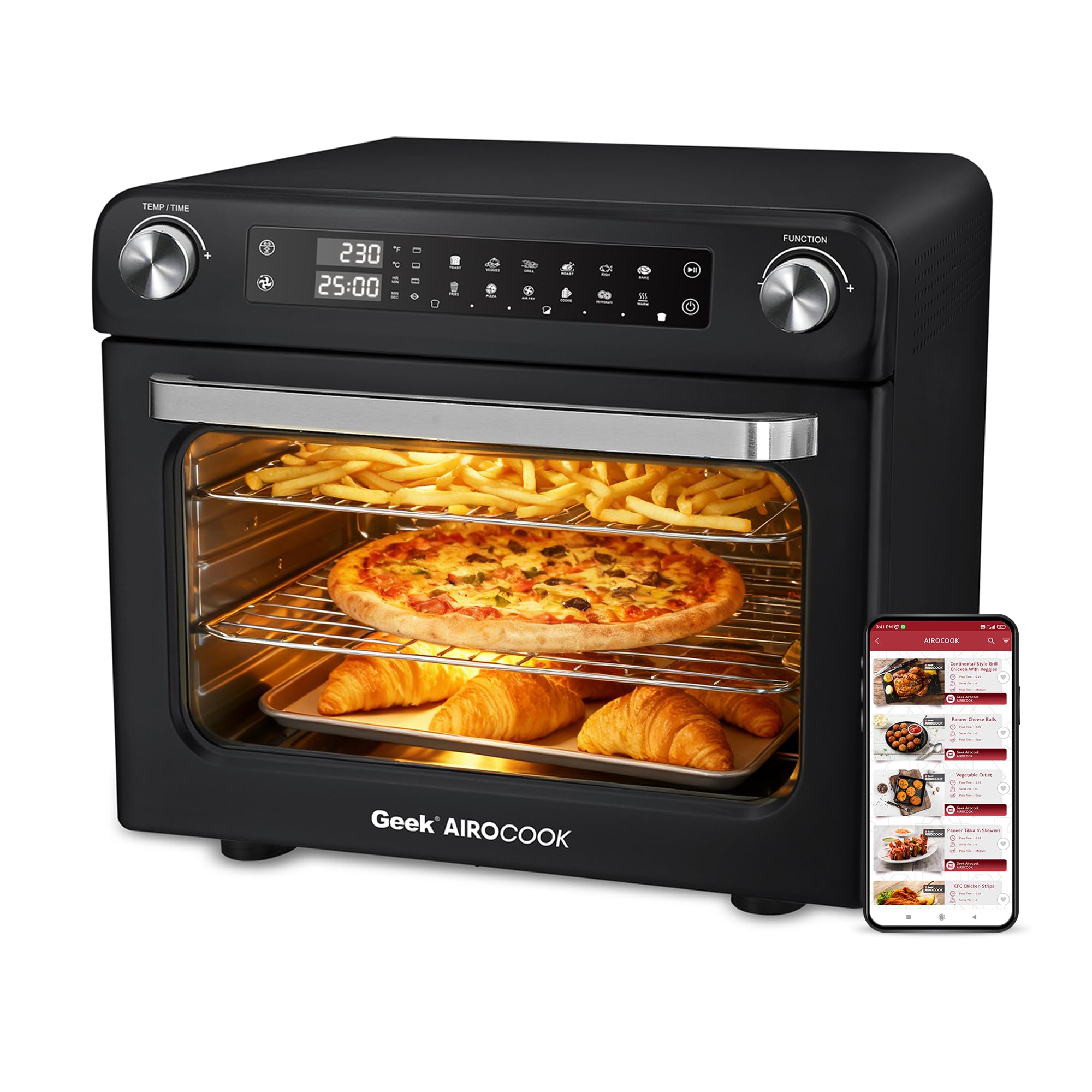
Image: Front view of the Geek AiroCook Magnix Air Fryer Oven, showing the control panel and oven door.
5. Operating Instructions
Control Panel Overview

Image: Close-up of the Geek AiroCook Magnix control panel, highlighting the Time/Temperature knob, Function knob, Power Button, Start/Pause Button, Light, Rotisserie Button, and Fan button.
The oven features a smart knob control system for easy operation.
- Time/Temperature Knob: Adjusts cooking time and temperature.
- Function Knob: Selects cooking modes.
- Power Button: Turns the appliance on/off.
- Start/Pause Button: Initiates or pauses the cooking cycle.
- Light Button: Turns the interior oven light on/off.
- Rotisserie Button: Activates the rotisserie function.
- Fan Button: Controls the convection fan.
General Operation
- Power On: Plug in the oven and press the Power Button.
- Select Function: Turn the Function Knob to choose one of the 10 preset cooking modes (Air Fry, Grill, Bake, Toast, Rotisserie, Broil, Roast, Warm, Pizza, Dehydrate).
- Adjust Settings: Use the Time/Temperature Knob to set the desired temperature (up to 230°C) and cooking time (up to 90 minutes).
- Start Cooking: Press the Start/Pause Button to begin the cooking process.
- Monitor Cooking: Use the Light Button to check food progress without opening the door.
- End Cooking: The oven will beep when the cooking cycle is complete. Carefully remove food using oven mitts.
Cooking Modes and Presets
The oven offers 10 preset cooking modes for various dishes. The temperature can be set up to 230°C and the timer up to 90 minutes.
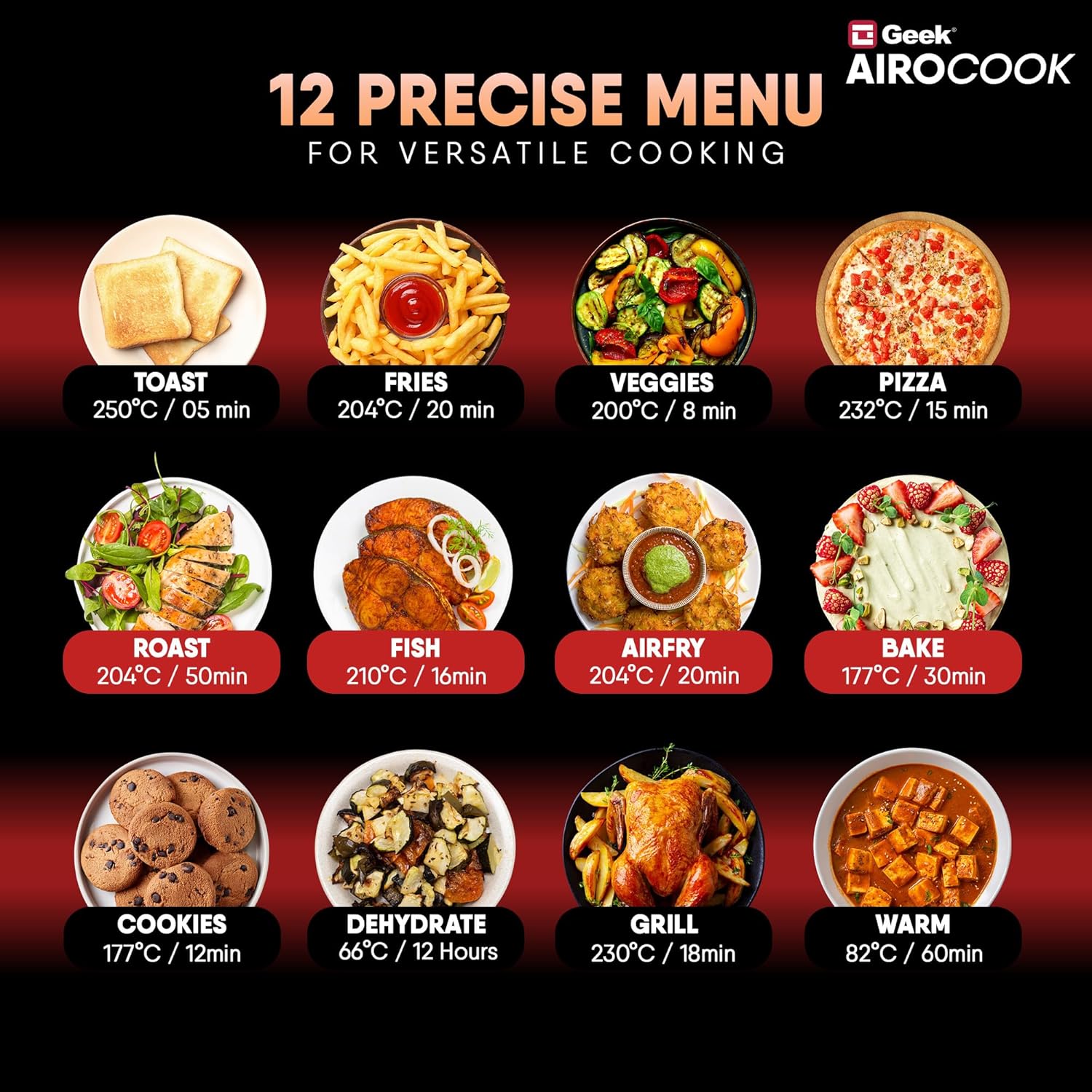
Image: Visual representation of 12 precise menu presets available on the Geek AiroCook Magnix, including Toast, Fries, Veggies, Pizza, Roast, Fish, Airfry, Bake, Cookies, Dehydrate, Grill, and Warm, with suggested temperatures and times.
- Air Fry: Utilizes 360° Swirl Hot Air (SHA) technology for crispy results with less oil.
- Rotisserie: For roasting whole chickens or other large cuts of meat using the rotisserie kit.
- Bake: Ideal for cakes, cookies, and other baked goods.
- Grill/Broil: For grilling meats and vegetables.
- Toast: For toasting bread slices.
- Dehydrate: For drying fruits, vegetables, or making jerky.
- Warm: To keep food warm after cooking.
For specific recipes and detailed instructions, refer to the downloadable recipe app.
6. Maintenance and Cleaning
Regular cleaning and maintenance will ensure the longevity and optimal performance of your air fryer oven.
- Before Cleaning: Always unplug the appliance from the power outlet and allow it to cool completely before cleaning.
- Exterior: Wipe the exterior with a soft, damp cloth. Do not use abrasive cleaners or scourers.
- Interior: Clean the interior walls with a damp cloth and mild detergent. For stubborn stains, a non-abrasive sponge can be used. Ensure the interior is dry before next use.
- Crumb Tray: The removable crumb tray should be emptied and cleaned after each use to prevent grease buildup and smoking. Wash with warm, soapy water.
- Accessories: The air fry basket, baking pan, oven rack, and rotisserie kit are dishwasher-safe. For manual cleaning, wash in warm, soapy water and rinse thoroughly.
- Do Not Immerse: Never immerse the main unit, power cord, or plug in water or any other liquid.

Image: The Geek AiroCook Magnix Air Fryer Oven showing the removable crumb tray, which facilitates easy cleaning and maintenance.
7. Troubleshooting
| Problem | Possible Cause | Solution |
|---|---|---|
| Appliance does not turn on. | Not plugged in; power outlet malfunction; power button not pressed. | Ensure the power cord is securely plugged into a working 16 Amps outlet. Press the Power Button. |
| Food is not cooking evenly. | Overcrowding the basket; incorrect temperature/time settings. | Do not overcrowd the cooking area. Ensure food is spread in a single layer. Adjust temperature and time as per recipe or food type. Flip or shake food halfway through cooking. |
| White smoke coming from the appliance. | Grease or food residue in the crumb tray or on heating elements. | Unplug and allow to cool. Clean the crumb tray and interior thoroughly. Ensure no food particles are touching the heating elements. |
| Rotisserie function not working. | Rotisserie rod not properly installed; Rotisserie button not activated. | Ensure the rotisserie rod is correctly seated in its slots. Press the Rotisserie Button on the control panel. |
8. Specifications
- Model Name: AiroCook Magnix
- Capacity: 36 Litres
- Material: Stainless Steel
- Color: Black
- Product Dimensions: 38D x 48W x 41H Centimeters
- Item Weight: 10 Kilograms
- Output Wattage: 1800 Watts
- Voltage: 220 Volts
- Min Temperature Setting: 38 Degrees Celsius
- Max Temperature Setting: 250 Degrees Celsius
- Controller Type: Jog dial
- Special Feature: Large Capacity
- Manufacturer: Spar Appliances Private Limited
- Country of Origin: India
9. Warranty and Support
For warranty information and customer support, please contact the manufacturer:
- Manufacturer: Spar Appliances Private Limited
- Contact Number: 1800 121 922922
Please have your model number (AiroCook Magnix) and purchase details ready when contacting support.