
1. Important Safety Information
Please read all instructions carefully before using the VGR 3-in-1 Barber Kit. Retain this manual for future reference.
- Keep all devices away from water. Do not use near bathtubs, showers, basins, or other vessels containing water.
- Do not use the devices while sleeping or if you are unconscious.
- Keep all components out of reach of children.
- Avoid ingestion or inhalation of small parts. Ensure all accessories are securely attached during use.
- Only use the provided charging adapter and charging station.
- Do not disassemble or attempt to repair the devices yourself. Contact customer support for assistance.
2. Package Contents
Carefully unpack your VGR 3-in-1 Barber Kit and ensure all items are present and in good condition. If any items are missing or damaged, please contact customer support.
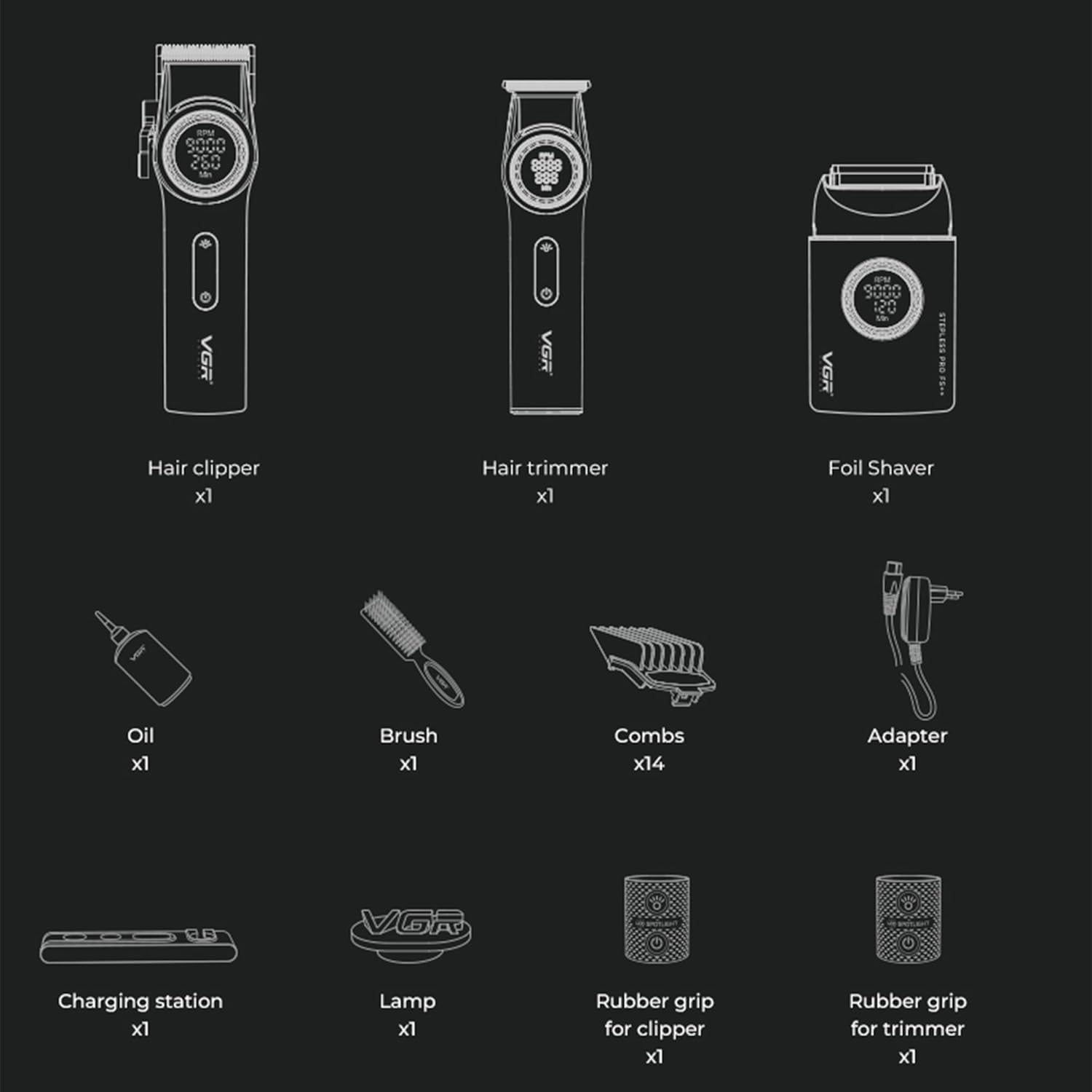
Figure 2.1: Included Components
- 1 x VGR 001 Hair Clipper
- 1 x VGR 977 Hair Trimmer
- 1 x VGR 377 Foil Shaver
- 1 x Multi-device Charging Station
- 1 x Power Adapter
- 14 x Guide Combs (various sizes for clipper and trimmer)
- 1 x Cleaning Brush
- 1 x Lubricating Oil
- 2 x Rubber Grips (for clipper and trimmer)
- 1 x LED Lamp (integrated into charging station)
3. Setup and Charging
3.1 Initial Charging
Before first use, fully charge all devices. This helps to optimize battery life and performance.
- Connect the power adapter to the charging station and plug it into a suitable power outlet.
- Place the Hair Clipper, Hair Trimmer, and Foil Shaver into their respective slots on the charging station. Ensure they are seated correctly.
- The charging indicators on the devices or charging station will illuminate to show they are charging.
- Allow the devices to charge for the recommended times:
- Hair Clipper: Approximately 3 hours
- Hair Trimmer: Approximately 1.5 hours
- Foil Shaver: Approximately 2 hours
- Once fully charged, the indicators may change or turn off.

Figure 3.1: Charging Station in Use
3.2 Attaching Guide Combs
Guide combs are used to achieve desired hair lengths. Ensure the device is turned off before attaching or detaching combs.
- Select the appropriate guide comb for your desired hair length. The combs are typically marked with their length in millimeters (mm) or inches.
- Align the comb with the blade of the hair clipper or trimmer.
- Gently push the comb onto the blade until it clicks securely into place.
- To remove, gently pull the comb away from the blade.

Figure 3.2: Guide Comb Selection
4. Operating Instructions
4.1 Power On/Off
Press the power button located on the device to turn it on or off.
4.2 Adjusting Speed
The VGR 001 Hair Clipper and VGR 977 Hair Trimmer feature adjustable speeds for precise control.
- Turn on the device.
- Rotate the central knob (or press the speed adjustment buttons, if applicable) to increase or decrease the RPM (revolutions per minute).
- The LED display will show the current RPM setting.
- Hair Clipper (VGR 001): Speed range from 7000 to 9000 RPM, adjustable in 100 RPM increments (21 speeds).
- Hair Trimmer (VGR 977): Speed range from 6000 to 8000 RPM.
- Foil Shaver (VGR 377): Operates at a fixed optimal speed for shaving.

Figure 4.1: Speed Adjustment
4.3 Using the LED Spotlight (VGR 001 Hair Clipper)
The VGR 001 Hair Clipper features an integrated LED spotlight for improved visibility during use.
- Turn on the hair clipper.
- Click the dedicated LED light button (usually indicated by a light bulb icon) to turn the spotlight on. A beeping sound may confirm activation.
- Click the button again to turn the spotlight off.

Figure 4.2: LED Spotlight Operation
4.4 Using the Foil Shaver (VGR 377)
The VGR 377 Foil Shaver is designed for a close, smooth shave.
- Ensure your skin is clean and dry for best results.
- Turn on the shaver.
- Hold the shaver at a right angle to your skin and move it in short, gentle strokes against the direction of hair growth.
- Do not press too hard, as this can cause irritation.
5. Maintenance and Cleaning
Regular cleaning and maintenance will ensure optimal performance and extend the lifespan of your VGR Barber Kit.
5.1 Cleaning Blades and Combs
- Turn off and unplug the device before cleaning.
- Remove any attached guide combs.
- Use the provided cleaning brush to gently brush away hair clippings from the blades and inside the comb attachments.
- Do not rinse the main body of the devices under water. The blades can be carefully wiped with a damp cloth if necessary, then dried immediately.
5.2 Cleaning the Foil Shaver Head
The shaver head is detachable for easy cleaning.
- Ensure the shaver is turned off.
- Press and hold the release button on the shaver head.
- Gently pull the shaver head upwards to detach it from the body.
- Use the cleaning brush to remove stubble and debris from both the shaver head and the internal components.
- Align the shaver head with the body and push down until it clicks back into place.

Figure 5.1: Detaching Shaver Head
5.3 Lubrication
To maintain optimal cutting performance, lubricate the clipper and trimmer blades regularly (after every few uses or when performance decreases).
- Ensure the device is clean and turned off.
- Apply 1-2 drops of the provided lubricating oil evenly across the top of the blades.
- Turn on the device for a few seconds to allow the oil to distribute.
- Wipe off any excess oil with a soft, dry cloth.
6. Troubleshooting
If you encounter any issues with your VGR Barber Kit, please refer to the following common solutions:
| Problem | Possible Cause | Solution |
|---|---|---|
| Device does not turn on. | Battery is depleted. | Charge the device fully using the charging station and adapter. |
| Power button not pressed correctly. | Ensure the power button is pressed firmly. | |
| Poor cutting/shaving performance. | Blades are dull or clogged with hair. | Clean the blades thoroughly with the brush. Lubricate the blades. |
| Battery is low. | Charge the device fully. | |
| Device not charging. | Charging station or adapter not connected properly. | Check all connections. Ensure the device is correctly seated in the charging station. |
| Power outlet is not working. | Try a different power outlet. |
If the problem persists after trying these solutions, please contact VGR customer support.
7. Product Specifications
Detailed specifications for the VGR 3-in-1 Barber Kit.

Figure 7.1: Product Specifications Overview
| Feature | Specification |
|---|---|
| Model Name | VGR STEPLESS Pro 3 in 1 (YS-V3 IN 1) |
| Power Source | Battery Powered |
| Adapter Input | 100-240V~ 50/60Hz |
| Adapter Output | 5V === 3A |
| Hair Clipper Battery | 4600 mAh |
| Hair Trimmer Battery | 2500 mAh |
| Foil Shaver Battery | 1400 mAh |
| Hair Clipper Charging Time | 3 hours |
| Hair Trimmer Charging Time | 1.5 hours |
| Foil Shaver Charging Time | 2 hours |
| Hair Clipper Run Time | 260-300 minutes |
| Hair Trimmer Run Time | 260-300 minutes |
| Foil Shaver Run Time | 120-140 minutes |
| Hair Clipper Speed | 7000-9000 RPM (21 speeds) |
| Hair Trimmer Speed | 6000-8000 RPM |
| Foil Shaver Speed | 7000-9000 RPM |
| Blade Material | Titanium, Ceramic (DLC coating) |
| Minimum Cutting Length | 0.5 mm |
| Maximum Cutting Length | 24 mm |
| Special Features | Ergonomic design, USB Charging, LED Display, LED Spotlight (clipper) |
| Country of Origin | China |
8. Warranty and Support
VGR is committed to providing high-quality products and customer satisfaction.
- 30-Day Money-Back Guarantee: If you are not satisfied with your purchase, you may return it within 30 days for a full refund.
- 1-Year Warranty: This product is covered by a 1-year limited warranty from the date of purchase against defects in materials and workmanship. This warranty does not cover damage caused by misuse, accident, unauthorized modification, or normal wear and tear.
- 24-Hour Support: For any questions, concerns, or warranty claims, please contact VGR customer support. Our team is available to assist you.
Please refer to your purchase documentation or the VGR official website for contact information and detailed warranty terms.