
Introduction
Thank you for choosing the voijump K301 Portable Karaoke Machine. This device combines a powerful Bluetooth speaker with two wireless microphones, offering a versatile audio experience for various occasions. Designed for ease of use and portability, the K301 features multiple connectivity options, dynamic LED lighting, and robust sound quality. Please read this manual thoroughly to ensure proper setup, operation, and maintenance of your new karaoke machine.
What's in the Box
- 1 x voijump K301 Karaoke Machine
- 2 x Wireless Microphones
- 1 x Remote Control
- 1 x USB Charging Cable
- 1 x AUX-in Cable
- 1 x Power Adapter
- 1 x Shoulder Strap
- Batteries (4 x AA for microphones, 2 x AAA for remote)
- 1 x User Manual (this document)

Image: All components included with the voijump K301 Portable Karaoke Machine.
Setup
1. Charging the Karaoke Machine
- Connect the provided power adapter to the 'POWER 5V-1A' port on the machine.
- Plug the adapter into a standard wall outlet.
- The charging indicator light will illuminate. Charge the unit fully before first use (approximately 4-5 hours). A full charge provides 6-8 hours of continuous playtime or 72 hours of standby time.
2. Installing Microphone Batteries
- Unscrew the bottom cap of each wireless microphone.
- Insert two AA batteries into each microphone, ensuring correct polarity (+/-).
- Replace the bottom caps.
3. Attaching the Shoulder Strap (Optional)
- Locate the metal rings on the sides of the karaoke machine.
- Attach the clips of the shoulder strap to these rings for easy portability.

Image: The karaoke machine with its adjustable shoulder strap, highlighting its lightweight and portable design.
Operating Instructions
1. Power On/Off
- To power on the machine, toggle the 'ON/OFF' switch located on the control panel.
- The display will light up, indicating the current mode.
2. Mode Selection
- Press the 'M' (Mode) button on the control panel or remote control to cycle through available modes: Bluetooth (BLU), USB, TF Card, FM Radio, and AUX.
3. Bluetooth Connectivity
- Select 'BLU' mode. The machine will enter pairing mode, indicated by a flashing 'BLU' on the display.
- On your smartphone, tablet, or other Bluetooth device, search for 'K301' in the Bluetooth settings.
- Select 'K301' to pair. A confirmation tone will sound upon successful connection.
- You can now play audio from your device through the karaoke machine.
4. USB/TF Card Playback
- Insert a USB flash drive or TF card (with MP3 audio files) into the respective slot.
- The machine will automatically switch to USB or TF mode and begin playing. If not, select the mode manually using the 'M' button.
- Use the playback controls (play/pause, next/previous track) on the machine or remote.
5. FM Radio
- Select 'FM' mode.
- Extend the antenna for better reception.
- Press and hold the 'Play/Pause' button to auto-scan and save available stations.
- Use the 'Next/Previous' buttons to navigate through saved stations.
6. AUX-in Connection
- Connect an external audio device (e.g., TV, computer) to the 'AUX IN' port using the provided AUX cable.
- Select 'AUX' mode. Audio from the connected device will play through the speaker.
Image: The top control panel of the karaoke machine, detailing ports for USB, TF card, AUX in, and microphone inputs, along with volume and effect knobs.
7. Using Wireless Microphones
- Turn on the karaoke machine.
- Press the power button on each wireless microphone. They will automatically pair with the machine.
- Adjust microphone volume using the 'MIC.VOL' knob on the machine.
- Adjust echo effect using the 'ECHO' knob.
- The microphones feature noise reduction and anti-interference technology for clear sound.

Image: The karaoke machine paired with two wireless microphones, emphasizing their automatic connection and anti-noise capabilities for clear vocal performance.
8. Adjusting Sound (Bass/Treble)
- Use the 'BASS' and 'TREBLE' knobs on the control panel to fine-tune the audio output to your preference.
9. LED Lights
- Toggle the 'LED ON/OFF' switch to activate or deactivate the colorful disco LED lights.
- The lights can sync to the music's rhythm, offering an immersive visual experience.

Image: The karaoke machine's dynamic LED lights in action, creating a festive atmosphere during a family karaoke session.
10. TWS (True Wireless Stereo) Mode
- To activate TWS mode, you need two identical voijump K301 karaoke machines.
- Ensure both machines are powered on and not connected to any Bluetooth device.
- On one machine, press and hold the 'TWS' button. It will search for the other machine.
- Once connected, a confirmation tone will sound, and both speakers will play synchronized stereo audio.

Image: A visual representation of two karaoke machines linked in True Wireless Stereo (TWS) mode, providing an immersive surround sound experience.
11. Recording Function (REC)
- Insert a TF card or USB drive into the respective slot.
- Press the 'REC' button on the control panel. The machine will begin recording audio from the microphone.
- Press 'REC' again to stop recording. The recording will be saved to the inserted storage device.
12. Remote Control Usage
- The remote control allows for convenient operation from a distance.
- Functions include power on/off, mode selection, volume control, track skipping, play/pause, and LED light control.
Video: An official demonstration of the voijump K301 Karaoke Machine, showcasing its features and ease of use with two wireless microphones.
Video: An official overview of the voijump Karaoke Machine, highlighting its suitability for both adults and kids, and various entertainment options.
Maintenance
Cleaning
- Wipe the exterior of the machine and microphones with a soft, dry cloth.
- Do not use abrasive cleaners, waxes, or solvents.
Storage
- Store the karaoke machine and accessories in a cool, dry place away from direct sunlight and extreme temperatures.
- Remove batteries from microphones and the remote control if storing for extended periods to prevent leakage.
Troubleshooting
| Problem | Possible Cause | Solution |
|---|---|---|
| No power | Battery depleted; Power switch off | Charge the machine; Ensure power switch is ON |
| No sound from speaker | Volume too low; Incorrect mode selected; Device not connected | Increase master volume; Select correct mode; Reconnect Bluetooth/AUX device |
| Microphone not working | Microphone batteries low/dead; Microphone not paired; Mic volume too low | Replace microphone batteries; Power cycle microphone to re-pair; Increase 'MIC.VOL' |
| Bluetooth connection unstable | Device too far; Interference | Move device closer to machine (within 10m); Avoid obstacles; Disconnect other Bluetooth devices |
| Poor FM reception | Antenna not extended; Weak signal | Fully extend the antenna; Try repositioning the machine |
Specifications
- Brand: voijump
- Model: K301
- Mounting Type: Tabletop
- Power Source: Battery Powered (Built-in 3.7V/5200mAh Lithium-ion)
- Connectivity Technology: AUX, Bluetooth 5.3
- Audio Input: Wireless Microphones, USB, TF Card, AUX-in
- Speaker Configuration: 5.25-inch Subwoofer, 2-inch Tweeter
- Number of Channels: 4
- Item Weight: 6.3 lb (2.86 kg)
- Product Dimensions (L x W x H): 12.6 x 5 x 10 inches (32 x 12.7 x 25.4 cm)
- Material: Solid Wood, Leather, Metal
- Special Features: LED Lights (4 lighting effects), TWS Mode, Remote Control, Recording Function, FM Radio, Phone/Tablet Groove
- UPC: 768534580176
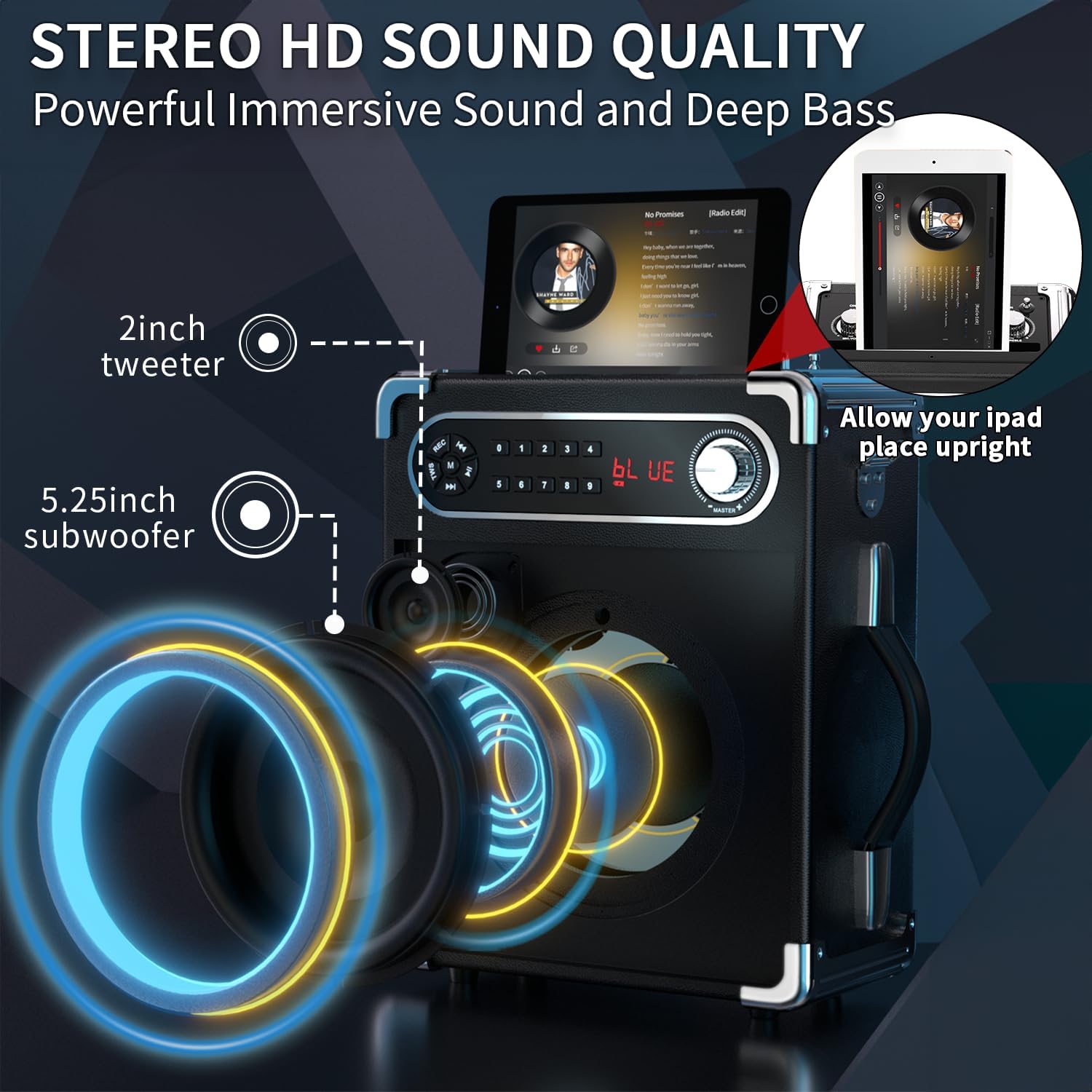
Image: Detailed view of the speaker's internal components, including the 5.25-inch subwoofer and 2-inch tweeter, designed for high-definition stereo sound.
Warranty and Support
voijump is committed to providing high-quality products and customer satisfaction. This product comes with a 365-Day Warranty. For any technical assistance, troubleshooting, or warranty claims, please contact voijump customer support. We also offer Lifetime Technical Support and Free Replacement for eligible issues.
For further assistance, please refer to the contact information provided on the product packaging or visit the official voijump website.