
WSTER WS-558
WSTER WS-558 Portable Bluetooth Speaker Instruction Manual
Model: WS-558 | Brand: WSTER
1. Introduction
Thank you for purchasing the WSTER WS-558 Portable Bluetooth Speaker. This speaker features a unique pickup truck design, delivering HD sound with multiple playback options including Bluetooth, USB, TF card, and FM radio. It also includes LED party lights and a built-in microphone for hands-free calls. Please read this manual carefully to ensure proper use and optimal performance of your device.
2. What's in the Box
Please check the package contents:
- WS-558 Portable Bluetooth Speaker
- Power Cable (Type-C)
- Quick Start Guide
3. Product Overview
Familiarize yourself with the speaker's components and controls.
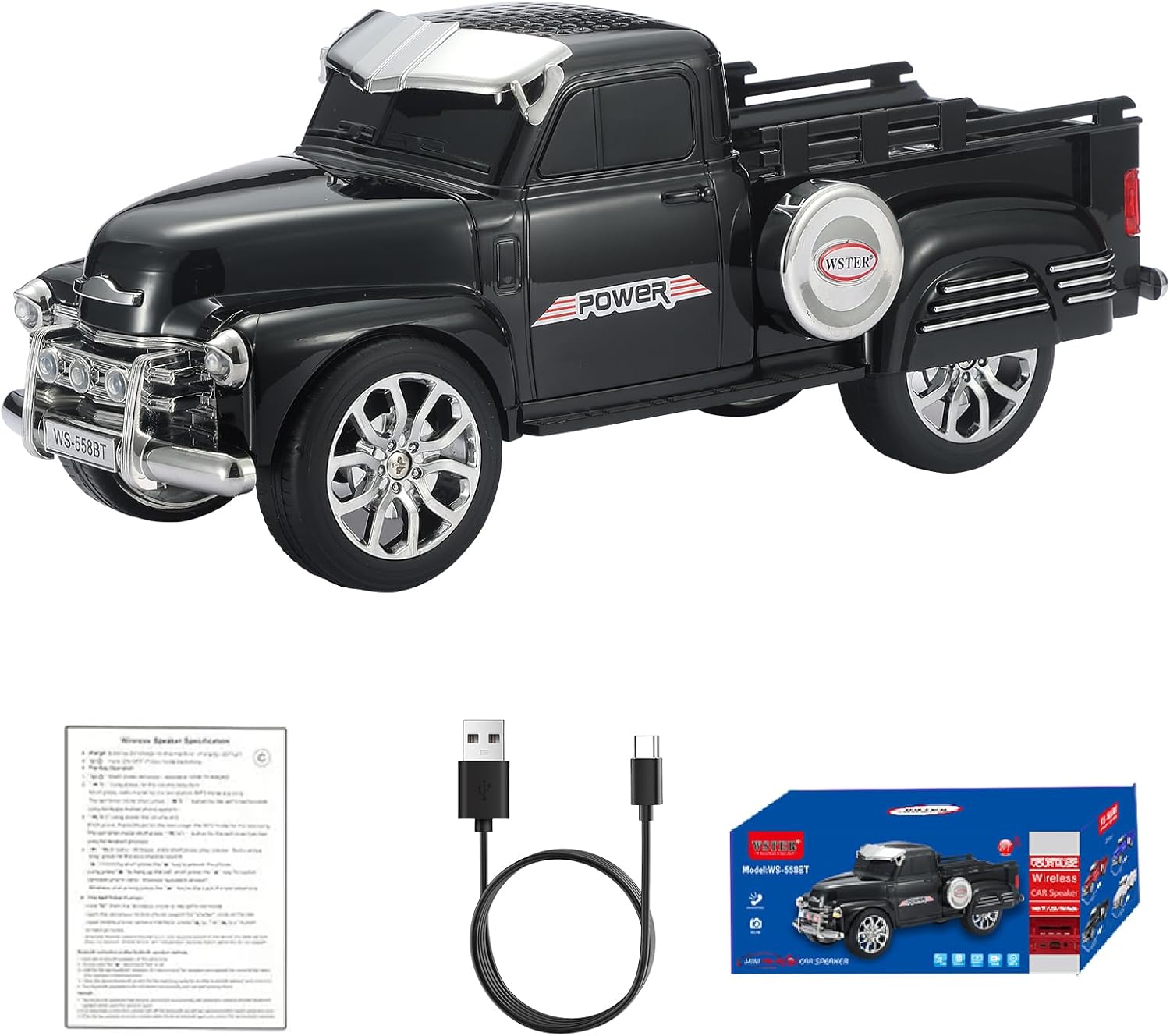
Figure 3.1: Front-side view of the WSTER WS-558 Black Pickup Truck Bluetooth Speaker.

Figure 3.2: Detailed top view of the WS-558 speaker, highlighting the control panel with power, mode, play/pause, and track navigation buttons.

Figure 3.3: Diagram showing the dimensions of the WS-558 speaker: 10.5 inches (length), 3.98 inches (width), 4.21 inches (height).
Control Panel Functions:
- Power/Mode Button (U/M): Press and hold to power on/off. Briefly press to switch between modes (Bluetooth, FM Radio, USB, TF Card, AUX).
- Previous Track/Volume Down (K<): Briefly press for previous track. Press and hold to decrease volume.
- Play/Pause (II): Briefly press to play or pause music. In FM mode, press and hold to auto-scan for stations.
- Next Track/Volume Up (>K): Briefly press for next track. Press and hold to increase volume.
- Microphone (MIC): Built-in microphone for hands-free calls.
- USB Port: For USB drive playback.
- TF Card Slot: For TF (MicroSD) card playback.
- Type-C Charging Port: For charging the speaker.
4. Setup
4.1 Powering On/Off
- To Power On: Press and hold the Power/Mode button (U/M) until the display lights up and you hear a power-on prompt.
- To Power Off: Press and hold the Power/Mode button (U/M) again until the display turns off and you hear a power-off prompt.
4.2 Bluetooth Pairing
Connect your device wirelessly to the WS-558 speaker.
- Ensure the speaker is powered on and in Bluetooth mode (indicated by "BLUE" on the display). If not, briefly press the Power/Mode button to switch modes.
- On your mobile device, enable Bluetooth and search for available devices.
- Select "WS-558" from the list of devices.
- Once connected, you will hear an audible confirmation.

Figure 4.1: Illustration demonstrating stable Bluetooth connection and swift pairing for the WS-558 speaker.
4.3 TWS (True Wireless Stereo) Pairing
For an enhanced stereo experience, you can pair two WS-558 speakers together.
- Ensure both WS-558 speakers are powered on and in Bluetooth mode, but not connected to any other device.
- On one of the speakers (this will be your primary speaker), double-press the Play/Pause button. You will hear a confirmation tone.
- The two speakers will automatically search and pair with each other. Once paired, you will hear another confirmation.
- Now, connect your mobile device to the primary speaker via Bluetooth as described in Section 4.2. Audio will play through both speakers in stereo.

Figure 4.2: Illustration showing two WS-558 speakers connected via TWS for true stereo sound.
5. Operating Instructions
5.1 Music Playback
- Bluetooth Mode: After successful pairing (Section 4.2), play music from your connected device. Use the Play/Pause, Previous Track, and Next Track buttons on the speaker or your device to control playback.
- USB/TF Card Mode: Insert a USB drive or TF card into the respective port. The speaker will automatically switch to the correct mode and begin playing audio files. Use the Play/Pause, Previous Track, and Next Track buttons to control playback.
- Volume Control: Press and hold the Previous Track button to decrease volume. Press and hold the Next Track button to increase volume.
5.2 FM Radio
- Briefly press the Power/Mode button (U/M) until "FM" appears on the display.
- To auto-scan for available stations, press and hold the Play/Pause button. The speaker will scan and save all available FM stations.
- Briefly press the Previous Track or Next Track buttons to navigate through the saved stations.
5.3 Hands-Free Calling
- When a call comes in while connected via Bluetooth, the speaker will ring.
- Briefly press the Play/Pause button to answer the call.
- To end the call, briefly press the Play/Pause button again.
- To reject an incoming call, press and hold the Play/Pause button.
5.4 LED Lights
The speaker features integrated LED lights. These lights typically activate automatically when the speaker is powered on and playing audio. Specific controls for light modes may vary or be automatic.
5.5 Charging
Connect the provided Type-C USB cable to the speaker's charging port and the other end to a USB power adapter (not included) or a computer USB port. The charging indicator will show the charging status.
6. Maintenance
- Keep the speaker away from water, moisture, and extreme temperatures.
- Clean the speaker with a soft, dry cloth. Do not use abrasive cleaners or solvents.
- Avoid dropping or subjecting the speaker to strong impacts.
- When not in use for extended periods, store the speaker in a cool, dry place and charge it periodically to maintain battery health.
7. Troubleshooting
| Problem | Possible Cause | Solution |
|---|---|---|
| Speaker does not power on. | Low battery. | Charge the speaker using the provided Type-C cable. |
| No sound. | Volume too low; device not connected; incorrect mode. | Increase volume; ensure Bluetooth is paired or media is inserted; switch to correct mode. |
| Bluetooth pairing fails. | Speaker not in pairing mode; device too far; interference. | Ensure speaker is in Bluetooth mode; move devices closer; restart both devices. |
| Poor FM radio reception. | Weak signal; environmental interference. | Move the speaker to a different location; perform auto-scan again. |
8. Specifications
| Feature | Detail |
|---|---|
| Brand | WSTER |
| Model Number | WS-558 |
| Speaker Maximum Output Power | 6 Watts |
| Frequency Response | 18 KHz |
| Connectivity Technology | Bluetooth |
| Audio Output Mode | Stereo |
| Mounting Type | Tabletop Mount |
| Enclosure Material | Acrylonitrile Butadiene Styrene (ABS) |
| Additional Features | Bluetooth Connection, Built-In Microphone, FM, LED Light, TWS |
| Item Dimensions (D x W x H) | 10.5"D x 3.98"W x 4.21"H |
| Item Weight | 630 Grams |
| Number of Batteries | 1 Nonstandard Battery (included) |
| UPC | 768274349484 |
9. Warranty Information
Warranty information for this product is not specified in the provided details. Please refer to the product packaging or contact the retailer/manufacturer for specific warranty terms.
10. Support
For further assistance or inquiries, please refer to the Quick Start Guide included in your package or visit the official WSTER website for support resources.
11. Instructional Videos
Watch these official videos for visual guidance on using your WSTER WS-558 speaker.
WSTER Speaker Instructions (Part 1)
This video provides a comprehensive overview of the speaker's functions and basic operations.
WSTER Speaker Instructions (Part 2)
A continuation of the instructional series, detailing more advanced features and usage scenarios.
WS-558 Product Showcase
A brief video highlighting the design and key features of the WS-558 speaker.
Related documentsWS-558

Ask a question about this manual
Ask about setup, troubleshooting, compatibility, parts, safety, or missing instructions. Manuals+ will review the question and use this page’s manual context to help answer it.