
MFVLP LC210
MFVLP LC210 Smart Watch User Manual
Your comprehensive guide to setup, operation, and features.
1. Introduction
Welcome to the MFVLP LC210 Smart Watch user manual. This guide provides detailed instructions to help you set up, operate, and maintain your new smartwatch. The MFVLP LC210 is designed to enhance your daily life with its advanced features, including a vibrant AMOLED display, Bluetooth calling, comprehensive health monitoring, and a wide range of sports modes. Please read this manual thoroughly to ensure optimal performance and longevity of your device.
2. What's in the Box
Upon unboxing your MFVLP LC210 Smart Watch, please verify that all the following items are included:
- Smart Watch * 1
- Magnetic charger * 1
- User Manual * 1 (This document)
- Black Watch Band * 1
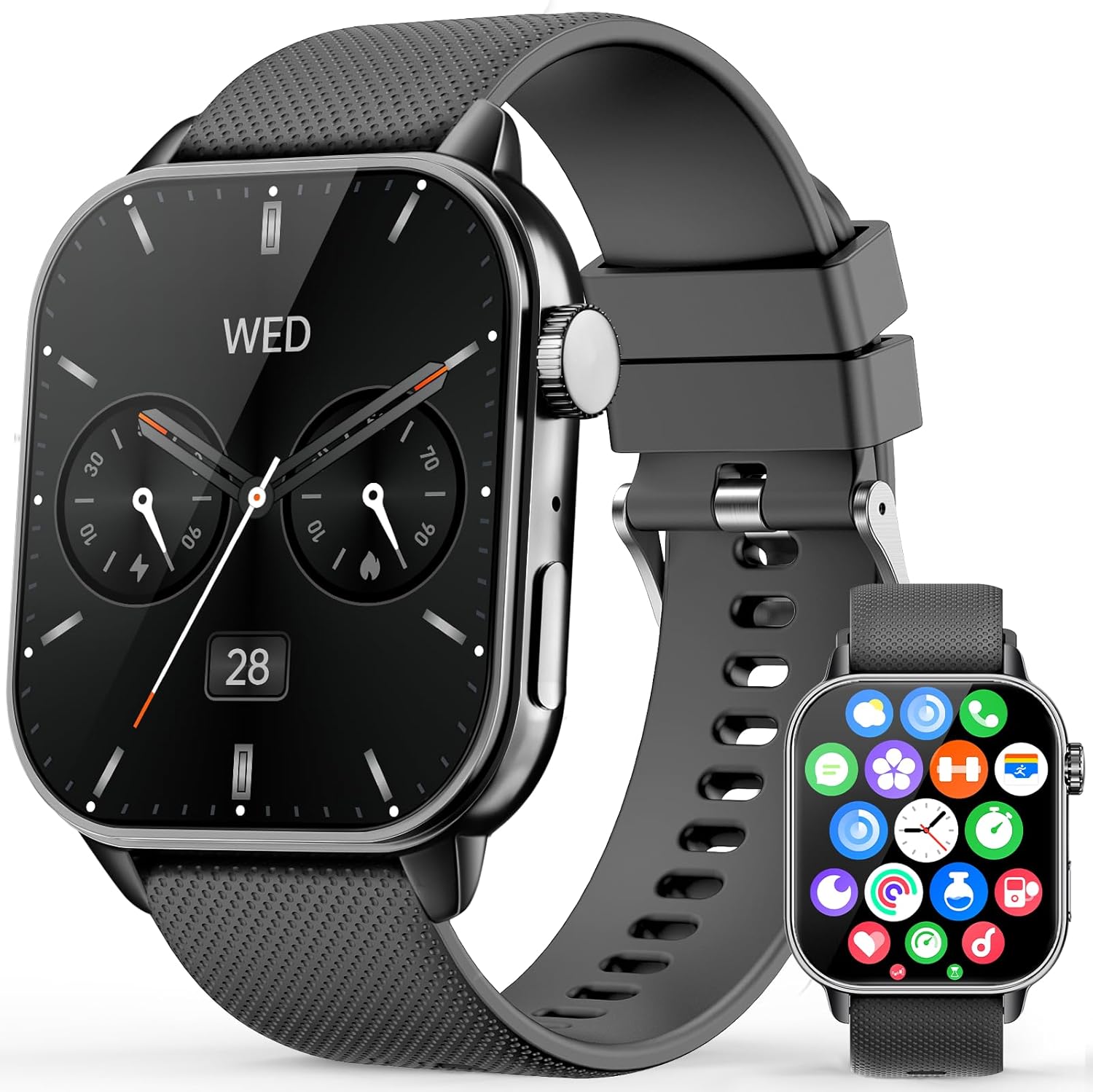
Image: The MFVLP LC210 Smart Watch, magnetic charger, and user manual as typically found in the box.
3. Setup Guide
3.1 Initial Charging
Before first use, fully charge your MFVLP LC210 Smart Watch. Connect the magnetic charger to the charging points on the back of the watch and plug the USB end into a power adapter (not included) or a computer's USB port. A full charge typically takes approximately 2 hours.

Image: The smartwatch connected to its magnetic charging cable, illustrating the charging process.
3.2 App Download and Pairing
To unlock the full potential of your MFVLP LC210 Smart Watch, download and install the "Da Fit" application on your smartphone. The app is compatible with both Android (5.0 or above) and iOS (9.0 or above) devices.
- Enable Bluetooth: Ensure Bluetooth is turned on in your phone's settings.
- Download "Da Fit": Scan the QR code provided in the watch's packaging or search for "Da Fit" in the Google Play Store (for Android) or Apple App Store (for iOS). You can also visit http://plus.crrepa.com/app-download/dafit.
- Open App & Add Device: Launch the "Da Fit" app, navigate to the "Add Device" section, and select "LC210" from the list of available devices.
- Confirm Pairing: Follow the on-screen prompts on both your phone and watch to confirm the Bluetooth pairing. Grant necessary permissions for notifications and health data synchronization.

Image: Visual guide demonstrating the steps to connect the smartwatch to your phone using the Da Fit app.
Video: A demonstration on how to operate a smartwatch, including app pairing and basic navigation, applicable to the MFVLP LC210.
3.3 Initial Configuration
Once paired, you can customize settings such as language, time format (12-hour or 24-hour), and unit system (metric or imperial) directly through the "Da Fit" app or on the watch itself.
4. Operating the Smart Watch
4.1 Basic Navigation
- Touch Screen: Swipe left, right, up, or down to navigate through menus and access different functions. Tap to select.
- Side Button/Crown: Press the side button to return to the home screen or wake the display. Rotate the crown to scroll through menus and lists.

Image: Close-up of the smartwatch highlighting the rotating encoder crown for easy navigation.
4.2 Watch Faces
The MFVLP LC210 offers over 190 watch faces through the "Da Fit" app. You can also customize your watch face using your own photos. Long-press the home screen to quickly change watch faces directly on the device.

Image: A selection of available watch faces for the MFVLP LC210, including options for custom photo backgrounds.
4.3 Always-On Display (AOD)
The watch features an Always-On Display (AOD) for instant time checks without needing to raise your wrist. Note that enabling this function may slightly reduce battery life.

Image: The smartwatch displaying the time with its Always-On Display feature active.
5. Key Features
5.1 Bluetooth Calling & Message Notifications
Equipped with a Bluetooth 5.3 chip, built-in microphone, and HD waterproof speaker, the LC210 allows you to make and receive calls directly from your wrist. You can also receive notifications from various apps (SMS, WhatsApp, Facebook, Twitter, etc.) to stay connected without constantly checking your phone.

Image: The smartwatch showing incoming call and message notifications, demonstrating its communication features.
5.2 Voice Assistant
Utilize the integrated voice assistant for hands-free control. Simply activate the feature and issue commands for tasks like setting alarms, checking the weather, or initiating calls.

Image: The smartwatch screen displaying the voice assistant interface, ready for commands.
5.3 Music Control
Control your smartphone's music playback directly from your watch. Play, pause, skip tracks, and adjust volume, ideal for workouts or when your phone is out of reach.
5.4 Camera Control
Use your smartwatch as a remote shutter for your phone's camera, making it easier to capture group photos or selfies.
5.5 Other Daily Tools
The LC210 includes over 15 practical tools such as Weather Forecast, Calculator, Stopwatch, Timer, Alarm, World Clock, Flashlight, Phone Finder, Women's menstrual cycle reminder, and Sedentary & Hydration Reminders.

Image: A collage of smartwatch screens showing various useful functions including weather, music control, and remote camera shutter.
6. Health Monitoring
The MFVLP LC210 is equipped with advanced optical sensors for comprehensive 24/7 health monitoring.
6.1 Heart Rate Monitoring
Continuously monitors your heart rate in real-time, providing insights into your cardiovascular health throughout the day and during exercise.

Image: The smartwatch displaying a heart rate graph and current BPM, indicating active heart rate monitoring.
6.2 Sleep Tracking
Automatically tracks your sleep duration and analyzes sleep quality, differentiating between light sleep, deep sleep, and awake periods to help you improve your sleeping habits.

Image: The smartwatch displaying sleep data, including duration of deep sleep, light sleep, and awake time.
6.3 Blood Oxygen Monitoring (SpO2)
Measures your blood oxygen levels, allowing you to monitor this important health indicator anytime and anywhere.

Image: The smartwatch displaying blood oxygen levels with maximum and minimum readings.
6.4 Stress Level Measurement
Monitors your stress levels throughout the day. If high stress is detected, the watch can guide you through stress relief exercises.

Image: The smartwatch displaying a stress level graph, indicating daily stress fluctuations.
6.5 Women's Health Tracking
Provides accurate tracking and reminders for women's menstrual cycles, offering personalized care and insights.

Image: The smartwatch displaying a calendar interface for tracking menstrual cycles.
7. Sports Modes & Activity Tracking
The MFVLP LC210 is your ideal fitness companion, offering extensive tracking capabilities for various physical activities.
7.1 120+ Sports Modes
Choose from over 120 built-in sports modes, including running, walking, cycling, yoga, dance, and more. The watch adapts to various activity scenarios to accurately record your performance.

Image: The smartwatch interface showing different sports modes and activity metrics like calories, distance, and steps.
7.2 All-Day Activity Tracking
Continuously records your daily activity data, including steps taken, distance covered, and calories burned. This data helps you monitor your progress and achieve your fitness goals.

Image: The smartwatch displaying a summary of daily activity, including steps, calories, and distance.
8. Water Resistance (IP68)
The MFVLP LC210 Smart Watch boasts an IP68 waterproof rating, making it resistant to sweat, rain, hand washing, and suitable for swimming in a pool. Avoid hot water, saunas, or diving to prevent damage.

Image: The smartwatch shown in water, illustrating its IP68 waterproof capability for activities like swimming.
9. Battery Life
The LC210 features a long-lasting battery. Expect 3-6 days of active use on a single charge and up to 30 days of standby time. Charging is quick, reaching full capacity in approximately 2 hours using the magnetic charger.

Image: Infographic detailing the battery life (3-6 days active, 30 days standby) and charging time (2 hours) of the smartwatch.
10. Specifications
| Feature | Detail |
|---|---|
| Model Number | LC210 |
| Display | 1.85-inch AMOLED HD Screen |
| Dimensions | 42.6mm x 37.5mm x 8.8mm (1.68in x 1.48in x 0.35in) |
| Item Weight | 40 Grams (1.41 ounces) |
| Connectivity | Bluetooth 5.3 |
| Water Resistance | IP68 |
| Battery Capacity | 290 Milliamp Hours |
| Operating System Compatibility | Android 5.0 or above, iOS 9.0 or above |
| Memory Storage Capacity | 128 MB |
| Strap Width | 20mm (0.79in) |
| Wrist Circumference | 150mm - 195mm (5.9in - 7.67in) |

Image: Detailed diagram showing the dimensions of the MFVLP LC210 Smart Watch and its strap.
11. Maintenance
- Cleaning: Regularly wipe the watch screen and strap with a soft, dry cloth. For stubborn stains, use a slightly damp cloth and mild soap, then rinse and dry thoroughly.
- Avoid Chemicals: Do not use harsh chemicals, cleaning solvents, or strong detergents, as these can damage the watch's finish and seals.
- Storage: When not in use for extended periods, store the watch in a cool, dry place. Ensure it has some charge to prevent deep discharge.
- Water Exposure: While IP68 rated, avoid prolonged submersion in water, especially hot water, and do not press buttons underwater.
12. Troubleshooting
- Watch not turning on: Ensure the watch is fully charged. Connect it to the magnetic charger for at least 10 minutes.
- Cannot pair with phone:
- Ensure Bluetooth is enabled on your phone.
- Make sure the watch is within Bluetooth range (typically 10 meters).
- Restart both your phone and the watch.
- Check if the "Da Fit" app has all necessary permissions.
- Forget the device in your phone's Bluetooth settings and try pairing again.
- Notifications not received:
- Verify that app notifications are enabled in the "Da Fit" app settings.
- Ensure your phone's notification settings allow notifications for the "Da Fit" app.
- Check if "Do Not Disturb" mode is active on either your phone or watch.
- Inaccurate health data: Ensure the watch is worn snugly on your wrist, not too tight or too loose. Clean the sensor on the back of the watch.
- Short battery life: Reduce screen brightness, disable unnecessary features like Always-On Display, and limit frequent heart rate monitoring if not needed.
13. Warranty & Support
MFVLP is committed to providing high-quality products and excellent customer service. Your MFVLP LC210 Smart Watch comes with a 1-year free replacement service for manufacturing defects.
For any inquiries, technical assistance, or warranty claims, please contact our customer support. We aim for rapid response within 24 hours and long-term support with satisfactory solutions.
- Customer Service: Refer to the contact information provided in your product packaging or visit the official MFVLP website.
- Online Resources: Check the MFVLP brand store on Amazon for FAQs and additional support.

Image: Details on MFVLP's quality service support, including rapid response and 1-year free replacement service.
Related documentsLC210

Ask a question about this manual
Ask about setup, troubleshooting, compatibility, parts, safety, or missing instructions. Manuals+ will review the question and use this page’s manual context to help answer it.