
1. Introduction
This manual provides detailed instructions for the setup, operation, and maintenance of your Sensforge 2.5K Indoor Outdoor Battery Camera (Model SF-BC22). Please read this guide thoroughly before using your camera to ensure optimal performance and safety.

Figure 1: Sensforge 2.5K Indoor Outdoor Battery Camera
2. What's Included
Verify that all items listed below are present in your package:
- Camera Body (with pre-installed microSD Card)
- Charging Cable
- Instruction Manual (this document)
- Mounting Screw Kit
- Power Adapter
For a visual guide on unboxing and included components, please refer to the video below:
Video 1: Unboxing and overview of the Sensforge Indoor/Outdoor Battery Camera components.
3. Product Overview
The Sensforge SF-BC22 camera is designed for versatile indoor and outdoor surveillance. It features a 2.5K Ultra HD resolution, smart AI detection, spotlight for color night vision, and a magnetic mount for easy installation.

Figure 2: Camera highlighting AI Smart Detection capabilities for humans, vehicles, and pets.
3.1. Camera Components
- Camera Lens: Captures 2.5K Ultra HD video.
- Motion Sensor: Detects movement for alerts.
- Spotlight: Provides illumination for color night vision.
- Microphone & Speaker: For two-way audio communication.
- Reset Button: Used for device reset and power control.
- MicroSD Card Slot: For local storage (32GB card pre-installed).
- USB Charging Port: For recharging the camera battery.
- Magnetic Base: Allows for flexible mounting on metallic surfaces.
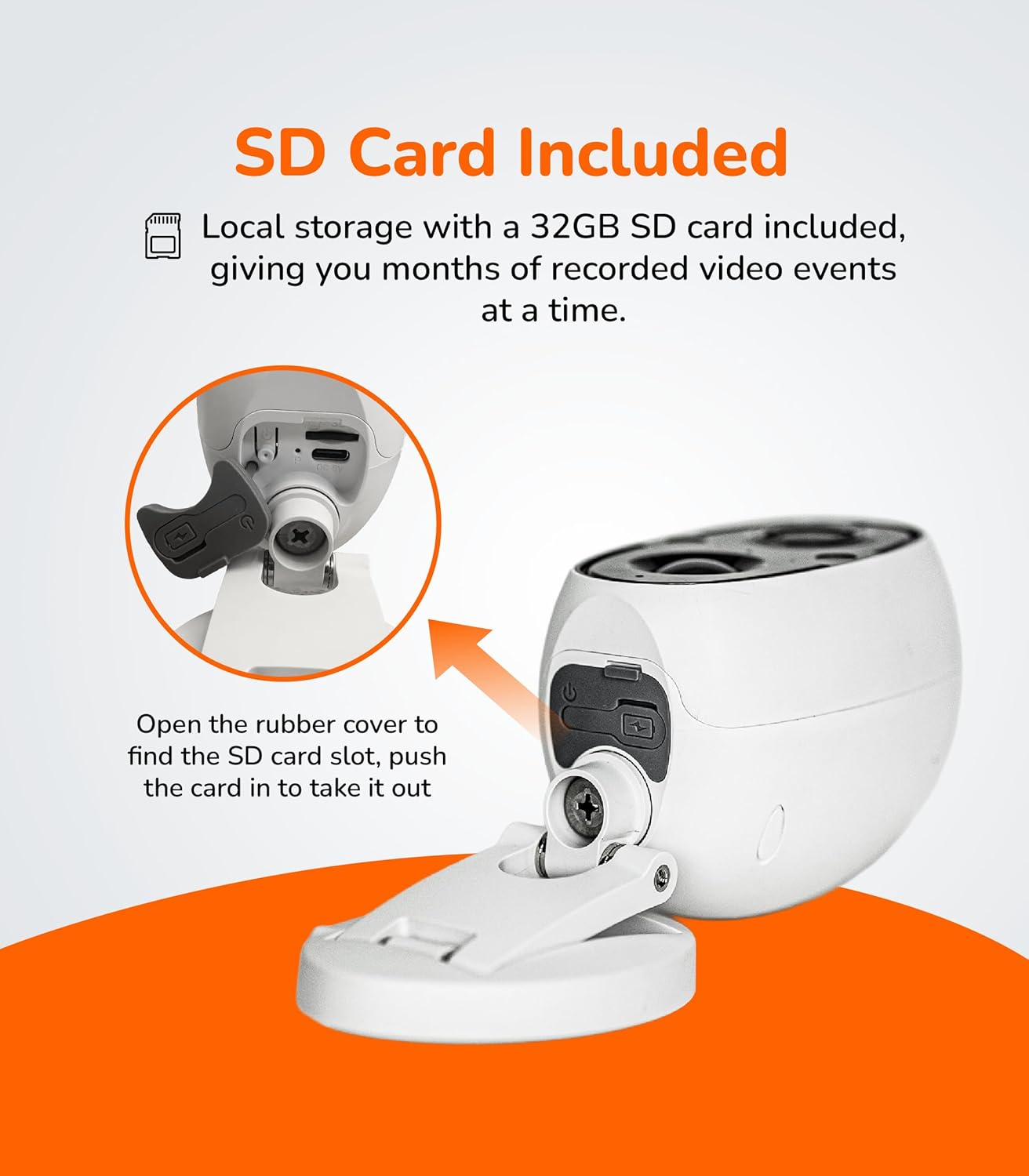
Figure 3: Location of the SD card slot and charging port under the protective rubber cover.
4. Setup Guide
4.1. Initial Charging
Before first use, fully charge the camera. Connect the provided charging cable to the camera's USB port and the power adapter. The red indicator light will turn off once charging is complete.
4.2. App Download and Account Creation
Download the "Sensforge" app from the App Store (iOS) or Google Play Store (Android). Follow the in-app instructions to create a new account or log in if you already have one.
4.3. Connecting to Wi-Fi
- Power on the camera by holding the reset button for 5 seconds until you hear the prompt "The device is powered on."
- In the Sensforge app, tap the '+' icon to add a new device.
- Scan the QR code located on the bottom of your camera's stand.
- Follow the on-screen prompts to connect the camera to your home Wi-Fi network. The camera supports both 2.4 GHz and 5 GHz Wi-Fi for a stable connection.
- Once connected, name your camera and finalize the setup.

Figure 4: The camera supports both 2.4 GHz and 5 GHz Wi-Fi networks for enhanced streaming quality.
4.4. Mounting the Camera
The camera features a strong magnetic base for flexible placement. It can be mounted on any metallic surface without tools, or using the provided screw kit for wall mounting.

Figure 5: Demonstrating the simple magnetic installation of the camera.
For a detailed setup guide, including app connection and mounting, please watch the video below:
Video 2: User guide for setting up the Sensforge Battery Camera, including unboxing, charging, app connection, and mounting.
5. Operating Instructions
5.1. Smart AI Detection
The camera utilizes advanced AI to accurately detect humans, vehicles, pets, and general motion. This reduces false alarms and ensures you receive relevant notifications. Configure detection settings within the Sensforge app.

Figure 6: AI Smart Detection capabilities of the Sensforge camera.
5.2. Spotlight and Color Night Vision
The built-in spotlight enables full-color night vision, providing clear and detailed images even in low-light conditions. This feature can be activated manually or set to trigger upon motion detection.
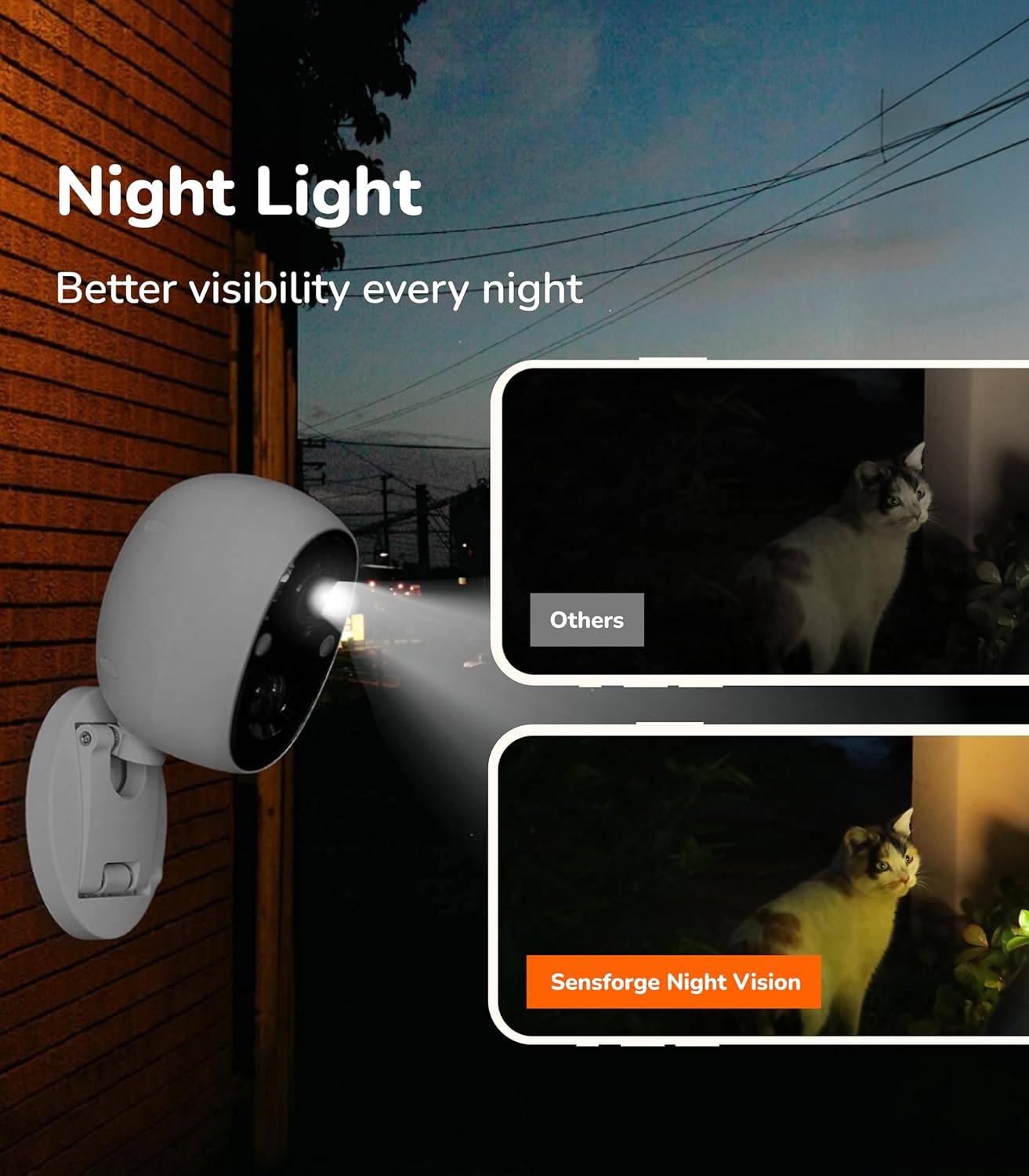
Figure 7: Comparison of standard night vision and Sensforge Color Night Vision with spotlight.
5.3. Remote Access and Alerts
Access live video streams, review recorded events, and receive instant motion alerts directly on your smartphone via the Sensforge app. Two-way audio allows for communication through the camera.
5.4. Local Storage
The camera comes with a pre-installed 32GB SD card for secure local storage of video recordings. This eliminates the need for monthly subscription fees for video storage.
6. Maintenance
6.1. Battery Management
The camera's high-capacity rechargeable battery lasts approximately 30-120 days per charge, depending on usage and settings. Monitor the battery level through the Sensforge app and recharge as needed using the provided cable and adapter.

Figure 8: Battery life can last 30-120 days depending on customized settings.
6.2. Cleaning and Care
Wipe the camera lens and body with a soft, damp cloth. Avoid using harsh chemicals or abrasive cleaners. Ensure the rubber cover for the ports is securely closed to maintain its IP65 waterproof rating.
7. Troubleshooting
- Camera not connecting to Wi-Fi: Ensure your camera is close to your router during setup. Verify you are connecting to a private 2.4 GHz or 5 GHz home Wi-Fi network, as public networks may have restrictions.
- Frequent false alarms: Adjust the AI detection sensitivity settings in the Sensforge app. Ensure the camera's field of view is clear of moving objects like tree branches or flags if not intended for detection.
- Poor video quality: Check your Wi-Fi signal strength in the app. Ensure the camera lens is clean and free from obstructions.
- Battery draining quickly: Review your camera's settings. Frequent motion detection, live viewing, and spotlight usage can reduce battery life.
8. Specifications
| Feature | Detail |
|---|---|
| Model Number | SF-BC22 |
| Video Resolution | 2.5K Ultra HD |
| Connectivity | Dual-Band Wi-Fi (2.4 GHz & 5 GHz), Bluetooth |
| Power Source | Battery Powered (1 9V battery included) |
| Battery Life | 30-120 days (depending on usage) |
| Storage | 32GB Micro SD Card (pre-installed) |
| Night Vision | Spotlight with Color Night Vision, 30 Feet Range |
| AI Detection | Human, Vehicle, Pet, Motion |
| Weather Resistance | IP65 Waterproof |
| Mounting Type | Magnetic, Wall Mount |
| Dimensions | 2.5 x 3.5 x 4.25 inches |
| Weight | 1.46 pounds |
9. Warranty and Support
Sensforge products come with a standard manufacturer's warranty. For specific warranty details, please refer to the warranty card included in your package or visit the official Sensforge website. For technical support, troubleshooting assistance, or any inquiries, please contact Sensforge customer service.
Contact Information:
- Website: www.sensforge.com
- Email: support@sensforge.com


