
Haozee HZ-WF-WV
Haozee HZ-WF-WV WiFi Smart Water Valve and Automatic Shutoff User Manual
1. Introduction
This manual provides essential information for the installation, operation, and maintenance of your Haozee HZ-WF-WV WiFi Smart Water Valve. This device is designed to monitor water flow, detect leaks, and provide automatic water shutoff capabilities, enhancing water management and protecting your property from potential water damage. Please read this manual thoroughly before installation and use.
2. Package Contents
Verify that all items are present in your package:
- Haozee Smart Water Valve (Model: HZ-WF-WV)
- User Manual
- Power Adapter (5V/2A AC)
- Power Cable
- 3/4-inch Head Adapters (2 pcs)
- Silicone Waterproof Rings
- Plumbing Tape

A layout of all components included in the product package: the Smart Water Valve, power adapter, power cable, plumbing tape, silicone waterproof rings, and two 3/4-inch head adapters.
3. Safety Information
- Ensure the power supply matches the specified voltage (5V/2A AC).
- Do not expose the device to extreme temperatures or direct sunlight.
- The device is rated IP66 for water resistance; however, avoid submerging it in water.
- For plumbing work, it is recommended to consult a qualified professional.
- Turn off the main water supply before installing the valve.
4. Product Overview
The Haozee HZ-WF-WV Smart Water Valve integrates advanced features for comprehensive water management:
- WiFi Connectivity: Connects to 2.4GHz and 5GHz Wi-Fi networks for remote control via a mobile application.
- Ultrasonic Flow Detection: Utilizes W-type ultrasonic technology for accurate real-time water flow measurement.
- Automatic Shutoff: Can automatically close the valve based on preset flow rate alarms or integration with a leak detector.
- Smart Water Meter: Monitors and records water usage statistics (daily, monthly, yearly).
- Built-in Battery: Features a 2600mAh NiMH rechargeable battery for manual operation during power outages.

The Haozee HZ-WF-WV Smart Water Valve shown alongside a smartphone displaying its control application, illustrating remote monitoring and operation capabilities.
5. Setup and Installation
5.1 Physical Installation
- Prepare the Installation Site: Identify the main water line where the valve will be installed. Ensure the pipe diameter is DN20 (3/4-inch). Turn off the main water supply before proceeding.
- Install the Valve: The valve is designed for lead-free copper water pipes. Use the provided 3/4-inch head adapters and plumbing tape to ensure a secure, leak-free connection. Ensure the flow direction arrow on the valve aligns with the water flow in your pipe. Professional installation is recommended.

An image of the Haozee Smart Water Valve integrated into a water pipe system, highlighting its digital screen that displays real-time water flow data and operational status.
5.2 Power Connection
- Connect the provided power cable to the valve and then to the 5V/2A AC power adapter.
- Plug the power adapter into a standard electrical outlet. The device will begin charging its internal 2600mAh NiMH rechargeable battery.
- The built-in battery allows for manual valve operation during power outages. Note that APP control and monitoring functions are not available when operating solely on battery power.

The Smart Water Valve connected to its power adapter, emphasizing the requirement for a 5V-2A AC/DC power supply for continuous operation.
5.3 App Installation and Wi-Fi Connection
- Download the Tuya Smart or Smart Life app from your smartphone's app store (iOS or Android).
- Register or log in to your account.
- Add the device by following the in-app instructions. The valve supports both 2.4GHz and 5GHz Wi-Fi networks and does not require a separate gateway.
- Ensure your smartphone is connected to the same Wi-Fi network during the pairing process.
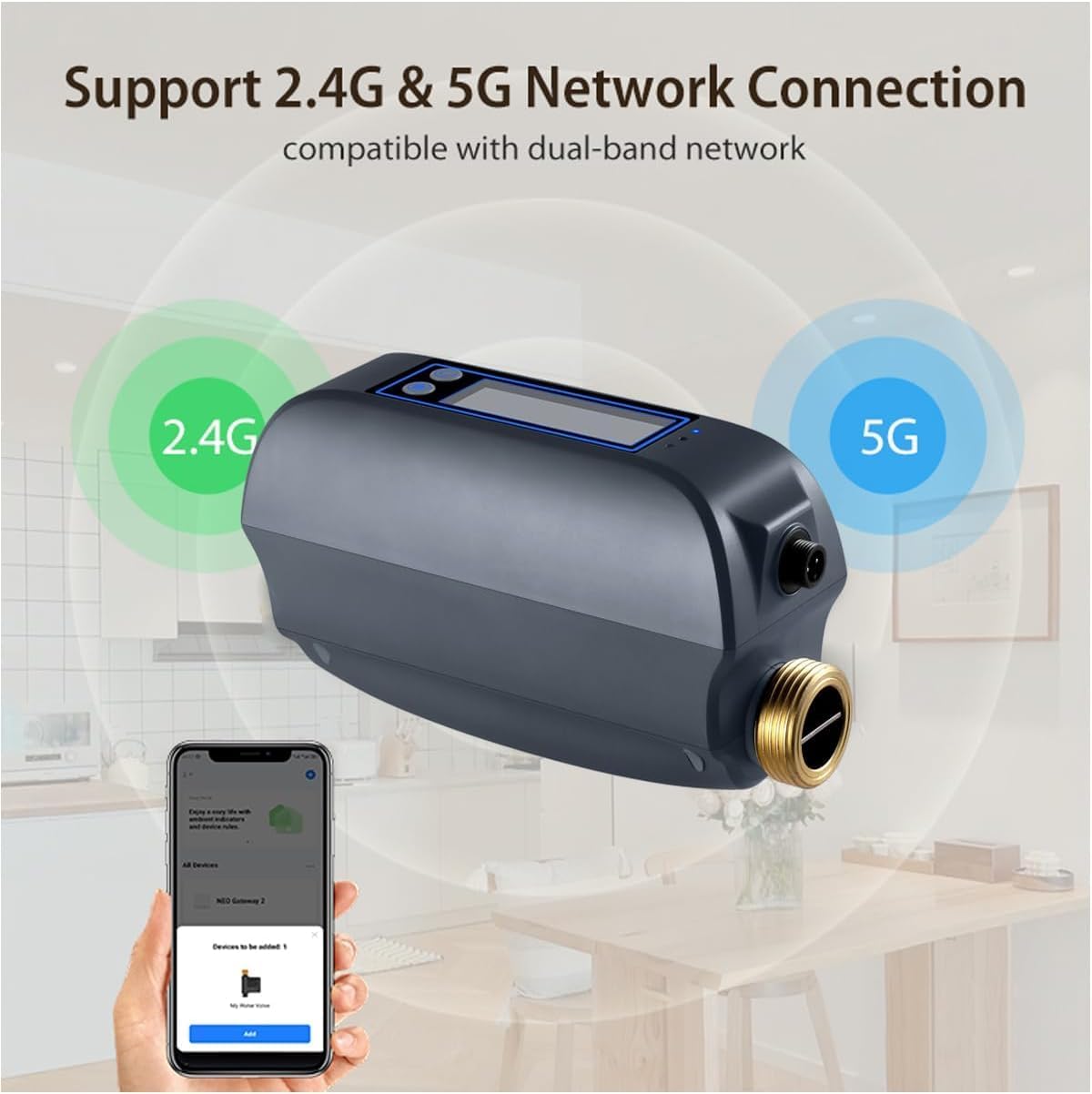
The Smart Water Valve highlighting its compatibility with dual-band 2.4GHz and 5GHz Wi-Fi networks for flexible and reliable connectivity.
6. Operating Instructions
6.1 Remote Control and Monitoring
- Once connected to the app, you can remotely open or close the water valve from anywhere with an internet connection.
- The app displays real-time water flow rates and total water consumption.

A visual representation of the water valve's digital display and the corresponding mobile application, both showing real-time water flow data and total water usage.
6.2 Automatic Shutoff and Alarms
- Ultrasonic Flow Detection: The valve uses W-type ultrasonic technology for precise flow measurement.
- Flow Rate Alarms: Set custom high or low water flow rate alarms within the app. If the flow exceeds or falls below the set values, the valve can automatically close to prevent waste or damage.
- Leak Detector Integration: Through the Tuya app, you can create automation scenes to link the Smart Water Valve with a Tuya WiFi Water Leak Detector (sold separately). If a leak is detected, the valve can automatically shut off the water supply.

An internal diagram of the Haozee Smart Water Valve, detailing the W-type ultrasonic technology used for accurate water flow detection, showing the transmitter, reflectors, and receiver.

An example setup showing the Smart Water Valve and a separate leak sensor in a bathroom environment, demonstrating how an automated scene can shut off water upon leak detection.
6.3 Smart Water Meter Functions
- The app provides detailed water usage statistics, including daily, monthly, and last usage reports.
- Use these statistics to monitor and manage your water consumption more efficiently.
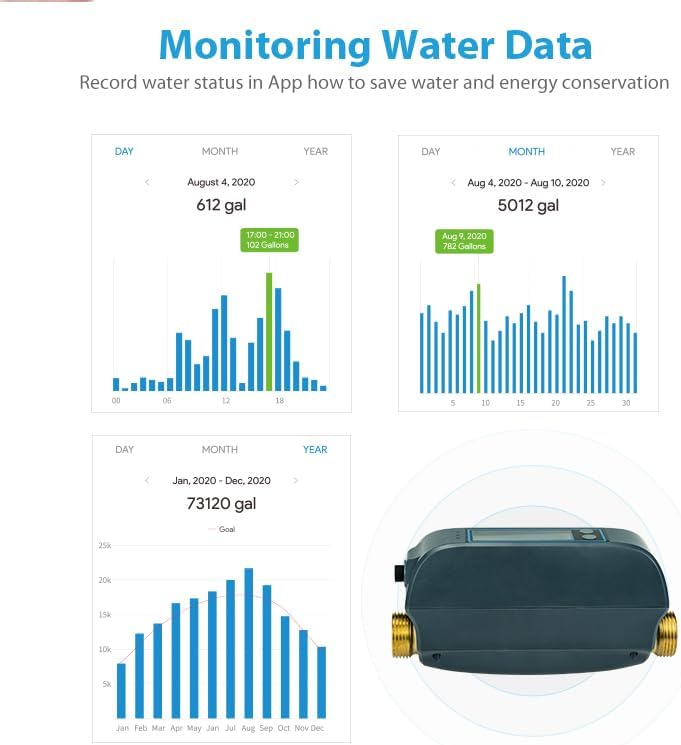
Screenshots from the mobile application illustrating the water usage monitoring features, including graphs for daily, monthly, and yearly consumption, aiding in water management.
7. Maintenance
- Regularly check the valve and pipe connections for any signs of leaks.
- Keep the device clean and free from dust and debris.
- Ensure the power adapter and cable are in good condition.
- The built-in rechargeable battery is designed for long life; no user maintenance is required for the battery itself.
8. Troubleshooting
| Issue | Possible Cause | Solution |
|---|---|---|
| Device not connecting to Wi-Fi | Incorrect Wi-Fi password; Device too far from router; Router operating on unsupported frequency (e.g., 5GHz only, but device supports both); Network congestion. | Verify Wi-Fi password. Move device closer to router. Ensure router is broadcasting 2.4GHz or 5GHz. Try restarting router. |
| App control not working | Device is in battery mode; No internet connection; App is outdated. | Ensure device is connected to AC power for app control. Check internet connectivity. Update the app to the latest version. |
| Inaccurate water flow readings | Improper installation; Air in pipes; Sensor obstruction. | Verify correct installation and flow direction. Bleed air from pipes. Ensure sensor area is clear. |
| Valve not shutting off automatically | Automation scene not configured correctly; Leak detector not paired or faulty; Flow alarm thresholds not set. | Review and adjust automation scene settings in the app. Check leak detector status. Set appropriate flow alarm thresholds. |
9. Specifications
| Feature | Detail |
|---|---|
| Model Number | HZ-WF-WV |
| Power Input | DC 5V/2A |
| Battery | Built-in 2600mAh NiMH rechargeable battery |
| Valve Diameter | DN20 (3/4-inch) |
| Water Flow Reporting Accuracy | 0.1 gal |
| Working Water Pressure | 0 ~ 1.3 MPa |
| Wireless Frequency | 2.412 ~ 2.483 GHz / 5.18 ~ 5.85 GHz |
| Wireless Standard | IEEE 802.11a/b/g/n; IEEE 802.11a/n/11ac |
| Bluetooth | Bluetooth 5.0 |
| Wireless Distance | Up to 45 meters (approx. 147 feet) |
| Thread Specification | NPT & BSP compatible |
| Waterproof Level | IP66 |
| Working Temperature | 1 ~ 60°C (34°F ~ 140°F) |
| Working Humidity | 1 ~ 95% RH (non-condensing) |
| Product Dimensions | 195mm x 78mm x 102mm (7.68 x 3.07 x 4.02 inches) |
10. Warranty Information
Haozee products are manufactured to high quality standards. For specific warranty terms and conditions, please refer to the warranty card included with your product or contact customer support. This warranty typically covers defects in materials and workmanship under normal use.
11. Customer Support
If you encounter any issues or have questions regarding your Haozee Smart Water Valve, please contact our customer support team. Refer to the product packaging or the official Haozee website for the most current contact information.
Ask a question about this manual
Ask about setup, troubleshooting, compatibility, parts, safety, or missing instructions. Manuals+ will review the question and use this page’s manual context to help answer it.