
Introduction
Thank you for choosing the PROHEAR 033 2.0 Bluetooth Hearing Protection Headphones. This device is designed to provide effective hearing protection while allowing communication and entertainment through Bluetooth connectivity and FM/AM radio. It features advanced sound amplification technology to enhance low-level sounds and suppress harmful loud noises, making it ideal for various environments such as shooting ranges, workshops, and outdoor activities.
Please read this manual thoroughly before using the headphones to ensure proper operation and to maximize your experience with the product.

Image: The PROHEAR 033 2.0 Bluetooth Hearing Protection Headphones in blue, with a black headband and earcups, shown with various patches in the background.
What's in the Box
Verify that all items listed below are included in your package:
- Electronic Hearing Protector x 1
- 3.5mm Cable x 1
- Tactical Wildlife Antlers Patch x 1
- Hook backing for patches x 2
- User Manual x 1
- Carrying Pouch x 1
- Patriot Patch x 2
- Punisher patch x 1

Image: A visual representation of the items included in the PROHEAR 033 2.0 package, such as the headphones, cables, patches, and user manual.
Setup
1. Charging the Headphones
Before initial use, fully charge the headphones. The built-in 2000mAh battery provides approximately 50 hours of operation on a single 6-hour charge. The device supports over 300 recharge cycles.
- Locate the USB charging port on the headphones.
- Connect the provided USB charging cable to the headphones and a compatible USB power source (e.g., computer, wall adapter).
- The charging indicator light will illuminate. Once fully charged, the light may change color or turn off.
Alternatively, the earmuffs can operate on 2 AAA batteries, offering approximately 300 hours of battery life for the active hearing protection feature.

Image: An illustration detailing the rechargeable battery life (48 hours playtime with 4 hours charge) and wired mode playtime (125 hours) for the PROHEAR 033 2.0 headphones.
2. Adjusting for Fit
For optimal hearing protection and comfort, ensure the headphones fit securely and snugly over your ears.
- Extend the telescopic headband to its maximum length.
- Place the earcups over your ears, ensuring they fully cover them.
- Adjust the headband by sliding the earcups up or down until a comfortable and secure seal is achieved around your ears. The padded headband is designed for various head sizes.
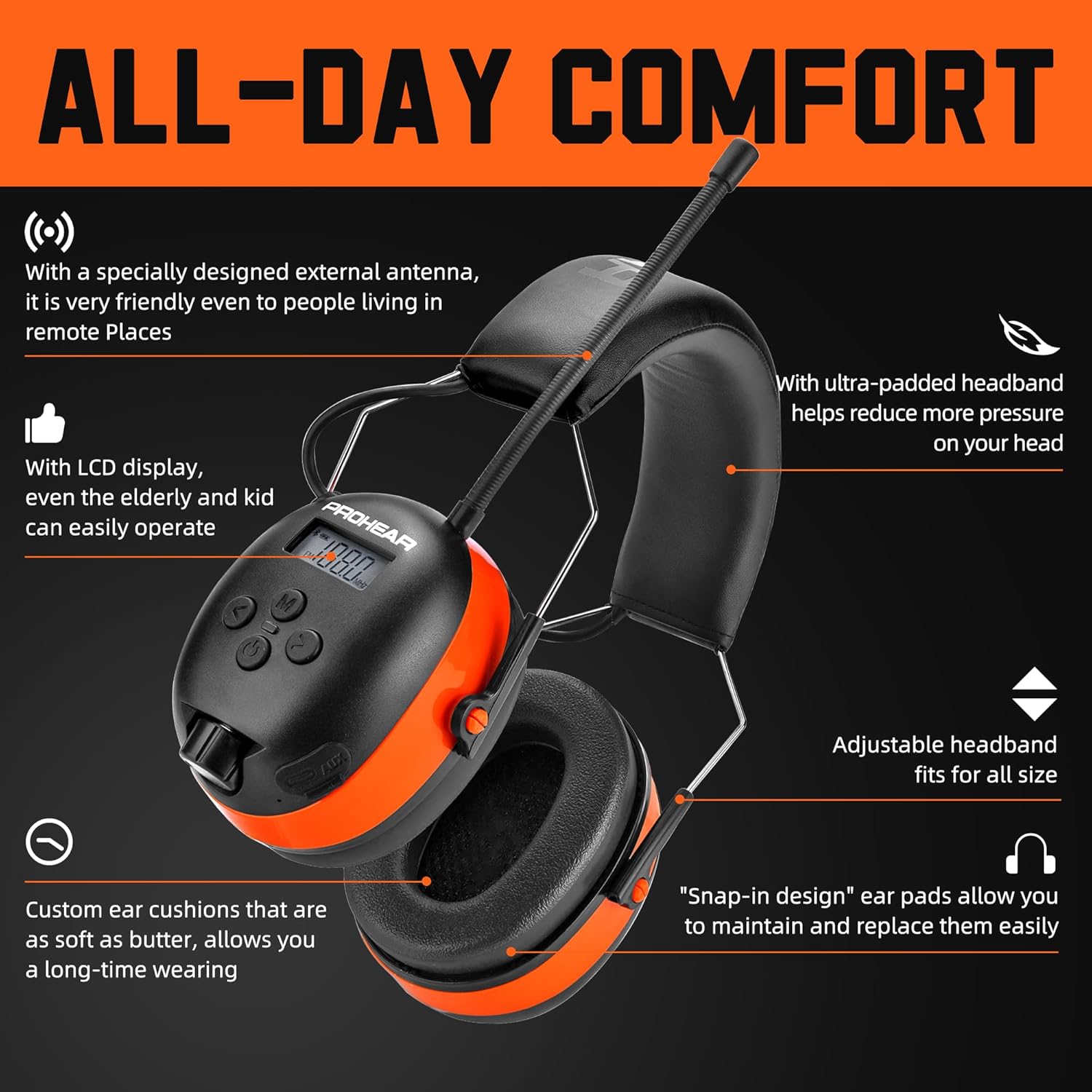
Image: A diagram highlighting the comfort features of the PROHEAR 033 2.0, including the ultra-padded headband, adjustable headband, custom ear cushions, and snap-in ear pad design.
Operating Instructions
1. Power On/Off and Volume Control
Locate the easy-to-use volume switch on the earcup. This switch typically controls both power and volume for the active hearing protection and radio functions.
- To power on, rotate the volume switch clockwise until you hear a click or the display illuminates.
- To adjust volume, continue rotating the switch clockwise to increase volume or counter-clockwise to decrease volume.
- To power off, rotate the volume switch counter-clockwise until you hear a click or the display turns off.

Image: A detailed view of the PROHEAR 033 2.0 headphones, highlighting features like the digital display, simple function buttons, easy-to-use volume switch, audio jack, and USB charging port.
2. Bluetooth Pairing
The headphones feature Bluetooth 5.3 for stable and long-range connectivity (up to 49 feet).
- Ensure the headphones are powered on.
- Activate Bluetooth on your mobile device or other Bluetooth-enabled audio source.
- On your device, search for available Bluetooth devices. The headphones should appear as "PROHEAR 033 2.0" or similar.
- Select the headphones to initiate pairing. A voice prompt or indicator light may confirm successful pairing. Pairing typically takes about 5 seconds.

Image: An infographic illustrating the benefits of Bluetooth 5.4 connectivity for the PROHEAR 033 2.0, including rapid response, unshakable stability, and extended range (up to 49 feet).
3. FM/AM Radio Operation
The headphones include an integrated FM/AM radio for entertainment.
- Press the "Mode" button (if available, refer to the control image) to switch to FM or AM radio mode.
- Use the "Tune" or "Scan" buttons to find radio stations. The digital display will show the current frequency.
- Adjust the volume using the main volume switch.
4. Active Hearing Protection and Sound Amplification
The PROHEAR 033 2.0 features SMART technology for active hearing protection and sound amplification.
- Noise Reduction: The headphones provide a Signal-to-Noise Ratio (SNR) of 31dB, effectively reducing harmful noise levels in loud environments.
- Gunshot Suppression: Harmful impulse noises, such as gunshots, are suppressed within 0.01 seconds, protecting your hearing.
- Sound Amplification: Low-level sounds, like conversations or environmental cues, are amplified up to 4 times their natural volume, allowing for clear communication and situational awareness.
- The system automatically reduces noise above 82dB.

Image: An image depicting the PROHEAR 033 2.0 headphones' capability for up to 4X sound amplification to enhance communication, allowing users to adjust volume and automatically reducing noise above 82dB.

Image: A person at a shooting range wearing the PROHEAR 033 2.0 headphones, illustrating the protection from harmful gunshot noises within a 0.01S reaction time.
Maintenance
1. Cleaning
- Wipe the exterior of the headphones with a soft, damp cloth.
- Do not use abrasive cleaners or solvents.
- Ensure no moisture enters the electronic components.
2. Earcup Replacement
The ear cushions are designed for easy replacement to maintain hygiene and comfort.
- Gently pull the old ear cushion away from the earcup. It is designed to snap off.
- Align the new ear cushion with the earcup and press firmly until it snaps into place.
3. Storage
When not in use, store the headphones in a cool, dry place, away from direct sunlight and extreme temperatures. Use the provided carrying pouch for protection.
Troubleshooting
| Problem | Possible Cause | Solution |
|---|---|---|
| No power | Battery is depleted | Charge the headphones using the USB cable. Ensure AAA batteries (if used) are correctly inserted and not depleted. |
| Cannot pair via Bluetooth | Bluetooth not enabled on device; headphones not in pairing mode; device too far | Ensure Bluetooth is active on your device. Power cycle the headphones. Move device closer to headphones (within 49 feet). |
| Poor radio reception | Weak signal; interference | Adjust your position. Extend the external antenna fully. Scan for stations again. |
| Sound amplification not working | Headphones not powered on; volume too low | Ensure headphones are powered on. Increase the volume using the volume switch. |
| Uncomfortable fit | Headband not adjusted; ear cushions worn | Adjust the telescopic headband for a snug fit. Consider replacing ear cushions if they are worn or damaged. |
Specifications
- Model: PROHEAR 033 2.0
- Noise Reduction Rating (SNR): 31dB
- Bluetooth Version: 5.3
- Bluetooth Range: Up to 49 feet (15 meters)
- Battery Type (Internal): 2000mAh rechargeable lithium-ion
- Battery Life (Internal): Up to 50 hours (on a 6-hour charge)
- Battery Type (External): 2 x AAA batteries (for active hearing protection)
- Battery Life (AAA): Up to 300 hours
- Sound Amplification: Up to 4X
- Harmful Noise Suppression: Within 0.01 seconds (for gunshots)
- Automatic Noise Reduction Threshold: Above 82dB
- Weight: Approximately 0.6 pounds (272 grams)
- Fabric Type: Durable ABS shell, ultra-soft and extremely lightweight material
- Package Dimensions: 7.8 x 5.3 x 3.9 inches
Warranty Information
The PROHEAR 033 2.0 Bluetooth Hearing Protection Headphones come with a one-year warranty from the date of purchase. This warranty covers manufacturing defects and ensures quality assurance. Please retain your proof of purchase for warranty claims.
For warranty service, please contact PROHEAR customer support with details of the issue and your purchase information.
Support
If you encounter any issues or have questions regarding your PROHEAR 033 2.0 headphones that are not addressed in this manual, please contact our customer support team.
- Online Support: Visit the official PROHEAR website for FAQs and support resources.
- Email Support: Refer to the contact information provided on the product packaging or the official website.
Please have your model number (033 2.0) and purchase date ready when contacting support.


