
1. Introduction
The SHARMEAL TM16K is a versatile and powerful portable jump starter designed to provide emergency starting power for vehicles with 12V batteries. It also features an integrated air compressor for tire inflation, an LED flashlight, and acts as a portable power bank for charging electronic devices. This manual provides essential information for the safe and effective use of your device.
2. Safety Information
Please read all safety warnings and instructions before using this product. Failure to follow these instructions may result in electric shock, fire, or serious injury.
- Always wear eye protection when jump starting a battery.
- Do not short-circuit the jump starter clamps. Avoid connecting the red and black clamps together.
- Keep the device away from children.
- Do not disassemble the jump starter. Refer all servicing to qualified personnel.
- Operate and store the device within the specified temperature range.
- Ensure proper ventilation during use. Do not cover the device.
- Do not use the jump starter if it is damaged or if the cables/clamps are compromised.
- Disconnect the jump starter from the vehicle battery immediately after starting the engine.
3. Package Contents
Verify that all items are present in the package:
- SHARMEAL TM16K Jump Starter Unit
- Smart Jump Cables with Clamps
- USB-C Charging Cable
- Air Nozzles (various types)
- Storage Bag
- Hard Carrying Case
- User Manual

Image showing the SHARMEAL TM16K Jump Starter and its included accessories: smart jump cables, USB-C charging cable, various air nozzles, storage bag, and hard case.
4. Product Overview
Familiarize yourself with the components of your SHARMEAL TM16K Jump Starter:
- Digital Display: Shows battery level, pressure readings, and operational status.
- Control Buttons: Power, mode selection, and pressure adjustment.
- Jump Start Port: For connecting the smart jump cables.
- Air Compressor Hose Port: For connecting the air inflation hose.
- LED Flashlight: Multi-mode illumination.
- USB Output Port: For charging external electronic devices.
- Type-C Input Port: For charging the jump starter unit.

Front view of the SHARMEAL TM16K Jump Starter, highlighting the digital display, control buttons, and jump start port.
5. Setup
5.1 Charging the Jump Starter
Before first use, fully charge the SHARMEAL TM16K. Connect the provided USB-C charging cable to the Type-C input port on the jump starter and to a suitable USB power adapter (not included). The digital display will indicate the charging status. A full charge is recommended every 3-6 months to maintain battery health, even when not in use.

The SHARMEAL TM16K Jump Starter connected via its Type-C port, demonstrating its fast charging capability for external devices, which also applies to charging the unit itself.
6. Operating Instructions
6.1 Jump Starting a Vehicle
- Ensure the jump starter is sufficiently charged (at least 50% recommended).
- Connect the smart jump cables to the jump start port on the unit.
- Connect the red (+) clamp to the positive (+) terminal of the vehicle battery.
- Connect the black (-) clamp to the negative (-) terminal of the vehicle battery.
- Once connected, the smart cable indicator light will show readiness. If the indicator is green, proceed to start the vehicle.
- Start the vehicle's engine. If the engine does not start on the first attempt, wait at least 30 seconds before trying again.
- Once the vehicle starts, immediately remove the black (-) clamp, then the red (+) clamp from the vehicle battery.
- Disconnect the smart jump cables from the jump starter unit.
Forced Start Function
If the jump starter does not detect the vehicle battery (e.g., if the battery voltage is extremely low), the smart cable indicator may not turn green. In this case, you can use the Forced Start function:
- Ensure all connections are correct (red to positive, black to negative).
- Press and hold the 'FORCED-START' button on the smart clamp for 3-5 seconds until the indicator light turns green.
- Start the vehicle within 30 seconds.
- Immediately remove the clamps after the vehicle starts.

Illustration of pressing the 'FORCED-START' button on the smart clamp when the jump starter does not detect a low-voltage battery, enabling manual activation of the jump start function.
6.2 Using the Air Compressor
The integrated air compressor can inflate tires and other inflatables.
- Connect the air hose to the air compressor port on the jump starter.
- Attach the appropriate nozzle to the air hose and connect it to the item you wish to inflate (e.g., tire valve).
- Turn on the jump starter and select the inflation mode.
- Use the control buttons to set the desired pressure (PSI, Bar, Kpa, Kg/cm²).
- Press the start button to begin inflation. The compressor will automatically stop when the preset pressure is reached.
- Disconnect the air hose and store it properly.
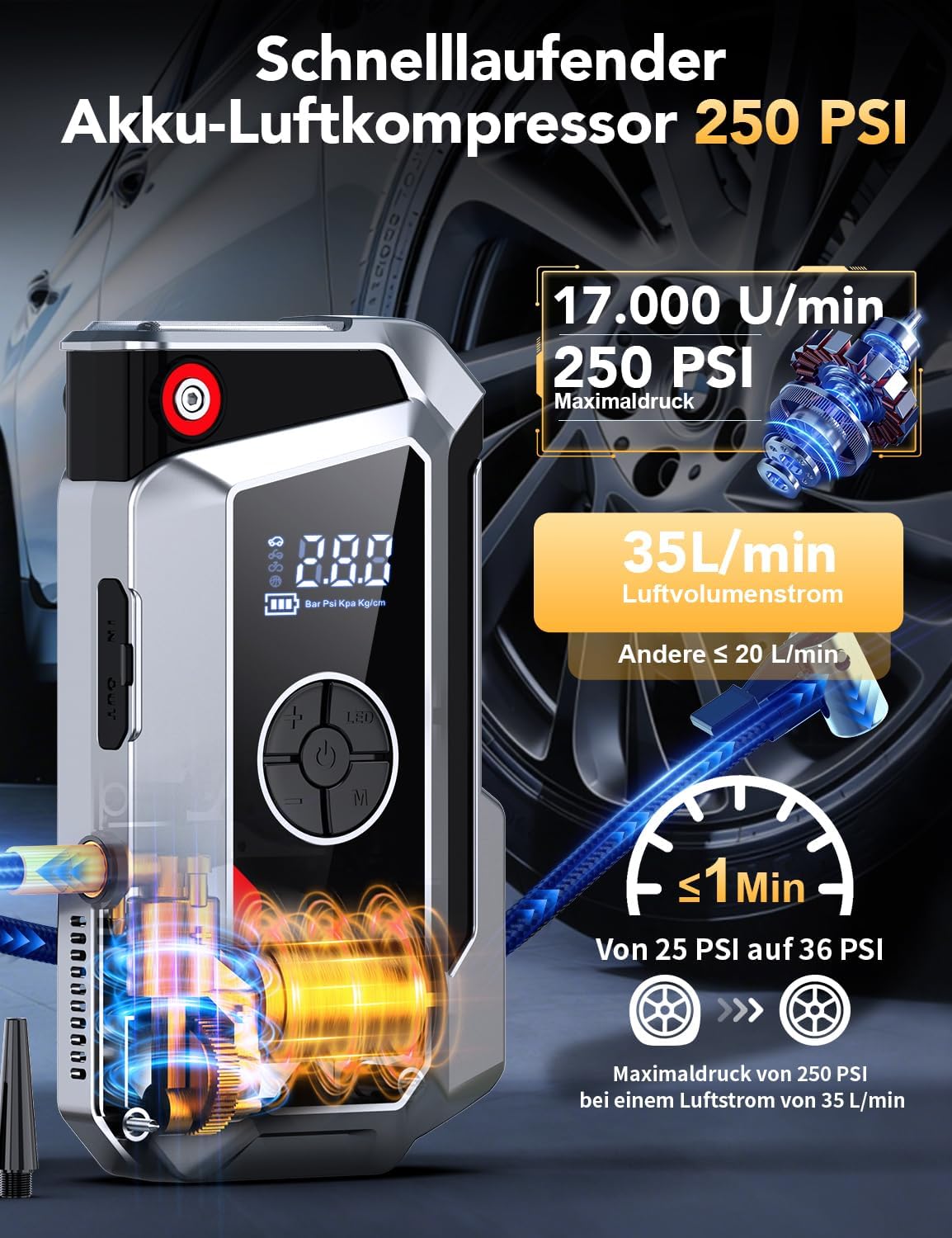
The SHARMEAL TM16K Jump Starter's integrated air compressor, showing its 250 PSI maximum pressure and 35 L/min airflow, capable of inflating a tire from 25 to 36 PSI in under 1 minute.
6.3 Using the LED Flashlight
The built-in LED flashlight offers multiple lighting modes for various situations.
- Press the flashlight button to turn on the light.
- Press the button again to cycle through modes: Constant On, SOS Signal, Strobe Light.
- Press and hold the button to turn off the flashlight.

The 800-Lumen LED flashlight feature of the SHARMEAL TM16K Jump Starter, demonstrating its use for general illumination, SOS signaling, and strobe light functions.
6.4 Using as a Portable Power Bank
The jump starter can charge your electronic devices via its USB output port.
- Connect your device's USB charging cable to the USB output port on the jump starter.
- The jump starter will automatically begin charging your device.
- Disconnect your device once charging is complete.

The SHARMEAL TM16K Jump Starter functioning as a portable power bank, illustrating its USB output and Type-C input for charging various electronic devices.
7. Maintenance
- Charging: Recharge the unit every 3-6 months to maintain optimal battery performance, even if not used.
- Cleaning: Wipe the unit with a dry, soft cloth. Do not use harsh chemicals or abrasive cleaners.
- Storage: Store the jump starter in a cool, dry place, away from direct sunlight and extreme temperatures. Keep it in its protective case when not in use.
8. Troubleshooting
- Unit does not turn on: Ensure the unit is charged. If not, connect it to a power source using the USB-C cable.
- Vehicle does not start: Check that the smart clamps are correctly connected to the battery terminals (red to positive, black to negative). Ensure the jump starter has sufficient charge. If the battery is extremely low, use the Forced Start function.
- Air compressor not working: Check that the air hose is securely connected. Ensure the unit is turned on and in inflation mode. Verify the desired pressure is set.
- Smart clamp indicator shows an error: Refer to the specific error codes in the full user manual (if provided) or ensure connections are clean and secure.
9. Specifications
| Model Number | TM16K |
| Brand | Sharmeal |
| Peak Current | 5000 A |
| Voltage | 12 Volts |
| Battery Type | Lithium-ion |
| Dimensions (L x W x H) | 20.6 x 5.5 x 11 cm |
| Weight | 800 grams |
| Air Compressor Max Pressure | 250 PSI |
| LED Light Output | 800 Lumens |
10. Warranty and Support
For warranty information or technical support, please refer to the documentation included with your purchase or contact the seller directly. Keep your proof of purchase for warranty claims.