
SEDETA B0FMRJ4MZM
SEDETA Farmhouse L-Shaped Electric Standing Desk
Model: B0FMRJ4MZM
Brand: SEDETA
1. Safety Information
Please read and understand all safety instructions before assembly and use. Failure to follow these instructions may result in injury or damage to the product.
- Always ensure the desk is properly anchored to the floor to prevent tipping.
- Do not place heavy objects on the desk that exceed the weight limit of 176 lbs.
- Be cautious when using the power outlet and do not overload it.
- Keep the desk and its components away from heat sources and open flames.
- Always follow the assembly instructions carefully to avoid injury.
2. Product Overview
The SEDETA Farmhouse L-Shaped Electric Standing Desk is a versatile and ergonomic solution for your home office. It features a height-adjustable design, ample storage, and integrated power outlets to enhance productivity and comfort.
Key Features:
- Adjustable Height Standing Desk: Features a sleek LED display, 3 customizable height presets, and precision up-and-down controls. Adjustable height range from 30" to 47".
- Reversible Desk: Can be configured as a 67-inch corner desk or a 110.3-inch long office desk for two persons.
- Ample Storage Space: Includes a file drawer, 2 regular drawers, 1 storage cabinet, and 7 open shelves. The file cabinet accommodates letter/A4/legal files.
- Charging Port: Integrated charging station with 4 AC outlets and 2 USB ports for simultaneous charging of up to 6 devices.
- Built to Last with Exceptional Stability: Constructed from P2 particle board and premium cold-rolled steel, supporting up to 176 lbs. Tested for 50,000 full-load lift cycles with operation noise below 45 dB.

Figure 2.1: SEDETA Farmhouse L-Shaped Electric Standing Desk in Black, showcasing its overall design and adjustable height feature.

Figure 2.2: Overhead view of the SEDETA L-Shaped Desk, illustrating its 63-inch and 67-inch dimensions for the L-shape configuration.
3. Setup
The SEDETA L-Shaped Electric Standing Desk requires assembly. Detailed instructions and numbered parts are included in the packaging to facilitate the process. It is recommended to have assistance during assembly due to the size and weight of the components.
Assembly Guidelines:
- Unpack all components and verify against the parts list provided in the manual.
- Follow the step-by-step instructions carefully.
- Ensure all screws and fasteners are tightened securely.
- Do not use power tools unless explicitly stated in the instructions to avoid overtightening or damaging components.
Video 3.1: Official installation tutorial video for the SEDETA L-Shaped Electric Standing Desk, guiding users through the assembly process.
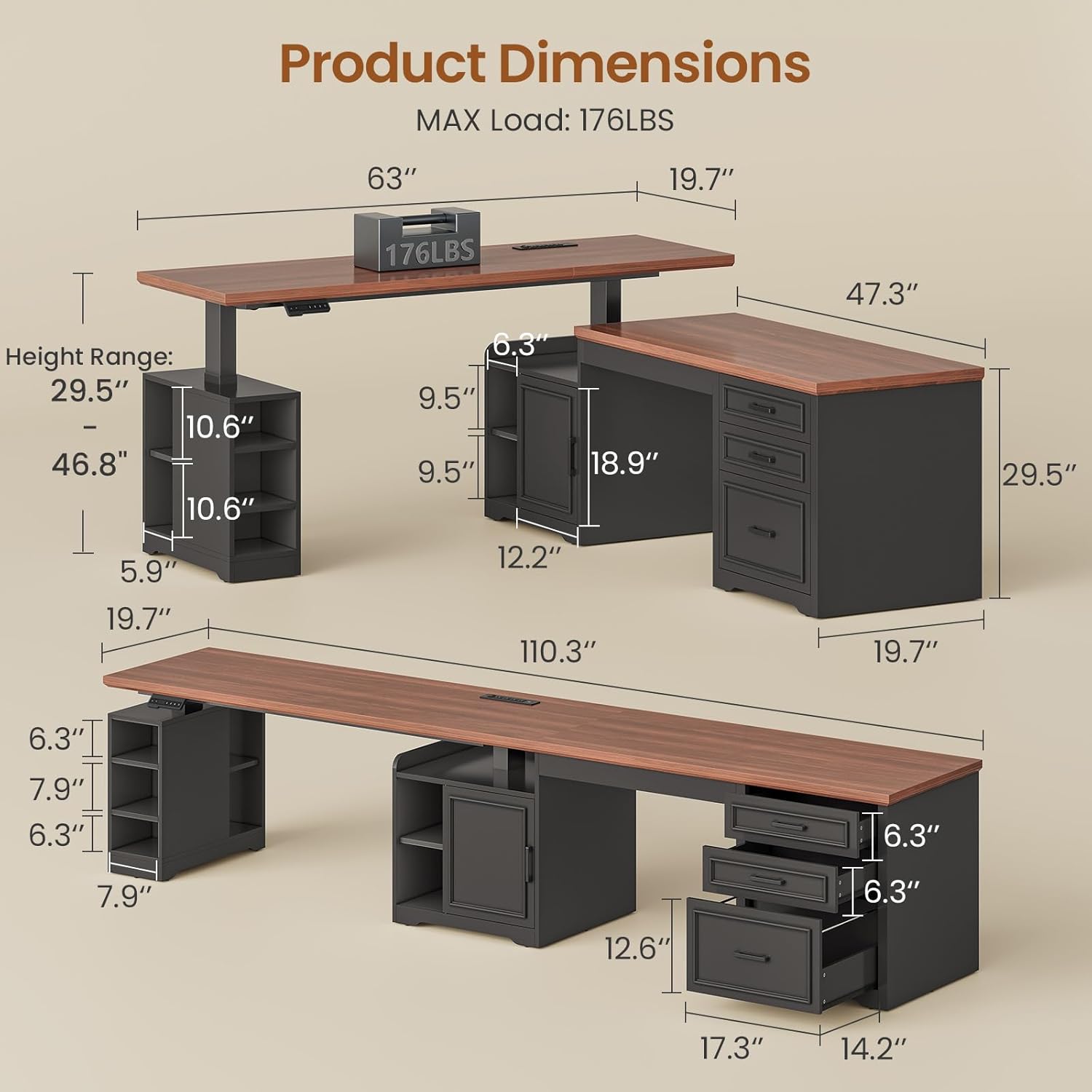
Figure 3.1: SEDETA L-Shaped Desk in a home office setting, configured for two users with monitors and laptops, illustrating the final assembled product.
4. Operating Instructions
4.1 Adjustable Height Function
The desk features an electric lift system allowing you to switch between sitting and standing positions effortlessly. The control panel is located on the front edge of the adjustable section.
- Up/Down Controls: Use the ^ (Up) and v (Down) buttons to manually adjust the desk height. The current height is displayed on the LED screen.
- Memory Presets: The desk offers 3 programmable height presets (1, 2, 3). To save a height, adjust the desk to your desired level, then press and hold one of the preset buttons (1, 2, or 3) until the display flashes. To recall a saved height, simply press the corresponding preset button.
- Reset Function: If the desk encounters an error or needs recalibration, press the RST button (often indicated by a circular arrow) and hold until the desk moves to its lowest position and resets.
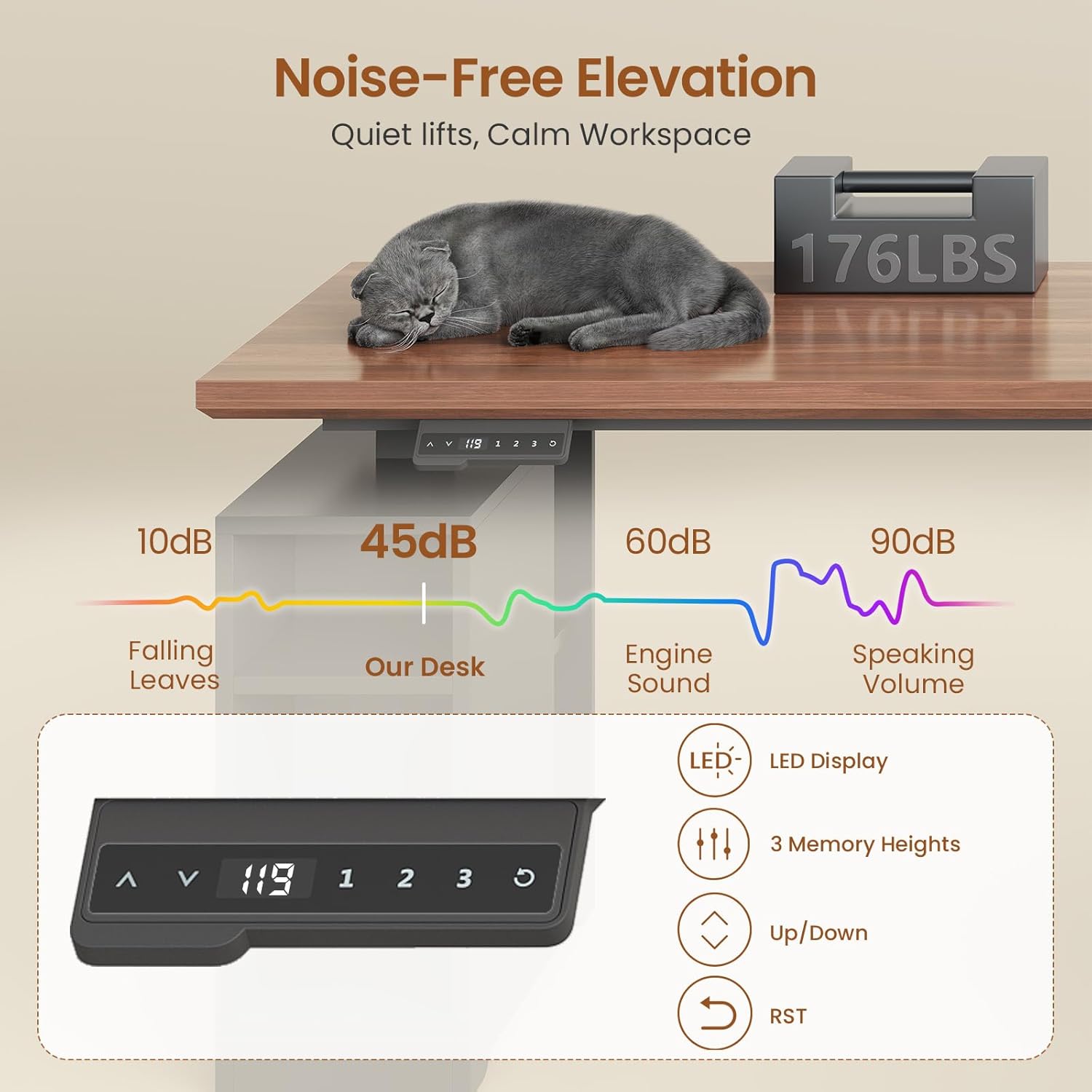
Figure 4.1: Graphic illustrating the quiet operation of the desk's electric lift motor (45dB) and the LED control panel with memory presets.
Video 4.1: Official product video illustrating the adjustable height functionality and storage solutions of the SEDETA Farmhouse L-Shaped Standing Desk.
4.2 Integrated Charging Station
The desk includes a built-in charging station for your electronic devices.
- The charging station features 4 AC outlets (120V/12A) and 2 USB ports (5V/2A).
- A power cord (6.5-foot) connects the station to a wall outlet.
- Use the integrated safety switch to turn the power station on or off.
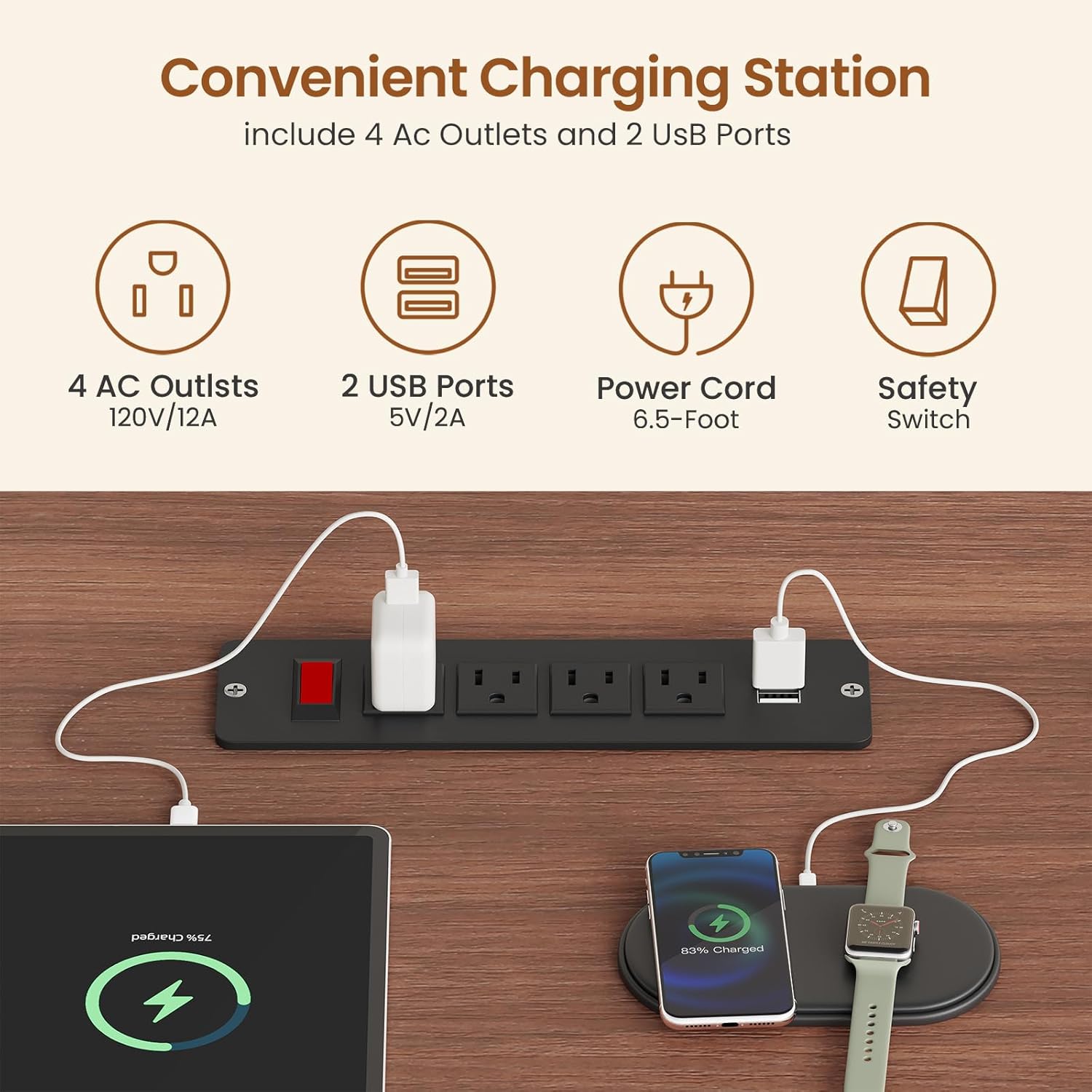
Figure 4.2: Integrated charging station on the desk surface, featuring 4 AC outlets and 2 USB ports for convenient device charging.
4.3 Storage and Configuration
The desk offers flexible storage and configuration options:
- The L-shape can be reversed to suit your room layout.
- Drawers are designed to hold various file sizes (letter, A4, legal).
- The storage cabinet and open shelves provide additional space for office supplies, books, and other items.

Figure 4.3: Close-up of the desk's drawers, showing ample space for letter, A4, and legal-sized files.

Figure 4.4: Image displaying the ample storage space of the desk, including seven open shelves and a storage cabinet.
5. Maintenance
To ensure the longevity and optimal performance of your SEDETA desk, follow these maintenance guidelines:
- Cleaning: Wipe surfaces with a soft, damp cloth. Avoid harsh chemicals or abrasive cleaners that may damage the finish.
- Spills: The desk surface is designed to be waterproof. Wipe up spills immediately to prevent any potential damage.
- Scratches: The desk surface is anti-scratch. However, use coasters for drinks and desk mats for heavy equipment to further protect the surface from potential marks.
- Motor Care: Periodically check the motor and cables for any signs of wear or damage. Ensure cables are not pinched or tangled.
- Weight Limit: Do not exceed the maximum weight recommendation of 176 lbs to prevent strain on the lift mechanism.

Figure 5.1: Desk surface demonstrating anti-scratch and waterproof properties, ensuring durability and easy cleaning.
6. Troubleshooting
If you encounter any issues with your SEDETA Electric Standing Desk, please refer to the following common troubleshooting steps:
- Desk Not Moving: Check if the power cord is securely plugged into both the desk and the wall outlet. Ensure the safety switch on the charging port is in the 'ON' position. Try performing a reset using the RST button on the control panel.
- Uneven Movement: Ensure the desk is not overloaded and weight is evenly distributed. Perform a reset to recalibrate the lift mechanism.
- Noise During Operation: A low noise level (below 45 dB) is normal. If you experience excessive or unusual noise, ensure all assembly bolts are tightened and nothing is obstructing the lift columns.
- Charging Port Not Working: Verify the charging station's power switch is on. Check if the main power cord is connected. Test with different devices and cables.
If the problem persists after attempting these steps, please contact customer support.
7. Specifications
| Feature | Detail |
|---|---|
| Brand | SEDETA |
| Model | B0FMRJ4MZM |
| Shape | Rectangular (L-Shaped configuration) |
| Desk Design | Standing Desk |
| Product Dimensions (D x W x H) | 67"D x 63"W x 29.5"H |
| Color | Black |
| Style | Farmhouse |
| Base Material | Wood |
| Top Material Type | Engineered Wood |
| Special Feature | Adjustable, Convertible |
| Recommended Uses | Gaming, Studying, Working |
| Included Components | Desk, Drawer, Storage Cabinet, Shelves |
| Required Assembly | Yes |
| Maximum Weight Recommendation | 176 Pounds |
| Minimum Height | 29.5 Inches |
| Maximum Height | 46.8 Inches |
| Number of Drawers | 3 |
| Number of Shelves | 7 |
| Number of Cabinets | 1 |
| Item Weight | 161 Pounds |
8. Warranty and Support
SEDETA is committed to providing high-quality products. While specific warranty details are not provided, the desk is built with commercial-grade durability for daily use.
For any issues regarding damaged, scratched, or missing parts, or for general after-sales service, please contact our customer support team. We are dedicated to offering free replacements or partial refunds as needed.
For further assistance, please visit the official SEDETA Store on Amazon: SEDETA Store
Ask a question about this manual
Ask about setup, troubleshooting, compatibility, parts, safety, or missing instructions. Manuals+ will review the question and use this page’s manual context to help answer it.