
Introduction
Thank you for purchasing the SLuB 6800mAh MagSafe Wireless Power Bank. This manual provides important information on how to safely and effectively use your device. Please read it thoroughly before use and keep it for future reference.

Image: The SLuB 6800mAh MagSafe Wireless Power Bank, showcasing its compact design and wireless charging capability. The image highlights the purple color variant.
Product Overview
Key Features
- MagSafe Compatibility: Strong magnetic attachment for secure wireless charging with iPhone 12 series and newer.
- Dual Charging Modes: Supports both 15W wireless charging and 20W wired (Type-C) fast charging.
- Simultaneous Charging: Capable of charging two devices concurrently (one wirelessly, one via Type-C).
- High Capacity: 6800mAh battery provides approximately 1.6 charges for an iPhone 17 or 1.5 charges for a Galaxy S25.
- Compact & Lightweight: Measures 10.2 x 6.35 x 1 cm and weighs only 116g for easy portability.
- Integrated Cable/Strap: A detachable USB-C to USB-C cable that also functions as a convenient carrying strap.
- LED Power Indicator: 5-stage LED lights clearly display remaining battery level.
- Multiple Safety Protections: PSE certified with safeguards against overcharge, over-discharge, overcurrent, short circuit, high temperature, and surge.
- Airline Approved: Meets international aviation standards for safe travel.

Image: A visual representation of the strong magnetic attraction feature, ensuring a secure connection for MagSafe-compatible devices.
Setup
Initial Charging of the Power Bank
- Connect the included USB-C to USB-C cable to the power bank's Type-C port.
- Connect the other end of the cable to a compatible USB power adapter (not included).
- The LED indicators will light up to show the charging status. All five LEDs will be solid when fully charged.
It is recommended to fully charge the power bank before its first use.

Image: The power bank and its accessories, including the USB-C cable, illustrating the components provided in the package.
Operating Instructions
Wireless Charging (MagSafe Compatible)
- Ensure the power bank has sufficient charge.
- Align your MagSafe-compatible device (e.g., iPhone 12 series or newer) with the magnetic charging area on the power bank. The magnets will automatically snap into place.
- Charging will begin automatically. The LED indicators on the power bank will show its remaining charge.
- To stop charging, simply detach your device from the power bank.
Note: Using a metal case or a thick protective case on your device may reduce charging efficiency or prevent charging. Remove such cases for optimal performance.

Image: A smartphone wirelessly charging by being magnetically attached to the power bank, demonstrating the MagSafe feature.
Wired Charging (Type-C)
- Ensure the power bank has sufficient charge.
- Connect your device to the power bank's Type-C port using a compatible USB-C to USB-C cable (included) or another appropriate cable for your device.
- Charging will begin automatically. The LED indicators on the power bank will show its remaining charge.
- Disconnect the cable from your device and the power bank when charging is complete.

Image: The power bank simultaneously charging two devices, one wirelessly and one through its Type-C port, highlighting its dual-charging capability.
Checking Battery Level
The power bank features five LED indicators to show the remaining battery capacity:
- 1 LED: 1% - 20%
- 2 LEDs: 21% - 40%
- 3 LEDs: 41% - 60%
- 4 LEDs: 61% - 80%
- 5 LEDs: 81% - 100%

Image: Close-up of the power bank's LED indicators, illustrating how they display the remaining battery charge in real-time.
Specifications
| Model Number | CW12 |
| Battery Capacity | 6800mAh (3.85V 26.18Wh) |
| Type-C Input | 5V/3A, 9V/2A, 12V/1.5A |
| Type-C Output | 5V/3A, 9V/2.22A, 12V/1.67A |
| Wireless Output | Max 15W |
| Battery Type | Polymer Battery |
| Dimensions (L x W x H) | 10.2 x 6.4 x 1 cm |
| Weight | 116g |
| Operating Temperature | -10°C to 40°C |
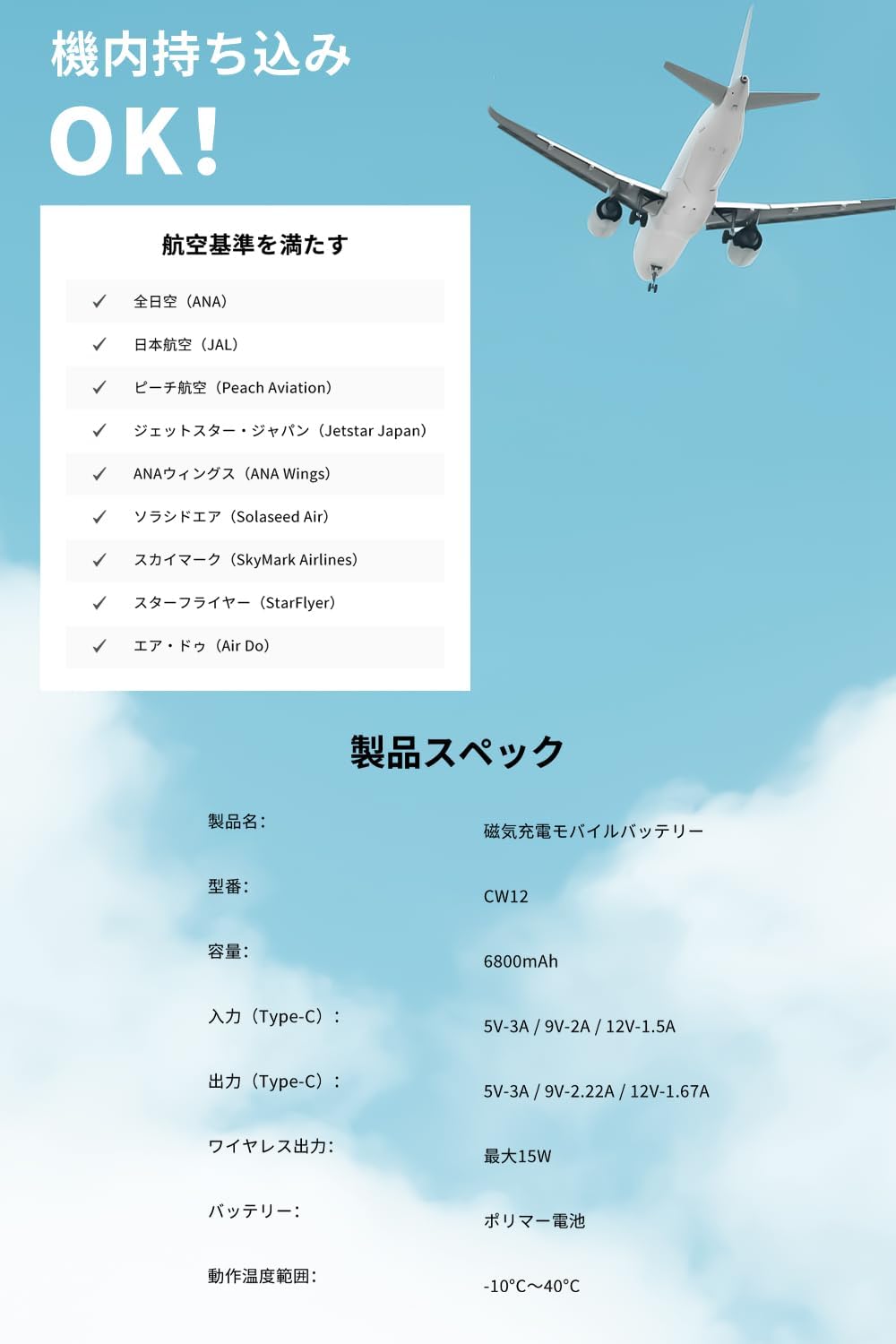
Image: A summary of the product's technical specifications and a list of airlines that accept the power bank for carry-on.
Safety Precautions
To ensure safe operation and prevent damage, please observe the following:
- If not used for an extended period, charge the power bank once every 3 months.
- Slight heating during use is normal.
- Store in a dry place. Do not use chemical detergents for cleaning.
- After use, dispose of the product as household waste or in designated recycling bins.
- Do not allow children to use the product unsupervised.
- The manufacturer is not responsible for malfunctions or accidents caused by improper operation, disassembly, or modification.
- Before charging smartphones or digital devices, verify compatibility.
Integrated Safety Features
This power bank is equipped with multiple safety protection functions, including:
- Overcharge Protection
- Over-discharge Protection
- Overcurrent Protection
- Short Circuit Protection
- High Temperature Protection
- Overvoltage Protection
- Surge Protection
- Electromagnetic Interference (EMI) Prevention
The product is PSE certified and covered by PL insurance, ensuring reliability and safety for all users.

Image: A series of icons visually representing the comprehensive safety features, such as overcharge, over-discharge, and short-circuit protection.
Troubleshooting
- Device not charging wirelessly:
- Ensure your device is MagSafe compatible and properly aligned with the power bank's charging area.
- Remove any thick or metallic phone cases that might interfere with wireless charging.
- Check if the power bank has sufficient charge.
- Device not charging via cable:
- Ensure the cable is securely connected to both the power bank and your device.
- Try using a different USB-C cable to rule out a faulty cable.
- Check if the power bank has sufficient charge.
- Power bank not charging:
- Ensure the charging cable is securely connected to the power bank and the power adapter.
- Try using a different power adapter and cable.
- Verify the power adapter is functioning correctly.
- Power bank feels warm during use:
- Slight warming during charging or discharging is normal. If it becomes excessively hot, discontinue use and contact support.
Maintenance
- Clean the power bank with a soft, dry cloth. Do not use liquid cleaners or aerosols.
- Avoid exposing the power bank to extreme temperatures, direct sunlight, or high humidity.
- Do not drop, puncture, or disassemble the power bank.
- Store the power bank in a cool, dry place when not in use.
Package Contents
- SLuB 6800mAh MagSafe Wireless Power Bank (Model CW12)
- USB-C to USB-C Cable (also functions as a strap)
- User Manual
Warranty and Support
This product is covered by PL insurance (Product Liability Insurance). For any issues or inquiries, please contact SLuB customer support through your purchase platform or the official SLuB website. Please retain your proof of purchase for warranty claims.

