
1. Introduction
Thank you for choosing the DEENO Hydro4 Cordless Robotic Pool Cleaner. This automatic pool vacuum is designed for efficient cleaning of both inground and above-ground pools, offering floor, wall, and waterline cleaning capabilities. Featuring dual inlet technology and a self-parking function, the Hydro4 simplifies pool maintenance. This manual provides essential information for the safe and effective operation, maintenance, and troubleshooting of your device.
2. Safety Information
Please read all safety instructions carefully before operating the DEENO Hydro4. Failure to follow these instructions may result in property damage, injury, or voiding of the warranty.
- Ensure the charging port is dry before connecting the charger.
- Do not operate the cleaner if the power cable or charger is damaged.
- Keep children and pets away from the pool area while the cleaner is in operation.
- Only use the original charger and battery provided by DEENO.
- Do not attempt to disassemble or repair the cleaner yourself. Contact authorized service personnel.
- Remove the cleaner from the pool before adding chemicals or performing backwashing.
- Store the cleaner in a cool, dry place when not in use.
3. Package Contents
Verify that all items are present in the package:
- 1 x DEENO Hydro4 Pool Cleaner
- 1 x Floating Battery
- 1 x Charger
- 1 x User Manual (this document)
4. Product Overview
The DEENO Hydro4 is a sophisticated robotic pool cleaner designed for comprehensive pool maintenance. Key components include:
- Main Unit: Houses the motors, pumps, and control systems.
- Filter Basket: A 4.1L dual-chamber basket for collecting debris.
- Active Scrubbing Brushes: Food-grade silicone brushes for dislodging stubborn dirt.
- Floating Buoy: Contains the battery and charging port, detaches for charging.
- Charging Cable: 10ft (3m) anti-snag cable for connecting the buoy to the cleaner.
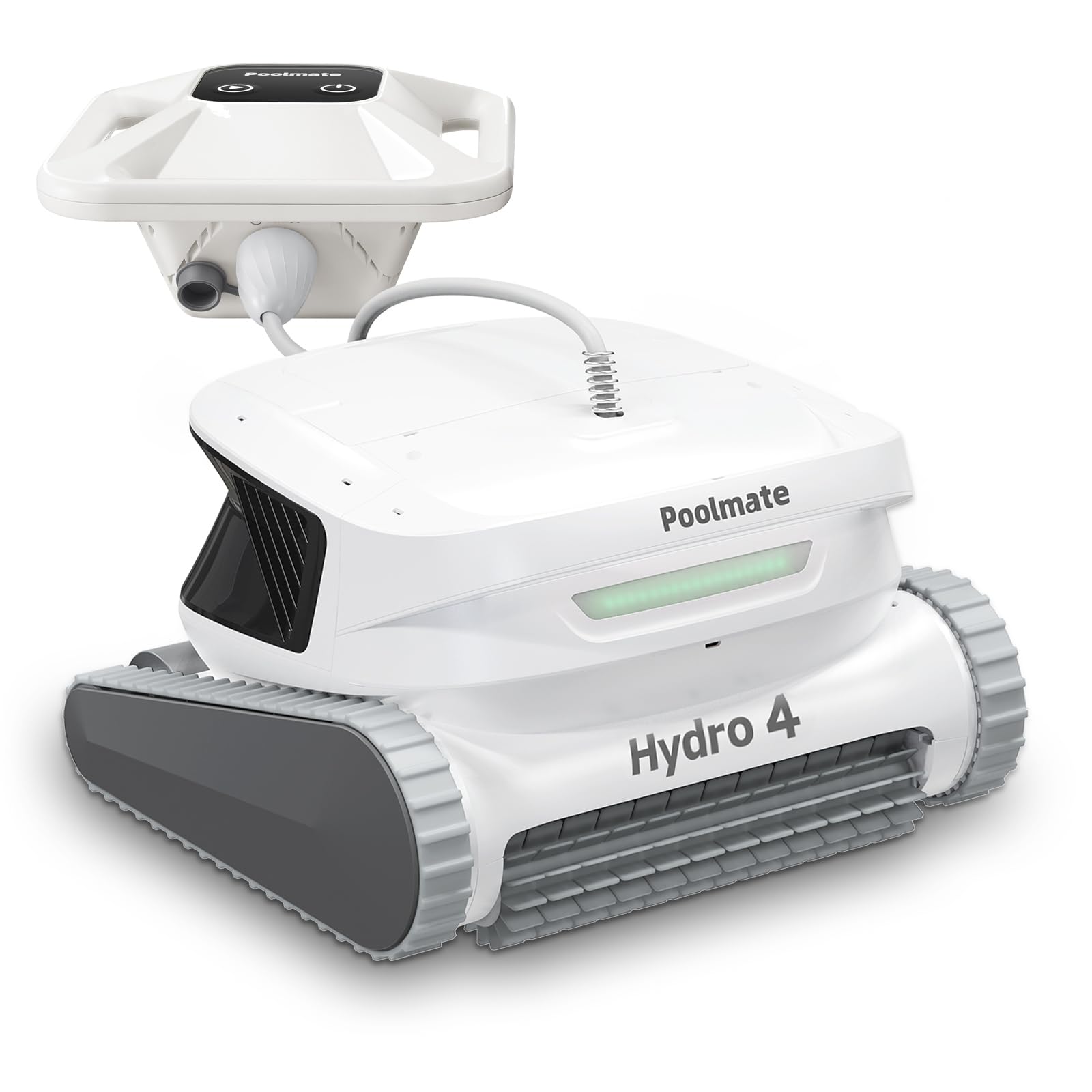
Figure 1: DEENO Hydro4 Cordless Robotic Pool Cleaner. This image shows the main body of the cleaner, its floating buoy, and the connecting cable.
5. Setup
5.1 Charging the Battery
- Detach the lightweight floating buoy from the main cleaner unit.
- Ensure the charging port on the buoy is clean and dry.
- Connect the charger to the buoy's charging port and then plug the charger into a standard electrical outlet.
- Allow approximately 4 hours for a full charge. The indicator light on the charger will change to indicate a full charge.
5.2 Initial Placement in Pool
- Once fully charged, reattach the floating buoy to the main cleaner unit, ensuring a secure connection.
- Gently lower the DEENO Hydro4 into the pool. The cleaner will slowly sink to the bottom.
- Ensure the 10ft (3m) cable connecting the buoy to the cleaner is free from tangles and obstructions.
6. Operating Instructions
6.1 Powering On and Mode Selection
The DEENO Hydro4 offers six cleaning modes to suit various pool conditions:
- Auto Mode: Cleans floor, walls, and waterline.
- Wall Enhanced Mode: Focuses on wall and waterline cleaning.
- Floor Only Mode: Cleans only the pool floor.
Each mode can be set for different cycle durations:
- 1-hour (Fast)
- 2-hour (Regular)
- 3-hour (Ultra)
To select a mode and cycle, use the Poolmate Bot App.
6.2 Using the Poolmate Bot App
The Poolmate Bot App provides remote control and monitoring capabilities:
- Download the "Poolmate Bot App" from your device's app store.
- Follow the in-app instructions to connect your DEENO Hydro4 via Bluetooth or cloud service.
- From the app, you can:
- Start or stop cleaning cycles.
- Select desired cleaning modes and durations.
- Schedule future cleaning tasks.
- Monitor the cleaner's status and battery level.
6.3 Self-Parking Function
Upon completion of a cleaning cycle or when the battery is low, the DEENO Hydro4 will automatically move to the side of the pool for easy retrieval. Use a pool hook (not included) to lift the cleaner out of the water. Allow excess water to drain before removing it completely.
7. Maintenance
7.1 Cleaning the Filter Basket
Regular cleaning of the filter basket is crucial for optimal performance.
- Remove the cleaner from the pool.
- Locate and open the dual-chamber filter basket. Both top and bottom lids open fully.
- Empty all collected debris (leaves, silt, etc.) into a waste receptacle.
- Rinse the filter basket thoroughly with a garden hose until all fine particles are removed.
- Ensure the basket is completely clean before reinserting it into the cleaner.
- Close the filter basket securely.
7.2 General Care and Storage
- After each use, rinse the exterior of the cleaner with fresh water to remove any pool chemicals or debris.
- Inspect the scrubbing brushes for wear or damage. Replace if necessary.
- Store the DEENO Hydro4 in a cool, dry, and shaded area when not in use, away from direct sunlight and extreme temperatures.
- Ensure the battery is charged periodically during long storage periods to maintain battery health.
8. Troubleshooting
Refer to the following table for common issues and their solutions:
| Problem | Possible Cause | Solution |
|---|---|---|
| Cleaner does not turn on. | Battery is not charged or not connected properly. | Ensure the battery buoy is fully charged and securely connected to the main unit. |
| Poor cleaning performance. | Filter basket is full or clogged; Brushes are worn. | Clean the filter basket thoroughly. Inspect and replace brushes if necessary. |
| Cleaner gets stuck or moves erratically. | Obstruction in the pool; Cable tangled; Low battery. | Remove large debris from the pool. Ensure the cable is free. Charge the battery. |
| App connection issues. | Bluetooth/Wi-Fi interference; App not updated. | Ensure cleaner is within range. Restart app and cleaner. Check for app updates. |
9. Specifications
| Feature | Detail |
|---|---|
| Brand | DEENO |
| Model Name | Hydro4 |
| Material | Acrylonitrile Butadiene Styrene (ABS) |
| Color | Gray |
| Product Dimensions (L x W x H) | 15"L x 10"W x 12"H |
| Power Source | Battery Powered |
| Special Features | Waterproof |
| Control Method | App |
| Efficiency | High Efficiency, Efficient, Long Battery Life |
| Battery Type | Rechargeable Lithium-Ion |
| Filter Basket Capacity | 4.1 Liters |
| Load Capacity | 14.5 Pounds |
| Required Assembly | No |
| Installation Type | Robotic |
| Manufacturer Part Number | Hydro4Cordless |
10. Warranty and Support
10.1 Warranty Information
The DEENO Hydro4 Cordless Robotic Pool Cleaner comes with a 2-year warranty from the date of purchase. This warranty covers manufacturing defects and malfunctions under normal use. It does not cover damage caused by misuse, accident, unauthorized modification, or improper maintenance.
Please retain your proof of purchase for warranty claims.
10.2 Customer Support
For technical assistance, warranty claims, or any questions regarding your DEENO Hydro4, please contact our dedicated US-based customer support team:
- Email: support@deeno.com
- Phone: 1-800-XXX-XXXX (Available Monday-Friday, 9 AM - 5 PM EST)
- Website: www.deeno.com/support
When contacting support, please have your product model (Hydro4) and purchase date available.