
1. Introduction
Thank you for choosing the Devoko MW-MSP-0769-6-0818 Self-Cleaning Cat Litter Box. This automated system is designed to provide a clean and hygienic environment for your cat while simplifying litter maintenance for you. This manual provides essential information for safe operation, setup, maintenance, and troubleshooting.
This litter box features a large 90-liter capacity, an 8.5-liter waste compartment, and is suitable for cats weighing between 1.5 kg and 10 kg, aged 3 months or older. It can operate for up to 10 days without requiring waste disposal, making it ideal for multi-cat households or owners who are frequently away.

Figure 1: Devoko Self-Cleaning Cat Litter Box with two cats and app interface.
2. Safety Information
Your safety and your cat's safety are paramount. Please read and adhere to the following safety guidelines:
- Intelligent Sensor System: The litter box is equipped with 1 motion sensor, 4 infrared sensors, and 4 weight sensors. These sensors continuously monitor your cat's presence.
- Automatic Stop Feature: If a cat approaches or enters the litter box during a cleaning cycle, the operation will immediately pause to prevent any injury. The cycle will resume once the cat has left the unit.
- Anti-Pinch Protection: The design incorporates features to minimize the risk of pinching.
- Placement: Place the unit on a flat, stable surface away from direct sunlight, heat sources, and excessive moisture.
- Power Supply: Use only the provided power adapter. Ensure the power cord is not damaged or pinched.
- Children and Pets: Keep children and other pets away from the unit during operation.
- Maintenance: Always unplug the unit before performing any cleaning or maintenance.

Figure 2: Intelligent Safety Sensor System overview.
3. Product Components
The Devoko Self-Cleaning Cat Litter Box package includes the following main components:
- Main Litter Box Unit (with rotating drum)
- Waste Collection Drawer (8.5L capacity)
- Power Adapter
- Litter Mat
- Waste Bags
- Litter Scoop

Figure 3: Litter box with integrated step and litter mat for clean paws.
4. Setup Instructions
- Unpack: Carefully remove all components from the packaging.
- Placement: Position the main litter box unit on a level, stable surface in a suitable location.
- Install Waste Drawer: Slide the waste collection drawer into the designated slot at the bottom front of the unit. Ensure it is fully inserted.
- Insert Waste Bag: Line the waste collection drawer with one of the provided waste bags.
- Add Litter: Pour suitable cat litter into the rotating drum. Ensure the litter level is between the MIN and MAX indicators inside the drum. Compatible litter types include clay, tofu, mixed, and bentonite, with a diameter of ≤2.5 mm and length of ≤15 mm. Crystal litter is not recommended.
- Connect Power: Plug the power adapter into the unit and then into a wall outlet. The unit will perform a self-check.
- App Connection (Optional but Recommended): Download the Devoko app from your smartphone's app store. Follow the in-app instructions to connect your litter box to your home's 2.4GHz Wi-Fi network. This enables remote control and monitoring.
- Litter Mat Placement: Place the provided litter mat in front of the unit's entrance to help capture any stray litter from your cat's paws.
5. Operating Instructions
The Devoko Self-Cleaning Cat Litter Box offers multiple operating modes for convenience.
5.1. Cleaning Modes
The unit supports three cleaning modes:
- Automatic Cleaning: The unit detects when your cat has used the litter box and automatically initiates a cleaning cycle after a set delay (configurable via the app).
- Scheduled Cleaning: Set specific times for cleaning cycles through the mobile application.
- Manual Cleaning: Initiate a cleaning cycle manually via the control panel on the unit or through the mobile application.
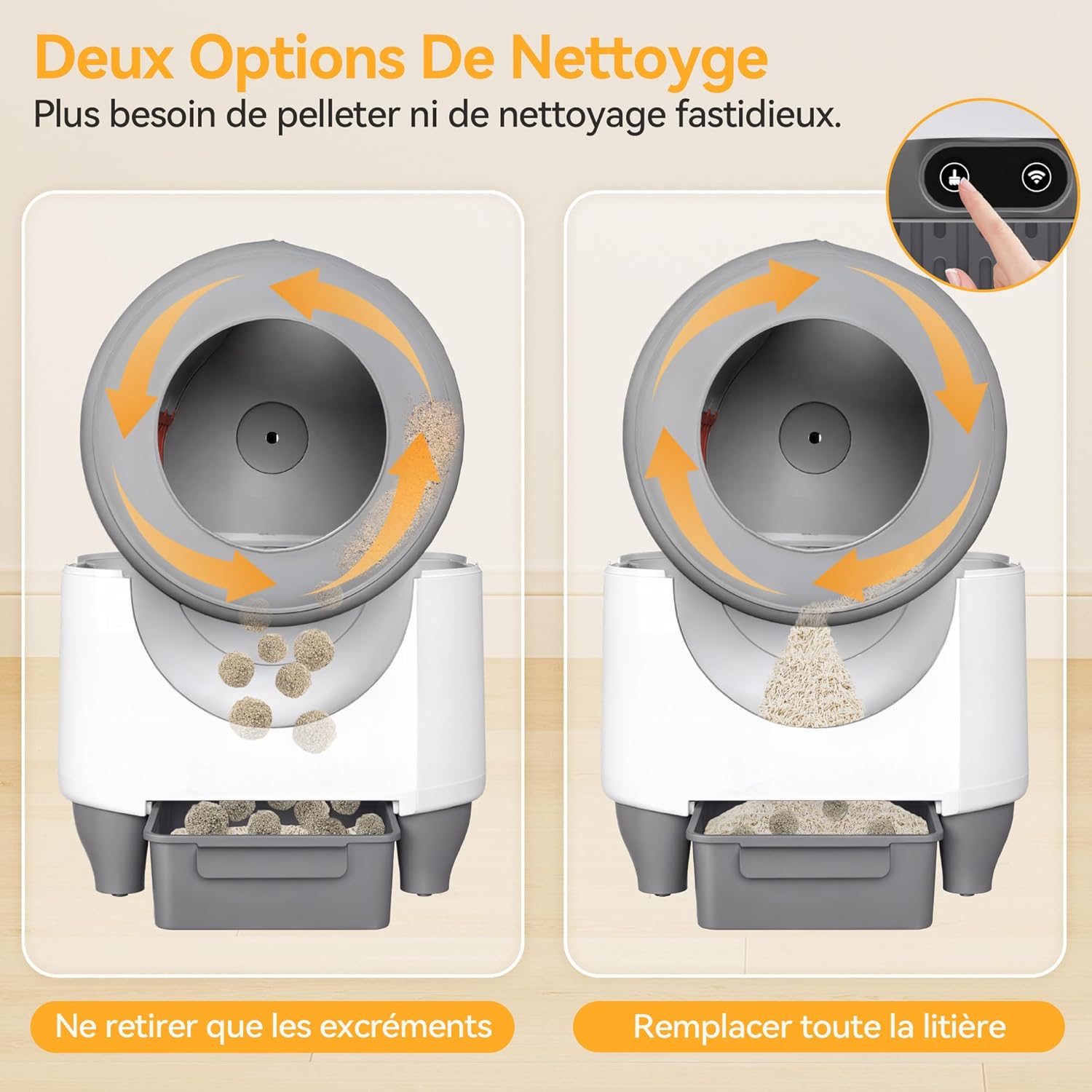
Figure 4: Two cleaning options: waste removal and full litter replacement.
5.2. Mobile Application Control
The dedicated Devoko app provides comprehensive control and monitoring features:
- Remote Cleaning: Start or stop cleaning cycles from anywhere.
- Usage Tracking: Monitor your cat's weight, frequency, and duration of litter box usage. This data can help track your cat's health.
- Night Mode: Activate night mode to suspend automatic cleaning during specific hours, ensuring undisturbed sleep.
- Notifications: Receive alerts for waste drawer fullness or other operational statuses.
Note: The app requires a 2.4GHz Wi-Fi connection.

Figure 5: Smart App Control interface.
5.3. Deodorization System
The unit includes a scented deodorization system to maintain a fresh environment. This system operates automatically to neutralize odors after cleaning cycles.

Figure 6: Low noise operation (35dB) and odor control.
6. Maintenance
Regular maintenance ensures optimal performance and hygiene of your Devoko litter box.
6.1. Emptying the Waste Drawer
When the waste drawer is full (indicated by the app or a visual cue on the unit), it needs to be emptied:
- Ensure the unit is not in a cleaning cycle.
- Pull out the waste collection drawer from the front of the unit.
- Carefully tie the waste bag and dispose of it.
- Insert a new waste bag into the drawer.
- Slide the drawer back into the unit until it clicks into place.
6.2. Changing Litter
Periodically, the entire litter in the drum should be replaced:
- Initiate a full litter replacement cycle via the app or manual control. The unit will rotate to empty all litter into the waste drawer.
- Empty the waste drawer as described above.
- Add fresh litter to the drum, ensuring it is between the MIN and MAX lines.
6.3. Cleaning the Unit
The modular structure allows for easy disassembly for thorough cleaning:
- Unplug the unit from the power outlet.
- Disassemble the rotating drum and other removable parts according to the instructions in the full manual (refer to the manufacturer's website for detailed disassembly guides).
- Clean parts with mild soap and water. Avoid harsh chemicals or abrasive cleaners.
- Ensure all parts are completely dry before reassembling and plugging the unit back in.
7. Troubleshooting
If you encounter issues with your Devoko Self-Cleaning Cat Litter Box, refer to the following common problems and solutions:
| Problem | Possible Cause | Solution |
|---|---|---|
| Unit not cleaning automatically | Cat still inside or near unit; sensors obstructed; automatic mode disabled. | Ensure cat is clear. Clean sensors. Check app settings for automatic mode. |
| Bad odor persists | Waste drawer full; deodorizer needs replacement; unit needs cleaning. | Empty waste drawer. Check deodorizer status. Perform a full unit cleaning. |
| App not connecting | Incorrect Wi-Fi password; not 2.4GHz network; unit too far from router. | Verify Wi-Fi credentials. Ensure connection to 2.4GHz network. Move unit closer to router. |
| Litter spilling out | Too much litter; incorrect litter type; cat tracking litter. | Reduce litter level. Use recommended litter types. Ensure litter mat is in place. |
For further assistance, please contact Devoko customer support.
8. Specifications
| Feature | Detail |
|---|---|
| Model Number | MW-MSP-0769-6-0818 |
| Dimensions (L x W x H) | 52 x 57 x 58 cm |
| Product Weight | 11 Kilograms |
| Litter Drum Capacity | 90 Liters |
| Waste Drawer Capacity | 8.5 Liters |
| Compatible Cat Weight | 1.5 kg to 10 kg |
| Material | Plastic |
| Color | White |
| Connectivity | 2.4GHz Wi-Fi (for app control) |
| Noise Level | Approximately 35 dB during cleaning |

Figure 7: Product dimensions and cat size suitability.
9. Warranty and Support
For warranty information, please refer to the documentation included with your purchase or visit the official Devoko website. If you require technical support, have questions about operation, or need assistance with troubleshooting, please contact Devoko customer service through their official channels.
Please have your model number (MW-MSP-0769-6-0818) and purchase details ready when contacting support.