
Introduction
The Vacmaster SMF1501 2-in-1 Steam Mop is designed for versatile and chemical-free cleaning across various surfaces. This appliance functions as both an upright steam mop for floors and a detachable handheld steamer for detailed cleaning tasks. It heats up quickly, offering two steam settings for optimal performance.
This manual provides essential information for the safe and effective use, maintenance, and troubleshooting of your Vacmaster SMF1501 Steam Mop.
Important Safety Information
Please read all instructions carefully before using this appliance. Failure to follow these instructions may result in electric shock, fire, or serious injury.
- Always use distilled or demineralized water to prevent mineral buildup and extend the life of your steam mop.
- Do not add cleaning solutions, perfumes, or other chemicals to the water tank. This can damage the appliance and void the warranty.
- Ensure the appliance is unplugged before filling or emptying the water tank, or when changing accessories.
- Steam is hot. Avoid direct contact with steam to prevent burns. Use caution when handling accessories during or after use.
- Do not use on unsealed hardwood floors or surfaces that are sensitive to heat or moisture. Test on an inconspicuous area first.
- Keep the appliance out of reach of children and pets.
Package Contents
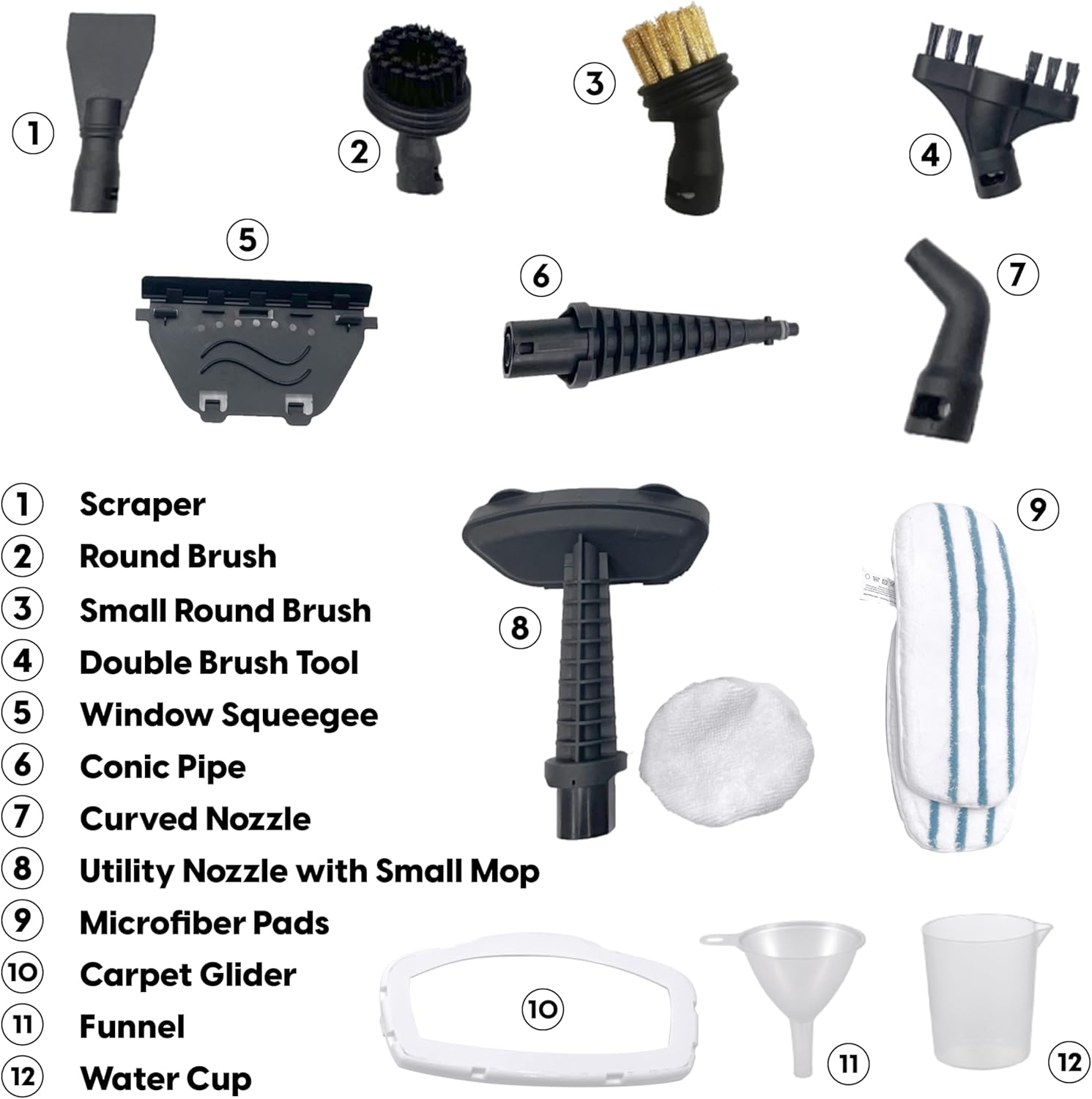
Your Vacmaster SMF1501 2-in-1 Steam Mop package includes the following items:
- Steam Mop Main Unit (with detachable handheld steamer)
- 2 x Microfiber Pads
- Carpet Glider
- Funnel
- Water Cup
- Conic Pipe
- Scraper Tool
- Big Round Brush
- Small Round Brush
- Curved Nozzle
- Double Brush Tool
- Small Mop (Utility Nozzle with Small Mop)
- Squeegee
Setup Instructions
Follow these steps to prepare your steam mop for first use:
- Assembly: The main unit comes partially assembled. Unfold the handle until it clicks into place. Attach the desired cleaning head (e.g., floor mop head) to the main unit.
- Attach Microfiber Pad: Securely attach a microfiber pad to the bottom of the floor mop head. The pads are designed for easy, hands-free installation.
- Fill Water Tank: Ensure the steam mop is unplugged. Open the water tank cap on the handheld unit. Use the provided water cup and funnel to fill the tank with distilled or demineralized water. Do not overfill. Close the cap securely.
- Power On: Plug the power cord into a grounded electrical outlet. The indicator light will illuminate.

Operating Instructions
Your Vacmaster SMF1501 offers two primary modes of operation: upright steam mop and detachable handheld steamer.
Using as an Upright Steam Mop
- Heat Up: After plugging in, the steam mop will heat up in approximately 20-25 seconds. The indicator light will change (e.g., from blue to green) when it's ready to produce steam.
- Select Steam Setting: Use the steam control buttons (+/-) on the handle to select your desired steam level (low or high).
- Begin Cleaning: Slowly move the steam mop across the floor surface. The steam will be released automatically. For stubborn stains, hold the mop over the area for a few seconds.
- Carpet Cleaning: For carpets, attach the carpet glider over the microfiber pad. Move the mop slowly over the carpet to refresh and deodorize.
Using as a Detachable Handheld Steamer
- Detach Unit: Press the release button to detach the handheld steamer unit from the main body.
- Attach Accessory: Select the appropriate accessory for your cleaning task (e.g., brush for grout, scraper for tough grime, curved nozzle for tight spaces). Securely attach it to the nozzle of the handheld unit.
- Begin Cleaning: Direct the steam towards the area to be cleaned. Use the steam control buttons on the handheld unit to adjust steam intensity.

Official Product Videos
Video 1: Vacmaster SMF1501 2-in-1 Steam Mop for Floor Cleaning Demo. This video demonstrates the steam mop's functionality for floor cleaning.
Video 2: Vacmaster SMF1501 2-in-1 Steam Mop for Floor Cleaning. An overview of the steam mop's features and cleaning capabilities.
Maintenance
Regular maintenance ensures optimal performance and longevity of your steam mop.
- Empty Water Tank: After each use, unplug the appliance and allow it to cool. Empty any remaining water from the tank. Leave the tank cap open to allow it to air dry, preventing odor and mildew buildup.
- Clean Microfiber Pads: The microfiber pads are washable and reusable. Remove them from the mop head and machine wash with similar colors. Do not use bleach or fabric softeners. Air dry or tumble dry on low.
- Clean Accessories: Wipe down all accessories with a damp cloth after use. Ensure they are dry before storing.
- Descaling (Monthly/As Needed): If you notice reduced steam output or mineral residue, descaling may be necessary. Consult the full user manual for detailed descaling instructions, typically involving a vinegar solution.
Troubleshooting
If you encounter issues with your Vacmaster SMF1501 Steam Mop, refer to the following common solutions:
| Problem | Possible Cause | Solution |
|---|---|---|
| No steam or low steam output | Water tank empty; Mineral buildup; Appliance not heated up | Refill water tank; Perform descaling; Wait for indicator light to show ready. |
| Water leaking from mop head | Microfiber pad not properly attached; Water tank overfilled | Ensure pad is securely attached; Do not overfill water tank. |
| Mop not gliding smoothly | Microfiber pad is dirty or worn; Using on carpet without glider | Replace or clean microfiber pad; Attach carpet glider for carpet use. |
| Appliance not turning on | Not plugged in; Power outlet issue | Check power cord connection; Test outlet with another appliance. |
Specifications
| Feature | Detail |
|---|---|
| Brand | Vacmaster |
| Model Name | SMF1501 Steam Mop |
| Wattage | 1550 watts |
| Item Weight | 6.31 Pounds |
| Tank Volume | 13.53 Fluid Ounces |
| Heat Time | 20-25 Seconds |
| Special Features | 2-in-1 Detachable Handheld Steamer, Quick-Heating, Lightweight, 2 Steam Settings, 14 Accessories Included, Foldable Handle, Steam Control |
| Surface Recommendation | Hard Floors, Carpets, Tiles, Upholstery |
Warranty and Support
Vacmaster products are manufactured to high-quality standards. For warranty information, technical support, or to purchase replacement parts and accessories, please refer to the official Vacmaster website or contact customer service directly.
Keep your purchase receipt as proof of purchase for any warranty claims.
