
1. Introduction
This manual provides detailed instructions for the installation, operation, and maintenance of your SIXWIN 5-inch Wireless CarPlay Motorcycle Display. Please read this manual thoroughly before using the product to ensure proper function and safety.
2. Safety Information
Always prioritize safety when operating your motorcycle. Distracted driving can lead to accidents. Ensure the device is securely mounted and all connections are stable before riding.
- Do not attempt to operate the device or adjust settings while riding. Pull over to a safe location if adjustments are necessary.
- Ensure the device is installed in a position that does not obstruct your view of the road or motorcycle controls.
- Verify all wiring is correctly connected to prevent electrical hazards.
- The device is IP68 waterproof, but avoid submerging it or exposing it to high-pressure water jets.
- Operating temperature range: -4°F to 149°F (-20°C to 65°C). Do not operate outside this range.
3. Package Contents
Verify that all items are present in the package:
- 1 x SIXWIN 5-inch Wireless CarPlay Motorcycle Display
- 1 x Power Cable (3.4m)
- 1 x Universal Holder
- 1 x User Manual
- Accessories (Waterproof Ring, Strip Rolling, Direct Package)

Image: Overview of the package contents including the display, power cable, universal holder, and various accessories. Also shows product dimensions.
4. Product Overview
The SIXWIN 5-inch Wireless CarPlay Motorcycle Display is designed to enhance your riding experience with smart connectivity and navigation features.
Key Features:
- 5-inch HD Touchscreen: High-resolution display for clear visibility.
- Wireless CarPlay & Android Auto: Seamless integration with your smartphone for navigation, calls, and music.
- Bluetooth Connectivity: Connects to Bluetooth headsets or speakers for audio output.
- IP68 Waterproof: Designed to withstand water, dust, and sand.
- Adjustable Brightness: Manual and automatic brightness adjustment for optimal viewing in various light conditions.
- Airplay & Android Cast: Mirror your smartphone screen directly to the display.
- Quick Installation: Universal mounting bracket for easy, tool-free setup.

Image: The SIXWIN display mounted on a motorcycle, illustrating its main features and capabilities.
5. Setup
5.1. Mounting the Display
- Select a suitable location on your motorcycle handlebar that does not obstruct your view or controls.
- Attach the universal holder to the handlebar using the provided accessories. Ensure it is securely fastened.
- Mount the SIXWIN display onto the universal holder. Adjust the viewing angle for optimal visibility.
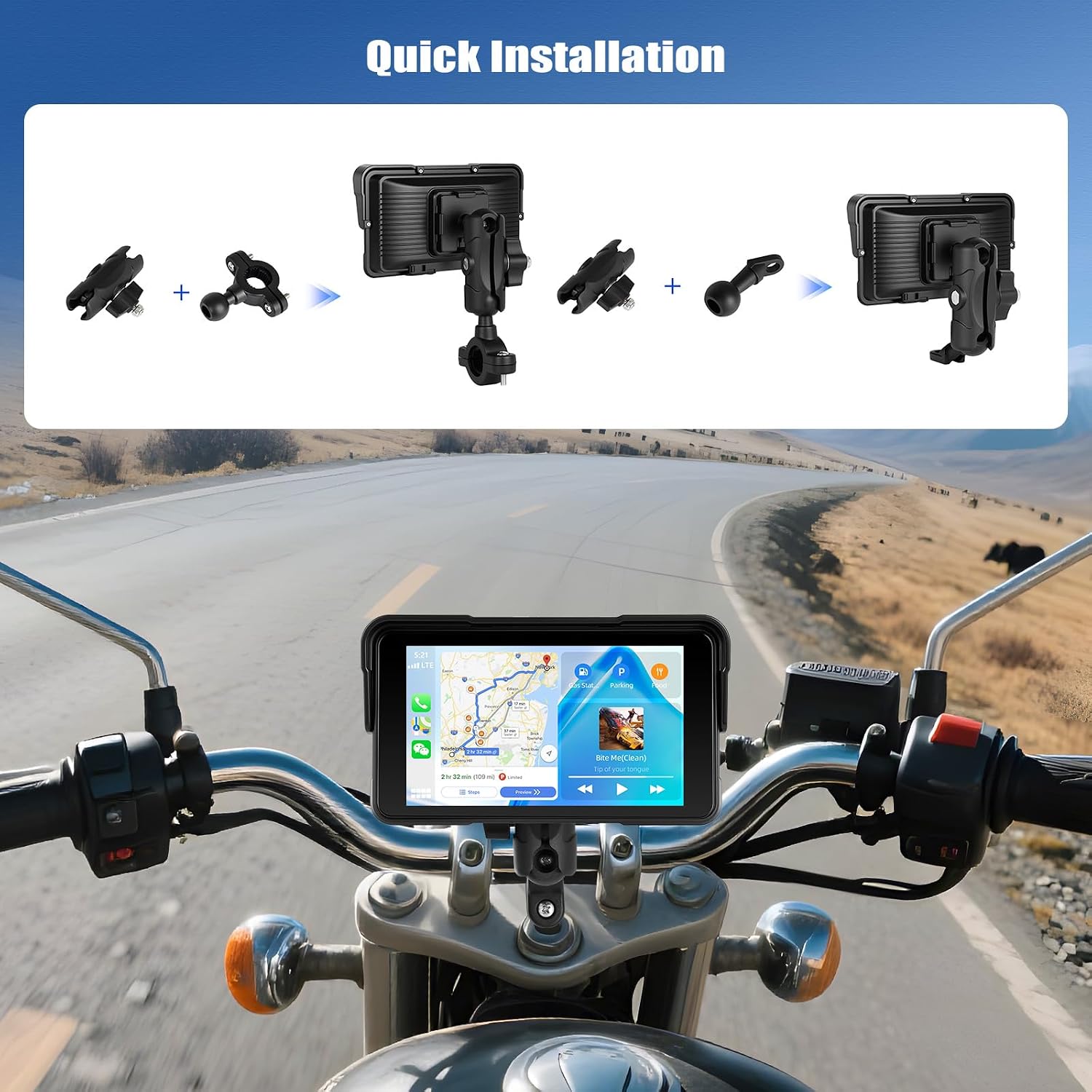
Image: Step-by-step visual guide for quick installation of the display on a motorcycle.
5.2. Power Connection
Connect the provided power cable to the display's USB-C input. The other end of the power cable should be connected to your motorcycle's power source. The device is designed to power on automatically with the ignition.
Note: The power cable connector has a waterproof design. Ensure it is properly seated to maintain water resistance.
5.3. Initial Pairing (Wireless CarPlay / Android Auto)
- Power on the SIXWIN display.
- On your smartphone, enable Bluetooth and Wi-Fi.
- On the SIXWIN display, navigate to the CarPlay or Android Auto section.
- Search for the display's Bluetooth name on your smartphone and pair.
- Once Bluetooth is connected, the device will automatically establish a Wi-Fi connection for CarPlay or Android Auto functionality.

Image: Examples of the Wireless Apple CarPlay and Android Auto interfaces.
6. Operating Instructions
6.1. Touchscreen Operation
The 5-inch HD touchscreen allows for intuitive control. Use your finger or a compatible glove to navigate menus, select applications, and input information.

Image: Demonstrates touchscreen interaction and brightness adjustment settings.
6.2. Wireless CarPlay / Android Auto
Once paired, your smartphone's CarPlay or Android Auto interface will be displayed on the SIXWIN screen. You can access navigation, make calls, send messages, and play music using the familiar interface. Voice commands are supported via your smartphone's assistant (Siri/Google Assistant).
6.3. Bluetooth Audio
The display can connect to Bluetooth headsets or speakers for audio output. This allows for clear hands-free calling and music streaming directly to your helmet's communication system or external speakers.
- Ensure your Bluetooth headset/speaker is in pairing mode.
- On the SIXWIN display, navigate to the Bluetooth settings.
- Select your device from the list and pair.

Image: Visual representation of connecting Bluetooth headphones and speakers to the display.
6.4. Airplay & Android Cast (Screen Mirroring)
For devices not using CarPlay or Android Auto, or for specific content, you can mirror your smartphone screen to the display via Airplay (iOS) or Android Cast (Android). Connect your phone to the display's Wi-Fi network or via Bluetooth as prompted by the device.
6.5. Brightness Adjustment
The display features automatic brightness adjustment, adapting to ambient light conditions. You can also manually adjust the brightness through the settings menu for personal preference or specific environments.
6.6. Tire Pressure Detection (Optional)
If you have compatible tire pressure sensors (sold separately), the display can show real-time tire pressure information. Refer to the sensor's manual for pairing instructions with the SIXWIN display.

Image: Display interface showing tire pressure monitoring, indicating the need for external sensors.
7. Maintenance
7.1. Cleaning
Wipe the display screen and body with a soft, damp cloth. Do not use abrasive cleaners or solvents, as these can damage the screen or casing.
7.2. Water and Dust Resistance (IP68)
The device is rated IP68, meaning it is protected against dust ingress and can withstand immersion in water up to 1.5 meters for 30 minutes. Ensure all ports are securely closed to maintain this rating. While resistant, avoid prolonged exposure to extreme conditions or high-pressure water.

Image: Visual representation of the display's durability against water, dust, and extreme temperatures.
7.3. Temperature Considerations
The display is designed to operate in temperatures ranging from -4°F to 149°F (-20°C to 65°C). Store the device within this range when not in use to prolong its lifespan.
8. Troubleshooting
- Display does not power on:
- - Check the power cable connection to both the display and the motorcycle's power source.
- - Ensure the motorcycle's ignition is on and providing power.
- Cannot connect to Wireless CarPlay/Android Auto:
- - Ensure Bluetooth and Wi-Fi are enabled on your smartphone.
- - Verify that your phone is paired via Bluetooth to the display.
- - Restart both your smartphone and the SIXWIN display.
- - Check for any software updates for your smartphone's operating system.
- No audio from Bluetooth headset/speakers:
- - Ensure the headset/speaker is properly paired with the SIXWIN display.
- - Check the volume levels on both the display and your audio device.
- - Confirm that the audio output is routed to the Bluetooth device in the display's settings.
- Screen visibility issues in bright sunlight:
- - Adjust the screen brightness manually through the display settings.
- - Ensure the auto-brightness feature is enabled and functioning correctly.
- - The display has a sun-resistant design, but extreme direct sunlight can still affect visibility.
9. Specifications
| Feature | Detail |
|---|---|
| Brand | SIXWIN |
| Model Number | 1 |
| Display Size | 5 Inches |
| Resolution | HD (854x480) |
| Connectivity Technology | Bluetooth, Wireless CarPlay, Wireless Android Auto, Wi-Fi (for mirroring) |
| Special Features | IP68 Waterproof, Dustproof, Adjustable Brightness, Touchscreen, Airplay, Android Cast |
| Operating Temperature | -4°F to 149°F (-20°C to 65°C) |
| Item Weight | 600 g (0.6 Kilograms) |
| Power Input | USB-C (via motorcycle power cable) |
| Batteries Included | No |
10. Warranty and Support
For warranty information and technical support, please refer to the official SIXWIN website or contact your retailer. Keep your purchase receipt as proof of purchase for warranty claims.