
ATK ATK 68 RX
ATK 68 RX Hall Effect Gaming Keyboard User Manual
Model: ATK 68 RX
Introduction
The ATK 68 RX is a 65% esports keyboard engineered for precision and durability. It features advanced Hall Effect magnetic switches, which utilize non-contact actuation to eliminate physical wear, ensuring a longer lifespan and more consistent input compared to traditional mechanical switches.
This keyboard offers an exceptional level of customization with adjustable actuation for each key, ranging from 0.005 mm to 3.3 mm in precise 0.001 mm increments. This allows users to fine-tune sensitivity for both rapid gaming responses and accurate typing.
Constructed with a robust tray-mount chassis and an aluminum plate, the 68 RX provides superior keystroke stability and reduced vibration, enhancing the overall typing and gaming experience. The Cherry-profile frosted PC keycaps are designed to optimize RGB lighting diffusion while maintaining durability.

Figure 1: Top-down view of the ATK 68 RX Hall Effect Gaming Keyboard.
Setup
To begin using your ATK 68 RX keyboard, follow these steps:
- Unboxing: Carefully remove all components from the packaging. Verify that you have the keyboard, USB-C cable, keycap & switch puller, M2 cross screwdriver, matching wrist rest, replaceable strap plate, strap, and matching add-on keycaps.
- Connect the Keyboard: Plug the USB-C end of the provided cable into the port on the keyboard and the USB-A end into an available USB port on your computer. The keyboard is designed for wired connectivity.
- Driver Installation (Optional but Recommended): For full customization and access to advanced features like adjustable actuation and preset switching, download and install the official ATK software driver from the ATK support website.

Figure 2: Package contents of the ATK 68 RX keyboard.

Figure 3: USB-C port on the ATK 68 RX keyboard for connectivity.
Operating
The ATK 68 RX keyboard offers a range of features designed to enhance your gaming and typing experience.
Key Features
- Hall Effect Switch Technology: The magnetic sensing mechanism provides ultra-high precision, faster response times, and an extended switch lifespan by eliminating physical contact points.
- Adjustable Actuation Range: Customize the sensitivity of each key from 0.005 mm to 3.3 mm in 0.001 mm increments. This allows for optimal performance tailored to competitive gaming (e.g., rapid trigger) or precise typing.
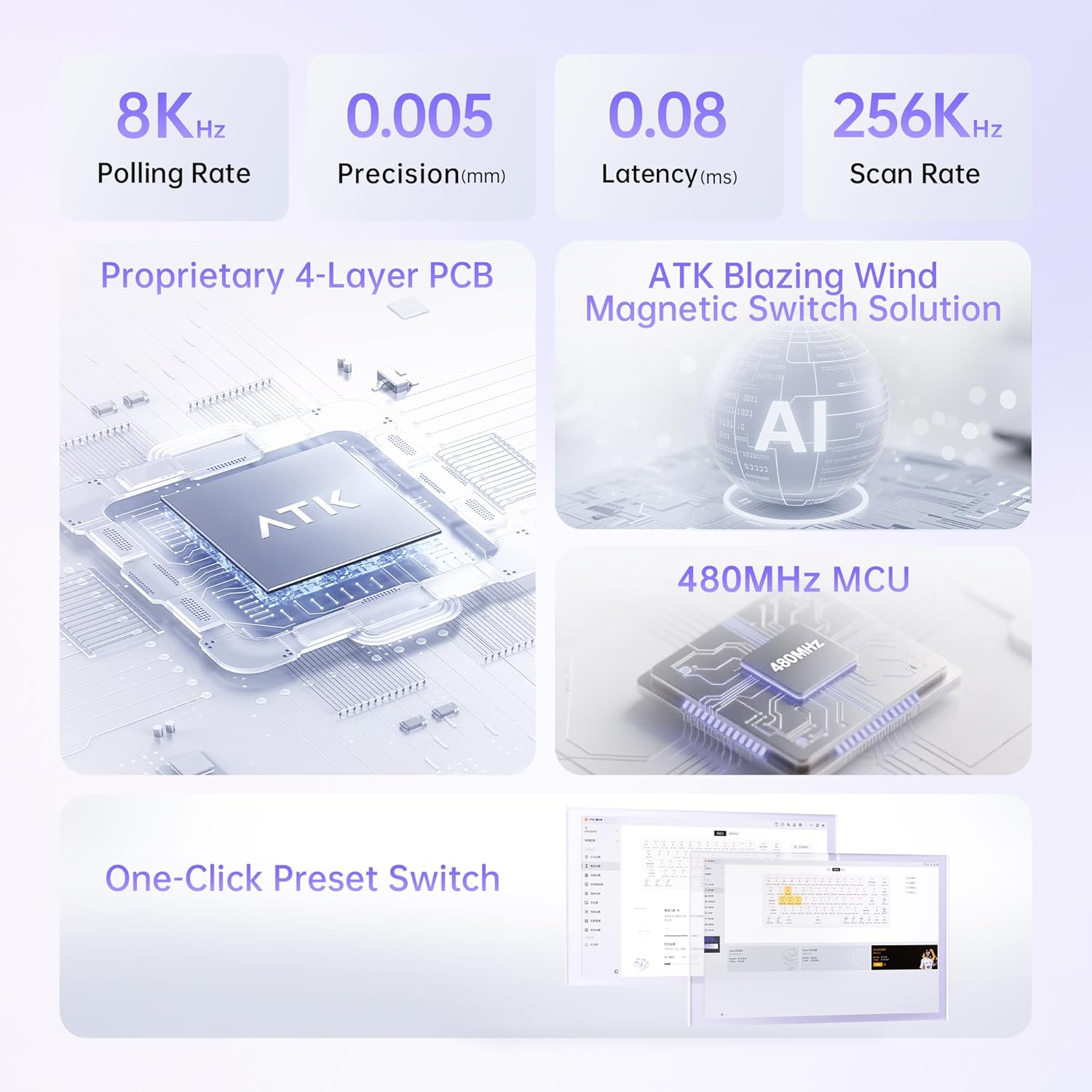
Figure 4: Illustration of 0.005mm step precision.
- 65% / 68-Key Compact Layout: This layout retains essential keys and arrow keys while significantly saving desk space, which is ideal for gamers requiring quick mouse movements.
- Tray-Mount Structure with Aluminum Plate: This design ensures consistent keystroke stability, reduces unwanted vibration, and provides a more rigid and premium feel compared to standard plastic-mounted keyboards.
- Technical Components & Customization: The keyboard features Cherry-profile frosted PC keycaps that improve RGB diffusion. Users can choose between Wolf or Primordial magnetic switches based on their preference.

Figure 5: The compact size of the ATK 68 RX keyboard.
Customization and Features
- One-Click Preset Switch: Utilize the driver software to set up three customizable presets, allowing seamless switching between work and gaming modes.
- RGB Lighting: The keyboard features south-facing 16.8 million color RGB lighting with 22 pre-set lighting effects, offering extensive visual customization.
- Advanced Functions: Supports RT (Rapid Trigger), DKS (Dynamic Key Stroke), MT (Macro Trigger), TGL (Toggle), adjustable deadzone, and comprehensive key remapping through the software.
- Innovative Wrist Rest Design: The detachable aluminum wrist rest provides ergonomic support and allows for custom DIY modifications.

Figure 6: Software interface for one-click preset switching.

Figure 7: Innovative wrist rest design with color options.
Maintenance
Proper maintenance ensures the longevity and optimal performance of your ATK 68 RX keyboard.
- General Cleaning: Regularly use a soft brush or compressed air to remove dust and debris from between the keycaps. For surface cleaning, wipe with a slightly damp, lint-free cloth. Avoid harsh chemicals.
- Keycap Care: The Cherry-profile frosted PC keycaps can be removed using the provided keycap puller for deeper cleaning. Wash keycaps with mild soap and water, then dry thoroughly before reattaching.
- Switch Care: Due to the Hall Effect magnetic switches, there is no physical contact wear. However, ensure no foreign objects enter the switch housing. If a switch needs replacement, use the provided switch puller.
- Cable Management: Avoid sharp bends or excessive pulling on the USB-C cable to prevent damage.
Troubleshooting
If you encounter issues with your ATK 68 RX keyboard, consider the following common solutions:
- Keyboard Not Responding:
- Ensure the USB-C cable is securely connected to both the keyboard and the computer.
- Try connecting the keyboard to a different USB port on your computer.
- Test the keyboard on another computer to rule out system-specific issues.
- Specific Keys Not Working:
- Remove the keycap and visually inspect the switch for any obstructions.
- If you suspect a faulty switch, and you have spare switches, you may attempt to hot-swap the switch using the provided tool.
- Software Issues / Customization Not Applying:
- Ensure you have the latest version of the ATK software driver installed.
- Restart the software and/or your computer.
- Check for any conflicting software that might interfere with keyboard functions.
- RGB Lighting Problems:
- Verify that the lighting settings in the ATK software are correctly configured.
- Ensure the keyboard is receiving sufficient power from the USB port.
If these steps do not resolve your issue, please refer to the support section for further assistance.
Specifications
Detailed technical specifications for the ATK 68 RX Hall Effect Gaming Keyboard:
| Feature | Description |
|---|---|
| Product Name | ATK 68 RX esports Hall Effect Keyboard |
| Color Options | White, Black, Pink |
| Switch Type | Wolf Switch / Primordial Switch (Magnetic Hall Effect) |
| Stabilizer | V1 Demagnetized Stabilizer |
| RT (Rapid Trigger) Range | 0.005mm ~ 3.3mm |
| RT Step Precision | 0.001mm |
| Latency | 0.08ms |
| Scan Rate | 256K Hz |
| Polling Rate | 8000 Hz |
| Keycaps | PC Frosted Keycaps (Cherry-profile) |
| Padding | Silicone Base Pad, Poron Foam, EPDM Foam, PET Film, IXPE Pad, Silicone Plate Foam |
| Wrist Rest Material | CNC Aluminum |
| Wrist Rest Color Options | Champagne Gold, Gray, Pink |
| Wrist Rest Finish | Anodized Sandblasting, Electrostatic Powder Coating |
| Lighting | South-Facing 16.8M RGB with 22 Pre-set Lighting Effects |
| Positioning Plate | Aluminum Positioning Plate |
| Functions Supported | RT/DKS/MT/TGL/Adjustable Deadzone and Key Remapping |
| Connectivity | Wired (USB-C) |
| System Compatibility | Windows / MacOS / Linux |
| Product Dimensions | 12.5"L x 4.5"W x 1.2"H (31.75 cm x 11.43 cm x 3.05 cm) |
| Item Weight | 2 pounds (0.91 kg) |
| Manufacturer | ATK |
| Model Number | ATK 68 RX |
| First Available | August 16, 2025 |

Figure 8: Technical overview of the ATK 68 RX keyboard.
Warranty and Support
ATK is committed to providing high-quality gaming gear. For information regarding product warranty, please refer to the warranty certificate included in your product packaging (Figure 2, item 2).
For technical support, driver downloads, or frequently asked questions, please visit the official ATK store or support page:
Visit the Official ATK Store on Amazon
You can also contact the seller, ATK Gaming Gears, directly through the Amazon platform for assistance.
Related documentsATK 68 RX

Ask a question about this manual
Ask about setup, troubleshooting, compatibility, parts, safety, or missing instructions. Manuals+ will review the question and use this page’s manual context to help answer it.