
1. Introduction
Thank you for choosing the Nobsound G3 Bluetooth 5.0 Stereo Amplifier. This compact HiFi power amplifier is designed to enhance your home or desktop audio experience with versatile connectivity and adjustable sound controls. Please read this manual thoroughly before operation to ensure proper setup and optimal performance.

Image 1: Nobsound G3 Bluetooth 5.0 Stereo Amplifier, front view with antenna.
2. Package Contents
Please check the package carefully to ensure all items are present and in good condition.
- 1x Nobsound G3 Amplifier
- 1x Bluetooth Antenna
- 1x DC 19V Power Adapter
- 1x User Manual (this document)

Image 2: Contents of the Nobsound G3 amplifier package, including the amplifier unit, Bluetooth antenna, power adapter, and user manual.
3. Product Overview
The Nobsound G3 amplifier features a compact design with essential controls and connectivity options for a versatile audio setup.
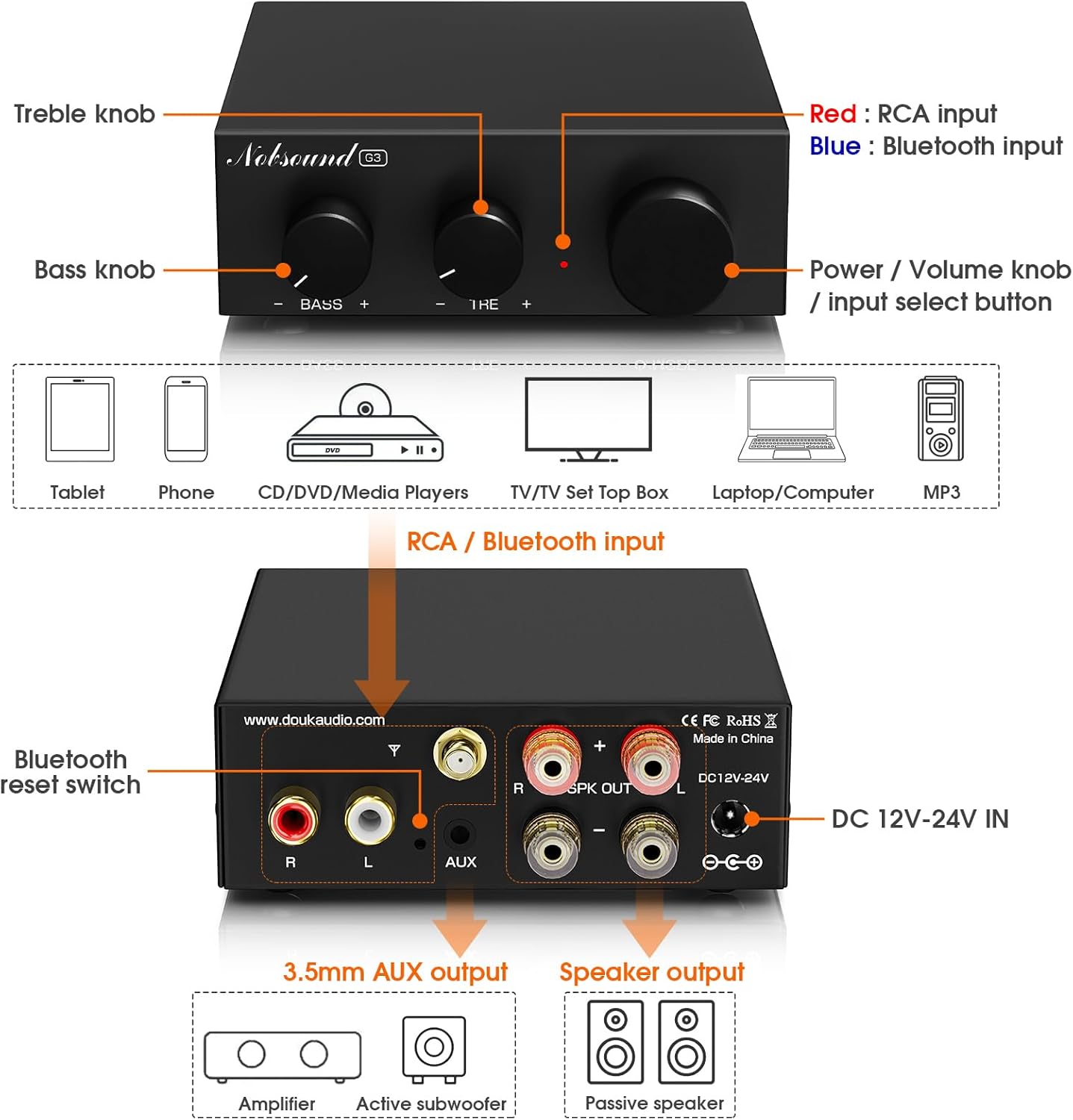
Image 3: Diagram illustrating the front panel controls (Bass, Treble, Power/Volume/Mode knob) and rear panel connections (RCA input, Bluetooth antenna port, 3.5mm AUX pre-out, speaker outputs, DC power input).
Front Panel Controls:
- Bass Knob: Adjusts low-frequency output.
- Treble Knob: Adjusts high-frequency output.
- Power / Volume Knob / Input Select Button:
- Press and hold to power on/off.
- Rotate to adjust volume.
- Short press to switch between RCA and Bluetooth inputs.
Rear Panel Connections:
- RCA Input (L/R): For connecting traditional audio sources like CD players, TVs, or PCs.
- Bluetooth Antenna Port: Connect the included Bluetooth antenna for wireless connectivity.
- 3.5mm AUX Pre-Out: For connecting an active subwoofer to create a 2.1 channel system.
- Speaker Output (L/R): Connect passive bookshelf or tower speakers (4-8Ω impedance).
- DC 12V-24V IN: Power input for the included DC 19V power adapter.
- Bluetooth Reset Switch: A small button to reset Bluetooth pairing.
4. Setup Instructions
4.1 Connecting Speakers
- Ensure the amplifier is powered off.
- Connect your passive bookshelf or tower speakers to the Speaker Output (L/R) terminals on the rear panel. Ensure correct polarity (+ to + and - to -) for each speaker. The amplifier supports speakers with 4-8Ω impedance.
4.2 Connecting Audio Sources
The Nobsound G3 offers two primary input methods: Bluetooth and RCA.
4.2.1 Bluetooth Connection
- Screw the included Bluetooth antenna firmly into the antenna port on the rear panel.
- Power on the amplifier.
- Short press the Power/Volume knob to select Bluetooth input mode. The indicator light will flash, indicating it's ready for pairing.
- On your Bluetooth device (e.g., smartphone, tablet), search for "Nobsound G3" in the Bluetooth settings and pair.
- Once paired, the indicator light will remain solid.
4.2.2 RCA Connection
- Connect your audio source (e.g., TV, PC, CD player) to the RCA Input (L/R) ports on the rear panel using an RCA cable. Ensure left and right channels are connected correctly.
- Short press the Power/Volume knob to select RCA input mode. The indicator light will be solid (and a different color than Bluetooth, typically red for RCA and blue for Bluetooth, refer to Image 3).

Image 4: The Nobsound G3 amplifier connected to speakers via RCA cables from a laptop, and wirelessly via Bluetooth to a smartphone. This illustrates both wired and wireless input options.
4.3 Connecting an Active Subwoofer (Optional)
To create a 2.1 channel audio system with enhanced bass, you can connect an active subwoofer.
- Connect the 3.5mm AUX Pre-Out on the rear panel of the G3 amplifier to the input of your active subwoofer using a 3.5mm to RCA or 3.5mm to 3.5mm cable, depending on your subwoofer's input type.
- Adjust the subwoofer's volume and crossover frequency as desired.
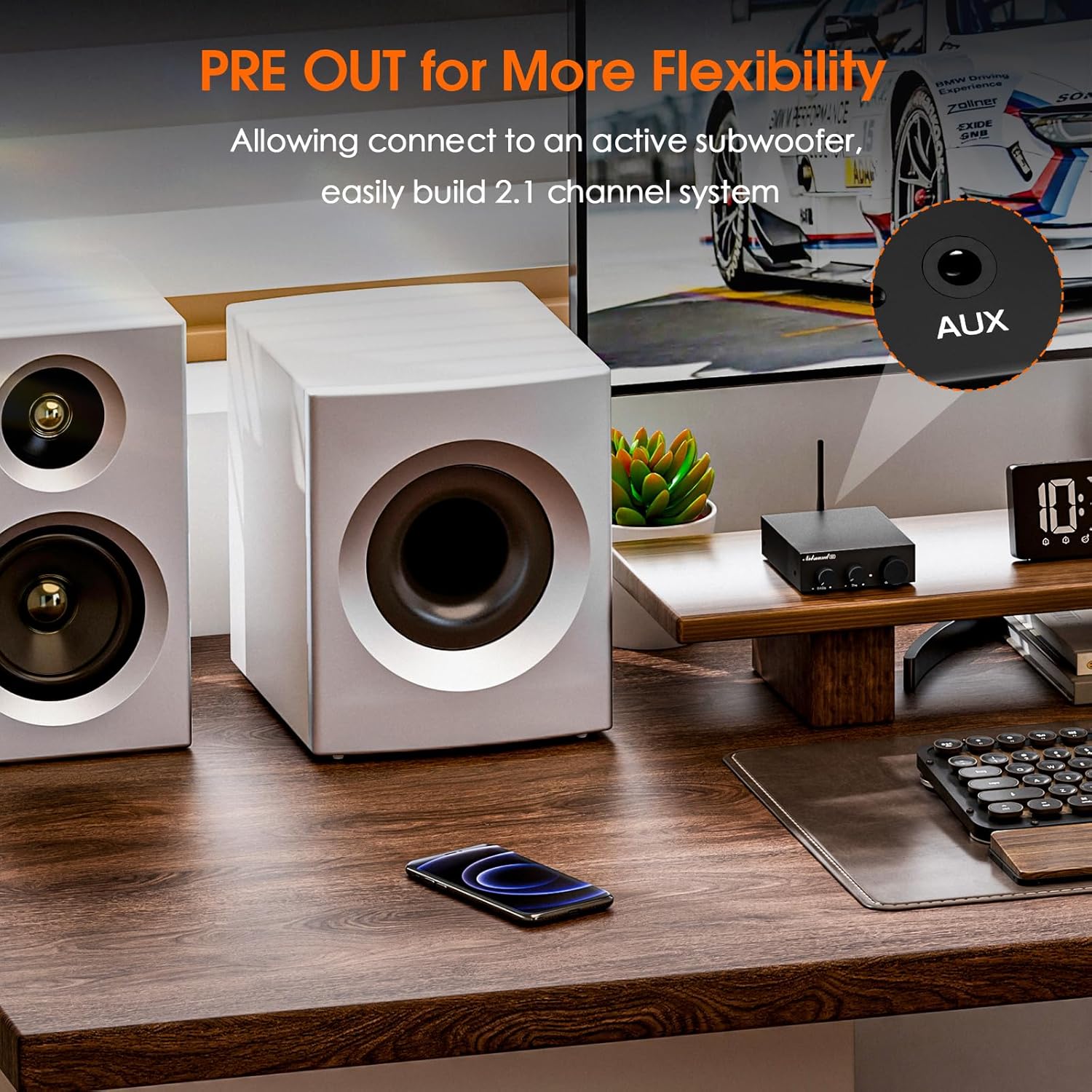
Image 5: The Nobsound G3 amplifier positioned on a desk with a connected active subwoofer, demonstrating the 2.1 channel pre-out functionality.
4.4 Power Connection
- Connect the DC 19V power adapter to the DC 12V-24V IN port on the rear panel.
- Plug the power adapter into a suitable wall outlet.
5. Operating Instructions
5.1 Power On/Off
- To power on, press and hold the Power/Volume knob for approximately 3 seconds.
- To power off, press and hold the Power/Volume knob for approximately 3 seconds.
5.2 Input Selection
Short press the Power/Volume knob to cycle between Bluetooth and RCA inputs. The indicator light color will change to reflect the selected input (e.g., blue for Bluetooth, red for RCA).
5.3 Volume Control
Rotate the Power/Volume knob clockwise to increase volume and counter-clockwise to decrease volume.
5.4 Tone Adjustment
Use the Bass and Treble knobs on the front panel to fine-tune the audio output to your preference.
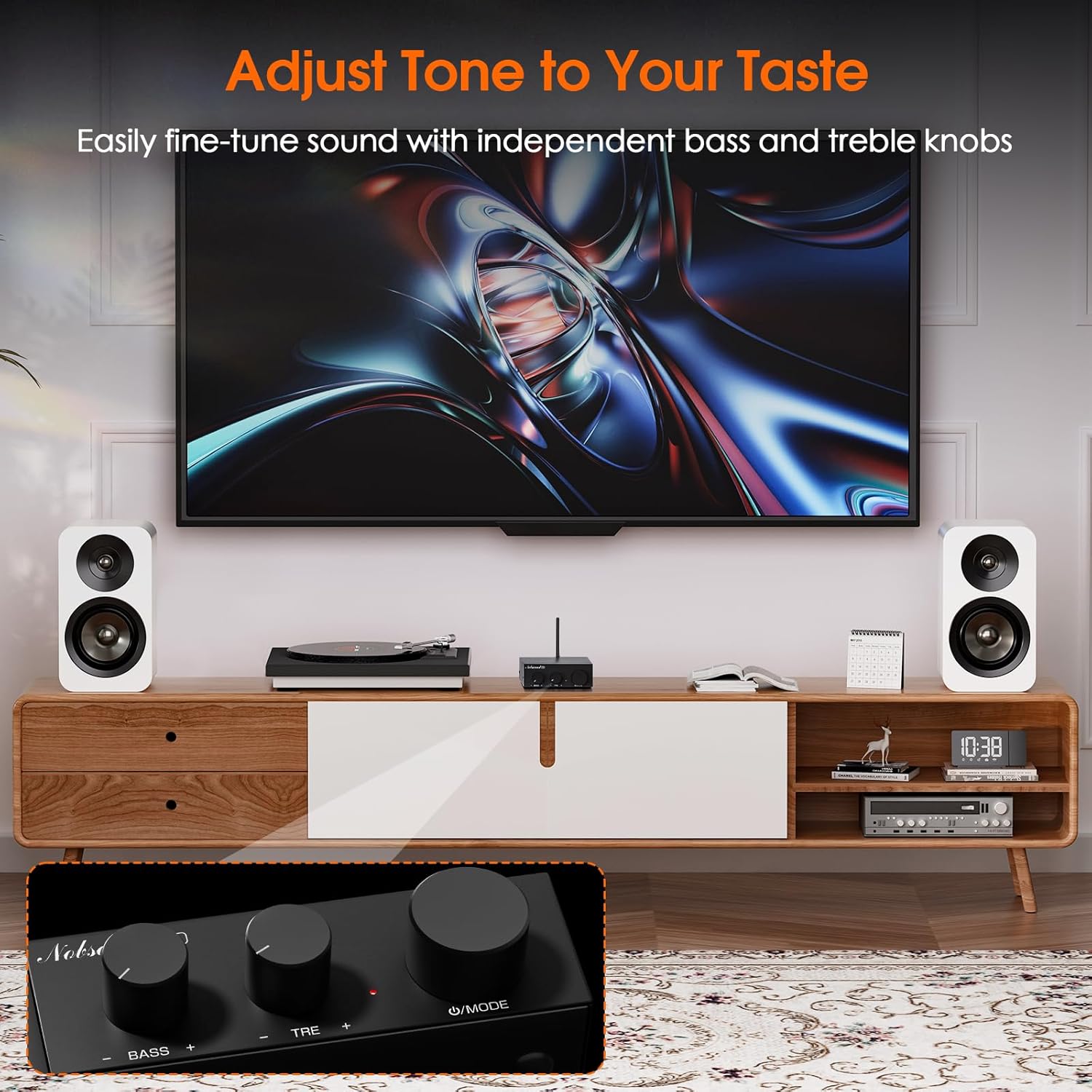
Image 6: The Nobsound G3 amplifier in a living room setup, highlighting the bass and treble adjustment knobs on the front panel for sound customization.
6. Maintenance
- Keep the amplifier in a dry, well-ventilated area, away from direct sunlight, heat sources, and moisture.
- Clean the exterior with a soft, dry cloth. Do not use liquid cleaners or solvents.
- Ensure proper airflow around the unit to prevent overheating.
- Avoid placing heavy objects on top of the amplifier.
7. Troubleshooting
| Problem | Possible Cause | Solution |
|---|---|---|
| No power / Indicator light off | Power adapter not connected or faulty; unit not powered on. |
|
| No sound output | Incorrect input selected; loose speaker connections; low volume; faulty audio source. |
|
| Bluetooth pairing issues | Bluetooth not in pairing mode; device too far; interference. |
|
| Distorted sound | Volume too high; incorrect tone settings; poor audio source quality. |
|
8. Specifications
| Feature | Detail |
|---|---|
| Brand | Nobsound |
| Model Number | SUC-G3-US |
| Connectivity | Bluetooth 5.0, RCA |
| Output Wattage | 110 Watts (Max. 55W x2 stereo output) |
| Compatible Devices | Passive Speakers (4-8Ω), Active Subwoofer, CD Player, PC, TV |
| Pre-Out | 3.5mm AUX for active subwoofer |
| Tone Control | Adjustable Bass and Treble |
| Power Input | DC 12V-24V (19V adapter included) |
| Material | Aluminum |
| Color | Black |
| Item Weight | 13.4 ounces (approx. 380g) |
| Product Dimensions | 4.13 x 3.54 x 1.18 inches (105 x 90 x 30 mm) |

Image 7: The Nobsound G3 amplifier placed on top of a speaker, illustrating its compact dimensions and suitability for various spaces.
9. Warranty and Support
For warranty information or technical support, please contact Nobsound Direct, the seller of this product. You can typically find their contact information through your purchase platform or by visiting the Nobsound brand store.
Online Support: For further assistance, please visit the official Nobsound store or contact customer service via the platform where you purchased the product.